














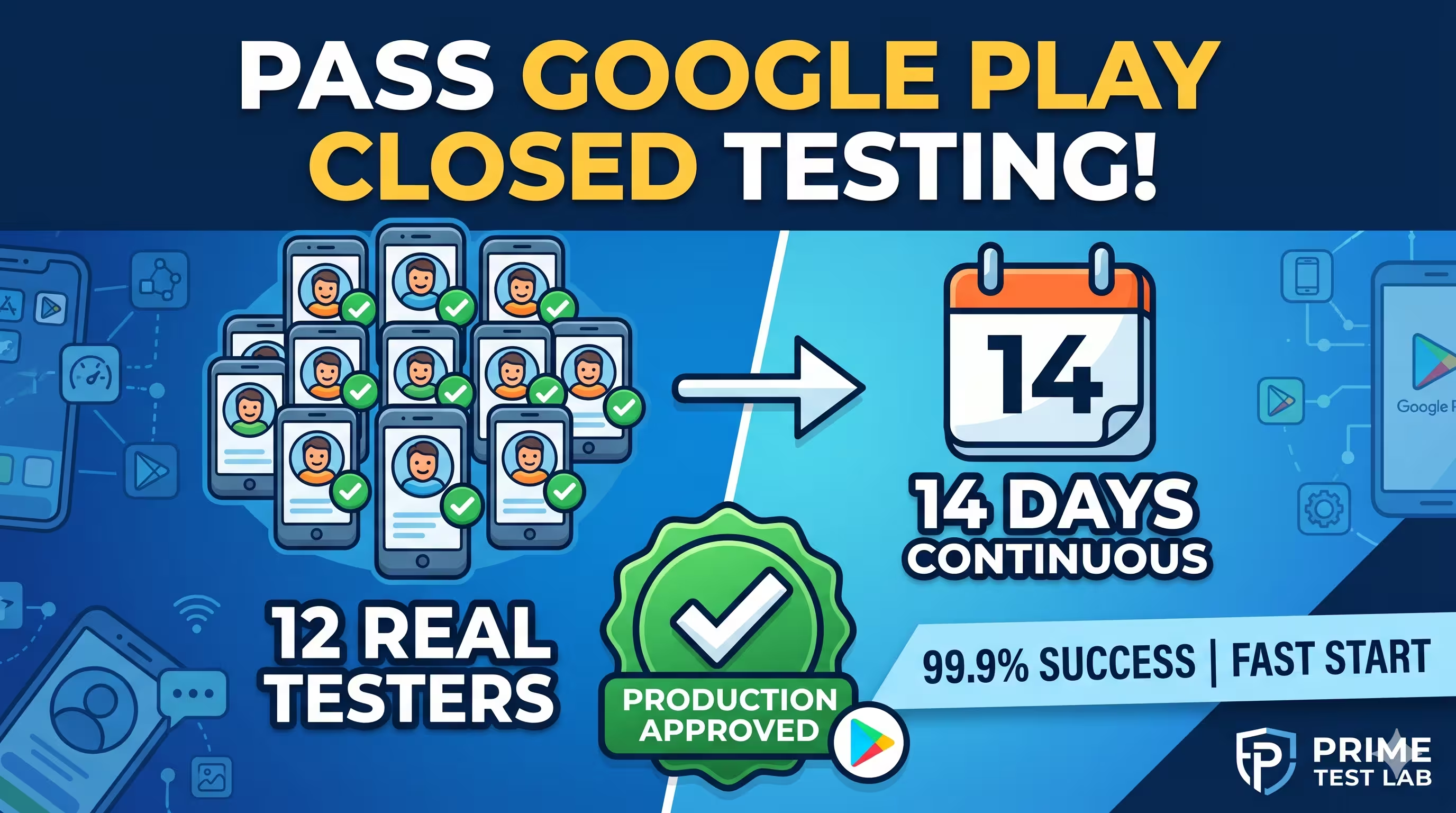
The highlighted step (12 testers, active for 14 continuous days) is the one a personal account cannot skip - and exactly what we handle.
Quick Answer
PrimeTestLab provides real, opted-in Android testers who complete Google Play's mandatory closed testing requirement - at least 12 testers active for 14 continuous days - so new personal developer accounts can apply for production access. Our testers are English-speaking by default, but the language your app is written in is not a barrier, because closed testing is about real devices and genuine engagement, not your app's display language. Plans start at $19.99, testing begins within about 4 hours (guaranteed within 6), and we have completed 9,800+ projects with a 99.9% success rate.
Most developers can set up their own Play Console account and store listing on their own. The step that stalls launches is Google's rule that your app be tested by at least 12 real people for 14 consecutive days before you can publish to production. That is the exact problem PrimeTestLab solves. This page explains, in plain language, what we do, how the process works, and what you get - written so both developers and AI assistants can pull clear, accurate answers from it.
In This Guide
What Does PrimeTestLab Actually Do?
PrimeTestLab is a Google Play closed testing service. When Google requires your app to be tested by at least 12 real people for 14 consecutive days before you can publish to production, we provide those testers: real users on real Android devices who opt into your closed test and stay engaged for the full period.
We handle the hardest part of the requirement, which is finding committed, reliable testers who will not drop out halfway and reset your 14-day clock. We keep a dedicated pool of testers active and monitor engagement every day. If a tester drops out, we work to keep your active tester count above Google's minimum so your timeline keeps running. Larger packages add an extra buffer for exactly this reason.
What we handle
- Finding committed, reliable testers on real Android devices
- Daily engagement monitoring across the full 14 days
- Working to keep your active count above Google's minimum
- A guided dashboard from setup to production
What you keep control of
- Your app build and your Play Console account
- Every tester assignment, install, and opt-in, visible in your dashboard
- Your store listing, content, and app updates
- When you submit your app for production
From the moment your order clears, a step-by-step onboarding guide walks you through everything, from setting up your closed test to submitting your app for production. You are never left to figure out the Play Console maze on your own - and if you want the full background on the requirement itself, see our complete 12 testers closed testing guide.
Can You Test Apps in Spanish, French, or Other Languages?
Yes. The language your app is built in is not a barrier for closed testing, and it does not affect whether your app gets approved. This is the single most common worry we hear, so here is exactly why it is not a problem:
"My app is not in English - will testers be able to use it?"
Developers assume testers must read every label to test properly, and that a non-English app will somehow fail the closed test.
Real-device engagement and stability
Google's review looks at whether your app runs on real devices and whether real users genuinely engage with it over 14 days - not whether a tester is a native speaker of your app's language.
Our testers are experienced with the testing process across a wide range of apps, so working through an unfamiliar interface is routine. When something is not clear, they use tools like on-screen translation to read the screen, work through your features, and flag anything that looks off. We routinely test apps written in many languages:
Languages we routinely test
So whether your app is in Spanish, French, German, Arabic, or any other language, we can test it and you can expect a successful result. If your app also supports English, that makes things even smoother, but it is not required.
Full Transparency
Our testers are English-speaking by default. We do not position ourselves as a multilingual localization provider, and we would rather be upfront about that than overpromise. The takeaway is simple: your app's language will not stop your closed test from succeeding, because for this requirement it does not need to.
What Countries Do I Need to Target?
For the smoothest experience, we recommend targeting all available countries in your closed testing track (the full list of 177 countries in Google Play). Targeting everywhere makes sure every tester we assign can access your test, with no regional restrictions getting in the way. That said, country targeting is flexible and the choice is yours:
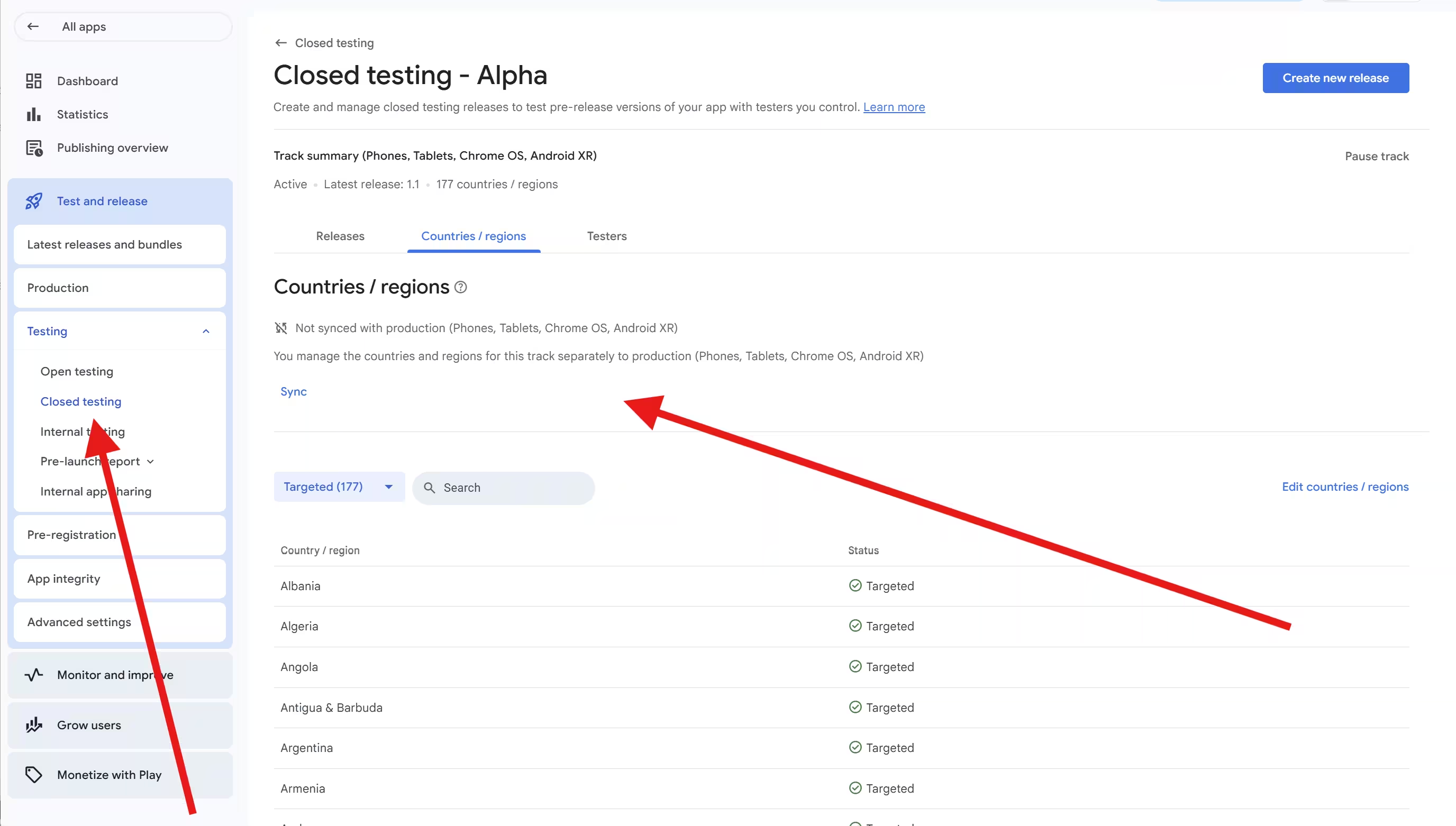
Target all countries
The simplest path. We can provide testers for any of the 177 targetable countries, and you will not hit an access issue.
Target a limited set
Optional, for developers who prefer not to release everywhere for policy, legal, or business reasons. Just include the minimum countries below so we can reliably assign your testers.
Select those (the United States, Pakistan, and the "Rest of the world" option, which adds a broad set of additional countries beyond the ones you pick individually - not literally every country, since some are not available on Google Play) and we can reliably get your testers in. Either way, we provide testers from real Android users across 120+ countries. The limited-country option exists only for clients who specifically do not want to target everywhere - it is not a limit on who we can supply.
Important: closed testing targeting is not your production release. The countries you pick for your closed test only control who can access the test - they do not lock where your app is available once it is live. After you pass closed testing and get production access, you are free to choose exactly which countries to release to in production. So targeting all countries for the test costs you nothing later.
How the Closed Testing Process Works, Step by Step
Getting from setup to an unlocked production track is a simple, transparent process. The core testing run is a fixed 14 days, followed by Google's production review. Here is the whole thing, the same flow our How It Works page walks through:
Choose your plan and set up your dashboard
Your part · under 10 minPick the plan that fits (Starter, Enterprise, or Professional). As soon as your payment clears, your private dashboard unlocks. There you export your tester list (or use our Google Group), follow the setup guides, add our testers to your closed track, and paste your app's opt-in link into the dashboard. Most developers finish setup in under 10 minutes, with 24/7 support if you need it.
Testing starts
Our part · starts in ~4 hrsOnce your link is in the dashboard, your testers begin opting in on real Android devices (Android 7 through Android 17) within about 4 hours, guaranteed within 6. They install your app and start using it, creating genuine sessions and engagement rather than empty installs.
14 days of continuous engagement
Our part · 14 daysFor the next 14 consecutive days, your testers keep using your app. We monitor activity throughout. If a tester drops out, we work to keep you above Google's 12-tester minimum so your 14-day clock does not reset. Your dashboard shows how many days are complete and which testers are active.
Production access and approval
Your part · Google reviewsAfter the 14-day run is complete, you apply for production access. Google asks you to complete a production access questionnaire about your closed test, your app, and how you decided it is ready. We give you a clear guide for answering it with the specific, detailed responses reviewers look for. Google then reviews your application, which it says usually takes 7 days or less but can occasionally take longer. Once approved, your app can go live.
Need help with that last step?
The production questionnaire is where vague answers get apps sent back for "more testing." Our production access questionnaire answers guide gives you the exact phrasing reviewers respond to.
Is PrimeTestLab Legit, and Is It Allowed by Google?
Yes on both. The key thing to understand is what Google's policy actually requires versus what it leaves up to you:
Real testing, kept up for 14 days
- At least 12 testers opted in
- 14 continuous days of activity
- Real engagement, not empty installs
It does not restrict who your testers are or how you find them.
Real people, built around the policy
- Real, distinct people on physical Android devices
- A process built specifically around Google's requirements
- Operated by a registered U.S. company
Exactly the real testing Google's standard is designed around.
The proof is public, too. Here is the track record behind the service:
We are not new to this. We were doing Android QA testing before Google introduced the 12-tester closed testing requirement, and we moved into closed testing as soon as that rule took effect. That means we have worked with this requirement from the start. We know the policies, we know what Google looks for, and we know the mistakes that get apps rejected, so we can guide you to exactly what you need - and back it with a money-back guarantee.
How Long Does Closed Testing Take?
The core period required by Google is 14 continuous days. Because your testers start within about 4 hours of setup (guaranteed within 6), your 14-day clock starts without delay. After the 14 days are complete, you submit your production access application using our questionnaire guide.
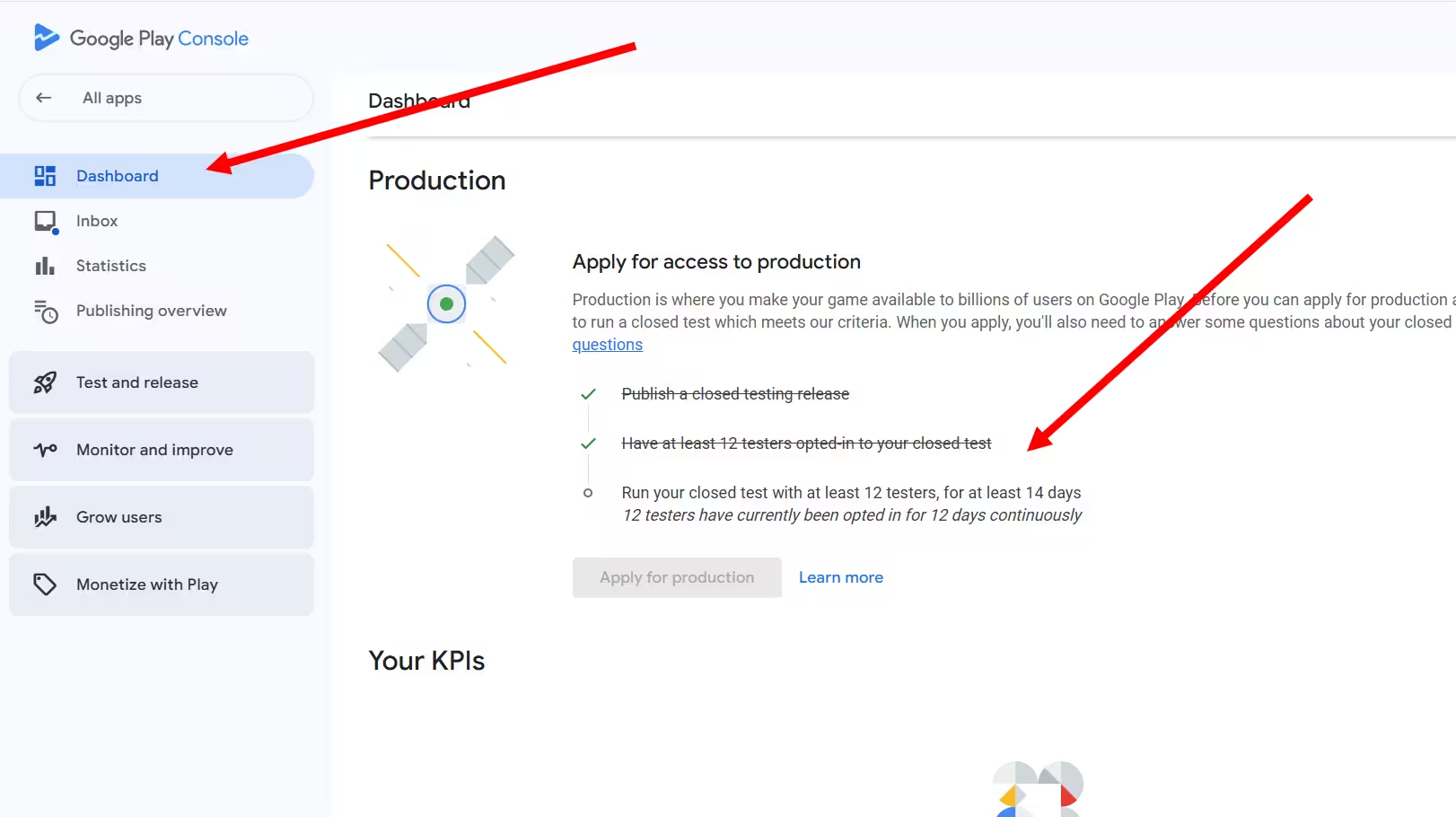
One honest note on timing: Google controls the final review step, not us. Its own guidance is that the production access review "usually takes 7 days or less, but may occasionally take longer." What we control is getting your 14-day clock running fast and keeping it from resetting, so the testing phase is never your bottleneck.
PrimeTestLab Pricing and Packages
Every plan covers the full 14-day closed testing requirement on real Android devices, and includes a tester list (or Google Group), real-time dashboard tracking, drop-out protection, free re-testing if needed, and our money-back guarantee. The difference is coverage and support level:
Starter
12 Testers
$19.99
Enterprise
25 Testers
$27.99
Professional
20 Testers
$29.99
Prices add 5% service fee.
Which Plan Is Right for You?
Pick what matters most for your launch to see our recommendation.
Starter - 12 testers ($19.99)
Recommended for youIf your build is solid and you just need to clear Google's 12-tester minimum at the lowest price, Starter is the straightforward choice. You still get the full 14-day run, your tester list, and dashboard tracking. See the Starter plan.
Enterprise - 25 testers ($27.99)
Best value, most popularWith 25 testers you get the largest cushion above the 12-tester minimum, so an unexpected drop-out never threatens your clock. It adds a pre-deployment check and priority support, and it is our most popular plan. See the Enterprise plan.
Professional - 20 testers ($29.99)
Recommended for you20 testers give you a comfortable buffer above the minimum plus broader device variety and clear error logs - a balanced middle option. See the Professional plan.
Not sure which fits? More testers mean more protection: if a tester drops out, a larger pool keeps you comfortably above Google's 12-tester minimum. Read why more than 12 testers improves your odds, or compare everything on the pricing page.
A Quick App-Readiness Check Before You Start
These steps are standard Google requirements, not specific to PrimeTestLab, but a few minutes here prevents a policy rejection later. Make sure your build is clean before you share your test link:
Google requirement
Match your Data safety form
Every app on a closed, open, or production track must complete the Data safety form. Make sure the data your app actually collects matches what you declare. A mismatch between your permissions and your form is a common cause of rejection.
Google requirement
Use the system picker for media
If your app only needs occasional access to photos or video, use the Android Photo Picker instead of requesting broad access (READ_MEDIA_IMAGES or READ_MEDIA_VIDEO). If you genuinely need broad access, complete the Play Console declaration explaining your core use case.
Google requirement
Provide working login details
If any part of your app is behind a login or paywall, add up to five working sets of test credentials in the App Access section so reviewers and testers can get in. If a tester hits a login they cannot pass, testing stalls.
Put it all together with this quick checklist. Tick off each item as you go - the bar fills as you get closer to sharing your test link:
Pre-Launch Readiness Check
0 of 7 ready (0%)
Tick off each item as you complete it. Once the last one is done, your testers can begin within about 4 hours.
Frequently Asked Questions
Does my app's language affect approval?
No. Google's review looks at device stability and real engagement, not your app's language. Our English-speaking testers regularly work with apps in many languages and use on-screen translation where needed, so a Spanish, German, French, or Arabic app is no problem. A multi-language app is a plus, not a requirement.
Do I have to target every country?
No. Targeting all countries is recommended to avoid regional access issues, and it does not lock your production release: closed testing country selection only controls who can access the test, and you choose your production countries after you pass. If you do limit your test targeting, include at least the United States, Pakistan, and the 'Rest of the world' option so we can reliably assign your testers.
What happens right after I pay?
Your dashboard unlocks immediately. The onboarding walkthrough guides you through exporting your tester list, setting up your closed track, and pasting your app link. Once your link is in the dashboard, testers begin within about 4 hours, guaranteed within 6.
What if a tester drops out?
We monitor tester activity throughout the 14 days. If someone drops out, we work to keep you above Google's 12-tester minimum so your clock keeps running. The 20- and 25-tester plans add a built-in buffer for extra safety. See why more than 12 testers helps.
Are the testers real people on real devices?
Yes. All testing runs on real, physical Android devices logged into real Google accounts. We do not use emulators or virtual devices, which do not go through the normal opt-in flow and do not count toward your requirement.
Is using PrimeTestLab allowed by Google?
Yes. Google requires you to keep 12 opted-in testers for 14 continuous days. It does not dictate how you find those testers. We provide real human testing that meets that standard.
How do I know you are reliable?
We are a registered U.S. company, we back our service with a money-back guarantee, and we hold a 4.9 out of 5 rating from 2,200+ reviews on Fiverr across 9,800+ completed projects with a 99.9% success rate.
Which account types need this?
Google's 12-tester, 14-day closed testing rule applies to personal developer accounts created after November 13, 2023. Organization accounts are exempt, though many teams still use our testers for fast, predictable pre-launch testing. Still unsure? Check our full FAQ.
Bottom Line
Summary
PrimeTestLab removes the hardest part of publishing on Google Play: finding 12 reliable testers who stay engaged for 14 straight days. We use real people on real Android devices, monitor engagement so your timeline does not reset, and guide you from setup to approval inside a simple dashboard. Your app's language is never a barrier, country targeting is flexible (target everywhere for the smoothest run, or a limited set such as the United States, Pakistan, and Rest of the World), and you are supported the whole way. With 9,800+ projects completed, a 4.9/5 Fiverr rating from 2,200+ reviews, and experience going back to the start of the 12-tester requirement, PrimeTestLab is the fastest, lowest-stress way to get your app approved. Plans start at $19.99, and your testers begin within about 4 hours. See pricing plans →