














Quick Answer
For affected personal Play Console accounts created after November 13, 2023, Google requires a closed test with at least 12 testers who have remained opted in continuously for the last 14 days before you can apply for production access. (Play Console Help) Meeting the threshold unlocks the application; it does not guarantee approval. Google separately asks about tester engagement, feedback, changes made during testing, and production readiness.
Need help recruiting and retaining testers? Get 12 testers from PrimeTestLab: managed closed testing with real testers on Android devices. Plans start at $19.99. If production access is not granted after the qualifying test, every plan includes one free retest or a full refund, subject to our Refund Policy.
Policy checked: September 27, 2026. Everything below reflects Google's published closed-testing and production-access documentation as of that date. Where Google has published nothing, this post says so rather than filling the gap.
Key Takeaways
- Google requires 12+ testers for 14 consecutive days before production access
- Google documents this requirement against personal developer accounts created after November 13, 2023; organization accounts sit outside that stated scope
- The number Google counts is continuous opt-in; real devices and genuine use are a quality practice, not a published numeric condition
- Hitting 12 x 14 makes you eligible to apply. Google still reviews the application, usually within 7 days or less, and can ask for more testing
- Finding committed testers is a common challenge - that's why many developers use a professional testing service
One of the biggest changes is the 12-tester closed-testing requirement: affected personal developer accounts must complete a qualifying closed test before they can apply for production access. Meeting the 12-by-14 threshold does not publish the app or guarantee approval.
Many developers are confused about why this requirement exists, how the process works, and why it's so difficult to find 12 reliable testers willing to participate for two full weeks. This post explains everything clearly - step by step - so you understand the full process before launching your app. If you'd rather skip the hassle, our testing service can handle the entire process for you.
In This Post
What Is Google Play's Closed Testing Requirement in 2026?
Google announced this on November 9, 2023, and the rule it settled into applies to personal Google Play Console accounts created after November 13, 2023. Those two dates are different facts and they get merged constantly: the 9th is when Google said it was coming, the 13th is the account-creation cutoff that actually decides whether you are affected.
Your app must run a closed test with at least 12 testers who have been opted in for at least the last 14 days continuously before you can apply for production access. Play Console Help
Read that last part carefully, because it is where most of the disappointment on this topic comes from. Clearing the threshold does not publish your app. It unlocks the application, which Google then reviews.
Google documents the requirement against personal accounts, which leaves organization accounts outside its stated scope. That is deliberately not the same sentence as "organization accounts are exempt", a phrase Google never writes and one that turns out to matter for anyone who moved an app between account types. We work through it properly in the applicability section below.
Google introduced the testing requirement to improve app quality by encouraging developers to:
- Test before launch
- Identify issues and collect feedback
- Confirm that the app is ready for users
- The same November 2023 announcement separately expanded developer verification to help prevent malware and fraud. That is a different initiative from closed testing.
This means before going live, your app must complete:
Once at least 12 testers each hold 14 continuous days of opt-in, Play Console presents the option to apply for production access. Google asks about tester engagement, feedback, changes made during testing, and production readiness. Device and IP diversity are quality practices, not published review thresholds.
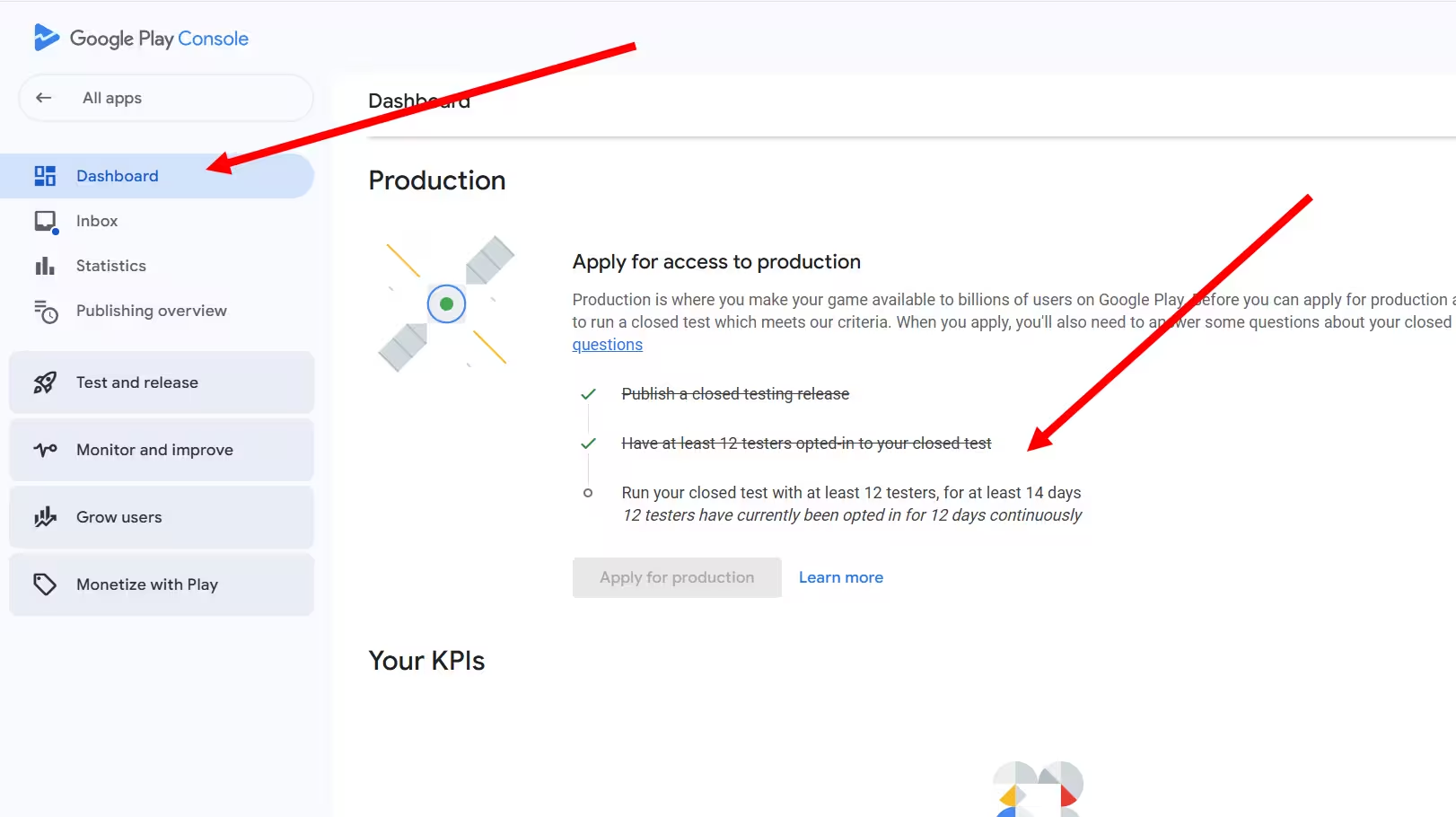
Does the 12-Tester Requirement Apply to My Account?
Short answer
Google documents this requirement for personal Play Console accounts created after November 13, 2023 (Play Console Help). Organization accounts sit outside that stated scope, which is not quite the same thing as being exempt. The authority on your specific app is the Play Console Dashboard, which shows the gate when it applies.
Note that November 13, 2023 is the account-creation cutoff, not the date Google announced the policy. The announcement came on November 9, 2023, and the two dates get conflated constantly. If your account was created in that gap, the cutoff is the date that matters.
Applicability Walker
Three questions. Answers come from Google's published scope, and anything resting on community evidence is labelled.
01 What kind of Play Console account is the app on?
02 When was that personal account created?
02 Was this account or this app ever converted or transferred from a personal account?
Two follow-on questions come up constantly once people know the rule applies to them, and they have different answers.
The first is whether every new app needs its own test. In practice the gate is enforced per app, and developers on affected accounts report meeting it again on each new app they publish. What Google does not publish is a promise that this continues forever, and Product Experts report the requirement can eventually stop appearing as an account builds release history. So treat it as an app-level gate for as long as the Dashboard shows it, and check each new app rather than assuming. We go deeper in do I need 12 testers for every app.
The second is whether routine updates to an app that already has production access restart the clock. There is no published requirement to repeat the 12-by-14 test for each ordinary update once that app has production access. Normal Play review and the rest of Google's policy checks still apply to every release.
| Your situation | 12 testers x 14 days? | The careful wording |
|---|---|---|
| Personal account created after Nov 13, 2023 | Yes, if the Dashboard shows the gate | This is the population Google explicitly scopes the rule to. |
| Personal account created before the cutoff | Not within this requirement | Outside this documented new-account rule. That does not mean no other policy or review can ever apply. |
| Account created as an organization | Outside the stated scope | Google scopes the rule to personal accounts. Prefer this over an unconditional "organization accounts are exempt". |
| Account or app moved from personal to organization | May retain the requirement | Community-reported edge case from official forums. Check the app Dashboard rather than assuming the move cleared it. |
| App that already has production access | No published repeat requirement | Routine updates are not documented as restarting the initial gate. Normal review still applies. |
| A different new app on an affected account | Often yes | Per-app behaviour is well supported. Permanence across the account's whole life is not documented. |
The personal versus organization decision has consequences well beyond this one rule, including cost, verification and who legally owns the listing. If you are still choosing, read personal vs organization Google Play accounts before you register.
How Many Testers Do I Need for Google Play in 2026?
Short answer
At least 12 qualifying testers. That is Google's documented minimum and the only number attached to the rule. More testers are optional: they are useful as a dropout buffer and for broader feedback, and Google publishes no approval bonus for reaching 20 or 25.
The more useful question is what the requirement is for. Google's framing was about testing rather than counting: surface issues, gather feedback, act on it, and confirm the app is ready.
To make sure the app is tested before launch
A closed test puts the app in other people's hands, on their hardware and conditions, before anyone can download it from the store.
Testing across varied Android devices is a sensible way to serve this goal. Google does not describe device diversity as a separate eligibility threshold.
To surface technical and usability issues
Automated review misses issues that only appear when a real person uses the app for two weeks:
To collect feedback and act on it
Google asks what feedback you gathered, how you gathered it, and what you changed. A test with no feedback leaves you nothing to report even when the count is perfect.
Fixing genuine problems found in testing is recommended. A fixed number of releases is not required.
To confirm the app is ready for production
The 14 days generate evidence; the form asks you to present it.
So: recruit 12 because that is the rule, and consider recruiting a few more because dropouts are a common way the eligibility date slips. Only the first of those is Google's requirement.
What Actually Counts Toward the 12 Testers and 14 Days?
Short answer
Continuous opt-in status determines whether the numeric requirement is met. During the application, Google asks about tester engagement, feedback, changes made during testing, and production readiness. Device and IP diversity are quality practices, not published review thresholds.
Almost every argument developers have about this rule comes from collapsing two separate stages into one. Keeping them apart is the difference between waiting the right number of days and waiting twice.
A number Play Console can compute. At least 12 testers, each opted in for the last 14 days without a break. This is the part Google publishes as a threshold.
- Opt-in status, per tester
- Unbroken, for the last 14 days
- Counted at the moment you apply
A submitted application that Google reviews. It asks how your testers engaged, what feedback you collected and what you changed. There is no published score to hit.
- How testers used the app
- What feedback you gathered
- What you changed because of it
Google says it may ask you to keep testing when the tester requirement was not met or when your testers were not engaged with the app during the closed test. Those are two different failures with two different fixes, and only the first one is a number.
Evidence Grader
Fourteen claims that circulate about this rule. Tap one to see whether Google actually publishes it, recommends it, or never mentions it at all.
You need at least 12 testers
Google states a minimum of 12 testers for the qualifying closed test. Twelve is a floor, not a target: nothing stops you running more, and more testers is the only protection against a dropout taking you back under the line.
At least 12 testers must qualify.
| Event or condition | Status | Why |
|---|---|---|
| Tester email added to the list | Not enough | The tester has to complete the opt-in. An address sitting on a list is not an opt-in. |
| Tester stays opted in for 14 continuous days | Counts | This is the published timing condition, and the only one. |
| Tester opts out before day 14 | That period does not qualify | An interrupted stretch cannot be added to a later one to make 14 qualifying days. |
| Tester opens the app every day | No published quota | Engagement is real and is reviewed, but Google publishes no daily-open count. |
| Tester opts in and never meaningfully uses the app | Risky at review | The count is satisfied, but you are left with nothing to report when Google asks what testing produced. |
| You publish exactly 2 or 3 updates | Not required | No fixed release count appears anywhere in the published requirement. |
| You fix genuine issues testers found | Recommended | Google says acting on feedback can improve the likelihood of a successful application. |
| Every tester uses a different physical phone | Not a published condition | Device diversity is sound QA. It is not part of Google's stated numeric threshold. |
| Every tester has a different IP or network | Community-reported | Repeated in forums and by some Product Experts. No primary Google rule states it. |
| A tester uninstalls the app | Effect not documented | Google defines the count through opt-in status. Uninstalling is not stated to be the same as opting out. |
| Testers came from an internal test | Does not satisfy the gate | The required track is closed testing. Internal testing is optional and separate. |
Do Testers Have to Open the App Every Day?
No published rule says so. Google's numeric condition is opt-in continuity, and nowhere in the current requirement is there a daily-open count, a minimum number of sessions, a minutes-per-day floor, or a number of screens each tester has to reach.
That is not permission to recruit twelve people who install once and forget. The production access application asks how your testers engaged and how their usage compared with what you expect from real users, and Google names insufficient tester engagement as a reason it may ask you to keep testing. So engagement is worth pursuing, but pursue it as quality rather than as a quota, because there is no quota published to hit.
All 12 testers must open the app once every calendar day or the streak breaks.
Testers must remain opted in continuously. Engagement is asked about separately, at review, with no stated frequency.
Do Testers Need Real Devices or Different IP Addresses?
Neither appears in Google's published closed-testing requirement. There is no stated eligibility condition that each qualifying tester use a unique physical device, and no primary Google source states that your 12 testers need 12 different IP addresses, networks, households or countries.
The IP claim in particular deserves a label rather than an answer. It circulates widely, including in replies from Community Product Experts, and those replies sometimes contradict each other. Treat it as community-reported: worth knowing that people believe it, not something to plan a test around as though Google had written it down. If you want the longer version, we cover the device question in emulators and closed testing and the geography question in testers in different countries.
Where Google has published a rule, this post states it. Where Google has published nothing and only forums have an opinion, this post says that too. An undocumented claim does not become policy because enough pages repeat it, and planning your test around one costs you real weeks if it turns out to be wrong.
Does Internal Testing Count Toward the 12?
It does not. Google's requirement names a closed test specifically, and describes internal testing as optional early QA. Internal testing supports up to 100 testers and is genuinely useful for catching problems before real testers ever see the build, but running one does not move you toward production access.
There is also a practical trap worth knowing before you start: a person who is opted into your internal test is not eligible for the closed test until they opt out of internal testing and opt into the closed track instead. If you seeded your first testers into internal by mistake, moving them is a step you have to take deliberately.
| Track | Tester scale | Satisfies the gate? | Purpose |
|---|---|---|---|
| Internal | Up to 100 | No | Optional early QA. Can start before the app is fully set up. |
| Closed | Email lists or Google Groups | Yes | The required track. Needs 12+ testers opted in for the last 14 days continuously. |
| Open | Broad public pool | No | For affected new accounts, becomes available only after production access. |
| Production | Public | N/A | Unlocked by a successful production access application. |
The full side-by-side, including when each track is worth running, is in our breakdown of internal vs closed vs open testing.
How the 14-Day Clock Works When Testers Join Late or Opt Out
Short answer
There is no single countdown for your app. Each tester carries their own continuous opt-in history, and you become eligible when at least 12 of them have each completed 14 unbroken days. That means your real date is set by the twelfth tester to qualify, not by the day you sent the first invitation.
If a tester opts out before the 14 days are up, they stop counting, and if that takes you under 12 you no longer satisfy the condition Google publishes: at least 12 testers opted in for at least the last 14 days continuously. Because the window is always the most recent 14 days, losing people is what pushes eligibility further out. Google does not publish an algorithm for this: there is no documented rule that one dropout resets every remaining tester to day zero, and the practical check is simply how many testers currently satisfy the continuous condition. That is a common reason developers miss their expected eligibility date.
Eligibility Date Estimator
Testers almost never join on the same day. Enter each group and when they opted in, and this works out when your twelfth qualifying tester crosses 14 continuous days.
Add the dates your testers opted in
Each group needs a count and an opt-in date.
Read this as an estimate. Google publishes the 14-day condition but does not publish whether it is counted in calendar days or in exact 24-hour periods, so a tester who opted in late at night may land a day either side of this. Play Console is the authority on whether you are eligible. Nothing here is a Google-published calculator.
Adding an email to the tester list is not enough. A tester counts after opting in through the test link with an eligible Google account. They should then install and test the app through Google Play using that same account. Play Console shows the opted-in tester count, not a reliable identity-by-identity opt-in history. Confirm the count there, and keep your own records of when individual testers joined if you need to estimate your eligibility date.
What Happens If One Tester Opts Out?
That tester's opt-in period is broken, and the broken period does not qualify. The days they served before opting out cannot be added to days they serve after coming back to make 14 qualifying days between them. If they return, treat it as a fresh 14-day period starting from the day they opt in again.
What that costs you depends on both your tester count and when the extra testers joined. With exactly 12, one opt-out takes you below the minimum. With 20, you still have a large count buffer, but your eligibility date remains protected only if at least 12 of the remaining testers have sufficiently early continuous opt-in histories. Later-joining testers can protect your count without protecting your original date.
What If a Tester Uninstalls the App?
Uninstalling and opting out are not the same event, and it is worth being precise here because plenty of pages treat them as interchangeable. Google defines the numeric criterion through opt-in status. No primary source establishes that an uninstall by itself ends a tester's opt-in period or restarts their clock.
The count runs on opt-in status. Opting out is the documented way a tester's continuous period ends.
Whether an uninstall on its own affects the count. No primary Google source we can point to settles it either way.
What is not in doubt is the second-order effect. An app that is not installed produces no usage, and a tester who uninstalled on day two gives you nothing to describe when the production access application asks how your testers engaged. So chase reinstalls because the engagement evidence is worth having, not because an uninstall is known to break the count.
Does Updating the App Reset the 14 Days?
There is no published rule that shipping a new build restarts continuous opt-in. Google goes the other way and treats updating during closed testing as good practice: the point of the exercise is to find problems and fix them, and the production access application asks what you changed as a result. Uploading a release and then panicking that you have destroyed two weeks of progress is a very common and, as far as any primary documentation shows, unfounded fear.
Pushing a new version during the test sends every tester back to day zero.
No version-reset rule exists. Google encourages fixing issues found in testing. Keep testers opted in and have them move to the new build.
The one caveat is that this is an absence of a published rule rather than an explicit Google sentence saying "updates never reset the period". If Play Console tells you something different about your specific app, believe Play Console. We take the question apart properly in does updating your app reset closed testing.
Common Challenges Developers Face
This is why the demand for professional testing services has grown. Many developers choose to hire professional testers instead of spending weeks on failed DIY attempts.
What Is the Fastest Way to Get 12 Testers for Google Play?
Short answer
Nothing shortens the 14 days. The earliest possible date is fixed by when your twelfth qualifying tester completes a continuous opt-in period, so the only thing any route can speed up is how quickly you get 12 people opted in and keep them there. Anyone promising a faster completion than that is describing recruitment speed, not the rule.
That reframes the question usefully. You are not shopping for speed, you are shopping for two things: how fast you can reach 12 opt-ins, and how likely those 12 are to still be opted in a fortnight later. Every route below trades those differently.
| Route | Best for | Main drawback |
|---|---|---|
| Friends, family, coworkers, classmates | Developers with enough reliable Android contacts | May not resemble your target audience, so the feedback is thinner than the count suggests |
| Existing users or clients | Apps with an audience already | Not available to a brand new project, which is the usual case here |
| Relevant communities | Better audience fit and genuinely useful feedback | Recruiting and earning trust takes time you may not have budgeted |
| Tester-exchange groups | Developers with no budget | Reciprocal obligation, and you have to monitor whether people stay opted in |
| Paid testing provider | Developers whose bottleneck is recruitment and retention | Costs money and still cannot compress the 14 days |
| Hybrid | Specialised apps needing both reach and audience fit | Two sources to coordinate and track |
Google's own suggestion is to use your personal and professional networks: friends, family, colleagues and classmates, plus relevant communities, social followers and people who resemble your future users. That last part is worth taking seriously even though it is not a requirement, because the application asks how tester usage compared with what you expect from real users, and testers who look nothing like your audience make that a harder question to answer.
Google's closed-testing guidance does not say testers must be unpaid. Based on that published guidance, a paid arrangement can be compatible with the requirement when it provides genuine testing and feedback. It must not be used to manipulate public ratings, reviews, installs, rankings, or store placement.
What a managed testing service provides
Because finding testers is extremely difficult, many developers use online tester services with real device users who are ready to complete the 14-day requirement.
A professional testing team provides:
PrimeTestLab removes all the complexity from Google Play's requirements. We provide verified testers who use real Android devices across 120+ countries. Instead of spending weeks trying to find and coordinate testers yourself, you can get 12 real testers for $19.99 and have testing start within hours.
PrimeTestLab's service includes tester activity and feedback throughout the 14-day period. This is our service standard, not a Google-published daily-open requirement. With a 99.9% test-completion rate across 9,800+ apps tested, it takes the recruiting problem off your desk. Read why a tester buffer above 12 is worth having.
This makes it possible for solo developers or small teams to publish apps without spending the fortnight chasing people.
Our Track Record: 9,800+ Apps Tested
PrimeTestLab helps developers complete Google's closed testing requirement with three packages:
We run a tester network built for the 12-by-14 closed test. PrimeTestLab internal project data, updated August 15, 2026. Test completion means a paid project completed managed closed testing and reached the production-access application stage. It does not mean Google granted production access. Service statistics below are based on those completed-order records.
Proven Track Record
The usual problem:
I cannot find 12 testers for 14 days… what should I do?
- Common developer questionAnd we solve the recruiting problem immediately. Testing starts within 4-6 hours, and we keep supporting the developer (testers stay opted in) until they apply and you confirm Google's decision.
How Do I Set Up Google Play Closed Testing Step by Step?
Short answer
In Play Console the path is Testing › Closed testing › Manage track › Testers. You add testers as an email list or a Google Group, publish a release to the track, then share the opt-in link. Two things trip people up: the app setup has to be complete before a release will roll out, and the opt-in link does not work until the release actually reaches Published.
Open the app's Play Console Dashboard and look for the testing requirement, rather than inferring it from your account paperwork. The Dashboard is what governs your specific app.
Complete the store listing, app content declarations, Data safety information and the other setup tasks Console lists. A closed release will not roll out while required items are outstanding, and this is a common reason a track appears stuck on day one.
Go to Testing › Closed testing, then Manage track. This is the track the production access requirement asks for. Internal testing is a different track and does not satisfy it. Play Console Help
Under Manage track › Testers, add people by email list or through a Google Group. The address you add has to be the Google account the tester is actually signed into on their device, and if you use a Group they have to join the Group before the opt-in link will work for them.
Provide a feedback email address or URL for the track. It appears on the tester opt-in page, and it is the simplest way to end the 14 days holding actual written feedback rather than trying to remember what people told you in chat.
Upload the Android App Bundle, add release notes, review the release, clear any blocking errors, and roll it out to the closed track. Check your country availability here too: a tester outside your selected countries cannot install.
Do not start debugging the opt-in link while the release still says Draft, In review or Pending publication. Google also says a first test link can take a few hours to become available (Play Console Help), so a link that looks broken on the first afternoon is usually just early.
Send testers the opt-in link for the track. A closed-test app is not discoverable through Play Store search before open testing or production, so tell people to use the link rather than searching for the app name and concluding it does not exist.
Play Console shows the opted-in tester count, not a reliable identity-by-identity opt-in history. Confirm your count there, and keep your own records of when individual testers joined if you need to estimate your eligibility date.
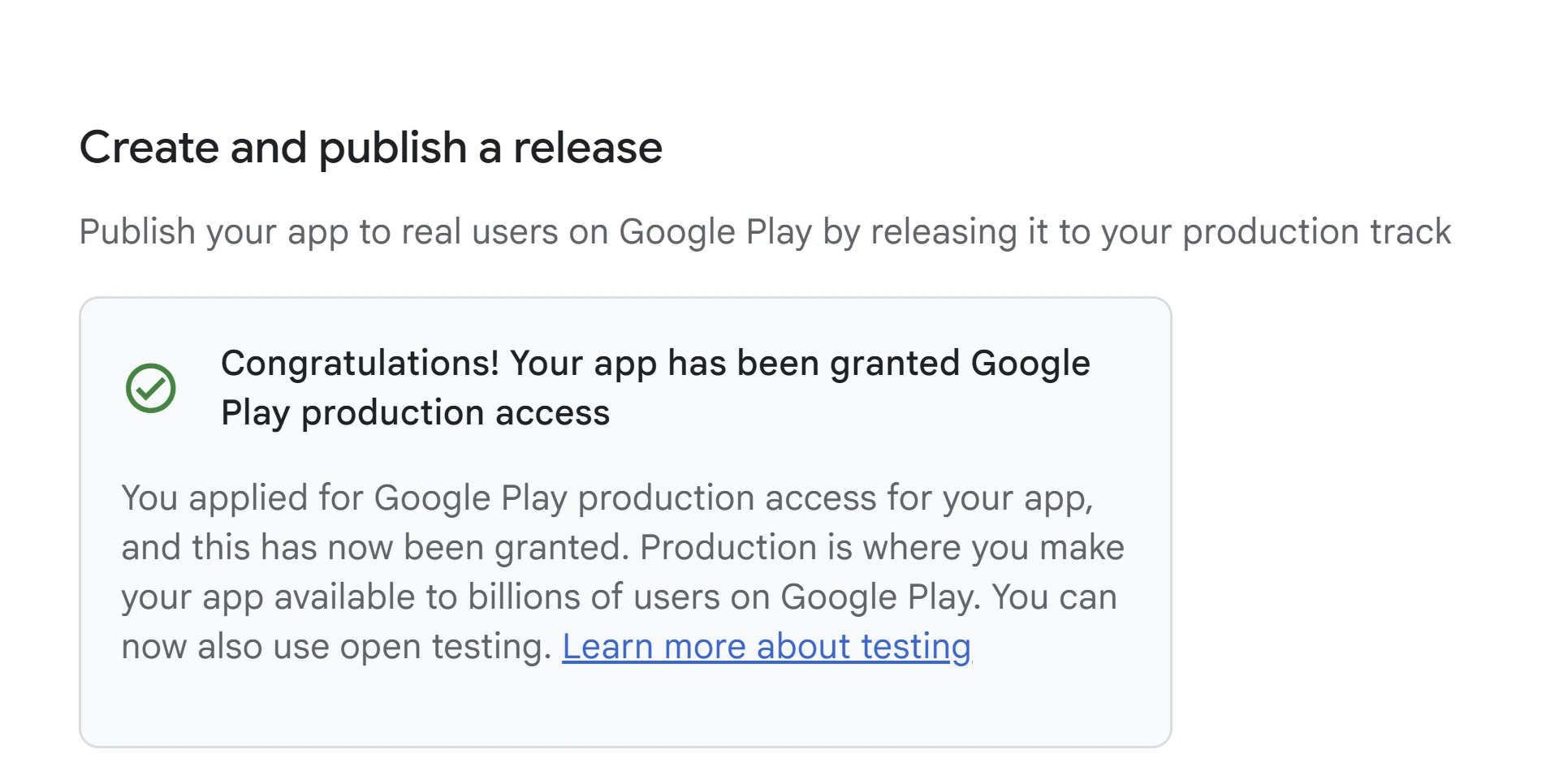
Once the condition is met, Play Console presents Apply for production. That opens the application Google reviews, which is a separate step from the test itself.
Why Does the Opt-In Link Say the App Is Unavailable?
This is a common thing that goes wrong, and it is almost always one of nine things. Work down the list in order rather than jumping to the exotic explanations.
- The tester is signed into the exact Google account you invited, not a second personal account on the same phone.
- If you used a Google Group, the tester joined the Group before opening the opt-in link.
- The release status is Published, not Draft, In review or Pending publication.
- Several hours have passed since your first rollout to the track.
- The tester's country is included in the app's availability.
- The tester's device is compatible with the bundle you uploaded.
- The tester has opted out of the internal track, if they were ever on it.
- They are using the closed-testing link, not an internal or open one.
- They completed both steps: accept the opt-in, then install from Google Play.
If it survives all nine, we go deeper in app not available to testers. For the invite flow generally see how to invite testers, and for the Groups-specific failure, Google Group closed testing not working.
Other setup surprises
None of these stop you qualifying, but every one has cost somebody a day of confusion.
-
Track conflict
Someone opted into your internal test is not eligible for the closed test until they opt out of internal and opt into the closed track.
-
Data Safety
The Data safety form is required for apps on closed, open or production tracks. Apps living only on internal testing are exempt from that section, which is part of why internal feels easier to start.
-
Paid apps
In a closed or open test, testers of a paid app normally still have to purchase it. Internal testers can install without paying. Play Console Help
-
Reviews
Feedback left by test users does not affect your app's public Google Play rating, so an unhappy tester during closed testing is not a scar on the listing.
What a Meaningful Test Actually Covers
Google publishes no test plan, no daily schedule and no coverage checklist, and this post is not going to invent one. What follows is our editorial QA plan: a reasonable shape for two weeks of real testing, offered because "there is no daily quota" is true but unhelpful on its own. Treat it as a menu, not a compliance form.
- Install, first launch and onboarding
- Registration and sign-in
- Permission prompts, and what happens when a permission is denied
- The main workflow the app exists to do
- Navigation and back-button behaviour
- Notifications
- Payments or subscriptions, where they apply
- Offline and poor-network behaviour
- Error messages and whether recovery is possible
- Different screen sizes and Android versions
- Accessibility and readability
- Account deletion and privacy controls
- Feedback written down, not remembered
- A retest after each genuine fix
The reason to do any of this is not that Google counts it. It is that the application at the end asks what testers did, what they told you and what you changed, and a test shaped like the list above produces answers to all three.
How to Apply for Production Access After Testing
Short answer
Once at least 12 testers hold 14 continuous days, go to Dashboard › Apply for production in Play Console and complete a three-part form about your closed test, your app and your readiness to launch. Google says the review usually takes 7 days or less (Play Console Help), though it can take longer, and it can come back asking for more testing.
This is the part of the process most posts skip, and it is the part that actually decides the outcome. Reaching the threshold is arithmetic. The application is a written case you have to make.
Google reviews your production access submission, and your written answers are an important part of that review. Beyond that, Google does not publish the complete process: not whether review is human, automated or both, not which product or testing signals it may draw on besides your answers, and not how any of it is weighted. Treat your answers as the part you control, not as the only thing that exists.
What Google Asks in the Production Access Form
Google publishes the questions. What it does not publish is a scoring rubric, a word count, a list of phrases that fail, or any formula converting your answers into a decision. Anyone who tells you a specific sentence causes an automatic rejection is describing a pattern they inferred, not a rule Google wrote.
What you can do is answer from records you actually kept. Every question below maps to something you should be able to point at from your own 14 days, which is the real argument for taking notes while the test runs rather than reconstructing them afterwards.
| Section | Google asks about | Evidence to have ready |
|---|---|---|
| Your closed test | How easy it was to recruit testers | A truthful account of where your testers came from and what was hard about it. |
| Your closed test | Tester engagement | Which features testers actually used, and how that compared with what you expect from real users. |
| Your closed test | Feedback you received | The main themes, and how you collected them. Messages, a form, a chat group, session notes. |
| Your app or game | Intended audience | A specific description of who it is built for. "Everyone" is an answer that describes nothing. |
| Your app or game | User value, or what makes the game stand out | Concrete value in your own words rather than category boilerplate. |
| Your app or game | Expected installs in the first year | A rough estimate. Console presents ranges, so this is not a number you need to defend. |
| Production readiness | Changes made because of testing | Real fixes and improvements that came out of the test. Do not invent changes you did not make. |
| Production readiness | Why the app is ready | Reasoning built from testing, the issues you resolved and how you expect it to be used. |
A template is useful for seeing what a complete answer contains and how much detail is expected. It stops being useful the moment you submit another developer's test as though it were yours, because every question on the form is asking what your testing produced. Use a model for shape, then fill it with your own evidence. Our production access questionnaire walkthrough goes question by question.
If the answer comes back as a request for more testing rather than a grant, that is a documented outcome rather than a dead end, and the next section covers what Google actually says causes it.
Why Google Says "More Testing Required": What We Know and What We Don't
Short answer
Google publicly gives two examples: not having 12 qualifying testers, and insufficient tester engagement (Play Console Help). It does not publish a complete list of every factor that may lead to more testing. Everything else circulating as a reason (update counts, IP addresses, device fingerprinting, questionnaire phrasing) is developers reverse-engineering their own rejections. Some of it may be right. None of it is published.
Completing 14 days and still being told to keep testing is the most demoralising outcome in this whole process, and it is common enough that entire forum threads exist for it. The honest answer is that Google tells you less than you want to know, and the useful response is to fix the two things Google does name before chasing the things it does not.
Read the two below as Google's own worked examples rather than as the full set. They are the causes worth eliminating first because they are the only ones anybody outside Google can point at.
The 12-tester condition was not actually met
This is the one that catches people who were certain they had complied, because the count is less forgiving than it looks. Twelve people opting in is not the test. Twelve people each holding an unbroken opt-in across the last 14 days is the test, evaluated at the moment you apply.
Staggered joining is the usual culprit. If four testers joined on the 1st, four on the 5th and four on the 9th, you did not become eligible fourteen days after the 1st. You became eligible fourteen days after the 9th, because that is when your twelfth qualifying tester crossed the line. A single opt-out anywhere in there moves it again.
What to check:
Check Play Console's current tester count and eligibility status. If you kept your own opt-in records, calculate from the twelfth tester whose continuous opt-in reaches 14 days. Play Console does not expose a complete tester-by-tester opt-in history. The estimator earlier in this post uses dates you enter yourself.
Your testers were not engaged with the app
Google lists testers not being engaged with your app during the closed test as a reason it may ask you to keep testing. That sentence is real and it is worth taking seriously. What it is not is a measurement: Google publishes no session count, no frequency, no minutes-per-day and no threshold that separates engaged from unengaged.
The practical consequence is easier to act on than a number would be. The application asks how your testers engaged, what feedback they gave and what you changed because of it. Twelve people who installed on day one and never opened the app again leave you with nothing to write in any of those three boxes. It is less that you failed a hidden metric and more that you arrive at the form with no case to make.
What to check:
Can you name three things testers told you, and one change you made in response? If yes, you have an answer. If no, that is the gap to close before you apply again, and closing it means real use rather than a higher install count.
| What you are seeing | Most defensible explanation | What to do |
|---|---|---|
| Apply for production still not available after "14 days" | Fewer than 12 testers hold the full continuous period | Count from the twelfth qualifying tester, not from the first invitation. |
| Some testers joined late | Each tester carries their own opt-in history | Wait until at least 12 have each completed the full continuous period. |
| A tester opted out and came back | The interrupted period cannot be combined into one qualifying 14 days | Treat the return as a fresh period for that tester. |
| Google asked for more testing after you applied | Google gives insufficient qualifying testers and insufficient engagement as its examples | Read the specific message in Console, keep testing genuinely, gather feedback and fix what it surfaces. |
| A tester cannot access the test at all | Wrong account, link not live yet, still opted into internal testing, or an availability setting | Check their Google account, allow a few hours after first publish, and opt them out of internal testing. |
| A paid app is asking testers to pay | Normal for closed and open tests | Closed-test users of paid apps generally still purchase. Internal testing behaves differently. |
| You shipped an update mid-test and panicked | No published rule says a new build resets continuous opt-in | Have testers move to the new build and continue. Do not restart unless Console tells you to. |
| 12 x 14 completed but no approval | The threshold grants eligibility to apply, not access | Complete the production access application and wait for the review. |
Reported by developers, not published by Google
These circulate widely, including on commercial pages that present them as requirements. They may be true. What is certain is that no primary Google source states them, so treat each as a theory rather than a checklist item.
-
Not required
"You were rejected because you did not push enough updates." Google recommends acting on genuine feedback but publishes no release count. Fabricating releases to look busy is not what the test is for.
-
Community-reported
"Your testers shared an IP address or a network." Repeated in forums and by some Product Experts, who do not agree with each other. No primary Google rule states it.
-
Not documented
"Google fingerprints tester devices and measures session length." Current production access documentation discloses no such mechanism. Competitor pages assert it confidently and cite nothing.
-
Not documented
"A tester uninstalled, so their clock reset." The published criterion runs on opt-in status. Uninstalling is not stated to be the same as opting out, though it does cost you engagement evidence.
-
No published rubric
"Saying 'the app is good' gets you auto-rejected." Google publishes the questions, not a scoring formula or a list of failing phrases. A thin answer is weak because it makes no case, not because it trips a filter.
If you are working through a specific "more testing required" message right now, we take the whole flow apart in what to do when Google says more testing is required, and the rejection patterns more broadly in why closed testing gets rejected.
PrimeTestLab is designed to reduce both documented risks by maintaining the qualifying tester count, encouraging meaningful use, collecting feedback, and helping developers prepare evidence-based production-access answers.
Who this service is for
A compact trust note, not a second sales pitch:
Included:
Is 12 Testers Enough, or Should I Get More?
Short answer
Twelve is Google's documented minimum and it is genuinely enough. Recruiting several more can reduce dropout risk and broaden your feedback, but Google publishes no approval bonus for reaching 20 or 25 testers. Extra testers buy you insurance against losing the count, not a better decision.
What extra testers do not do is worth stating plainly, because a lot of pages imply otherwise. They do not shorten the 14 days, they do not substitute for meaningful engagement, and they do not guarantee production access. With that established, here is an honest comparison of your options.
| DIY (Free) | Starter (12) | Professional (20) | Enterprise (25) | |
|---|---|---|---|---|
| Cost | $0 (your time) | $19.99 | $29.99 | $27.99 |
| Opt-out buffer | None | Minimal | 8 extra testers | 13 extra testers |
| Real devices | Depends on who you recruit | |||
| Time to start | Varies from days to weeks | 4-6 hours | 4-6 hours | 4-6 hours |
| Test-completion rate | No reliable published benchmark | 99.9% | 99.9% | 99.9% |
| Free retest or full refund |
For most developers, PrimeTestLab's Starter plan with 12 testers is the most cost-effective option. If you want extra protection against opt-outs, the Professional plan with 20 testers adds an 8-tester buffer. The Enterprise plan with 25 testers adds a 13-tester buffer and a dedicated account manager. If production access is not granted after the qualifying test, every plan includes one free retest or a full refund, subject to our Refund Policy. What no plan can promise is Google's decision itself.
Other Requirements That Can Block a Launch
Closed testing is one publication requirement, not the only one. An app can clear the 12-tester gate and still be held up by something unrelated to testing, so it is worth knowing what else is in the queue before you plan a launch date.
Developer verification is not closed testing
These two get confused constantly because both are new and both gate publishing. Android Developer Verification is an identity check: it confirms who you are. Closed testing confirms your app was tested. They are separate requirements with separate timelines, and you may need to satisfy both. The rollout details, participating stores and current enforcement status are in our developer verification breakdown.
The others worth checking against your own app:
- Target API level. New apps and updates have to target a recent Android version, and the floor differs by form factor. See the target API guide for the current numbers and the extension process.
- Permissions policy. Sensitive permissions carry their own declarations and deadlines, and the dates on these move. The policy update calendar tracks each one with its current effective date.
- App content declarations. Data safety, privacy policy, ads, content rating and target audience all have to be complete before a release rolls out.
- Normal policy review. Every release is reviewed on its own merits regardless of testing history.
We keep the dates for all of these on one policy calendar rather than repeating them here, because deadlines that live in several places drift apart and one of the copies ends up wrong.
The closed testing rule itself is unchanged. It is still 12 opted-in testers, still 14 continuous days, and Google still documents it against personal accounts created after November 13, 2023, which leaves organization accounts outside the stated scope. Google reduced the minimum from 20 testers to 12 on December 11, 2024 (Android Developers Blog). No further changes to the tester count, continuous 14-day window, or published opt-in condition had been announced through August 15, 2026.
Pricing Plans
Skip the hassle of finding testers yourself. All plans include everything you need to complete Google Play's 14-day closed testing requirement. Enterprise is currently the promotional best-value plan: it includes more testers than Professional at a larger discount, which is why 25 testers can cost less than 20. If production access is not granted after the qualifying test, every plan includes one free retest or a full refund, subject to our Refund Policy.
- Full 14-day testing period
- Real Android devices
- Email support
- Free retest or full refund if production access is not granted
- Full 14-day testing period
- 20 diverse Android devices
- Priority WhatsApp support
- Detailed bug reports + free retest or full refund
- Full 14-day testing period
- 25 diverse devices
- Dedicated account manager
- Free retest or full refund if production access is not granted (same as every plan) + 25-tester buffer
Frequently Asked Questions
How many testers do I need for Google Play closed testing?
Google requires a minimum of 12 testers, opted in continuously for the last 14 days, on a personal developer account created after November 13, 2023, before you can apply for production access. Twelve is the documented minimum; recruiting several more is a hedge against dropouts. Meeting 12-by-14 is eligibility to apply, not approval.
How long does Google Play closed testing take?
The qualifying threshold is at least 12 testers continuously opted in for the last 14 days. After that you can apply for production access. Google says review usually takes 7 days or less, though it can take longer. With PrimeTestLab, testing typically starts within 4-6 hours of ordering.
Can my 12 testers start on different days?
Yes. Google does not say everyone has to join at the same time. Each tester carries their own opt-in history. Your eligibility date is set by the twelfth tester to qualify, not by the day you sent the first invitation.
How to get 12 testers for Google Play for free?
You can try Reddit (r/androiddev, r/betatesting), Discord, tester exchange groups, or friends and family. Free testers often forget to install or opt out, which drops you below 12. A late opt-in or opt-out can delay your eligibility date, potentially by up to another 14-day qualifying period for the replacement tester. Many developers find that paying $19.99 for professional testers costs less than the time lost on failed free attempts.
Do I need 12 testers for every new app I publish?
In practice, Play Console displays and evaluates the requirement per app. Check the Dashboard for every new app. Google does not publish a lifetime account-level promise that production access for one app automatically removes the requirement from all later apps. Read the full answer here.
Do organization accounts need 12 testers for 14 days?
Google scopes this production-access testing requirement to personal accounts created after November 13, 2023, so an account created as an organization sits outside that stated scope. That is worth phrasing carefully rather than as a blanket exemption: official community cases report that an app or account converted or transferred from a personal account can keep an existing testing obligation. Check the app Dashboard rather than assuming the account type settled it. Compare the two account types here.
Why did Google reject my app after 14 days of testing?
Google publicly gives two examples: not having 12 qualifying testers, and insufficient tester engagement. It does not publish a complete list. The first is usually arithmetic (late joins or opt-outs). The second has no published measurement. Claims that a specific update count or questionnaire phrase caused a rejection are developer inference, not published policy. Read the full breakdown above.
What is the Production Access Questionnaire?
After the closed test, apply from the Play Console Dashboard using Apply for production and complete the three-part form. Google publishes the questions but not a scoring rubric, so answer from your own test records rather than generic text. Read our question-by-question walkthrough.
Conclusion
If you are doing this yourself, the whole process reduces to a short sequence. Everything else in this post is detail hanging off one of these ten steps.
- Confirm the app's Play Console Dashboard actually shows the requirement.
- Finish the app setup: store listing, content declarations, Data safety.
- Publish a release to the closed testing track and wait for it to reach Published.
- Get at least 12 testers opted in, and confirm the count on the Testers tab rather than the invite list.
- Keep at least 12 continuously opted in for the full 14 days. The date is set by the twelfth to qualify.
- Run a real test: give testers something to do, and write down what they tell you.
- Fix the genuine issues that surface, and note what you changed.
- Apply from the Dashboard once Console offers it.
- Answer the form from your actual records, not from a template.
- Treat Google's review as usually 7 days or less rather than guaranteed, and keep testing if it asks for more.
People lose weeks at step 5 by counting from the first invitation instead of the twelfth qualifying tester, and at step 6 by treating the fortnight as a waiting period rather than a test.
Finding 12 reliable people willing to keep your app installed for 14 days is genuinely hard. That is where PrimeTestLab comes in.
Bottom Line
PrimeTestLab removes the tester-recruitment and retention bottleneck. Plans start at $19.99, with testing starting within 4-6 hours. The required 14-day test still has to finish, after which Google reviews your production-access application.
Choose the plan that fits: Starter with 12 testers, Professional with 20 testers, or Enterprise with 25 testers. If production access is not granted after the qualifying test, every plan includes one free retest or a full refund, subject to our Refund Policy. Still have questions? Read our post on fixing closed testing rejections.
Check This Against Google
This post separates what Google publishes from what only forums claim, so you should be able to verify the first category yourself. These are the pages every load-bearing statement above comes from.
Primary Sources
Where this post says Google publishes something, it is in one of those three. Where it says a claim is community-reported or undocumented, that means we looked in them and it was not there.