














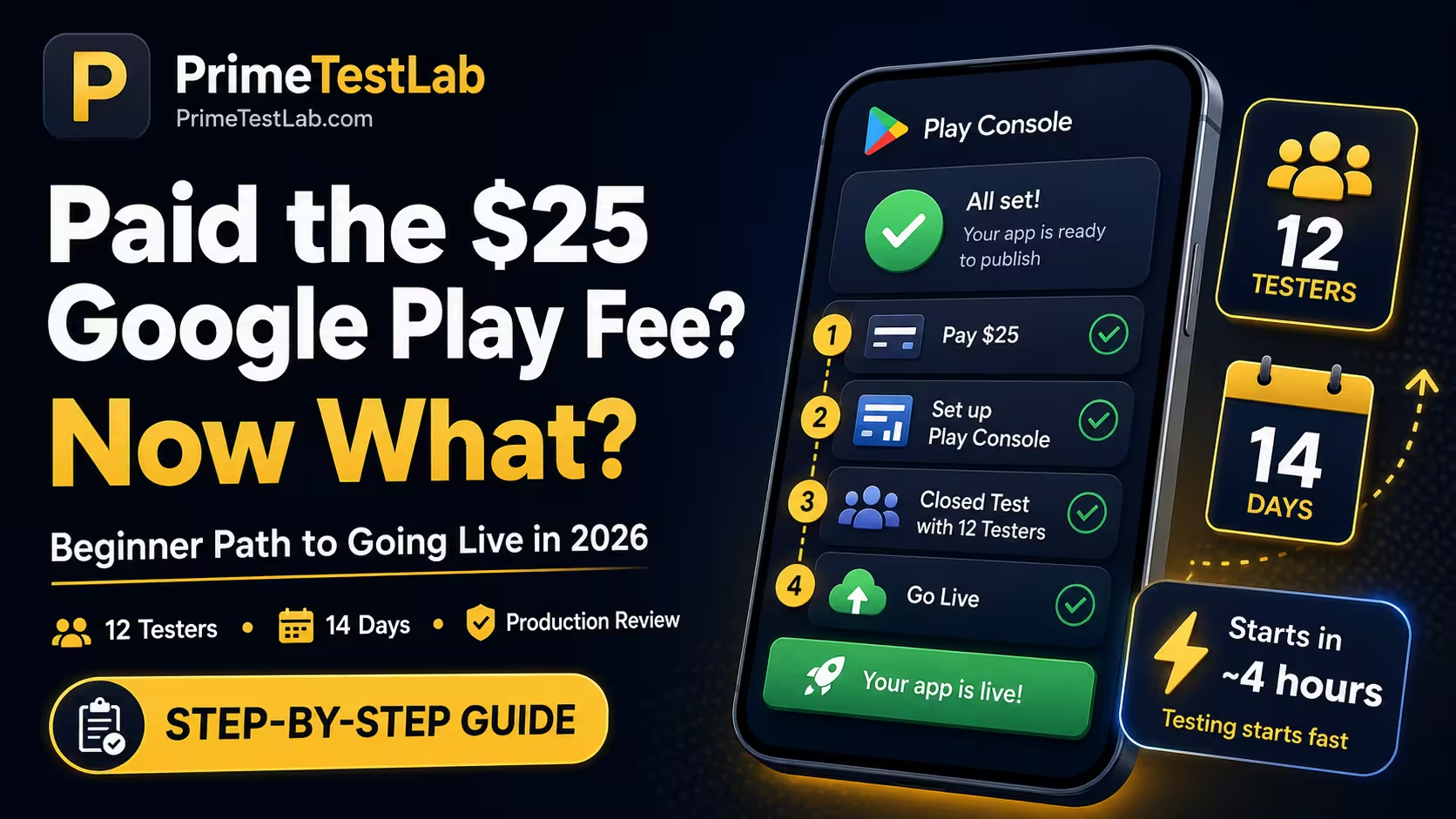
You paid the $25. Here is the road ahead.
The locked stop - the 12-tester, 14-day closed test - is the one a new personal account cannot skip, and the one that stops most first-timers.
Quick Answer
The $25 is a one-time, per-account registration fee, not a subscription. After paying it, a new personal account cannot go live until it runs a closed test with a minimum of 12 testers opted in for at least the last 14 days continuously, then passes a production access review that Google says "usually takes 7 days or less." Realistically, budget 2 to 4 weeks from payment to launch, and closer to 3 to 5 weeks if it is your first time. The one step you cannot do alone is the 12-tester closed test - that is exactly what PrimeTestLab handles.
Quick Reality Check
You paid $25. You still need 12 real people on real Android phones actively testing for 14 continuous days. This is the step that stops most first-time developers - and the rest of this post is how you clear it.
Important - who this applies to: the 12-tester / 14-day closed testing requirement applies only to personal Google Play accounts created after November 13, 2023. Organization accounts, and personal accounts created before that date, are not subject to it. If you have not registered yet and qualify as a business, an organization account is an alternative path around this rule - see personal vs organization accounts.
Paying Google's $25 fee feels like the finish line. It is closer to the starting gate. A brand-new personal account lands inside Play Console, opens the release page, and hits a greyed-out button and a line about "12 testers" and "14 days." This post maps the whole road from your payment to a live app, in the order you actually hit each step, and is current as of July 2, 2026. Where Google's own wording matters, we quote it directly instead of paraphrasing.
What This Post Covers
Is the $25 Google Play Fee Recurring?
No, and this is the first thing to relax about. Google's official wording is that there is a US$25 one-time registration fee. You pay it once and the developer account is yours indefinitely, with no annual renewal. It is charged per developer account, not per app, so you can publish many apps under that single payment.
The registration fee is $25 USD, paid one time. It never recurs, there is no annual renewal, and that single payment lets you publish an unlimited number of apps under the account.
A few payment details catch people out. Prepaid cards are not accepted, you must be at least 18 to register, and the fee is non-refundable even if your identity verification later fails. If you have used Apple's ecosystem, the contrast is stark:
So the good news is settled: you will not be billed again. The less obvious news is everything the fee does not do.
What Does the $25 Actually Unlock?
It unlocks access to Play Console. It does not unlock a public Play Store launch on its own. Before you can submit anything, Google requires you to verify your developer account, and your onboarding path depends on the account type you chose at signup.
What the Fee Does and Does Not Include
- Access to the Play Console dashboard
- The ability to create app records
- Internal, closed, and open testing tracks
- Unlimited apps under one account
- An instant public production launch
- A skip past identity verification
- An exemption from the 12-tester closed test
- A shortcut around Google's review
Google offers two account types, Personal and Organization, and they have access to the same core functionality. The difference is the identity information Google collects and displays. A personal account suits individual, hobby, or student publishing. An organization account is for a business or institution and requires a D-U-N-S number plus organization details.
Category matters more than it looks. Google says developers building financial services, health, VPN, or government apps should use an organization account. If your app falls into one of those categories and you registered as personal, you can create avoidable verification friction later. For most first-time solo developers shipping a normal app or game, a personal account is the right call. If you are weighing it, see personal vs organization accounts.
What Are the Real Steps From Payment to a Live App?
The cleanest mental model is that the $25 gets you in the door, but you still have to walk through the building. Here is the actual sequence Google puts a new developer through - the first three are already behind you.
The 10 Steps, In Order
Sign in with a Google account
You must be 18 or older to register a developer account.
Accept the Developer Distribution Agreement
Review and accept Google's terms during signup.
Pay the US$25 one-time fee
With a valid, non-prepaid card. This is the step you just completed.
Choose Personal or Organization
This is hard to change later, so pick the right type up front.
Verify your identity
Google may ask for a government ID and a card in your legal name.
Create your app record inside Play Console
Name it, set the language, and choose app or game, free or paid.
Complete the required setup tasks
Store listing, app content, and policy declarations all have to be done.
Run an internal test, then the mandatory closed test The wall
The closed test needs at least 12 opted-in testers for 14 continuous days. This is the step most first-timers stall on.
Apply for production access and pass review
Answer the three-section questionnaire; Google's review usually takes 7 days or less.
Roll out your production release
Once approved, your app goes live on Google Play.
If you want the condensed version of that pipeline in plain language, how it works lays out the same flow step by step. Identity verification on a personal account is often quick, sometimes within a day, though Google does not promise a fixed time. Organization accounts take longer because the D-U-N-S step, in Google's words, "can take up to 28 days," so a company should start it early.
The Pro Move
These stages overlap. Kick off identity verification and your closed test as early as possible, then finish the store listing and declarations while the 14-day clock is already ticking. Treating them as strictly sequential is what turns a 3-week launch into a 6-week one.
How Do I Create My App Without Making a Permanent Mistake?
When you create the app record, Google asks for the app name, default language, whether it is an app or a game, whether it is free or paid, a contact email for users, and acceptance of Play App Signing and policy terms. Two of the choices you make here are effectively permanent, so slow down on these.
The Two Permanent Decisions
Your package name is forever
The applicationId, something like com.yourname.yourapp, is unique and permanent. Google says it cannot be deleted or reused. Do not burn a good package name on a throwaway test build - you are stuck with it for the life of that app.
Account type is hard to switch
You can change type if your circumstances change, but converting an existing personal account to an organization is not a simple toggle - it effectively means re-registration. Pick the right type before you build.
Effectively re-registrationWhile you set up the store listing, keep Google's field limits in mind so you are not rewriting copy at the last minute. Your store listing is also shared across tracks, so your testers see essentially the same listing structure your public users eventually will.
What Paperwork Does Google Make Me Finish Before Launch?
More than most beginners expect - and this is usually where the delay comes from, not the code. Before you can launch, Google expects a set of App content and store setup tasks to be complete and accurate. Incomplete or inaccurate answers are one of the most common reasons a launch stalls.
The Declarations You Must Complete
Privacy Policy
An active, public URL. Required even if your app collects nothing.
RequiredData Safety Form
Declares what data you collect and share. Required on closed, open, and production tracks.
RequiredContent Rating
A questionnaire that assigns an age rating. Unrated apps can be removed.
RequiredTarget Audience
Declare your age group(s). Including children triggers Families policy rules.
RequiredAds Declaration
State whether your app contains ads, including third-party ad SDKs.
RequiredApp Access
Working login credentials for reviewers if any part of your app is gated.
If login-gatedThe Data safety form trips people up. Google says every app published on the closed, open, or production track must complete it - only internal-testing-only apps are exempt. Even an app that collects no user data still has to complete the form and link a privacy policy. Leaving this to the end is one of the easiest ways to lose days.
On the technical side, Google Play distributes apps as Android App Bundles: you upload one signed bundle and Play delivers optimized versions to each device. You also need to meet the current target API rule. New apps and updates must target Android 16 (API level 36) by August 31, 2026, with Wear OS and Android TV allowed to target at least API 35. If you are building now, target API 36 from the start so you are not forced into a rushed update.
Why Won't Play Console Let Me Publish My App?
Because you have a new personal account, and Google gates production access behind a closed testing requirement. Here is Google's exact wording:
Google Play Console Help
"If you have a newly created personal developer account, you must run a closed test for your app with a minimum of 12 testers who have been opted-in for at least the last 14 days continuously."- Google Play Console Help (answer 14151465)
This applies to personal accounts created after November 13, 2023. Accounts created before that date, and organization accounts, are exempt. The exemption is real, but remember that organization accounts require the D-U-N-S number most solo developers do not have.
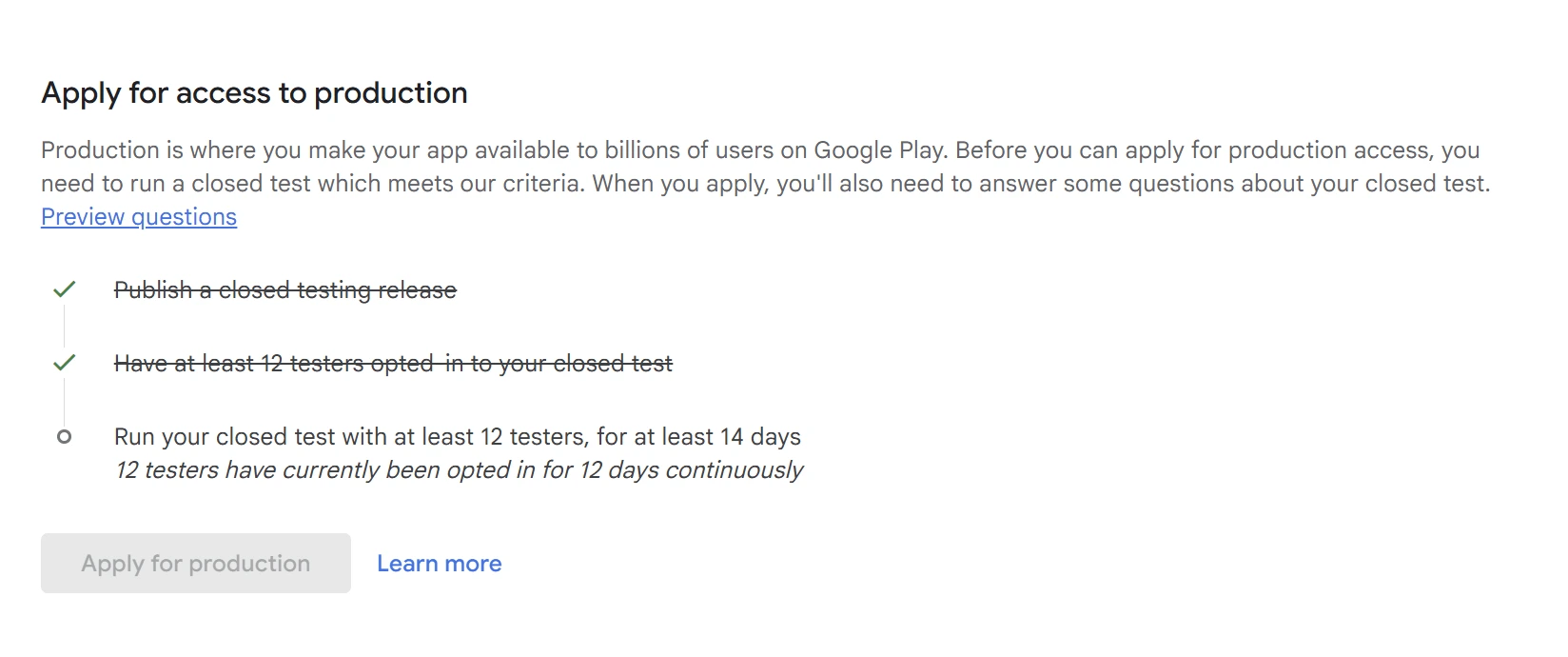
One more thing to clear up: the requirement started at 20 testers when Google launched it. Google reduced it to 12 testers in December 2024, a change that now shows directly in the Play Console interface. If you find an old tutorial telling you to round up 20 testers, that number is outdated - you need 12. There is more on that in why Google dropped 20 testers to 12.
What Counts as a Valid Tester, and What Resets the 14-Day Clock?
This is where beginners quietly lose weeks, so read this section twice. Test any scenario you are unsure about below, then read the rules underneath it.
Interactive
Will This Count as a Valid Tester?
Pick a scenario to see whether it satisfies Google's 12-tester, 14-day rule.
This counts
Exactly rightTwelve separate people, each opted in through your test link and genuinely using the app on real devices, is precisely what Google is measuring. Keep them active for 14 continuous days and you are on track.
Does not count
Not validYou cannot be one of your own 12 testers. Google wants 12 separate opted-in accounts, and stacking your own devices or extra accounts does not create the engagement signals reviewers look for - and faking the count can put your developer account at risk.
Risky - weak engagement
May fail reviewThey may keep your opt-in count up, but testers who install once and never return look inactive. Low engagement during the closed test is a common reason production access is refused, even when you technically had 12 names.
Does not count
Not validGoogle looks for real engagement on real devices. Emulator and bot installs typically fail to satisfy the requirement and can be flagged. This is one of the main reasons do-it-yourself shortcuts fall apart.
This is fine - no reset
EncouragedUpdating your build during closed testing does not reset the 14-day clock. Google actually says shipping fixes during the test is a good way to minimize low-quality reviews. Only your tester count dropping below 12 resets the streak.
Risky - breaks continuity
Clock at riskThe 14 days must be continuous. If an opt-out drops you below 12, you break the continuous window and can be forced to restart it. This is exactly why experienced developers over-recruit instead of starting with the bare minimum.
Here are the rules those verdicts come from:
- The 14 days must be continuous. Google will not count testers who opted in, tested for less than 14 days, and then opted out. If your opted-in count slips below 12, you risk restarting the window. There is a full breakdown in does the 14 days have to be consecutive.
- Opting out is not the same as uninstalling. A tester only formally opts out by visiting your test link and choosing to leave. Uninstalling the app does not opt them out on its own - but testers who install once and go silent look inactive, and weak engagement is a common rejection reason.
- Emulators do not count. Google wants real engagement on real devices. If you want the full explanation, see why emulators do not count for closed testing.
- Updating your build does not reset the clock. Pushing a bug fix during the 14 days is actually encouraged - here is exactly what does and does not reset the 14-day clock.
- The requirement is per app, not per account. You clear it once per unique package name. Routine updates to an approved app do not repeat it, but a brand-new app starts fresh.
A smart order of operations is to run an internal test first, then move to the closed test. Internal testing supports up to 100 testers and reaches them within minutes, which makes it the ideal place to catch install, signing, and crash problems before the 14-day clock is even running. Note that after your very first publish, the test link itself can take a few hours to appear. For the closed test, you can manage testers by email list or by Google Group - and if your Google Group opt-in link is not working and testers see "app not available," that is almost always a membership or wrong-account problem, not the link itself.
Internal
Up to 100 testers, ready in minutes.
- Fastest way to catch early bugs
- Does not count toward production
Does not satisfy the rule
Closed
A controlled group you invite.
- Satisfies the 12 / 14 requirement
- Email lists or Google Groups
Required for production
Open
Anyone can join.
- Great for a wider beta
- Only after production access
Comes after production
Every other requirement in this post is something you control directly. This one needs 12 real people on real Android devices, opted in and active for 14 unbroken days - which is exactly where solo developers stall.
The Dependable Way
Instead of chasing 12 friends who own Android phones and hoping none of them drift away, PrimeTestLab supplies 12 real testers on real devices, monitors them daily, and replaces anyone who drops so your count never falls below the line mid-cycle. Testing typically starts within about 4 hours, backed by a 99.9% success rate across 9,800+ apps. See how it works →
How Do I Apply for Production Access After the 14 Days?
Once you meet the criteria, an "Apply for production" option appears on your Play Console Dashboard. It opens a questionnaire in three sections.
What Each Section Asks
About your closed test
- How you recruited testers
- The engagement you saw
- A summary of their feedback
About your app or game
- Your intended audience
- The value the app provides
- Your expected installs
Production readiness
- What you changed based on testing
- How you decided it was ready
- Why it is production-quality now
Review time: Google says this "usually takes 7 days or less, but may occasionally take longer." If you are turned down, the usual reasons are not actually having 12 opted-in testers, or testers who barely engaged. Vague, generic answers hurt you, so write each response like a short test report with concrete details. For a worked example of strong answers for all three sections, see the production access questionnaire answers post.
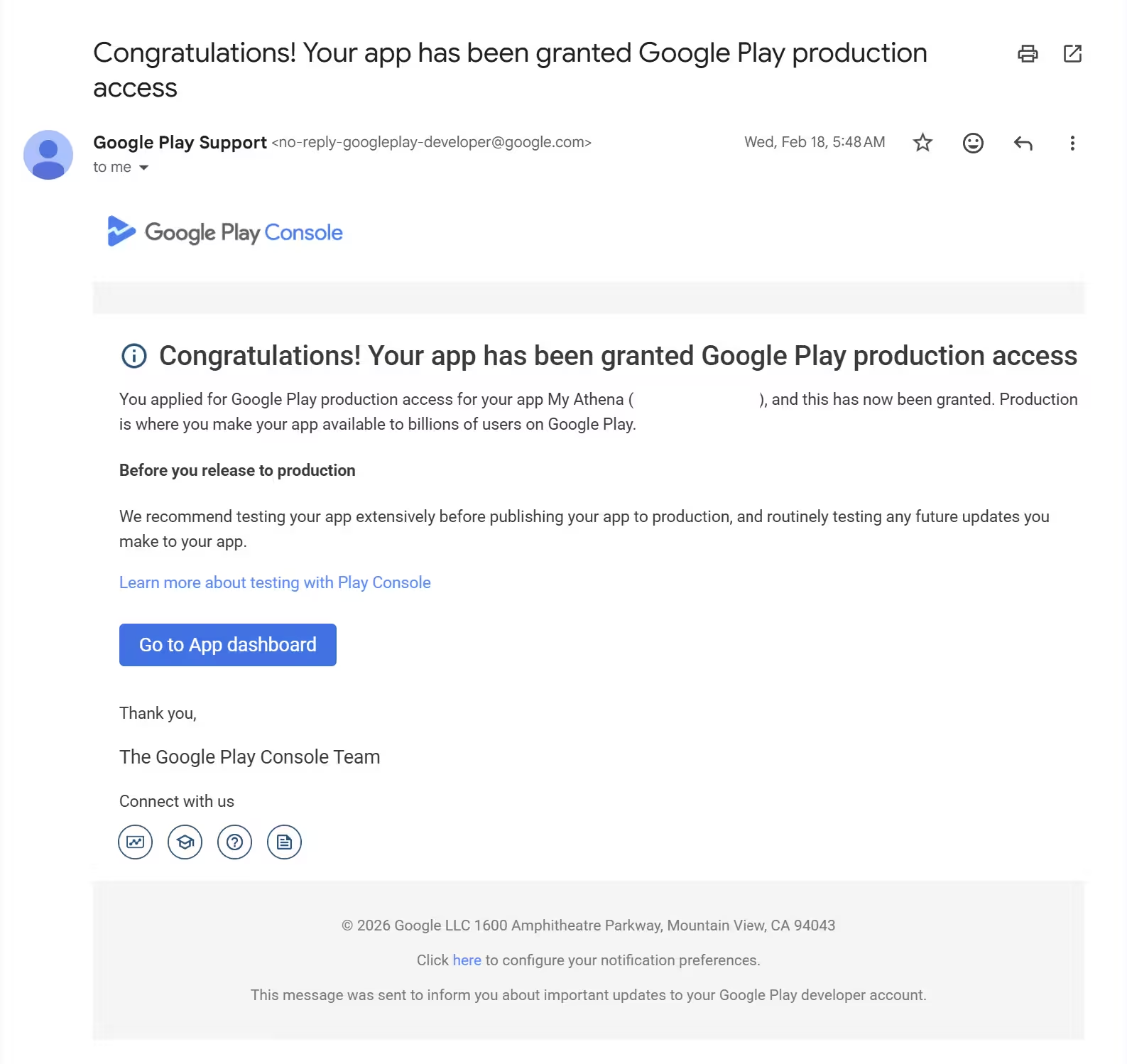
When you pass, this is the moment you have been working toward - Google emails you to confirm production access is granted:
How Long Until My App Is Actually Live?
Plan for 2 to 4 weeks at a minimum, and closer to 3 to 5 weeks if you are doing all of this for the first time. The 14-day window is fixed and cannot be shortened - the parts you can compress are recruiting testers and, above all, avoiding failed cycles.
Here is a realistic beginner timeline, with the overlaps that smart developers exploit:
Typical total for a first-timer: about 3 to 5 weeks. Stages overlap to shorten it; a failed cycle can add another 14 days.
Every failed run costs you another 14 days. If you start with exactly 12 testers and two wander off, you drop below the threshold and lose the entire window - which is why experienced developers recruit more than 12. Use the estimator below to see what a realistic launch looks like for your exact situation:
Interactive
When Will My App Be Live?
Answer three quick questions for a realistic estimate from today.
Where are you right now?
What account type?
Is this your first Play Store launch?
About 3-5 weeks to live
A realistic window from today, assuming no failed cycles.
What Else Changed for New Developers in 2026?
A few 2026 shifts are worth knowing before you publish.
The 2026 Changes That Affect You
Target API level 36 (Android 16)
New apps and updates must target Android 16; Wear OS and Android TV must target at least API 35.
Aug 31, 2026Android Developer Verification
Apps must be registered by a verified developer to install on certified devices. It is an identity check, not an app review.
Enforcement from Sept 30, 2026Android 17 released
The newest Android version available for testing reached its stable release.
June 16, 2026Free limited distribution accounts
Aimed at students and hobbyists: no registration fee, up to 20 devices, no government ID - a separate track, not a shortcut past the testing rule.
Rolling out 2026On verification, most Play developers are already covered, because completing Play Console verification satisfies it. In Google's June 2026 update it noted that most Play developers are already verified and that over 99% of their apps have been registered. If you just paid your $25 and complete account verification, this new layer is not an extra hurdle for you.
What Do First-Time Developers Most Commonly Get Wrong?
Almost every one of these is avoidable once you know it exists.
The Slip-Ups That Cost Beginners Weeks
Expecting a recurring bill
People see Apple's annual charge in the same search and assume Google works the same way. It does not - the $25 is one-time.
Not learning the 14-day rule until the wall
The closed testing gate surprises almost everyone. Plan for it from day one, not when the button is greyed out.
Recruiting friends who then go quiet
Free testers are unreliable, and low engagement gets production applications rejected.
Using emulators
They typically do not count and can be flagged as inauthentic engagement.
Assuming exactly 12 is enough
With no buffer, a single dropout can sink the run. Experienced developers over-recruit on purpose.
Thinking the app is stuck when it is not
Play Console can leave items under "Changes not yet sent for review." You still have to open the Publishing overview and submit them.
Is It Allowed to Pay for Google Play Testers?
Yes. Google requires a minimum of 12 opted-in testers for 14 continuous days, but it does not restrict who your testers are or how you find them. What is against the rules is fake or incentivized installs that do not reflect genuine usage.
Real, opted-in humans running your app on real devices are exactly what the requirement is designed to capture, and what emulators and bots cannot fake. That is precisely the model a legitimate closed testing service uses: real testers you can watch opt in inside your own Play Console, doing what Google's rule is built to measure. The line is simple - real engagement is fine; faked engagement is not.
Where PrimeTestLab Fits Into All This
Look back at the road from your $25 payment. Almost every stop is paperwork and engineering you control: the account, identity, the build, the listing, the declarations, and the questionnaire. One is fundamentally different - it needs 12 real people on real Android devices, opted in and genuinely active for 14 unbroken days. That single step is where most solo developers stall, and it is exactly what PrimeTestLab handles.
You share your closed testing opt-in link. We handle invitation, opt-in verification, daily engagement monitoring, and full 14-day retention, so one tester dropping out never breaks your streak and resets the clock. 9,800+ apps and counting, at a 99.9% first-attempt success rate across 120+ countries, on real devices running Android 7 to 17.
To Be Straight About It
PrimeTestLab covers the tester requirement - the 12 opted-in, 14-day-active part. It does not file your declarations, pick your account type, or pass the app review for you. The winning combination is your finished app and complete listing plus 12 real testers for the full 14 days, so the closed test is never the reason you get held up.
Doing the Closed Test Yourself vs a Managed Run
| What Google needs | Do it yourself | With PrimeTestLab |
|---|---|---|
| 12 opted-in testers | Recruit friends or forums and hope they actually join | 12+ real testers supplied and opted in |
| 14 continuous active days | Chase people daily to keep them engaged | Daily engagement monitoring built in |
| Never drop below 12 | One dropout can reset your 14-day clock | Immediate replacement protects the streak |
| Real devices, not emulators | You verify every tester yourself | Real Android devices across 120+ countries |
| Time to first tester | Days to over a week if done alone | Testing starts in 4-6 hours |
| Cost | Free, but slow and easy to fail | From $19.99, one-and-done |
Current Packages
- Meets Google's minimum
- Real Android devices
- Full 14-day coverage
- Maximum safety margin
- Best device diversity
- Strongest first-attempt rate
- Safety buffer included
- Better device diversity
- Higher approval confidence
Every price adds 5% service fee at checkout.
Track Your Road From $25 to Live
Frequently Asked Questions
Is the $25 Google Play fee recurring?
No. Google's official wording is that there is a US$25 one-time registration fee. You pay it once and your developer account stays active indefinitely, with no annual renewal. It is charged per account rather than per app, so a single payment covers every app you publish. Note that prepaid cards are not accepted and the fee is non-refundable.
Can I be my own tester for closed testing?
You cannot count yourself as one of the 12. Google requires 12 separate opted-in testers, each a real account holder who joins through your test link on a real device. Adding your own account, or relatives who never actually open the app, will not create the engagement signals Google looks for when it reviews your production application.
Do emulators count toward the 12 testers?
Generally no. Google evaluates real engagement on real devices, so emulator and bot installs typically do not satisfy the requirement and can be flagged. This is one of the main reasons do-it-yourself attempts fail. A dedicated testing service uses real humans on real Android phones and tablets, which is what the rule is built to measure.
How long until my app is live on Google Play?
Budget 2 to 4 weeks minimum from paying the $25, and closer to 3 to 5 weeks for a true first-timer. The mandatory 14-day continuous testing window is fixed, and after you apply, Google's review usually takes 7 days or less, but may occasionally take longer. Add setup and tester recruitment and the realistic total lands around a month.
Is it legal to pay for Google Play testers?
Yes. Google requires 12 opted-in testers for 14 continuous days but does not restrict how you recruit them, so paying for real testers on real devices is compliant. What violates policy is fake or incentivized installs that do not represent genuine use. Real, verifiable testers you can watch opt in inside Play Console keep you on the right side of the rules.
Does updating my app reset the 14-day clock?
No. Pushing new builds during closed testing does not reset the continuous 14-day window, and Google actually encourages fixing bugs and shipping updates while you test. The thing that resets your progress is your opted-in tester count dropping below 12, which breaks the continuous requirement and can force you to start the window again.
Do I have to redo closed testing for every update?
No. The closed testing requirement is per app and you clear it once. After that app has production access, its routine updates do not trigger the 14-day test again. Each brand-new app you publish under the same account has to run its own closed test from scratch, because the requirement attaches to the app, not the account.
Bottom Line
Summary
The $25 is a one-time, per-account fee, not a subscription, so you will not be billed again - but it only gets you into Play Console. The real hurdle for a new personal account is the mandatory closed test of at least 12 testers opted in for 14 continuous days, followed by a production review of up to about a week, which puts a realistic launch 2 to 4 weeks out and often nearer a month. For beginners who do not have a dozen reliable Android-owning testers on standby, PrimeTestLab is the fastest, policy-compliant way through the closed testing gate, with real testers on real devices from $19.99 and testing that starts within hours. See pricing plans →