













Google Play does not give one approval. It holds a release behind a chain of separate gates, and each gate has its own applicability rule - so a good deal of what follows will not apply to you.
Every requirement below carries the same four things: who it applies to, what you do, what proves it is finished, and the official page it comes from. Where Google's own pages contradict each other - on two points here, they do - you get both versions rather than our guess.
Scope of this guide
This is the requirements reference; step detail lives in focused guides, linked where you need them: creating and verifying the account, the target API requirement, setting up closed testing, review times by stage and Android developer verification and sideloading. If you have already paid the fee and are stuck, start here instead.
Table of contents
Google Play publishing requirements at a glance
Every gate is below, with the rule that decides whether it reaches you and the thing in Play Console that proves it is done. Rows marked conditional are skipped entirely by some publishers.
| Requirement | Applies to | Where | Done when |
|---|---|---|---|
| Developer account and the US$25 registration fee | Applies toEveryone; owner aged 18+ | WherePlay Console signup | Done whenThe account opens and Play Console loads |
| Account type: personal or organization | Applies toEveryone; some categories must use an organization | WherePlay Console signup | Done whenChosen at signup; changing it later is its own workflow |
| Identity verification | Applies toEveryone | WherePlay Console account details | Done whenConsole stops showing the verification task |
| Device verification Conditional | Applies toNew personal accounts | WherePlay Console mobile app, as account owner | Done whenThe device task leaves the Console Home page |
| D-U-N-S number and organization documents Conditional | Applies toOrganization accounts | WhereSignup and payments profile | Done whenOrganization details show as verified |
| Android developer registration | Applies toEvery app distributed on Google Play | WhereAndroid developer verification | Done whenRegistered, with no outstanding Console action |
| Android App Bundle and Play App Signing | Applies toNew public apps | WhereRelease | Done whenThe .aab uploads with no format error |
| Target API level | Applies toEvery new app and every update | WhereYour build | Done whenThe upload passes the target-API check |
| Native library compatibility (64-bit, 16 KB page size) Conditional | Applies toApps shipping native code, SDKs included | WhereYour build | Done whenCompatibility checks and runtime tests pass, not merely a clean upload |
| Play Billing Library version Conditional | Applies toApps that integrate Play Billing | WhereYour build | Done whenSubmission accepted on a supported version |
| Store listing text and graphics | Applies toEveryone | WhereMain store listing | Done whenIt saves with no missing-asset error |
| Privacy policy | Applies toEveryone, including no-data apps | WhereApp content, and inside the app | Done whenSaved, reachable, and shown in the app |
| Data safety form | Applies toClosed, open and production tracks | WhereApp content | Done whenSubmitted, with no task left on it |
| Health apps declaration | Applies toEvery app on the closed, open or production track, including apps with no health features | WhereApp content | Done whenForm submitted, with the no-features answer where that is accurate |
| Financial features declaration | Applies toEvery app on those tracks, including apps with no financial features | WhereApp content | Done whenForm submitted, with any features you do offer declared |
| Content rating questionnaire | Applies toEveryone | WhereApp content | Done whenAn IARC rating is issued |
| Target audience and ads declarations | Applies toEveryone | WhereApp content | Done whenDeclarations saved |
| Account and data deletion Conditional | Applies toApps that let users create an account | WhereApp content, the app, and a public URL | Done whenBoth routes work and the data really goes |
| App access instructions for reviewers Conditional | Applies toApps with any gated function | WhereApp content › App access | Done whenSomeone else can sign in with what you saved |
| Qualifying closed test Conditional | Applies toPersonal accounts created after Nov 13, 2023 | WhereTesting › Closed testing | Done when12 testers opted in across the previous 14 continuous days |
| Production access Conditional | Applies toPersonal accounts created after Nov 13, 2023 | WhereDashboard | Done whenGoogle grants access after review |
| Production release | Applies toEveryone | WhereProduction | Done whenChanges sent for review, then it publishes |
The order these actually happen in
Eight stages, and the order is not a preference - three of them are hard prerequisites for the one after.
- Choose and verify your developer account Account type, the fee, identity, and the device check where Console shows it.
- Create the app and prepare a compliant build App record and application ID, App Bundle and signing, target API, build preflight.
- Check Android developer registration A status check in Play Console once the app and package exist.
- Complete the store listing and assets Text limits, required graphics, the icon mask, AI asset declarations.
- Complete App content and reviewer access Privacy, Data safety, deletion, rating, audience, ads, the two universal declarations, sign-in instructions.
- Run the qualifying closed test 12 testers opted in for 14 continuous days. Personal accounts created after Nov 13, 2023 only.
- Apply for production access The three-part questionnaire about your test, app and readiness.
- Submit and publish the production release Countries, pricing, the bundle, release notes, sending for review, then publication.
What you can genuinely do in parallel
Start account verification, app preparation and tester recruitment early, and use internal testing while app setup is still incomplete. Complete the required setup before starting the qualifying closed release, then use the test period to collect feedback. Advice telling you to run the qualifying test while you finish the listing has the prerequisite backwards, and following it can cost you the 14 days.
1. Choose and verify your developer account
You need a Google account with 2-Step Verification enabled, and you accept the Developer Distribution Agreement and the Play Console Terms of Service at signup. Three things then have to clear before you can publish: the fee, your identity, and - where Console shows it - a device check.
What the US$25 fee is, and what it is not
The registration fee is US$25, paid once, with no annual renewal. It is charged per developer account, not per app, and the account owner must be at least 18. Get started with Play Console
It is a registration charge, not an estimate of what publishing costs in development, hosting, testing or monetization fees. And while it is widely called flatly non-refundable, Google documents limited refund circumstances tied to closing an account. Cancel a developer account Full cost breakdown: the developer fee guide.
The fee is paid by credit or debit card only. Accepted card types vary by location, and Google is explicit that prepaid cards are not accepted.
Accepted
Visa Mastercard American Express Discover (US only) Visa Electron (outside US)Not accepted
Prepaid cards PayPal for the fee Bank transferPersonal or organization - and when the choice is already made
Ask the category question first, because for some apps there is no choice to make.
Some categories require an organization account
Google Play requires an organization account for specified financial services apps, health apps such as medical and human-subjects research apps, approved VpnService apps, and government apps. If your app is one of those, a personal account will not be accepted no matter how you work - so get organization documents and a D-U-N-S number in hand before you build. Play Console RequirementsHealth Content and Services
If none of those categories reach you, the choice is yours. Both types can publish and monetize, so part of the difference is just what Google verifies about you - but it is not only paperwork. A personal account created after November 13, 2023 also owes a qualifying closed test, which is the longest fixed item in this guide. Fuller comparison: personal vs organization accounts.
Individual or indie
For solo developers, hobbyists and indie makers with no registered organization.
Company or business
For a registered organization - and mandatory for the categories named above.
Start the D-U-N-S number early. Play Console says obtaining one can take up to 30 days, which usually makes it the longest-lead item on an organization signup. Check whether your organization already has a number first, and read Google's exceptions - government entities and unsupported regions are handled differently. Required account information
Which account type do you need?
The category question is asked first because it can override the second answer entirely.
Answer both questions to see which account type Google requires and what to prepare.
Personal account
Available to youYou need a public developer name, a verified email address and phone number, and one government identity document. No D-U-N-S number, no organization documents.
Plan for two extra gates: a device verification task, and - if the account was created after November 13, 2023 - a closed test of 12 testers opted in for 14 continuous days before you can apply for production access.
Organization account
Available to youYou publish under the organization's name, and will need a D-U-N-S number (allow up to 30 days if you do not have one), a verified organization website, organization documents and a government ID for the account owner.
Organization accounts are not subject to the personal-account closed testing requirement. That is a real difference in the path to production - but not a reason to register an organization you do not actually operate.
Organization account is required
Not optionalFinancial services, health, approved VpnService and government apps must use an organization account. A personal account will not be accepted, whatever your own working arrangement is.
Get the D-U-N-S number and organization documents moving before you build, and read the category policy - health apps carry their own labelling and disclaimer requirements on top of the account type.
Check the category policy first
Resolve this before signing upThe category rule overrides everything else here, so it is worth ten minutes now. Read Google's Play Console Requirements, and the Health Content and Services policy if anything in your app touches health.
If neither reaches your app, answer "No" above and the second question decides it.
What account verification requires, and why timing varies
Google verifies who you are at account level before you can publish. A personal account supplies an official government identity document; an organization supplies organization details alongside one. What is asked for can depend on what your payments profile already verifies, which is why two people following the same guide get asked for different things. Verify your developer identity
Google publishes no guaranteed processing time for Play account-identity review, and the widely quoted "up to 5 days" is not one - that figure comes from Google's payments documentation, not the Play identity page. Complete the tasks Console shows and allow for extra document checks. Payment-method verification is separate again: a merchant check tied to taking payments, not a step every free-app developer has to start. Account information and merchant checks
Done when: Play Console stops showing the identity verification task for your account. Treat submitted and cleared as two different states - a submitted document does not unblock publishing.
Device verification: the gate most guides miss
New personal developer accounts have a separate device task. You verify access to a non-rooted physical Android mobile device running Android 10 or later, using the Play Console mobile app while signed in as the account owner. Device verification requirements
What it is not: the identity check, the qualifying closed test, or a rule about your testers - nothing here says the 12 people in your closed test need that device specification. It is its own item on the Console Home page, and an emulator will not clear it.
Done when: The device verification task disappears from your Play Console Home page.
Changing account type later
You can convert a personal developer account to an organization account through Google's verification workflow: verify the organization's website, create or select and verify its payments profile, then complete the change in the existing account. Google advises waiting at least 72 hours after conversion before submitting new apps. Going the other way - organization to personal - does require a new account. Account type conversion
Before you sign up, check which of your legal and contact details Google displays publicly. What is shown depends on your account type and whether you monetize, and it is easier to decide in advance than to discover on a live listing. Required account information Step-by-step signup: how to create a developer account.
2. Create your app and prepare a compliant build
Two halves: the app record you create in Play Console, and the artifact you upload into it. One decision here follows the app for its whole life, so it is worth thirty seconds now.
The decisions that are permanent
Creating the app in Play Console sets its name, default language, app-or-game type and free-or-paid status. The application ID is a separate thing: it lives in your build configuration, not in that Console form, and the two meet when you upload. So check the application ID in your build before you upload it, rather than assuming an empty Console record has already fixed it. Create and set up your appApplication ID
Two of these are one-way doors
Once an app is published, its application ID is its identity on Google Play: change it and you are no longer updating that app, you are shipping a different one. Catch a typo before the first upload, not after. Separately, an app offered as a free download cannot later become paid under the same identity - paid to free is allowed. If you are undecided about monetization, publishing free with in-app purchases keeps more options open. Set up your app's prices
Android App Bundle and the two signing roles
For an ordinary new public app, Google Play accepts the Android App Bundle (.aab) rather than an APK, and the app uses Play App Signing. That scope is worth stating once rather than as an absolute: eligible legacy apps still have APK workflows, App Bundles have been required for all Android TV apps since June 2023, and enterprise private-app distribution differs again. App BundlesPrivate apps
Play App Signing splits two roles, which is not the same as two physical keys you hold. The app signing key is managed by Google and signs what users install. The upload key signs your bundle before upload, so Google knows it came from you. The two roles can be backed by the same key or by separate ones; a separate upload key is the recommended configuration, because it can be reset if you lose it. Sign your app
Target API level, by form factor
This is the requirement most likely to block an upload outright, and it is not one number - it varies by what you are submitting.
| Submission | Target API floor | Android version |
|---|---|---|
| New mobile apps and updates (since August 31, 2026) | Target API floorAPI 36 | Android versionAndroid 16 |
| Wear OS | Target API floorAPI 35 | Android versionAndroid 15 |
| Android Automotive | Target API floorAPI 35 | Android versionAndroid 15 |
| Android TV | Target API floorAPI 34 | Android versionAndroid 14 |
| Android XR | Target API floorAPI 34 | Android versionAndroid 14 |
| Existing mobile apps, to stay available to new users on newer devices | Target API floorAPI 35 | Android versionAndroid 15 |
Google documents extension windows running to November 1, 2026 in some circumstances, but eligibility is decided for your specific app inside Play Console. Target API requirements Migration detail is in the target API guide.
Target API is not a minimum Android version. Targeting API 36 does not stop your app running on older releases - minSdk decides that, and it is a separate setting. The instinct to raise the minimum alongside the target costs first-time publishers real users. Target SDK guidance
Preflight: what can reject an apparently valid bundle
Two checks catch projects that otherwise look finished. Both are conditional - if neither applies to your app, skip this and move on.
Native libraries: 64-bit and 16 KB page size
If your app ships native code - directly, through an SDK, or generated by an app builder - check it for 64-bit support and 16 KB page-size compatibility, and test it on a 16 KB environment. Apps written only in Java or Kotlin, dependencies included, already support the relevant page size. Check the bundle you actually upload: a dependency can reintroduce a 32-bit or 4 KB-aligned library without any change on your side. 16 KB page sizes64-bit
Google's own pages disagree on this date
Current 16 KB guide
February 1, 2027The guide as retrieved states that update blocking begins on this date.
Original announcement
November 1, 2025The May 2025 announcement used this date for new apps and updates.
The current guide does not resolve how the later date applies to new apps, so we will not pick one and present it as settled. Test 16 KB compatibility now rather than planning around either date. Enforcement is not uniform across form factors either: Wear OS native 64-bit upload enforcement starts September 15, 2026. May 2025 announcementWear OS deadline Already hit it? The 16 KB error guide has the fix.
Play Billing Library version
If - and only if - your app integrates Play Billing, new submissions normally need Billing Library version 8 or newer. Version 7's ordinary deadline was August 31, 2026, and an applicable extension can run to November 1, 2026. None of this reaches an app without that integration, and it does not mean older installed apps stop working. Billing deprecation schedule
Done when: A signed .aab uploads with no target-API or format error, the version code is higher than anything you uploaded before, and - if the app ships native code - your compatibility checks and a run on a 16 KB environment both pass. Play Console validating an upload is not the same as your dependencies being tested; resolve blocking issues and read the warnings.
3. Check Android developer registration in Play Console
This comes after the previous stage because it needs the app to exist: registration attaches an app - its package name and signing-key fingerprint - to a verified developer identity, across the Android ecosystem rather than just Google Play. It is a different thing from the account-level identity check in stage 1, which proves who you are so you can hold an account.
For a Play publisher the practical question is narrow: is your app registered? Check its status on Play Console's Android developer verification page. Google attempts automatic registration and reuses the identity verification you already completed, so for most Play publishers this is a status check rather than a task - you do not need a separate Android Developer Console account, and you do not repeat identity verification. Confirm the registration and complete any outstanding Console action it shows. Registering Play package names
| When | What happens | Who it reaches |
|---|---|---|
| Now | What happensApp registration is open through Play Console and the Android Developer Console. Most existing Play apps were registered automatically. | Who it reachesEvery Play developer |
| Sep 30, 2026 | What happensApps that remain unregistered risk removal from Google Play globally. | Who it reachesEvery Play developer |
| Sep 30, 2026 | What happensInstallation checks begin through participating app stores for users in Brazil, Indonesia, Singapore and Thailand. Google's current FAQ excludes direct sideloading and non-participating stores from this first phase. | Who it reachesUsers in those four countries |
| 2027 | What happensGoogle has said it intends to expand the protections globally on certified Android devices. No specific date has been announced. | Who it reachesAnnounced, not scheduled |
Apps that remain unregistered risk removal from Google Play globally from September 30, 2026 - easy to miss, because most coverage of that date describes only the four-country installation phase, a different part of the same programme. Two things you can ignore: the free Limited Distribution account is for hobbyists shipping to a handful of devices and is not a free route onto Google Play; and the device-side verifier's Android floor is documented inconsistently (the Android Developers FAQ says 7 and newer, Android Help says 8 and newer), which is an unresolved conflict between two Google pages rather than a requirement you act on. Android Help
Done when: Play Console's Android developer verification page shows the app registered, with no outstanding action listed against it.
The rest of the programme - the advanced installation flow, ADB, third-party stores, and the one-time setup wait often misreported as a wait before every install - is covered in sideloading after developer verification.
4. Complete your store listing and assets
The listing is what users and reviewers see first, and it has hard limits that will stop a save. The useful line to hold is between what Google requires to publish and what it recommends for featuring; the two are separated below.
Required to publish
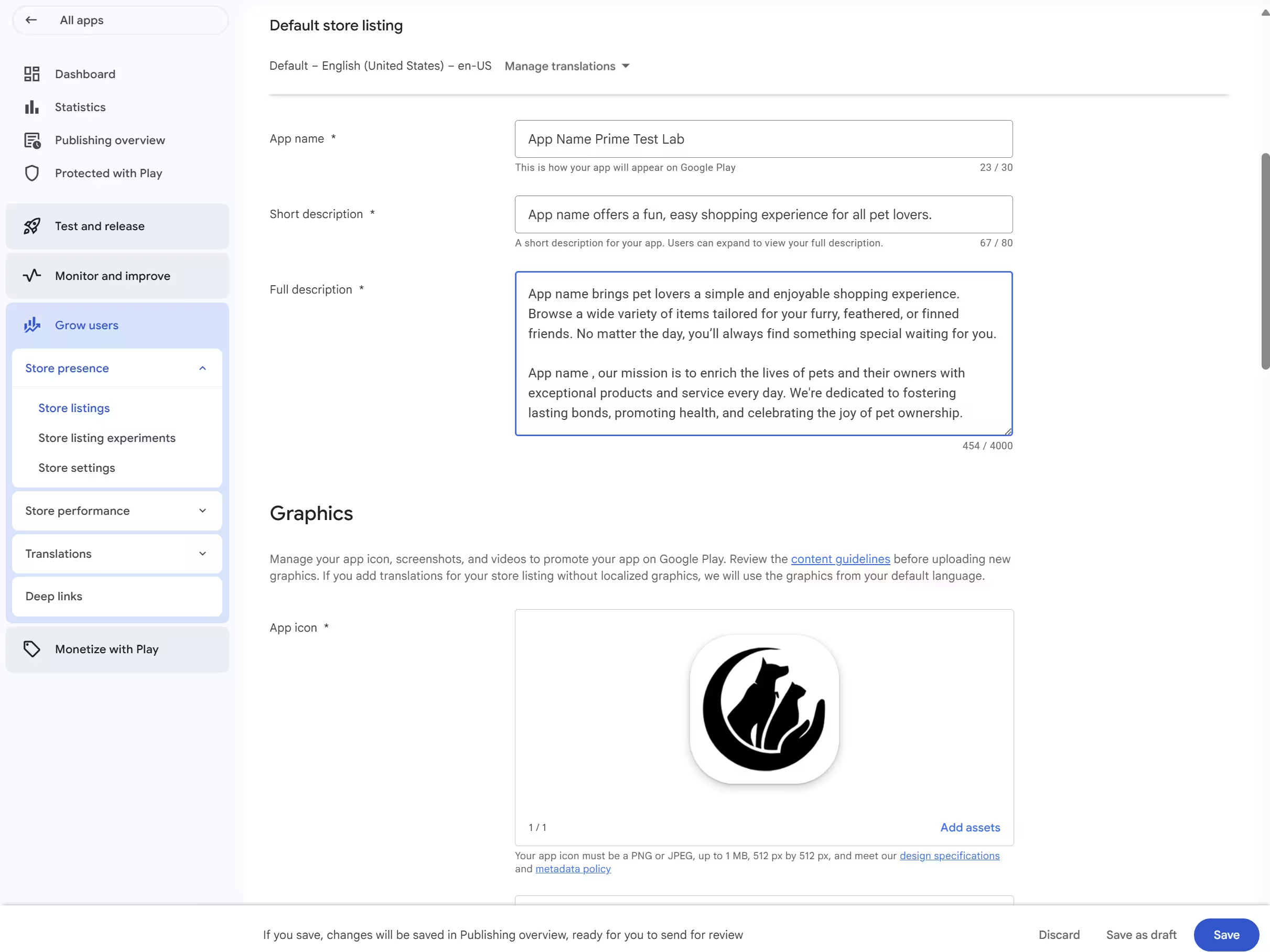
| Field | Limit |
|---|---|
| App name | Limit30 characters |
| Short description | Limit80 characters |
| Full description | Limit4,000 characters |
| Asset | Specification |
|---|---|
| App icon | Specification512 × 512 px, 32-bit PNG, up to 1,024 KB |
| Feature graphic | Specification1,024 × 500 px, JPEG or 24-bit PNG with no alpha channel |
| Screenshots | SpecificationA minimum of two across device types, with platform-specific requirements on top - a Wear OS listing has its own screenshot requirement, not an optional recommendation. Up to 8 per device type; each side 320-3,840 px; aspect between 1:2 and 2:1 |
| Preview video Optional | SpecificationA public or unlisted YouTube link, never a private one. The video must allow embedding, have monetization and ads turned off, and carry no age restriction |
Recommended, but not a publish gate
Google's preview-asset guidance also describes what makes a listing eligible for large-format and recommendation surfaces: more screenshots, higher resolutions, sets for the device classes you want featured on. Missing any of it does not block a release. Wear OS, TV and XR listings have their own asset rules on top. Preview assets
The icon corner mask
You upload a full square icon and Google Play applies a dynamic corner mask with a radius equivalent to 30% of the icon size, so anything near a corner is clipped in the rendered result. This is the current specification - not, as is often repeated, a change introduced in 2026. A source page's own modification date is not evidence of when a rule started. Icon design specifications
AI declarations for generated store assets
If you generate or edit listing images, video or promotional material with AI, Play Console now includes per-asset self-declarations in its content-creation flows, with labels applied to assets falling within the applicable regulatory scope. Google's help page states no start date and no exhaustive list of the rules it covers, so we are not inventing either. This is about store assets, separate from the policy governing what a generative app produces for users. Declaring AI-generated content
Metadata rules that get listings rejected
Google's listing guidance is strict about promotional language in the fields that appear in search results and on shelves - the title, icon, developer name and short description.
Do not use
- Keyword stuffing or excessive repetition
- Ranking claims: "#1", "Best", "Top"
- Price or promotional text: "Free", "discount", "sale"
- Calls to action such as "Install now"
- Misleading claims about what the app does
Do instead
- A title that accurately describes the function
- Clear, honest feature descriptions
- Screenshots showing the real in-app experience
- Keep screenshot taglines to roughly 20% of the image - that guidance is about taglines, not a cap on every pixel of visible text
- Assets that match the app's actual functionality
The accuracy rule
Your listing and screenshots must reflect what the app actually does. A mismatch between what you show and what a reviewer finds is a common rejection cause - screenshots need the real in-app experience, not a mockup of features that do not exist yet.
Done when: The main store listing saves with no missing-asset error, and the graphics you uploaded still read correctly after the corner mask.
5. Complete App content and reviewer access
App content is the part first-time publishers underestimate, because none of it is engineering and all of it blocks. It is a stack of declarations, and an incomplete or inaccurate answer is one of the most common reasons a launch stalls.
Privacy policy: every app, in two places
Every app needs a privacy policy - not only apps aimed at children, which is how this is often described. Provide the link in Play Console and a link or the policy text inside the app. Use an active, public, non-geofenced URL, not a PDF. An app that collects no data still needs one, and "we collect nothing" is not a policy: it still has to identify the app and developer, give a privacy contact, and describe how any data it does touch is handled and retained. User Data policy
Data safety
Every app on the closed, open or production track completes the Data safety form. Apps that only ever run on the internal testing track are exempt - a genuine reason to use internal testing early. An app that collects nothing still completes the form and says so. Data safety
Declare what your app actually collects and shares, including what your SDKs do on your behalf. That is the part most often wrong: an analytics, ads or crash-reporting SDK collects data whether or not you wrote that code, and the declaration is yours. Read each SDK's own documentation rather than assuming a whole vendor behaves one way.
Account and data deletion
If users can create an account in your app, you must let them request deletion from inside the app and from outside it - a publicly reachable web URL - and deleting the account must delete the associated data. Where law or a legitimate business reason requires you to keep something, disclose it.
Suspending, disabling or freezing an account is not deletion. A flow that only deactivates the account does not satisfy this, however clearly it is labelled.
Everything else in App content
Beyond privacy, Data safety, deletion and App access above, these remain. Two of them catch people out because the names sound conditional: the Health apps and Financial features declarations are required of an ordinary public app on the closed, open or production track even when it has neither kind of feature. Both have a no-features answer, and completing one does not make medical or financial licensing rules apply to you. Health apps declarationFinancial features declaration
Content rating
A questionnaire that assigns an IARC age rating. An unrated app is not allowed and can be removed.
RequiredTarget audience and content
The age groups you aim at. Including children triggers Families policy requirements.
RequiredAds declaration
Whether your app contains ads, including via a third-party ad SDK.
RequiredHealth apps declaration
Required even with no health features - the form has a no-features answer.
RequiredFinancial features declaration
Required even with no financial features. Declare any you do offer.
RequiredAdvertising ID
Declare the advertising identifier where your app or an SDK uses one.
If usedHigh-risk permissions
A form for sensitive access such as SMS or Call Log.
If requested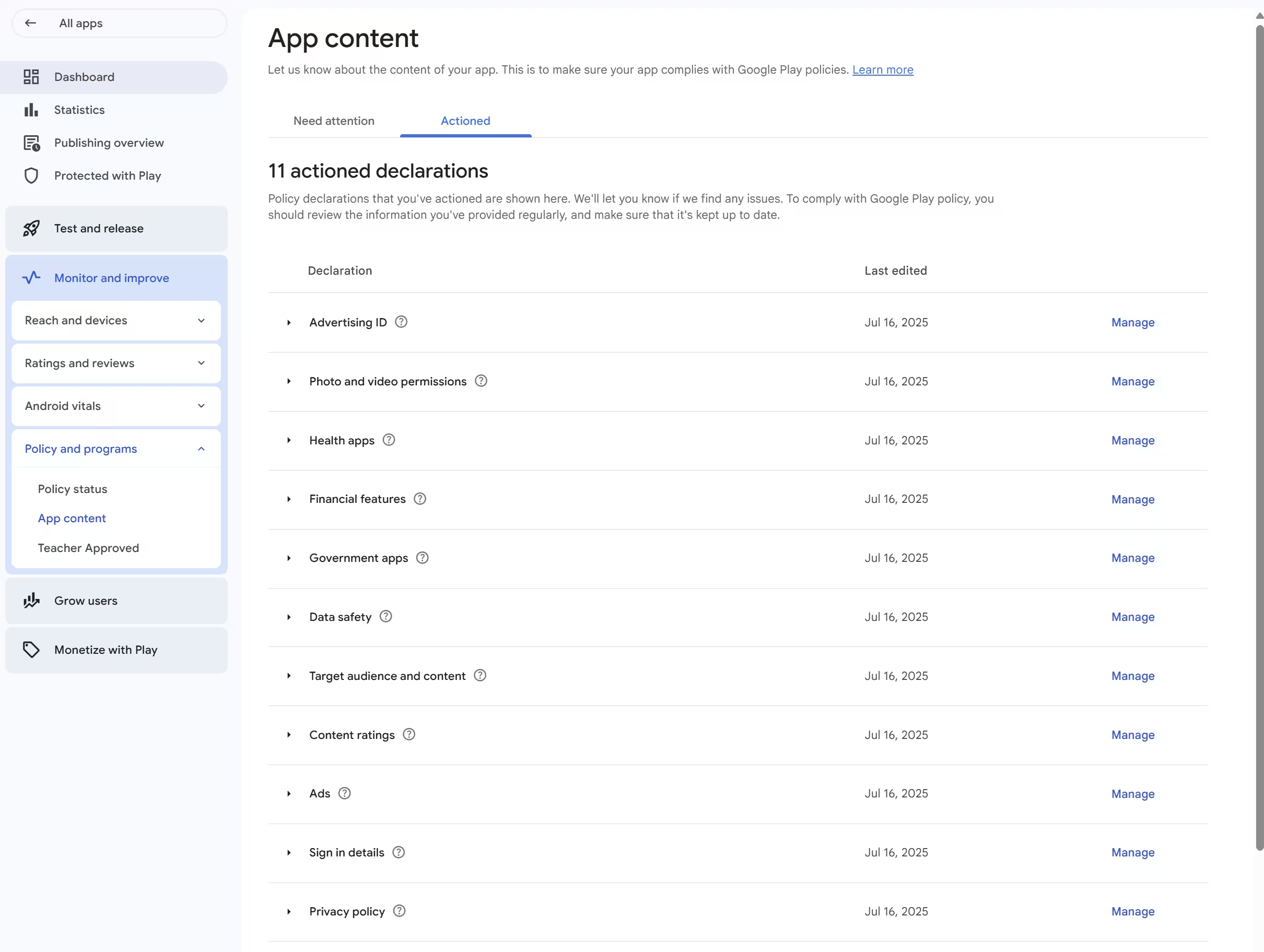
Give reviewers working access
If any part of your app sits behind a sign-in or another gate, fill in App access. Play Console supports up to five sets of instructions - instruction sets, not necessarily five credential sets, which matters if you have one login and several gated paths. Prepare your app for review
Before submitting, check the credentials still work and that every gated feature is reachable by someone who is not you. Expired accounts, one-time codes that arrive on your phone, and features that only unlock for an internal account are the usual failures.
Done when: App content shows no outstanding task, and someone other than you can sign in with exactly what you wrote in App access.
Category-specific declarations
Beyond the forms above, some policies attach to what the app actually does. These are genuinely conditional:
- Health apps, beyond the declaration. If the app really does have health features, the Health Content and Services policy adds medical-device labelling and a disclaimer requirement for non-regulated health apps, and health apps of the specified kinds require an organization account. Health Content and Services
- Generative AI apps. Prevent prohibited output, and give users an in-app way to report or flag it. This is about what the app produces - separate from the store-asset declarations above, and not a rule that every AI-assisted app carries a label. AI-Generated Content policy
- Photo and video permissions. Request broad access only where a core feature needs it; otherwise use the system photo picker.
- Location and contacts. Both have upcoming minimum-scope requirements with real dates and a narrow scope - see deadlines and conditional changes.
- Other categories. News and magazines, financial services, government apps and others each have a policy page linked from App content.
6. Complete the required closed test, if applicable
Applies to: personal developer accounts created after November 13, 2023. Organization accounts, and personal accounts created before that date, do not have this requirement at all - if that is you, skip to submitting the release.
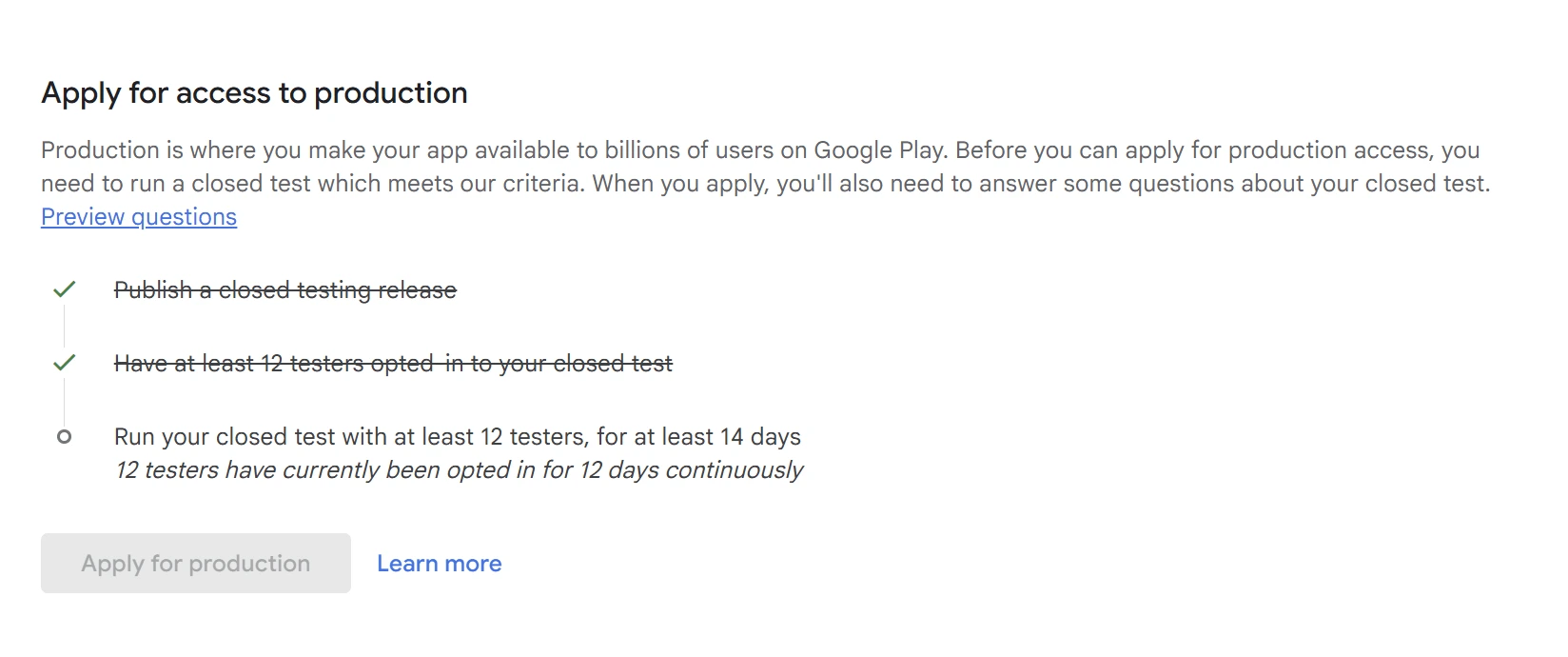
The rule is short: run a closed test with at least 12 testers opted in across the 14 continuous days preceding your production-access application. The reduction from 20 testers to 12 took effect on December 11, 2024 and kept the same 14 days. Testing requirementsThe 20-to-12 change
Get the prerequisite order right
Closed testing starts after your app setup is complete; internal testing is the track you can use while setup is incomplete. Advice that has you run the qualifying test while finishing the listing - including, until this revision, our own - has the dependency backwards. Recruit early, finish the setup, then start the closed release that will be your qualifying test. Set up a test
Three tracks, and only one of them counts
Internal testing looks like the obvious shortcut and is genuinely useful - just not for this.
| Track | What it is for | When you can use it | Satisfies the requirement? |
|---|---|---|---|
| Internal | What it is forA small group, up to 100 testers, for checks during development. | When you can use itWhile app setup is still incomplete. | Satisfies the requirement?No |
| Closed | What it is forA group you invite by email list or Google Group, via an opt-in link. | When you can use itAfter app setup is complete. | Satisfies the requirement?Yes - this is the qualifying track |
| Open | What it is forA public beta anyone can join. | When you can use itAvailable after production access. | Satisfies the requirement?No |
"Opted in" is not "added"
Adding an email address to your closed track does nothing on its own - each tester has to open the opt-in link and join. Continuity is measured per tester: someone who opts in, leaves and rejoins has not accumulated 14 continuous days, and a replacement starts their own clock rather than inheriting anyone else's. It is invisible until the counter refuses to move: added 12 testers, 0 opted in.
Google evaluates two things: your tester count and your tester engagement. Its own examples of why it asks for more testing include testers who were not engaged with the app during the test, so 12 names on a list is not the requirement. What Google does not publish is any rule about minutes per day or sessions - if you have read a specific daily figure, it is not from Google, and your test should not be planned around it.
How to actually satisfy it
Every other requirement here is paperwork or engineering you control. This one needs 12 real people, on real Android devices, who opt in and stay opted in for 14 unbroken days.
The practical answer
Two routes, and hiring testers is optional. Recruit them yourself - a Google Group, a developer community, a course, a subreddit - which costs nothing but gives you no control over who stays engaged. Or use a managed service: PrimeTestLab supplies real, opted-in testers on real Android devices, never emulators or bots, and replaces anyone who drops out so the 14-day run is never broken, from $19.99. Either way they have to be real people who genuinely opt in. See seven legitimate ways to find 12 testers or how to set up the closed track.
Done when: Play Console shows 12 or more testers opted in and the closed test running for at least 14 continuous days, and the Apply for production action becomes available on the Dashboard.
7. Apply for production access, if required
Applies to: the same accounts as the closed test - personal accounts created after November 13, 2023. Everyone else goes straight to the release.
Meeting the closed-testing criteria does not move you to production by itself. You apply on the Play Console dashboard and answer a questionnaire. It is often described as a fixed ten-question form; Google changes the wording over time, so hold it in your head as three subjects instead.
About your closed test
- How you recruited your testers
- How testers engaged with the app
- Whether that usage resembled real production use
- What feedback you gathered, and how you collected it
About your app or game
- What the app does and its core features
- Who it is intended for
- What value it gives those users
- Expected installs in the first year
Production readiness
- What you changed because of the testing
- How you decided the app is ready
- Why it is production quality now
Write it from the test you actually ran. No phrasing guarantees approval; concrete detail about real testing and real changes is what helps. Generic answers are a known route to being asked for more testing. Worked examples are there to show you how to describe your own test, not to give you a script.
Google says this review usually takes seven days or less, but may occasionally take longer - plan for seven, do not treat it as a ceiling. Production access review timing If access is refused, the usual outcome is a request for more testing rather than a rejection, and your closed test need not stop while you prepare to reapply. What to do after "more testing required".
Done when: Play Console shows production access granted. Nothing before that point - not a complete checklist, not a full 14 days - is the grant itself; the decision is Google's.
8. Submit and publish the production release
Production access, where it applies, unlocks the track - it does not publish anything. The release is its own sequence, and it is where people arrive with everything complete and nothing live. Prepare and roll out a release
- Countries and regions Start narrow and widen later if you want to.
- Pricing Set before the first release. A free app cannot later become paid under the same package name.
- Add the release bundle Select an eligible bundle you already uploaded for testing, or upload a new build with a higher version code. Moving a tested artifact into the production release does not itself require rebuilding it.
- Release name and release notes The name is internal; the notes are what users see for this version.
- Read the errors and warnings Console blocks on errors and lets warnings through. Read both - the warning is often what matters later.
- Send the changes for review Nothing is submitted until you do. A finished release page with unsent changes is one of the quietest ways a launch stalls.
- Follow it through review and publication In review, ready to publish and live are three different states. If managed publishing is available and enabled, approved changes wait until you select Publish changes - approval alone is not publication. The listing can then take time to appear.
Do not stage your first release
Several popular guides tell first-time publishers to roll out at 10% and ramp up. Google documents staged rollout as a mechanism for updates - it is not how you make a first release. Staged rollouts
Done when: The publishing overview shows no unsent changes, and the production release reads live - not merely approved. Where managed publishing applies, that last step is yours to trigger. Managed publishing and publication states
How long publishing takes and what can overlap
Two reviews sit near the finish line and they are separate: the production-access review after your questionnaire, and the review of the release itself. Google says access review usually takes seven days or less but may take longer, and that app review can also run beyond seven days in exceptional cases. Neither is capped at a week. Review and publishing timing Stage-by-stage figures: the review time guide.
What genuinely blocks what
Most of this can be worked in any order. Four things cannot, and knowing which four is the difference between a three-week launch and a six-week one.
Hard dependencies
- Account verification blocks publishing anything at all
- Completed app setup blocks the qualifying closed release - but not internal testing
- The 14 continuous days block the production-access application
- Production access blocks the production release, where it applies
Safe to run in parallel
- Building the app, and internal testing while you build
- The store listing and every App content declaration
- Android developer verification app registration
- Recruiting testers and getting them ready to opt in
A planning estimate, clearly labelled as one
Three to five weeks or more is a reasonable plan for a new personal account. That is our planning estimate, not a Google service level, and it assumes an app that is already substantially built, testers who opt in promptly, and no major rework. Building the app is not inside the number, and one round of rework adds to it.
Planning estimate for a new personal account: 3 to 5+ weeks, assuming a substantially built app, prompt testers and no major rework. Not a Google service level.
What Console is telling you, and where to fix it
Almost every stall shows up as one of six messages. Read which one you have rather than resubmitting and hoping.
| What you see | Likely cause | Where to fix it |
|---|---|---|
| Apply for production is unavailable | Likely causeAn account or app-setup task is outstanding, or the 12/14 condition is not met yet. | Where to fix itConsole Home tasks, then Closed testing |
| The release is blocked by an error | Likely causeTarget API, bundle format, a version code that did not increase, or a missing declaration. The error names the area. | Where to fix itRelease › errors panel |
| App content still shows an outstanding task | Likely causeA form saved as a draft rather than submitted, or an answer gone stale after an app change. | Where to fix itApp content |
| The reviewer could not open the app | Likely causeInstructions missing or expired, a one-time code only reaching your phone, or a feature that only unlocks for an internal account. | Where to fix itApp content › App access |
| Everything is filled in but nothing is happening | Likely causeThe changes were saved but never sent for review. | Where to fix itPublishing overview |
| The tester count will not reach 12 | Likely causeTesters were added to the list but never opened the opt-in link. | Where to fix itClosed testing › tester list |
Your stage-specific readiness checklist
Tell it which account you have and what you are working towards. It separates three things the usual checklist blurs together: what you need now, what is required later, and what does not apply to you at all. It is a tracker for your own use - it cannot see your Play Console, and finishing it is not an approval.
Readiness checklist
Answer the questions, then tick what is genuinely finished. Items for a later stage are labelled as such rather than counted against you.
Checklist progress
0 of 0 applicable items complete
Your ticks are saved in this browser only. They are not checked against your Play Console account, and completing this list does not mean Google has approved anything.
Complete for this stage
Go to that stepCurrent deadlines and conditional policy changes
These are the dated items that can change what you build or when you ship. Most of them will not reach your app - read the third column before you act on any of them.
| Date | What changes | Who it affects | What to do |
|---|---|---|---|
| Aug 31, 2026 | What changesNew mobile apps and updates must target API 36; Wear OS and Automotive API 35; TV and XR API 34. | Who it affectsEvery new mobile submission | What to doBuild against API 36. Check Console for any extension your app is eligible for. Target API requirements |
| Sep 15, 2026 | What changesWear OS native 64-bit upload enforcement begins. | Who it affectsWear OS apps that ship native code | What to doRebuild native libraries for 64-bit. Wear OS announcement |
| Sep 30, 2026 | What changesUnregistered apps risk removal from Google Play globally. Separately, installation checks begin via participating stores in Brazil, Indonesia, Singapore and Thailand. | Who it affectsEvery Play developer, not only those four countries | What to doConfirm your registration status in Play Console now. Play Console Requirements |
| Oct 1, 2026 | What changesThe US external content links programme begins its reporting obligations and relevant fees, covering qualifying external downloads as well as transactions. | Who it affectsPublishers enrolled in that US programme | What to doOnly if you link out under that programme. Not a first-publishing requirement. US external content links programme |
| Nov 1, 2026 | What changesThe documented extension window for the target API and Billing Library deadlines closes. | Who it affectsApps with an applicable extension | What to doConfirm eligibility in Console; an extension is not automatic. |
| Jan 27, 2027 | What changesApps targeting API 37+ may use READ_CONTACTS only where the Contact Picker cannot support a core feature, with a Console declaration explaining why. | Who it affectsApps targeting API 37+ that read contacts | What to doMove to the Contact Picker, or prepare the declaration. Restricted permissions and minimum scope |
| Jan 27, 2027 | What changesApps targeting API 37+ must use the Android location button for transactional precise location. A separate declaration covers apps requesting ACCESS_FINE_LOCATION; the form is scheduled for November 2026. | Who it affectsApps targeting API 37+ that request precise location | What to doImplement the location button where the API 37+ transactional-use rule applies, and prepare the declaration if the app requests ACCESS_FINE_LOCATION. These are cumulative, not alternatives. Foreground location and the location button |
| Feb 1, 2027 | What changesSources disagree. The current 16 KB guide gives this as the date update blocking begins; the original announcement used November 1, 2025, and the current guide does not resolve how that applies to new apps. | Who it affectsApps that ship native code | What to doTest 16 KB compatibility now rather than planning around either date. 16 KB page sizes |
One detail worth getting right: the location button does not replace ACCESS_FINE_LOCATION. You still declare that permission, with the onlyForLocationButton attribute, so the system grants precise location only through the button. Where approximate location is enough, the alternative is ACCESS_COARSE_LOCATION - the full name, not "COARSE_LOCATION". Google's April 2026 announcement was an updated policy rather than a clarification, and it also updated how age-restricted content applies to apps with a dating feature. April 15, 2026 announcement
Standing requirements with no deadline attached
In force now, and not in any "what changed" list - which is why they catch people who learned this process a year or two ago.
- Closed testing: 12 testers, 14 continuous days, for personal accounts created after November 13, 2023. The number dropped from 20 to 12 on December 11, 2024.
- Account ownership transfers go through Play Console's transfer flow. Direct owner transfer covers organizations and non-monetizing personal accounts; a monetizing personal account uses a different new-account and app-transfer route. Buying, leasing or selling accounts through third parties is prohibited. Transferring ownership
- Organization accounts are mandatory for specified financial services, health, approved VpnService and government apps.
- Photo and video permissions are enforced now. Broad access only where a core feature needs it; otherwise the system photo picker.
PolicyBytes: April 2026 policy updates
Google's Developer Experience team on the contacts and account-transfer policies and the location and age-restricted-content updates above. Optional; the table has the actionable version.

How PrimeTestLab helps with closed testing
Seven of the eight stages are paperwork and engineering you control. One needs 12 real people, on real Android devices, opted in and genuinely active across 14 unbroken days - the step solo developers stall on, and the only part we do.
You share your closed testing opt-in link. We handle invitation, opt-in confirmation, daily engagement monitoring and full 14-day retention, replacing anyone who drops out. Any app language, flexible country targeting.
What we do not do
PrimeTestLab covers the tester requirement - the 12 opted-in, 14-day-active part. We do not file your declarations, choose your account type, write your production-access answers or influence Google's review. Production access is Google's decision. Our 99.9% figure is our own managed test-completion rate across 9,800+ apps - it measures whether the test ran to completion, which is what we control, and it is not a Google guarantee of approval.
Current packages
Starter
12 Testers
$19.99
Enterprise
25 Testers
$27.99
Professional
20 Testers
$29.99
Money-back guarantee · Testing typically starts in 4-6 hours · No subscription
Frequently asked questions
Do I need 12 testers for every new app, or just the first one?
Google runs production access as an app-specific process: you apply for it from an app's Dashboard, and the testing requirement is evaluated for that application. Nothing Google publishes says that granting access to one app permanently removes the requirement from every later app, so check each new app's Dashboard rather than assuming the first one settled it.
Does internal testing count towards the closed testing requirement?
No. Only the closed track satisfies it. Internal testing is still worth using - it runs while app setup is incomplete, holds up to 100 testers, and internal-only apps are exempt from the Data safety form - but no amount of it moves the 12-tester, 14-day counter.
Is identity verification enough, or are there other verification steps?
Three separate things, easily confused. Identity verification proves who you are so you can hold an account. Device verification is a task on new personal accounts, done in the Play Console mobile app on a non-rooted physical Android device running Android 10 or later. Android developer verification registers your app to a verified identity. Completing one does not complete the others.
Does targeting API 36 mean my app only runs on Android 16?
No. Targeting API 36 tells Android which behaviours your app is built against; minSdk decides the oldest version it installs on. Raising the target does not require raising the minimum, and raising the minimum unnecessarily costs you users.
Do I need a privacy policy if my app collects no data?
Yes, and in two places: a link in Play Console, and a link or the policy text inside the app. An app that collects nothing still needs one that says so, and still completes the Data safety form on the closed, open or production track.
Why is Apply for production unavailable on my dashboard?
Usually one of four: an outstanding account task such as identity or device verification; incomplete app setup, so the closed release does not qualify; fewer than 12 testers actually opted in, as opposed to added; or the 14 continuous days not elapsed, including where a tester opted out and restarted their own count. Play Console names which on the Dashboard.
Can I convert a personal account to an organization account later?
Yes. Google provides a conversion workflow inside the existing account: verify the organization website, verify its payments profile, then complete the change. Google advises waiting at least 72 hours after conversion before submitting new apps. Converting the other way does require a new account.
Is the US$25 fee annual, or charged per app?
Neither. It is one-time, charged once per developer account, with no annual renewal, paid by credit or debit card - prepaid cards are not accepted and the owner must be 18 or over. It is a registration charge, not an estimate of overall publishing costs, and Google documents limited refund circumstances tied to closing an account.
What to do next
Your next move
Find the first unfinished requirement that actually blocks your next submission, and resolve that one - while continuing everything that can run alongside it: building the app, preparing accurate declarations, and lining up testers. If your account is not verified, that is the blocker. If it is verified and you are on a personal account created after November 13, 2023, finish app setup and start the closed test as early as you can: the 14 continuous days are the only part of this that working harder cannot compress. If your app is already in review, read the publishing overview rather than resubmitting. And if the closed test is the piece standing between you and production, that is the part we handle.
Where each requirement comes from
Every consequential claim above links its source where it is made; this is the directory version. Google's help pages are largely undated, so a page's modification date is not evidence of when a policy took effect.
What changed in this revision
- September 11, 2026
- Rebuilt against Google's documentation checked September 8, then revised again after a re-audit of that rebuild. Corrected: the target API requirement (now a per-form-factor matrix); the closed-testing prerequisite order; personal-to-organization conversion; D-U-N-S timing; the scope of the September 30, 2026 registration deadline, and its route, which is a Play Console status check after the app exists; contacts and location to January 27, 2027 at API 37+, with implementation and declaration cumulative; icon, screenshot and preview-video specifications; reviewer access as five instruction sets; the application ID as a property of the build, not the Console record; and release mechanics - an eligible tested bundle can be reused, and approval is not publication where managed publishing applies. Added: device verification, the create-app and release stages, native and Play Billing preflight, AI store-asset declarations, the Health apps and Financial features declarations (required even with no such features), a blocker table, and a source beside each consequential claim. Removed as unsupported: the January 28, 2026 health-migration date, the "five-day" identity myth, the April 2025 Android ID explanation, the feature-graphic 1 MB cap, and the "#1 avoidable rejection" ranking. The readiness checklist was rebuilt twice: it now separates "required later" from "does not apply", and no longer reads submitted work as complete.
- June 24, 2026
- First published.