














Quick Answer
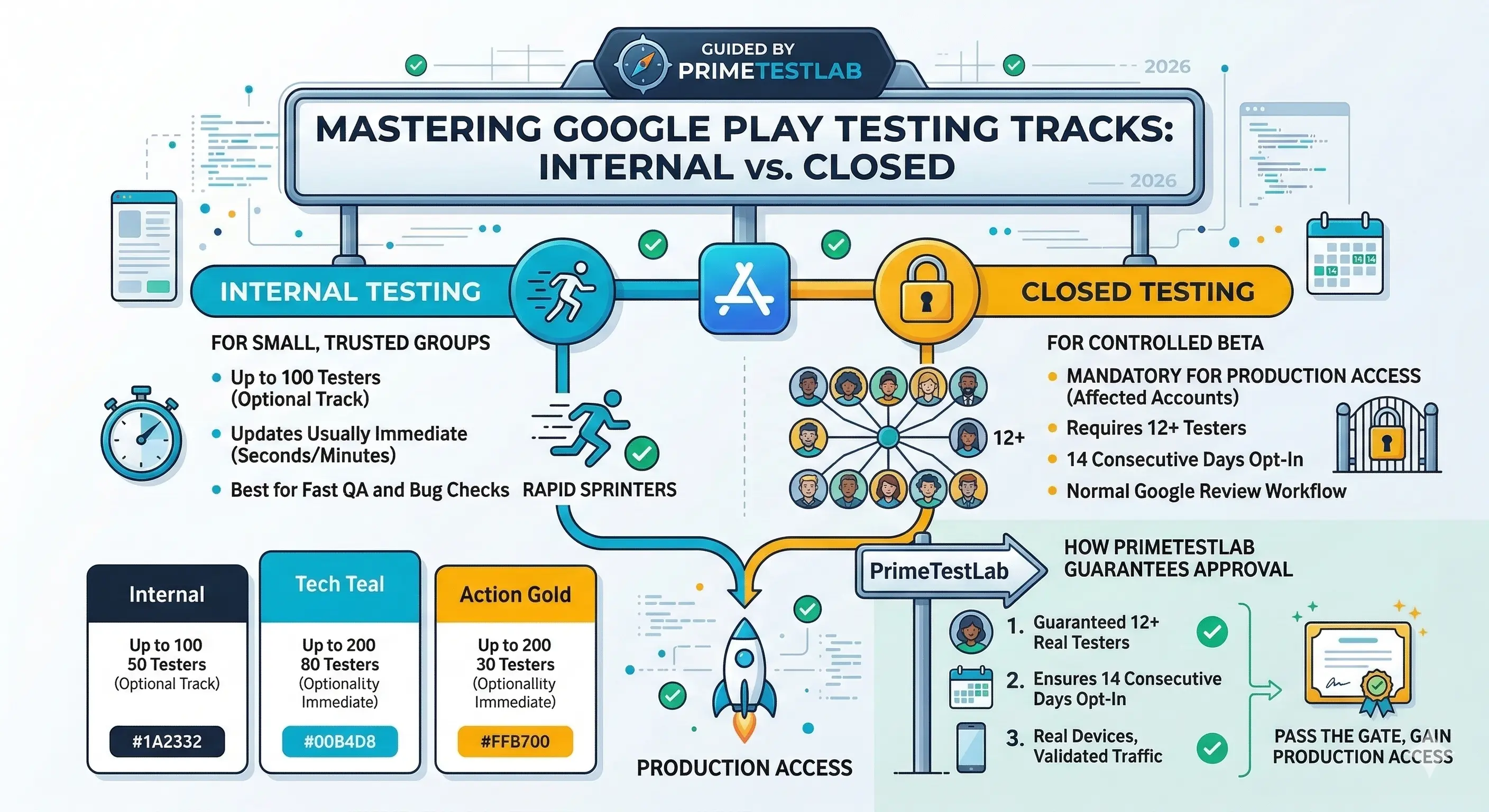
For personal Play Console accounts created after November 13, 2023, internal testing is optional, closed testing is required before you can apply for production access, and open testing becomes available after production access. That closed test needs at least 12 testers continuously opted in for the preceding 14 days. Completing it makes you eligible to apply - Google still reviews the application. For every other account, these are simply three tracks with different audiences and visibility, and none of them is mandatory.
For affected new personal developer accounts, closed testing is the only track that stands between you and a production application: Google requires at least 12 testers to have stayed continuously opted in for the preceding 14 days before you can apply to publish to production.
Which of those rules apply to you depends on your developer account. Google scopes the testing requirement to personal Play Console accounts created after November 13, 2023. If your account is an organization account, or a personal account created before that date, you are not covered by this specific requirement and you can pick tracks based on your QA and beta needs instead. Check which group you are in before you plan a release.
Official sources checked
Last checked against Google's Help Center on August 16, 2026. Everything on this page that is not attributed to Google is either our own operational experience or explicitly labelled as a first-party claim.
What Are the Three Google Play Testing Tracks?
Google Play provides three testing tracks before production: internal testing, closed testing, and open testing. Each serves a different purpose in the development lifecycle, and Google recommends starting with internal testing, then expanding to closed testing. The required order depends on your developer account: the internal → closed → production-application sequence described below is mandatory only for personal accounts created after November 13, 2023.
Internal Testing
Fast QA with your own team. Up to 100 testers. Builds available in minutes.
Optional
Closed Testing
Controlled beta group. Required for personal accounts created after Nov 13, 2023: 12+ testers, 14 continuous days, before you can apply for production access.
Required*
Open Testing
Public beta. Unlimited testers, or a cap of at least 1,000. Optional for every account; for personal accounts created after Nov 13, 2023 it becomes available after production access.
Optional
* Required for personal developer accounts created after November 13, 2023. Completing the closed test lets you apply for production access - it is not an automatic approval.
How Testing Tracks Flow to Production (personal accounts created after Nov 13, 2023)
The end of the 14-day period is not the finish line: completing it is what makes you eligible to apply. Open testing branches off after production access - it does not lead to it
Internal vs Closed vs Open Testing: Side-by-Side Comparison
Here is every key difference between the three testing tracks, based on Google's official Play Console documentation.
| Factor | Internal | Closed | Open |
|---|---|---|---|
| Who can join? | Internal: Invited testers only | Closed: Email list, Google Groups, or org | Open: Anyone on Google Play |
| Audience capacity | Internal: 100 testers per app | Closed: Email lists: 2,000 users per list, 50 lists per track, 200 lists total. Google Groups: no size limit published | Open: Unlimited, or capped at a number you choose (minimum 1,000) |
| Release availability and review | Internal: Usually available within minutes. Exceptions: a fully configured app's first internal release, and the first release after a rejection, may be reviewed | Closed: Normal Play review workflow | Open: Normal Play review workflow |
| Duration required | Internal: None | Closed: 12 testers x 14 days* | Open: None |
| Required before applying for production? | Internal: No | Closed: Yes* | Open: No |
| Discoverable on Play Store? | Internal: No | Closed: No | Open: Yes |
| Paid apps | Internal: Testers can install a paid app for free | Closed: Testers normally have to purchase the app | Open: Testers normally have to purchase the app |
| Feedback visibility | Internal: Private to you | Closed: Private; does not affect your public rating | Open: Private; does not affect your public rating |
| Best for | Internal: Quick QA, team testing | Closed: Pre-launch beta, meeting requirements | Open: Public beta, soft launch |
* For personal developer accounts created after November 13, 2023; other accounts are not governed by this requirement. Meeting it lets you apply for production access - Google still reviews the application.
Is closed testing capped at 2,000 testers? No. 2,000 is the size limit of a single tester email list. Google's setup documentation allows up to 50 lists per track and 200 lists in total, and it describes Google Groups as a separate way to manage closed testers without publishing a comparable group-size limit. So the number that actually constrains you is the 12 continuously opted-in testers the production-access requirement asks for, not a 2,000-person ceiling. Pages that print "closed testing: max 2,000 testers" are quoting one enrolment method as if it were the whole track.
Who Must Complete Closed Testing Before Production?
Google scopes this requirement narrowly, and most of the confusion around the three tracks comes from reading it as a universal rule. Google's Help Center requires a closed test with at least 12 testers continuously opted in for the preceding 14 days from personal Play Console accounts created after November 13, 2023, before those developers can apply for production access. If that is not your account, this sequence is not your path to production.
| What applies | Personal account created after Nov 13, 2023 | Every other account situation |
|---|---|---|
| Closed test, 12 testers, 14 days | Personal account after Nov 13, 2023: Required before you can apply for production access | Every other account: Not governed by this specific requirement |
| Open testing in this sequence | Personal account after Nov 13, 2023: Becomes available after production access | Every other account: Depends on the tracks enabled for the app; open testing stays optional either way |
| Sensible path | Personal account after Nov 13, 2023: Internal QA (optional) → required closed test → production-access application → production, then open testing if you want it | Every other account: Pick tracks by the audience and rollout you need, not by this sequence |
* The first column is what Google documents. The second is deliberately conservative: Google publishes this requirement for affected new personal accounts, and does not publish a matching universal rule for everyone else.
For accounts in the first column, the follow-up question is always the same - can another track stand in for the closed test? It cannot.
Internal testing does NOT substitute
Google labels internal testing as optional and specifically says you must run a closed test before applying for production access. Internal testing is excellent QA; it does not satisfy the requirement.
Open testing is NOT a shortcut
Google says open testing becomes available when you have production access. For affected accounts the closed test comes first and open testing comes later, so it cannot be used to skip ahead.
Organization accounts are not covered by this new-personal-account requirement. Read that narrowly: it means the 12-testers-for-14-days rule does not apply to them. It does not mean an organization account is exempt from Play review, policy compliance or any other publishing obligation. The personal vs organization account comparison covers the trade-offs before you choose.
What Is Internal Testing on Google Play?
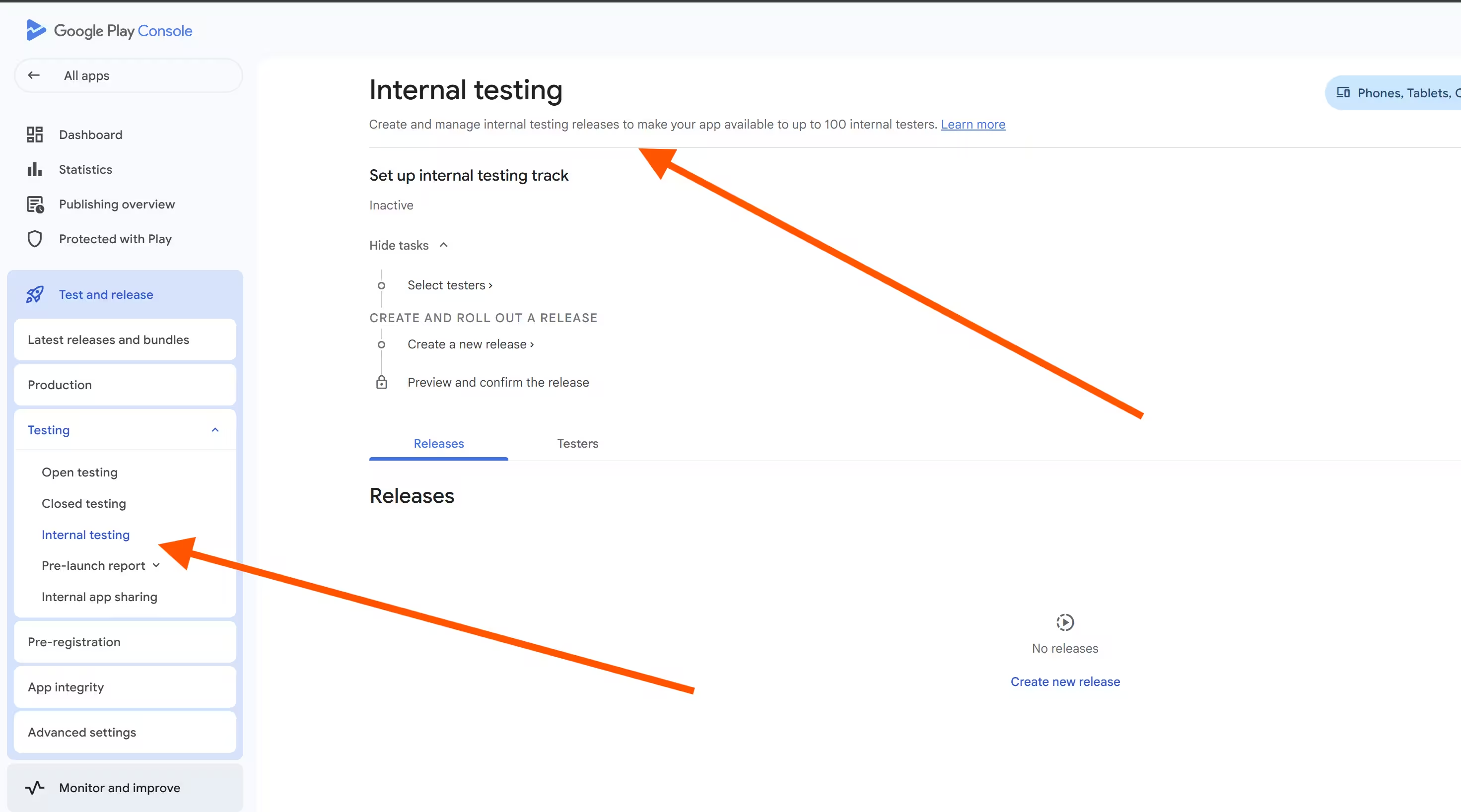
Internal testing is Google Play's fastest track. It is designed for a small group of your own trusted testers, and builds are usually available within minutes. You can even start an internal test before you have finished setting up your app, which makes it ideal for early QA, smoke testing, and bug checks before you worry about launch readiness. "Usually" is doing real work in that sentence, though - see the exceptions below.
Google caps internal testing at 100 testers per app. Internal-test users are invited directly, and the app is available to them via URL only - not as a public Play listing.
Internal testing is not review-free
Internal updates go live almost immediately in most cases, but Google documents exceptions: a fully configured app's first internal release may need review, and so may the first release you submit after a rejection. Internal releases can also be reviewed retroactively. Note the scope: if your first internal release is for a fully configured app, that release may have to wait for review - Google does not apply that exception to internal tests of apps that are not yet fully configured, which is exactly the early-QA case internal testing is built for.
One track difference that catches people out with paid apps: internal testers can install a paid app without buying it, while closed and open testers have to purchase it like any other user. If your app is paid, budget for that before you invite a closed-test group.
Setting one up, rather than choosing between them?
This page compares the three tracks. The click-by-click setup, the tester email list and CSV rules, the opt-in link, and the fixes for "this app isn't available for your account" are all in how to set up Google Play internal testing.
Best Use Cases for Internal Testing
Important Nuance
You can run internal testing concurrently with closed and open testing for different versions. However, a user who is opted into the internal track is not eligible for your open or closed track until they first opt out of internal testing and then opt into the other track.
What Is Closed Testing on Google Play?
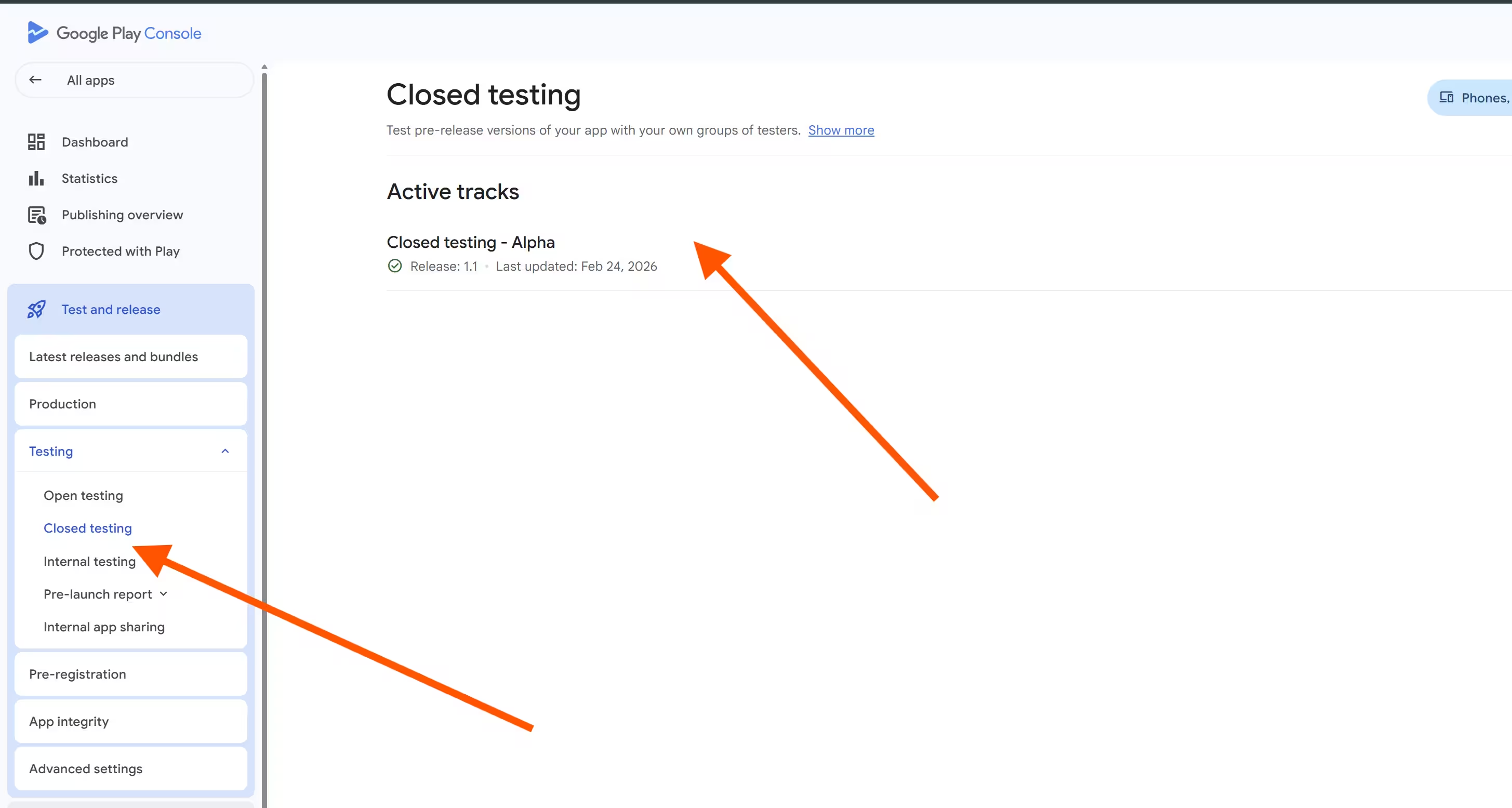
Closed testing is the track Google uses for a more realistic beta with a group you control. Google says this track lets you share your app with a wider set of testers that you choose, so you can fix issues and make sure the app complies with Google Play policy before launch.
Production Access Requirement
When you apply, at least 12 testers must have been continuously opted in for the preceding 14 days. Meeting that lets you apply for production access - it is not an approval.
When Does the 14-Day Period Actually Start?
Not when you upload the build, and not when you add tester emails. Qualifying time accumulates per tester, and only once two things are true: the closed release is available to testers, and each tester has individually opted in through your opt-in link. What Google measures at the moment you apply is that at least 12 testers have been continuously opted in across the 14 days immediately preceding the application - so the safest reading is backwards from your application date, not forwards from your release date. Play Console, not your own spreadsheet, is the thing that tells you the application is available.
Google is very specific about what "continuously" means. The qualifying period is the 14 days immediately before you apply, and it has to be consecutive, so testers who opt in, stay for less than 14 days, then opt out do not count - even if they later opt back in.
In practice, closed testing is where most first-time publishers get stuck. Internal testing does not satisfy this rule. Open testing does not replace it. For affected personal accounts, this closed-test step is the gate between "my app is in testing" and "I can finally apply for production access" - and what happens once the period is over is a separate stage that trips up just as many developers. If you are setting the track up rather than choosing between them, our guide to setting up a closed testing track and inviting testers has the Console steps, and the complete 12-testers-for-14-days guide goes deeper on the requirement itself.
Email Lists
2,000 users per list, 50 lists per track, 200 lists in total
Google Groups
Manage testers through a group instead of a list. Google does not publish a comparable group-size limit in this setup documentation
Distribution
Share the store URL or opt-in link directly with testers
Multiple Tracks
Create additional closed tracks for testing separate features
Before your app is in open testing or production, testers usually will not find a closed-test app just by searching the Play Store. You need to share the store URL or opt-in link with them directly.
What Happens After the 14 Days?
The end of the qualifying period is not a switch that publishes your app, and it is not a calendar date you can circle in advance. Once at least 12 testers have been continuously opted in for the full 14-day period immediately preceding your application, Play Console lets you apply for production access - and Google then reviews that application. Treat Play Console, not your own day count, as the source of truth for when you are eligible.
Not an automatic approval
Completing the required closed test makes an affected developer eligible to apply. It does not guarantee approval. Google evaluates how you recruited your testers, how engaged they were, what feedback you received, what you changed as a result, who the app is for, and whether it is ready for production. Google can also require additional testing - including when tester engagement was insufficient.
- Confirm eligibility: at least 12 testers continuously opted in across the full 14-day period that precedes your application, with Play Console enabling the application. What counts as 14 continuous days has the edge cases.
- Apply for production access in Play Console.
- Answer Google's questions about your closed test, your app or game, and your production readiness - our production access questionnaire guide works through them one by one.
- Google reviews the application. Google says this usually takes seven days or less, but it can take longer.
- Google grants production access - or asks you to keep testing.
Plan for that last outcome rather than being surprised by it. If Google comes back asking for more, what "more testing required" actually means covers the response. And you are not frozen during the 14 days either: you can keep shipping builds to the closed track, because the criterion Google measures is continuous tester opt-in, not a code freeze - updating your app during closed testing goes through what does and does not reset.
Do Testers Need to Use the App Every Day?
Requirement vs. what Google evaluates
Google's published minimum is continuous opt-in by at least 12 testers during the preceding 14 days. Google does not publish a rule that every tester must open the app every day, or complete a set number of sessions. The production-access application does ask about tester engagement and feature usage, though, and Google may require more testing when engagement is insufficient.
So treat opt-in as the floor rather than the whole job: recruit testers who can actually use the app and tell you something useful, and keep a record of what you changed because of them. Anyone quoting an exact daily-usage quota, a session count or a bot-detection threshold is repeating community folklore - Google publishes none of those numbers.
What Is Open Testing on Google Play?
Open testing is the public beta track. Google says open testing makes your app's test version visible on Google Play, and anyone can join and send private feedback. For early access apps that are not yet live in production, users can find your open test through Google Play search. For apps that already have a live production version, users can opt into open testing from the store listing.
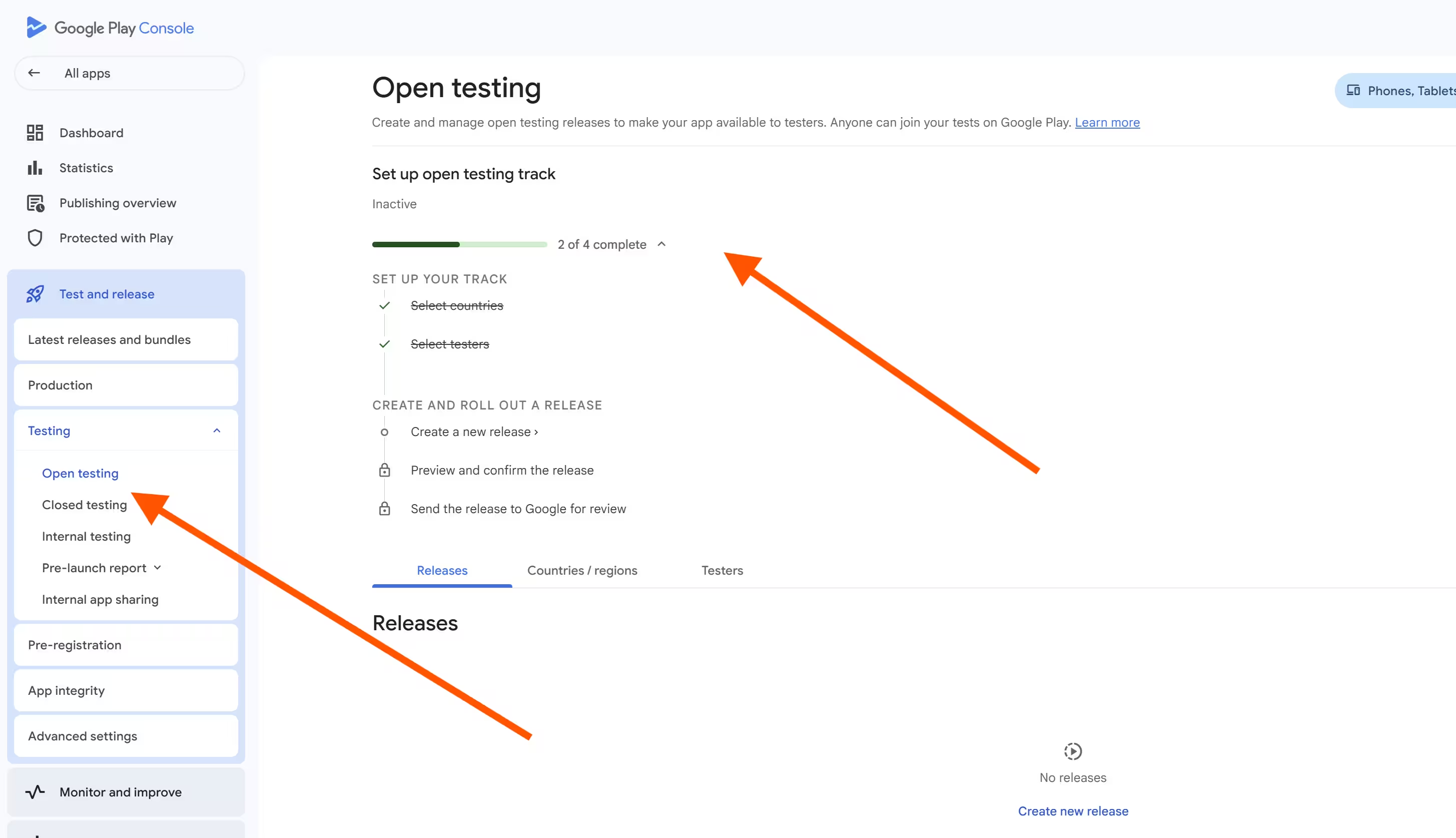
Google lets you choose unlimited testers, or a limited number that must be at least 1,000. That cap is a ceiling on the cohort, not a number of testers you have to recruit, and it is the single most misread setting on the track. The Console path, the tester and feedback settings, what "public" actually exposes and what to check when the test does not appear are all in the complete Google Play open testing setup guide.
Feedback stays private. Google says the feedback and ratings you collect during open and closed testing are private to you: they do not appear on your store listing and they do not affect your public Play Store rating. A rough beta will not cost you stars.
Open Testing Is Not a Shortcut
For personal Play Console accounts created after November 13, 2023, Google's Help Center says open testing becomes available once you have production access. For those accounts open testing is not a shortcut around the required closed test - it is an optional public-beta tool you use later, after the gate has been cleared. More generally, open testing is simply Google's broad pre-release track for putting a test build in front of a large audience, and it is optional for everyone.
Release Review vs Production-Access Review
Affected personal accounts can run into two separate review processes, with different triggers and different published timelines. Almost every "my closed test got delayed" question comes from mixing them up.
| Review | When it happens | Published timing |
|---|---|---|
| Release or app-change review | When: Before a submitted change is published. Closed and open releases normally follow this workflow. Internal updates are generally available immediately, apart from Google's documented first-release and post-rejection cases, and can be reviewed retroactively. | Timing: A few hours to 7 days, and exceptional cases can take longer |
| Production-access review | When: Only after an affected personal account has completed the required closed test and submitted the production-access application | Timing: Usually 7 days or less, occasionally longer |
Timing and the 14 days
Your first closed release may have to finish Play review before testers can reach it and opt in, so budget review time before the qualifying period rather than inside it. Later updates can be reviewed too, but submitting an update does not by itself end an existing closed test or erase continuous tester opt-in: while the update is in review, the previously approved release stays available and your testers stay opted in. The criterion Google measures is that at least 12 testers have been continuously opted in for the 14 days preceding your application - not that your build stopped changing. Updating your app during closed testing works through what does and does not reset.
Definitions used on this page
- Opted in - a tester has followed your opt-in link and accepted the test invitation. Being on your email list is not the same thing.
- Production access - permission to publish this app to the production track. Granted by Google after the application, not by finishing the test.
- Release review - the check a submitted build or app change goes through before publication. Closed and open releases normally follow it; internal updates usually do not.
- Production-access review - the separate assessment of your closed test, your app and your readiness after you apply.
- Public discoverability - whether a normal Play Store search can surface the app. Internal and closed tests are not discoverable; open tests can be.
Which Testing Track Should You Use?
For most developers, the right path is simple. Here is when to use each track:
Use Internal Testing When...
You want fast QA with your own team, client, or a few trusted testers. Best for catching obvious bugs quickly because internal builds are usually available within minutes.
Use Closed Testing When...
You need real pre-release testing with a controlled group, and especially when you are a personal developer account created after November 13, 2023 that must satisfy Google's 12-testers-for-14-days rule before applying for production access. This is the track that matters most for launch readiness.
Use Open Testing When...
You want a public beta, a broader soft launch, or large-scale feedback before a full production rollout. Open testing is optional for every account, and for accounts under the new personal-account rules it becomes available once you have production access.
Before You Start the 14 Days: A Readiness Check
The qualifying period is the expensive part, so it is worth not starting it on a build that wastes it. None of this is a Google requirement - the app does not have to be feature-frozen or bug-free - but a test that stalls because nobody could log in is 14 days you spend twice.
Ready to move from internal to closed
That last point is judgement, not policy: Google asks for 12 and publishes no recommended buffer, but a group of exactly 12 has no margin for one person changing phones.
Recommended Path by Developer Account Type
That is the sequence for personal accounts created after November 13, 2023, and it matches Google's own recommendation to start with internal testing and then expand to closed testing. Every other account: this specific sequence is not imposed on you. Pick internal, closed or open testing according to the audience and rollout you actually need, subject to the tracks enabled for your app - and use open testing whenever a public beta is genuinely the right tool.
Common Google Play Testing Pitfalls
Understanding what the tracks are is one thing. Moving between them without losing days is another. These three are the mistakes we see most often across the projects PrimeTestLab has supported - the first two are documented Play Console behaviour, the third is where developers most often misread what completing the test buys them.
Reuse the Tested Build (Don't Re-upload)
Many developers waste time uploading a new App Bundle (AAB) with a new version code for every track. You do not need to do this. Once your app passes internal testing, you can put that same artifact on the closed track without rebuilding it: open the closed track, create a release, and choose "Add from library" to select the version you already uploaded. No re-upload, no new version code.
Play Console path Test and release > Testing > Closed testing > create release > Add from library
A "Promote release" shortcut also exists in some Play Console versions and in a lot of older community guidance. If your console offers it, use it. It is just not documented as a stable internal-to-closed path in Google's current release Help (answer 9859348), which is why the library route is the one to memorise. The internal testing setup guide walks through it step by step.
Internal Testers Must Opt Out Before Joining Closed or Open Testing
Google states that a user who is opted into an internal test is not eligible for closed or open testing until they opt out of the internal test. That is documented policy, not a bug. In practice, the Play Store commonly shows those testers a "Not Found" or "App not available" screen while the account is still attached to the internal test, which sends developers hunting for a problem in their store listing that is not there.
Send closed test link while tester is still in internal track
Tester opts out of internal first, then clicks closed test opt-in link
Finishing the Test Is Not the Same as Being Approved
The 12-testers-for-14-days step is an eligibility bar, not a verdict. Clearing it lets an affected developer apply for production access; Google then assesses how you recruited testers, how engaged they were, what feedback you got, what you changed because of it, and whether the app is ready. Google can grant access, or ask for more testing. Developers who plan a launch date off the end of the 14 days - press, ads, a client deadline - are the ones this hurts. Build the production-access review into your schedule as a separate stage, and read why closed testing gets rejected before you submit rather than after.
PrimeTestLab experience
This is what we do for customers, offered as a first-party account rather than as a Google rule: we handle tester management, opt-in coordination and track sequencing. Testers are recruited and screened by us and use real Android devices, and they begin opting in as soon as your closed-test track and opt-in link are ready - within 4 hours of setup, guaranteed within 6, under the delivery terms on our pricing page. What that removes is the recruiting and the opt-in mistakes. It does not shorten Google's review, and it does not decide your production-access application.
Frequently Asked Questions
Does internal testing count toward the 12-testers-for-14-days requirement?
No. Google's production-access requirement is specifically a closed test. Internal testing is described as optional and is meant for fast private QA, so testers you gather there do not count toward the 12. Run internal testing first if it helps you, then run the closed test that actually satisfies the requirement.
Can internal and closed testing run at the same time, and can one tester join both?
The tracks can run simultaneously with different versions - that part is fine. An individual tester cannot be in both at once, though: Google states that a user opted into an internal test is not eligible for closed or open testing until they opt out of the internal test. So each tester has to leave the internal test before your closed-test opt-in link will work for them, which is why a working link can still show "app not available".
What happens after the 14 days?
You become eligible to apply for production access - nothing publishes automatically. Once at least 12 testers have been continuously opted in across the full 14-day period preceding your application, Play Console lets you submit it. You answer Google's questions about your testing, your app and your production readiness, and Google reviews the application (usually within seven days, sometimes longer). Google then grants production access or asks for more testing.
Do closed testers have to use the app every day?
Google's published minimum is continuous opt-in by at least 12 testers for the preceding 14 days, not daily usage. There is no official rule that every tester must open the app every day or complete a set number of sessions. Google does assess tester engagement and feedback when you apply, though, and can require more testing if engagement was insufficient - so recruit testers who will actually use the app.
Can I update my app during the 14-day closed test?
Yes. The criterion Google measures is that your testers stay continuously opted in, not that your build stops changing, and Google expects you to act on testing feedback before production. New releases still go through the normal Play review workflow, and while an update is in review the previously approved release stays available to your testers - submitting it does not, by itself, end the test or erase opt-in.
What is the difference between release review and production-access review?
They are two separate processes. Release review is the check a submitted build or app change goes through before publication; Google says it can take from a few hours to up to 7 days, and exceptional cases longer. Closed and open releases normally follow it, while internal updates are generally available immediately apart from Google's documented first-release and post-rejection cases. Production-access review happens only after an affected personal account has completed the required closed test and submitted the production-access application; Google says that one usually takes seven days or less. Completing release review does not grant production access.
Where PrimeTestLab Fits
This is the one commercial section on the page, so treat it as a first-party claim rather than as part of Google's rules. If you only need quick QA with your own team, internal testing is enough and you do not need a testing service at all. If your problem is the required closed test - specifically finding enough reliable testers who stay opted in and active for the full 14 days - that is the track PrimeTestLab is built for.
Our Focus
PrimeTestLab is for the closed testing track, not the internal or open track. Finding 12 reliable testers on your own can take weeks of recruiting and coordination; we supply them on real devices, opted in for the full 14 days, with testing starting within 4 hours (guaranteed within 6). This is an optional paid service - it does not change Google's requirements, and Google alone decides the production-access application. Plans start at $19.99 plus the service fee added at checkout (5%, with a $1.50 minimum, so Starter totals $21.49).
Those three numbers are first-party operational figures reported by PrimeTestLab across the app testing projects we have supported. They are not audited, and they are not a Google guarantee: Google decides every production-access application independently of us.
Plans run from 12 to 25 testers. The 25-tester plan costs less than the 20-tester one because it is our featured tier and carries a deeper discount off its base price - that ordering is deliberate, not a typo. The pricing page is the maintained source for current prices and the checkout fee.
Choosing Your Track: The Short Version
Bottom Line
Use internal testing for fast private QA. Use closed testing when you need a controlled beta and, for personal accounts created after November 13, 2023, to complete Google's required 12-testers-for-14-days step before applying for production access. Use open testing when you want a larger public beta and the track is available to your app. And if you are subject to the newer personal-account rules, remember that finishing the closed test starts the production-access application stage - it is not an automatic approval.
Need help with closed testing? View our pricing plans, read our complete 12 testers guide, or prepare for the production access questionnaire.
Revision history
| Date | What changed |
|---|---|
| August 16, 2026 | What changed: Rechecked Google's Help Center. Corrected the closed-testing audience-capacity row from a tester maximum to email-list capacity, added Google's two documented internal-review exceptions, split release review from production-access review into their own section, replaced calendar-day "day 14" wording with full-period eligibility wording, and cut the duplicated opening and the in-body pricing cards. |
| March 5, 2026 | What changed: First published. |