














Quick Answer
Prepare answers from your own recruitment, testing, feedback, changes and readiness records. Use the examples below as drafting frameworks, replace every factual detail, and follow the wording and the character limit shown in your own Play Console form.
The form asks about the test you just ran, the app you built, and your decision to ship it. This page walks each field, shows a worked draft, and covers what to write when your evidence is thin, qualitative, or produced no code change at all.
What Is the Production Access Questionnaire?
When your closed test meets the criteria, Play Console shows “Apply for access to production” on your app dashboard. That panel lists the criteria you still have to meet and carries a Preview questions link, so you can read the form before you start. Google asks in three sections:
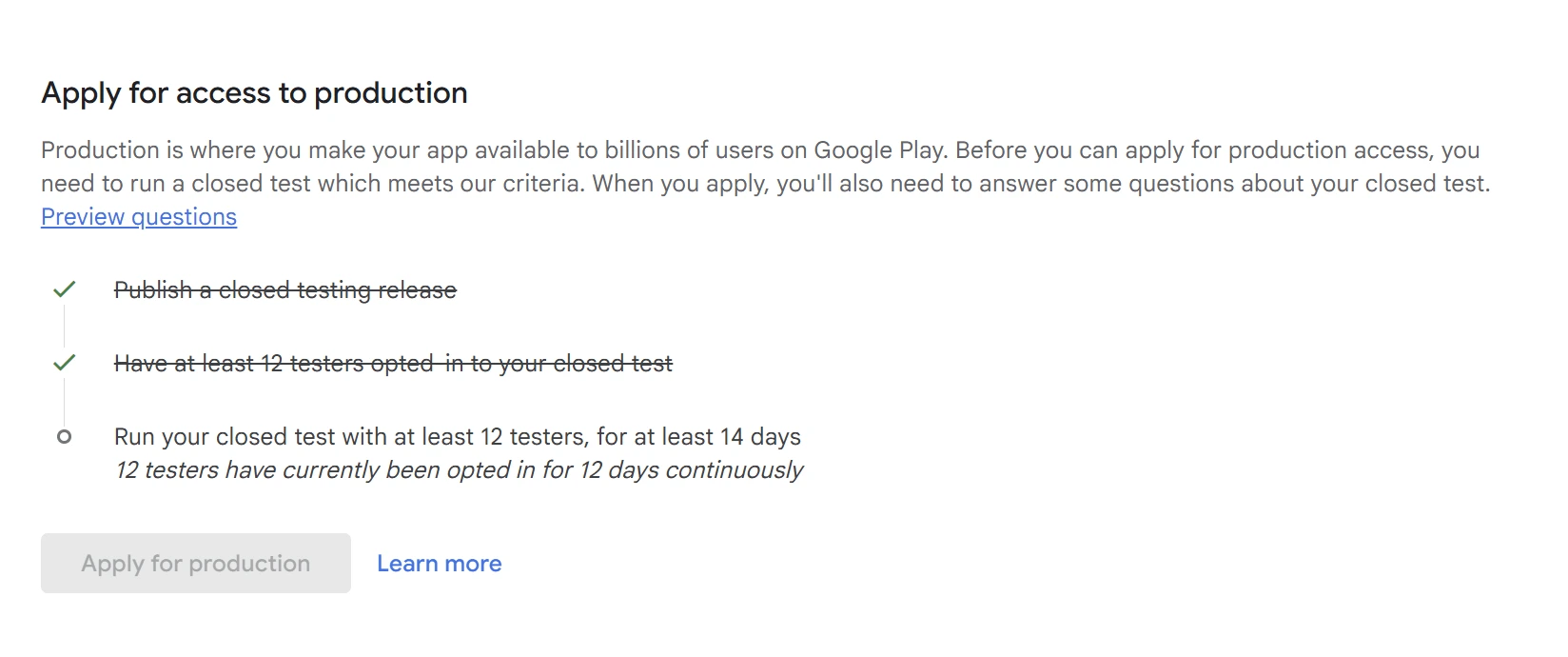
Google describes the purpose of the closed-test section as confirming that apps are satisfactorily tested before publication. Section 2 is the lightest part: Google states those answers are not shown on Google Play and do not affect access to Play Console features.
What Google publishes
- Review usually takes 7 days or less, and may take longer.
- You may be asked to continue testing if you do not have 12 eligible testers, or if testers were not engaged with the app.
- Section 2 answers are not published and do not affect feature access.
- Leaving the form without working through it can discard unsaved answers: use Next between sections and Apply at the end.
Source: Play Console Help, testing requirements for personal developer accounts.
This page covers nine questions from the initial application, plus one reapplication question reported by developers who were asked to continue testing. Google publishes no fixed list, and reported wording, field types and which questions appear differ between accounts. Follow your own form.
Every example here is under 300 characters and shows its own count. Some developers report a limit near that figure, but no universal current limit could be verified, so your own form’s counter is the authority. No published evidence links answer length to the outcome.
What Evidence Should You Prepare?
Do this once and the form stops being a writing problem. Gather these three things before you open it. Everything on this page is assembled from them.
The figures you will be asked about, taken from Play Console eligibility information and from your own records, so that the two agree with what you write.
- How many testers were opted in, and on which dates.
- Whether the opt-in ran continuously for the last 14 days, with no break.
- Which release each tester ended the test on.
Uninstalling is not leaving. A tester who deletes the app is still opted in; leaving is deliberate, from the test link or the app’s beta section in the Play Store (Leave an app’s beta program). So an install count proves neither that testing happened nor that it stopped.
Activities, not adjectives. Write down the flows they completed and how you know.
- Which core flows were exercised: sign-up, the main task, sharing, settings, payment.
- Roughly how often the app was opened, and over what period.
- Where people got stuck, and on which devices or Android versions if you know.
Label the source of each claim. A count based on tester reports is a different thing from a count recorded by analytics, even when both are written as numbers. Either is usable; say which one you have.
Google points developers at the Play Console testing feedback page and recommends keeping a record. One row per finding is enough:
- Where the feedback arrived (Play Console feedback, in-app form, chat, email).
- What you released in response, and in which version.
- How you confirmed it worked, and which findings are still open.
A record that answers four of the nine questions
Three columns is all it takes. The rows below belong to the fictional app introduced in the next section; yours will look nothing like them, which is the point.
| What the test found | What was released | How it was verified |
|---|---|---|
| Shift reminders did not fire after a roster was edited. | Version 1.4.1: reminder rescheduling corrected after roster edits. | Both testers who reported it confirmed reminders arrived on the next two shifts. |
| Publishing a roster failed on slow connections and lost the draft. | Version 1.4.2: the draft is kept locally and retried until the publish succeeds. | Retested on a throttled connection before and after; the draft survived. |
| The week view was cramped on small screens. | Not released. Scheduled for after launch. | Open. Named as an open item in the readiness answer rather than claimed as fixed. |
What If You Do Not Have Detailed Analytics?
If you did not collect session analytics, you can still answer every question. What you cannot do is turn an impression into a measurement. Say what you know and label how you know it. “Ten of twelve testers told me they built at least one roster; I had no session analytics” is usable and checkable. An invented average session length is not.
The same applies to a pre-launch report: Google describes it as automated testing on its own devices, with coverage limits (Use a pre-launch report to identify issues). It evidences an automated crawl, not human testing.
If Android vitals shows no crashes
An empty dashboard is not a demonstrated zero-crash result. Android vitals depends on eligible diagnostic data, and Google notes that an empty view can mean insufficient data under your selected filters (Android vitals). If the data is thin, report that limitation.
Draft the answers somewhere else first
Google warns that leaving the form without clicking Next through each section and Apply at the end can discard your work. Write the answers in a document, check them against each other, then paste them in.
Still need testers?
If you have completed testing, use the examples below to prepare answers from your own records, and check each answer against what actually happened. If you still need testers, compare testing support: PrimeTestLab supplies questionnaire answers after its test, and you check them and submit the application.
How to Use These Answer Examples
Every fact in every example below is invented. They all describe one fictional app, so you can see how a single test record turns into nine consistent answers. None of them is a submission-ready answer for your app, and none of them becomes one by being shortened.
Replace every name, number, date, feature and finding with your own before you use any of this. An answer that still says “Shiftly”, or still claims twelve testers over fourteen days when that is not what happened, describes someone else’s test.
Which variant should you pick?
The default drafts all follow the fictional Shiftly test. The alternative tabs describe different circumstances: another recruitment method, thinner evidence, a different kind of app. Choose the one that fits your test, then make the related answers agree. A no-change answer cannot sit beside feedback and readiness answers claiming released fixes, and the game tab is a separate fictional game.
How to read a draft
- Text marked like this is a fact you must replace.
- Copy as template swaps every one of those for a bracketed prompt, never a finished sentence.
- Explanations sit outside the draft panel, so you cannot paste an editorial note into the form.
- The character count measures the example, not your replacement.
Illustrative example, not a real app
ShiftlyA fictional shift-planning app for small shops and cafes, used throughout this page only to keep the nine answers consistent. Not a client, not a case study, and no outcome is claimed for it.
- Closed test 12 testers, 14 continuous days
- Core flows Sign up, build a weekly roster, invite a coworker, publish, receive a shift reminder
- Releases in the test 1.4.1 and 1.4.2
- Open item Cramped week view on small screens
Part 1: About Your Closed Test
This section asks you to describe recruitment, activity and feedback. Keep your answers consistent with the eligibility information in Play Console and with your own testing records, and explain the activities, feedback and checks that no dashboard metric captures.
How did you recruit users for your closed test?
Google asks where your testers came from. Name the source you actually used and say who ran the test. Diversity is sensible practice, not a rule against a single source, so an honest one channel beats an invented list.
What this field needs
- The channel or channels you genuinely used.
- Who the testers are in relation to your app’s audience.
- Who set the scenarios, read the feedback and released the changes.
Worked draft (fictional)
I recruited 12 testers from my own network: five colleagues at a shared workspace, four friends who manage shop rotas, and three from a testing forum. All opted in within two days and stayed opted in for the full 14 days. I set the test scenarios and read the feedback myself.
Copy unavailable. Select and copy the template below.
Worked draft (fictional)
I recruited 12 testers through a paid testing service. I chose the scenarios, read the feedback in Play Console and in the provider reports, released two updates during the test, and asked each reporter to confirm the fix.
Copy unavailable. Select and copy the template below.
Worked draft (fictional)
All 12 testers came from one source: a group of independent shop owners I already belonged to. They are the people the app is built for. I invited each one directly rather than posting a public test link.
Copy unavailable. Select and copy the template below.
A weaker version, and what it leaves out
“I found testers online.”
It names no channel, no relationship to your audience, and nobody who ran the test.
No published guidance suggests that naming a provider affects the outcome. What matters is that the rest of your form agrees with it: if a provider recruited the testers, say who set the scenarios, read the feedback, made the changes and checked them.
How easy was it to recruit testers?
A scale from very difficult to very easy. Choose the option that matches your experience. No published guidance names a preferred option. The lines below are loose illustrations, not criteria: recruiting can be hard or easy for reasons none of them covers.
- Very difficult You could not reach 12, and the test slipped or stalled.
- Difficult It took repeated asking, or several attempts over a long stretch.
- Neither It took some effort and roughly the time you expected.
- Easy One or two asks filled the list.
- Very easy You had more volunteers than places.
No option here is recommended. The wording and the number of choices can differ from what is shown above; read your own form.
Describe the engagement you received from testers
Google’s own examples here are about feature usage and whether it resembles real production use. “Highly engaged” names nothing anyone can picture. Give the flows, the period, the pattern, and where your figures come from.
What this field needs
- How many testers, over what period.
- Two to four flows they actually completed, by name.
- The usage pattern, and where the figures come from.
Worked draft (fictional)
Over 14 days, 12 testers created 31 weekly rosters between them; all completed sign-up and roster creation, nine invited a coworker and seven received a shift reminder. Multi-shop testers opened the app most days; single-shop testers used it weekly. These counts come from in-app event logging.
Copy unavailable. Select and copy the template below.
Worked draft (fictional)
I had no session analytics during the test. Ten of twelve testers told me they had built at least one weekly roster, and six said they had invited a coworker. I watched two testers complete sign-up in a screen share. I cannot report session counts.
Copy unavailable. Select and copy the template below.
A weaker version, and what it leaves out
“Testers were active and used the app.”
No count, no period, no named flow, and no source for any of it.
Provide a summary of the feedback you received
Google asks both what the feedback was and how you collected it. Give the channel, the themes that genuinely came up, and what you did about each, including what is not done. Fitting several findings into a short field is the part that takes editing.
What this field needs
- Where the feedback arrived.
- The themes that actually came up, however many that is.
- Which ones you have released, and which are still open.
Worked draft (fictional)
Feedback arrived through Play Console testing feedback and a group chat. The themes were shift reminders not firing after a roster edit, roster publishing failing on slow connections, and a cramped week view on small screens. The first two are fixed and released; the third is still open.
Copy unavailable. Select and copy the template below.
A weaker version, and what it leaves out
“Feedback was positive.”
It gives no channel, no theme and no response, which is all three things the field asks for.
If the feedback really was entirely positive, say so and say what it covered. An invented defect has to stay consistent with Q8 and Q9 too.
Short of testers who will stay opted in for 14 unbroken days?
PrimeTestLab provides 12 pre-qualified testers from $19.99, starting within 4-6 hours.
Part 2: About Your App or Game
Google states these answers are not shown on Google Play and do not affect your access to Play Console features. Write them plainly. This is not store copy, and there is nothing to be gained by selling here.
Who is the intended audience for your app?
Google asks you to be specific. “Everyone” describes no one. Cover who they are, what problem they have, and when they reach for the app. If you genuinely have two kinds of user, name both.
What this field needs
- Who they are: role, situation, or age range if it is genuinely relevant.
- The problem they have before your app exists.
- When and how often they use it.
Worked draft (fictional)
Shiftly is for owners and managers of shops and cafes with 3 to 20 staff who currently build rotas on paper or in a notes app. They use it once a week when they plan the coming week, and in short bursts when someone asks to swap a shift.
Copy unavailable. Select and copy the template below.
A weaker version, and what it leaves out
“Everyone.”
It names no user, no problem and no occasion, and it is almost never true.
Describe how your app provides value to users
Lead with the outcome, then name the two or three features that deliver it. For a game, the value is the experience: the loop, what makes it distinctive, how long a session runs and why anyone comes back.
What this field needs
- The outcome, in one sentence, before any feature list.
- Two or three features that produce that outcome.
- For a game: the loop, the distinctive element, the session length.
Worked draft (fictional)
Shiftly lets shop managers reuse last week’s rota, publish shifts to staff, and send a reminder before each shift. Staff request swaps in the app instead of by message.
Copy unavailable. Select and copy the template below.
Worked draft (fictional)
Players clear a board by chaining colour matches under a 90-second timer. Each cleared board rewrites the next one, so no two runs repeat. A run lasts about three minutes, and players return for the daily board.
Copy unavailable. Select and copy the template below.
A weaker version, and what it leaves out
“My app is useful and has good features.”
No outcome, no feature and no user, in a field Google does not publish anyway.
The Game tab is a second fictional example, not Shiftly. If you use it, the rest of your answers describe your game, not a rota app.
How many installs do you expect in the first year?
Google says a rough estimate is fine and the ranges are deliberately wide. Select the range supported by your own audience and launch estimate. No published guidance names a preferred range, and there is no basis for the common advice to pick a middle band.
- 0 – 10k
- 10k – 100k
- 100k – 1M
- 1M+
- I do not know A real option, and more defensible than a number you invented.
No option here is recommended, and none of these ranges implies anything about your app. Range labels and wording vary; read your own form.
Part 3: Production Readiness
This section asks what the test produced and why you decided to ship. Both answers should read as conclusions drawn from the record you built earlier, not as new claims that appear here for the first time.
What changes did you make based on your closed test?
Describe the changes you actually made and how you checked them. The published guidance sets out no scoring formula for this field and no minimum number of updates. That is not the same as the answer having no effect, and it does not excuse a known blocking or policy problem. Keep completed and planned work apart.
What this field needs
- What the test found, in your own words.
- What you released in response, with a version if you have one.
- How you checked it, and what is still open.
Worked draft (fictional)
Two releases during the test. 1.4.1 corrected reminder rescheduling after a roster edit; 1.4.2 fixed roster publishing on slow connections. The testers who reported the fault confirmed it, and I retested publishing on a throttled connection. The cramped week view is open, not fixed.
Copy unavailable. Select and copy the template below.
Worked draft (fictional)
I released no changes in this test. Testers checked sign-up on Android 10, publishing on a slow connection, and reminders on three OEM builds. The results were no reported failures in those paths, and no crashes in Android vitals for a period with enough data. Small-screen layout is untested.
Copy unavailable. Select and copy the template below.
A weaker version, and what it leaves out
“We improved the app.”
It names no finding, no release and no check, so it cannot be reconciled with your feedback answer.
What if you made no changes?
The guidance prescribes no number of updates, and an unchanged app is not automatically a weak application. What makes an answer weak is unexplained testing. Use the No changes released tab above: which flows and conditions were checked, what the results were and where they came from, and what is unresolved. Do not invent a defect to have a fix to report.
How did you decide your app is ready for production?
Google is asking for your decision criteria, not your confidence. Name the two or three things you looked at and the evidence behind each. Everything here should already appear earlier on the form, with the same verification history.
What this field needs
- The criteria you used, stated as criteria.
- The evidence behind each one.
- The open items, and why they do not block the release.
Worked draft (fictional)
Three criteria. The reminder fix was confirmed by the affected testers. I retested roster publishing on a throttled connection after 1.4.2. The cramped week view is still open; it is cosmetic, and the tested core flows are usable.
Copy unavailable. Select and copy the template below.
A weaker version, and what it leaves out
“I felt the app was ready.”
A feeling is not a criterion, so there is nothing here to agree or disagree with.
Common Answering Mistakes
None of these is a rule that Google publishes. They are the patterns that make an answer communicate less than the developer who wrote it intended.
“Highly engaged”, “very positive”, “thoroughly tested”. Each occupies space in a short field without naming a flow, a count or a period.
“No issues were found” in one field and “I fixed several bugs” in the next. Both cannot be true, and a reader has no way to tell which one is.
If you report feedback, say where it arrived: Play Console testing feedback, an in-app form, a chat group, email. Without it the summary is unsourced.
A pasted example that still describes someone else’s app, audience or bug is not a description of your test. Every template shares this failure mode, including the ones here.
A percentage invented to look rigorous is a claim you cannot support. A count from tester reports is perfectly usable; just say that is what it is.
Say which fixes shipped and which are scheduled. Presenting a plan as a release is contradicted by your own version history.
Picking the strongest-sounding option rather than the one that happened puts your dropdown at odds with your free text, and no published guidance names a preferred choice.
Check Your Answers Before You Submit
The form is read as one document. Most of what makes it weak is not a bad sentence but two sentences that disagree. Run this pass with all nine answers side by side.
Nothing on this checklist predicts a decision. It is the pass that stops your form from arguing with itself.
What Happens After You Apply?
Four outcomes are worth telling apart, because two of them are routinely mistaken for each other. A review still in progress is not a request for more testing, and access granted is not a published app.
Monitor the review
Review in progressGoogle states that review usually takes 7 days or less, and may take longer. Watch Play Console and the account email, and respond to anything Google asks for. A long wait on its own is not a reason to resubmit or restart the test.
One more step
Production access grantedAccess and a live app are separate things. You still have to prepare and roll out a production release, which carries its own review. See Google’s release workflow, and our production-access and release review times.
Read the actual message
More testing requiredA decision about your test, not only about your wording. Full guidance below.
An app problem, not a wording problem
Reviewer could not open the appIf your app is behind a login or is otherwise restricted, the reviewer needs working credentials. Provide them in sign-in details for review. No answer on the questionnaire can substitute for access.
If Google Asks You to Continue Testing
Do not resubmit the same form, and do not assume the problem was your writing. Work through it in this order.
The notification usually names a reason: fewer than 12 eligible testers, an opt-in that broke during the 14 days, or testers who were not engaged. Treat that message as authoritative over any general guide, including this one.
If you were short of testers, or an opt-in lapsed, get back to 12 eligible testers with an unbroken recent history before reapplying, which for new testers means another full 14 days. Rewriting answers over an unchanged tester record does not change the eligibility information.
Update the facts that changed, and clarify any answer that was incomplete or ambiguous: an answer can fail to communicate evidence you already had. What rewording cannot do is fix an underlying testing problem. A second test may produce new observations, feedback, changes or verification, but none is guaranteed and a new release is not required.
Google requires the most recent 14 consecutive days to have eligible testers, so never apply while short of 12. Beyond that, some denial messages name an additional period and others name none: Google publishes no universal reapplication interval. Our guide to reapplying after a “more testing required” denial covers both, including why asking testers to opt out and rejoin destroys the history you have.
If you are trying to work out what went wrong with the test itself rather than the form, start with troubleshooting a closed-testing rejection.
What did you do differently this time?
Reported by developers reapplying after being asked to continue testing. Reported wording varies, and not every account reports seeing it, so check your own form rather than assuming it will or will not appear.
Name what is different in the record, not what is different in your attitude. If the second test matched the first, that is what to fix before reapplying.
What this field needs
- What changed about the test itself.
- What that produced: findings, releases, confirmations.
- How the current evidence addresses the earlier decision.
Worked draft (fictional)
Since the last application I ran another 14-day test with 12 testers and recorded what each of them did. Two reminder faults were found, fixed in 1.4.3 and confirmed by the testers who reported them. These answers describe that test and those releases.
Copy unavailable. Select and copy the template below.
A weaker version, and what it leaves out
“This time I focused on gathering and implementing feedback.”
It describes an intention rather than a difference, which is the only thing this field asks about.
This draft is a later scenario: a second test with its own release, 1.4.3. If it fits you, the rest of your answers describe that current test, not the earlier 1.4.1 and 1.4.2 record.
How PrimeTestLab Supports Your Testing and Application
Everything above assumes you have a record to write from. If the blocker is the record itself, finding 12 people who stay opted in for 14 unbroken days, that is the part we do. Real people on real devices, starting within 4-6 hours, running the full 14 days, with progress you can see while it happens.
Our Starter plan provides 12 testers for $19.99, the Professional plan provides 20 testers for $29.99, and the Enterprise plan provides 25 testers for $27.99, all with the full 14-day guarantee.
The minimum requirement, met exactly
Most coverage for the same 14-day period
More engagement across the same 14 days
What this gives you for the form
Named testers with an unbroken opt-in history, a record of what they did, and their feedback in writing: the raw material for Q1, Q3, Q4 and Q8. You still write the answers, because they have to be yours.
What it does not give you
We do not submit the questionnaire for you, we are not able to influence a review, and nothing on this page predicts a decision. If a service tells you otherwise, that is the claim to check first.
Frequently Asked Questions
Can I use these examples as a template?
As a framework, yes. As text to submit, no. Every fact in them belongs to a fictional app, so an answer that keeps those facts describes someone else’s test. Replace every name, number, feature and finding; the copy control hands you a bracketed template for exactly this reason.
What is the production access questionnaire?
It is the form you fill in when you apply for production access after a closed test, covering the test you ran, your app or game, and your production readiness. You reach it from “Apply for access to production” on your Play Console app dashboard, and can read it in advance through the Preview questions link.
How long can each answer be?
Every example here is under 300 characters, and some developers report a limit near that. No universal current limit could be verified, so your own form’s counter is the authority. No published evidence links answer length to your odds.
Should I say that I used a paid testing service?
You can answer truthfully. No published guidance suggests naming a provider affects the outcome, and an invented list of channels is the bigger risk. Name the source, then say who set the scenarios, read the feedback, made the changes and verified them.
What if I have no analytics for the test?
If you did not collect session analytics, report what you know and label how you know it. “Ten of twelve testers told me they completed sign-up” is usable; an invented average session length is not. A count from tester reports is still a count, as long as you say so.
What if I made no changes during the closed test?
The guidance prescribes no number of updates, and an unchanged app is not automatically a weak application. What makes an answer weak is unexplained testing. Say which flows and conditions were checked, what the results were and where they came from, and what is unresolved.
How long does production access review take?
Google states that it usually takes 7 days or less, and that it may take longer. A review still in progress is not a rejection. Watch Play Console and the account email, and respond to anything Google asks for.
Google asked me to continue testing. When can I reapply?
Read the message you received: some name a specific additional period and some do not, and Google publishes no universal reapplication interval. In every case the most recent 14 consecutive days need at least 12 eligible testers. See our recovery steps above and the full more testing required guide.
Bottom Line
Summary
Write each answer from your own record: who tested, what they did, what they reported, what you released, and how you checked it. Replace every invented detail on this page, choose the dropdown options that match your circumstances, follow the wording and counter your own form shows, and read the answers together so they agree.
If the record is the missing piece, compare closed-testing plans.