













How it works
From order to production approved. In 4 simple steps.
Order a plan, paste our tester list into your Play Console, and 12+ real testers use your app every day for 14 days. On day 14 you apply with our proven questionnaire answers; Google's review usually takes 7 days or less.
Money-back guarantee · Starts in 4-6 hours · US registered company
The process
The full timeline, at a glance.
Your part is about 7 minutes across two short sessions. Here is exactly what happens from the moment you order to the day Google approves your app.
- Day 0 You order 2 minutes
- Day 0 Setup, testers opt in within 4-6 hours
- Day 1-14 Testing runs our part, all of it
- Day 14 You apply 5 minutes
- Approved Your app goes live review usually 7 days or less
PrimeTestLab exists to get your app through Google Play closed testing without you recruiting a single tester. You order a plan, download the tester list from your dashboard, paste it into your own Play Console, and send us the opt-in link Google shows you. That is your whole part, about 7 minutes across two short sessions.
From there our testers opt in within 4-6 hours, keep your app installed and in daily use for 14 consecutive days, and we replace any dropout the same day so the tester count never dips below Google's requirement. On the last day you apply for production access with questionnaire answers we provide, and Google's review usually takes 7 days or less. If Google does not approve your app, you choose a free retest or a full refund.
Step 1 · Day 0 · about 2 minutes
Choose a plan and unlock your dashboard
Pick 12, 20, or 25 testers and check out with just your email. Your dashboard opens instantly: the CSV list of tester emails is waiting to download, next to short written guides for every step that follows. Checkout asks for your email and payment, nothing else, and your account is created automatically in the background. The dashboard is also where everything later lives: your day counter, tester status, the step-by-step guides, and your bug report when it arrives. Most developers finish this step in about two minutes.
- Checkout takes your email, nothing else
- Dashboard account created for you automatically
- CSV tester list ready the moment you pay
Ready to paste into Play Console
Step 2 · Day 0 · about 3 minutes
Add our testers to your app
In your own Play Console, open your closed testing track, paste the list, and send us the opt-in link Google shows you. That is your whole part, and we never need access to your console or your account. The exact path is Testing, then Closed testing, then your track's Testers tab: paste the emails, save, and copy the opt-in URL Google generates on the same screen. If your console looks different or the track is not set up yet, message us on WhatsApp and a human walks you through it live. We never ask for your password at any point.
- Paste the CSV into your track's email list
- Copy the opt-in link and send it to us
- Console looks different? We walk you through it live on WhatsApp
Step 3 · Day 1-14 · your part: nothing
We test for 14 days. You do nothing.
Our testers opt in within 4-6 hours and the clock starts. Real people on real Android devices open and use your app every single day, and if anyone drops out we replace them the same day, so the streak never breaks. You can watch every opt-in appear in your own Play Console, so nothing depends on trusting us, and your dashboard shows the day counter and how many testers were active today. Uploading fixes during the window is fine and does not reset the clock, so many developers ship improvements as our bug report flags issues.
- 12+ verified testers active every day
- Dropouts replaced immediately at no cost
- Live day counter and tester status on your dashboard
Step 4 · Day 14 · about 5 minutes
Apply for production access and go live
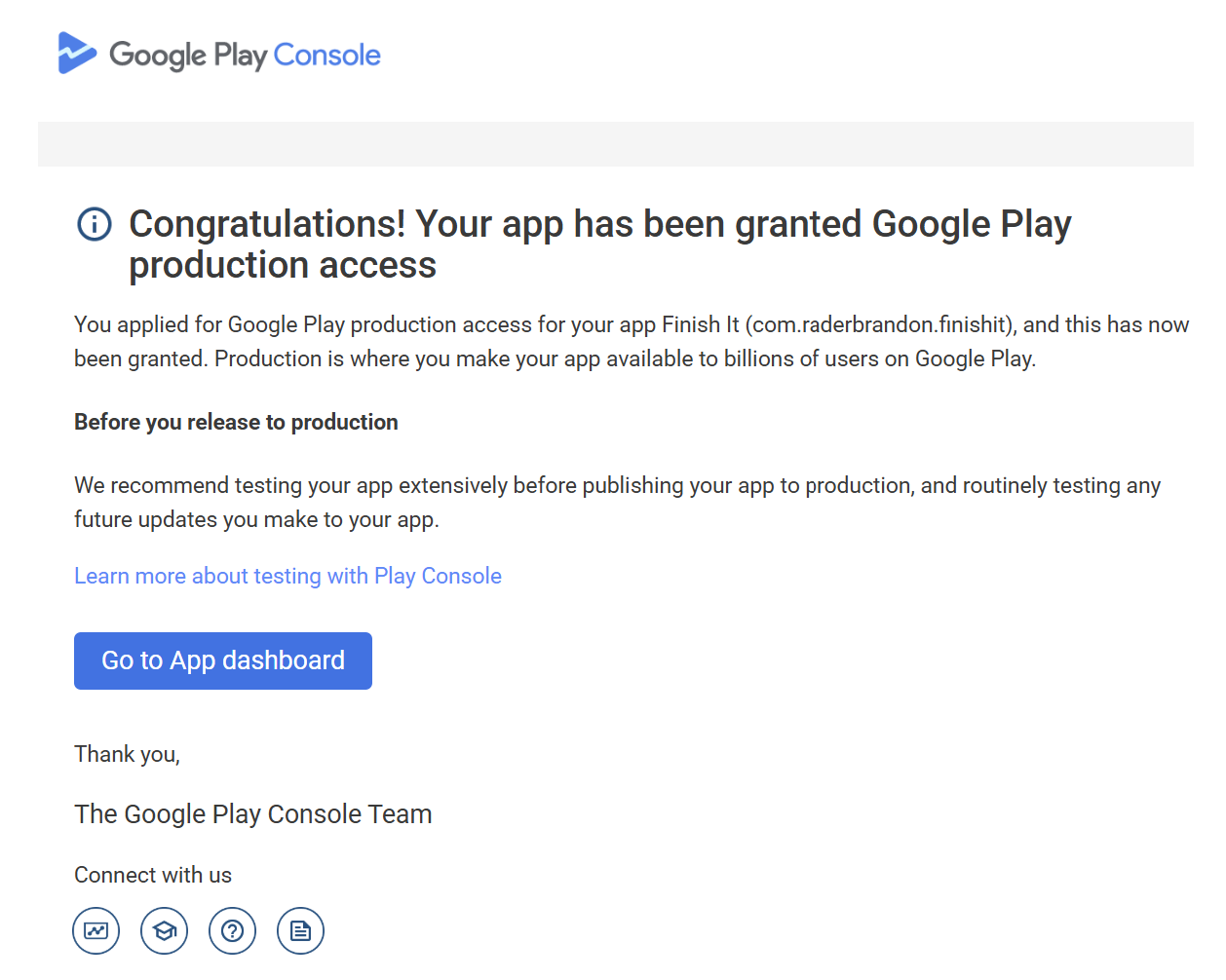
Play Console unlocks the production application, and Google asks a short questionnaire about your test. We hand you proven answers to adapt, because vague answers are the most common reason applications bounce. The questionnaire asks what you tested, who tested it, and what feedback you acted on, so adapt our answers to match your app and submit. Approval lands by email like the real screenshot here. If Google says no instead, you choose a free retest or a full refund, and we handle the rerun. Then this email arrives.
- Proven questionnaire answers included with every plan
- Google's review usually takes 7 days or less
- Not approved? Free retest or a full refund
Setup within 4-6 hours, weekends included · the 12-tester requirement, explained
Compliance
Is this safe? Yes. Here is why.
Google requires at least 12 opted-in testers for at least 14 consecutive days, and it does not restrict who your testers are or how you find them. We supply exactly what the rule asks for: real people, really using your app.
Run a closed test with at least 12 testers who have been opted in for at least the last 14 days before you can apply for production access.
Never emulators or bots. Those are what Google's policy actually forbids, and we never touch them.
Built around Google Play's published closed testing requirements, not around loopholes.
Zero developer accounts banned or penalized across every test we have run.
Every opt-in shows up in your own Play Console. You never have to take our word for it.
AEBU Technology, LLC, Dover, Delaware. A real company behind every order.
Not approved after the test? Full refund or free retest, written into our refund policy.
Compare your options
Why developers choose PrimeTestLab.
The same 14 days, three very different experiences. Here is the honest comparison against doing it yourself or hiring freelancers.
| What you get | Do it yourself Free but it costs weeks | Fiverr freelancers $10-$30 per gig | Recommended PrimeTestLab From $19.99 one-time · all-inclusive |
|---|---|---|---|
| Testing starts | Days to weeks | 1-3 days | 4-6 hours |
| Guaranteed testers for 14 days | Varies | ||
| Tester replacement if someone opts out | |||
| Live progress dashboard | |||
| 24/7 support | |||
| Production questionnaire answers | Some | ||
| Written bug report | Varies | ||
| Money-back guarantee | N/A | Varies | |
| Success rate | ~60-70% | ~80-90% | 99.9% |
| Order |
Swipe to compare · PrimeTestLab is the green column
Video review
Rejected twice alone. Approved with us.
A real developer tried friends and online communities first. Two rejections later he switched to PrimeTestLab, finished the 14 days, and went live. Here he is, unedited.
Enterprise plan · 25 testers · Approved after the 14 days
Read the transcript
Summary: Salman, an indie developer, got rejected twice during Google Play closed testing because he couldn't keep enough real testers active. Friends, WhatsApp groups, and online communities all failed. After discovering PrimeTestLab, he signed up for the 25 testers plan, all testers stayed active, he completed the requirements stress-free, and his app received Google Play production access. He shows the approval email and live Play Console dashboard in the video.
Hey there, my name is Salman and I'm an indie developer. The fact is that I was actually getting rejected all the times. I even got rejected twice during the closed testing stage, because I couldn't have enough real testers active.
I tried everything. I was asking my friends, sharing in WhatsApp groups, posting in online communities, but nothing worked. People would join and then they disappeared. I was feeling really stuck. I didn't know what to do next and I was really frustrated because I had spent a lot of time building the app.
And then someone told me about PrimeTestLab and I just decided to give it a try and see what happens. I got the 25 testers plan and it worked perfectly. The testers joined properly, they stayed active, and for the first time I was able to complete the testing requirements without any stress.
And now let me show you the email that I received from Google Play. As you can see, we've received an email from Google Play Support. It says: "Congratulations, your app has been granted Google Play production access."
Let's click on the app dashboard and see what's in here. Yeah, as you can see, the app is already approved. It has already gotten 42 installs. The production tab has already been enabled as well.
I wish I had found it earlier because it would have saved me a lot of time and frustration.
Shot by the customer · Unedited
Pricing
Pick a plan. Start today.
One payment, everything included, and setup starts within 4-6 hours. The bigger plans exist for safety margin: why more than 12 testers helps.
12 testers
- 12 verified testers on real devices
- Full 14-day closed test
- Basic bug report
- Live progress dashboard
- Email and chat support
25 testers
- 25 verified testers on real devices
- 13 extra testers as a safety buffer
- Full 14-day closed test
- Comprehensive bug report
- Highest priority start
- Dedicated account manager
- 24/7 premium support
- 99.9% success rate
20 testers
- 20 verified testers on real devices
- 8 extra testers as a safety buffer
- Full 14-day closed test
- Priority start
- Detailed bug report
- 99.9% success rate
If your app is not approved after our testing, you get a full refund. No questions asked.



Want the full feature matrix and per-tester math? See the complete pricing breakdown.
FAQ
Common questions, answered.
Everything developers ask about the process before ordering. If yours is missing, a human answers fast.
Is using a testing service like PrimeTestLab allowed by Google?
Yes. Google requires at least 12 opted-in testers for at least 14 consecutive days, and it does not restrict who your testers are or how you find them. We provide real people on real Android devices who genuinely install and use your app, which is exactly what the requirement asks for. What Google forbids is fake engagement: bots, emulators, and incentivized installs. We never touch those. 9,800+ apps have been approved through this exact process with zero developer accounts banned or penalized.
How long does the entire process take from order to production approval?
Plan for about 15 days from order to your production application. Setup happens within 4-6 hours, the 14-day clock starts as soon as our testers opt in, and on day 14 you apply using the questionnaire answers we hand you. Google says its review usually takes 7 days or less, though it can occasionally take longer. If you are racing a deadline, order in the morning and message us on WhatsApp; setup is the only part that can be compressed, and we compress it.
What happens if my app gets rejected after testing?
You choose: a full refund or a free retest, as written in our refund policy. With a 99.9% success rate this is rare, and a pushback usually means Google wants to see more genuine testing activity or clearer questionnaire answers. Both are fixable: we rerun the 14-day cycle at no cost and tighten your answers before you reapply. Our breakdown of why closed testing gets rejected shows the usual causes.
Do I need technical knowledge to use PrimeTestLab?
No. Your part is pasting an email list into Play Console and sending us the opt-in link, about 3 minutes with the step-by-step instructions in your dashboard. We handle everything else, and support answers on WhatsApp within minutes if your console looks different from the guide. The full walkthrough with screenshots is in our guide on how to invite testers.
How do I know the testers are real people using real devices?
You can verify it yourself, in your own Play Console: the closed testing track shows exactly how many testers have opted in. Every tester is a verified human on a physical Android device across 120+ countries; we never use emulators or bot accounts, because those typically do not count toward the requirement and they put the developer account using them at risk. The bug reports you receive are written from real sessions on real phones.
What if my testers opt out during the 14-day period?
We monitor tester activity every day of the window and replace any dropout immediately at no extra cost, so your count never falls below Google's minimum. The Professional and Enterprise plans also run 8 and 13 testers above the requirement as a built-in buffer. Keeping the streak unbroken is the entire job you are paying us for, and it is why developers who tried recruiting volunteers come to us after their count dipped mid-test.
How much does PrimeTestLab cost?
Three one-time plans: Starter is $19.99 for 12 testers, Enterprise is $27.99 for 25 testers (the most popular), and Professional is $29.99 for 20 testers. Every plan includes the full 14-day closed test, real devices, a written report, questionnaire answers, and free retesting. No subscription, nothing renews. The full breakdown is on our pricing page.
Do you need access to my Google Play Console?
No, never. You add the tester list to your own console yourself, which takes about 3 minutes, and the only thing you send us is the public opt-in link Google generates. We never ask for your password, your console access, or your developer account details, and you can watch every opt-in appear in your own dashboard. You stay in full control of your app and your account the entire time.
When exactly does the 14-day clock start?
The clock starts when testers accept your opt-in link, not when you paste their emails into the console. That distinction catches a lot of developers who add testers and wait while nothing counts. With us it stops mattering: our testers opt in within hours of receiving your link, your dashboard shows the day counter from day 1, and we watch that the 14-day window stays unbroken until the end.
Can I update my app while the test is running?
Yes. Uploading new versions to the closed track during the 14 days is allowed and does not reset the clock, so you can ship fixes as our testers report bugs. Many developers use the two weeks exactly that way and reach Google's review with a stronger build than they started with. The details are in our guide on updating your app during closed testing.
What do I need before I order?
Two things: a Google Play developer account with the $25 fee paid, and your app uploaded to a closed testing track in Play Console. Internal testing does not count toward the requirement, so the build must sit on a closed track; our comparison of the testing tracks explains the difference. If your app is not on a track yet, order anyway and message us on WhatsApp; we walk you through the upload live.
Do the testers have to be in my app's target countries?
No. Google counts opted-in testers wherever they live, and your launch countries are a separate setting in your store listing. The one thing to check is that your closed test track is available in the testers' countries, which we cover during setup. Our guide on testers in different countries breaks down both gates.
 Talk to a human, not a bot
Average reply: under 5 minutes, any day
Talk to a human, not a bot
Average reply: under 5 minutes, any day
or email info@primetestlab.com · book a 30-minute call
Chat on WhatsAppGoogle Play closed testing
Your 12 testers are ready.
Order in two minutes and testing starts within 4-6 hours.
From $19.99 · No subscription · Money-back guarantee