














No - it never resets
Update freely; a new build keeps your 14-day clock runningThere is no rule that creating a new release resets the closed testing clock. The 14-day requirement is measured by keeping at least 12 testers opted in continuously - it has nothing to do with your app version, version code, or how many builds you upload.
Your opted-in tester count dropping below 12.
If testers formally opt out and you fall under the minimum, the continuous streak breaks - not because you updated, but because you dropped below 12.
Quick Answer
No - updating your app during the 14-day closed test does not reset the clock, so you can push new builds as often as you need. Uploading a new build (AAB) to your existing closed testing track does not restart the 14 days. The clock is tied to keeping at least 12 testers opted in continuously - not to your app version, version code, or signing key. The only things that break the continuous window are your opted-in tester count dropping below 12 or testers formally opting out. Pushing updates is safe, and Google actually encourages it. PrimeTestLab keeps at least 12 real testers opted in continuously, so your clock keeps running while you ship fixes.
It is one of the most common closed testing fears: you are partway through your 14-day window, you spot a bug, and you freeze - terrified that uploading a fix will wipe your progress and force you to start the two weeks over. It will not. The 14-day clock watches your testers, not your builds. This guide separates exactly what resets the closed testing timer from what does not, gives you two interactive tools to test any action yourself, and explains why shipping updates is something Google actively wants to see. It is current as of June 30, 2026.
In This Guide
Does Updating My App Reset the 14-Day Closed Testing Clock?
No. This is the single most common fear among developers in their testing window, and the answer is reassuring: uploading a new app bundle to your existing closed testing track does not reset the 14-day continuous testing requirement.
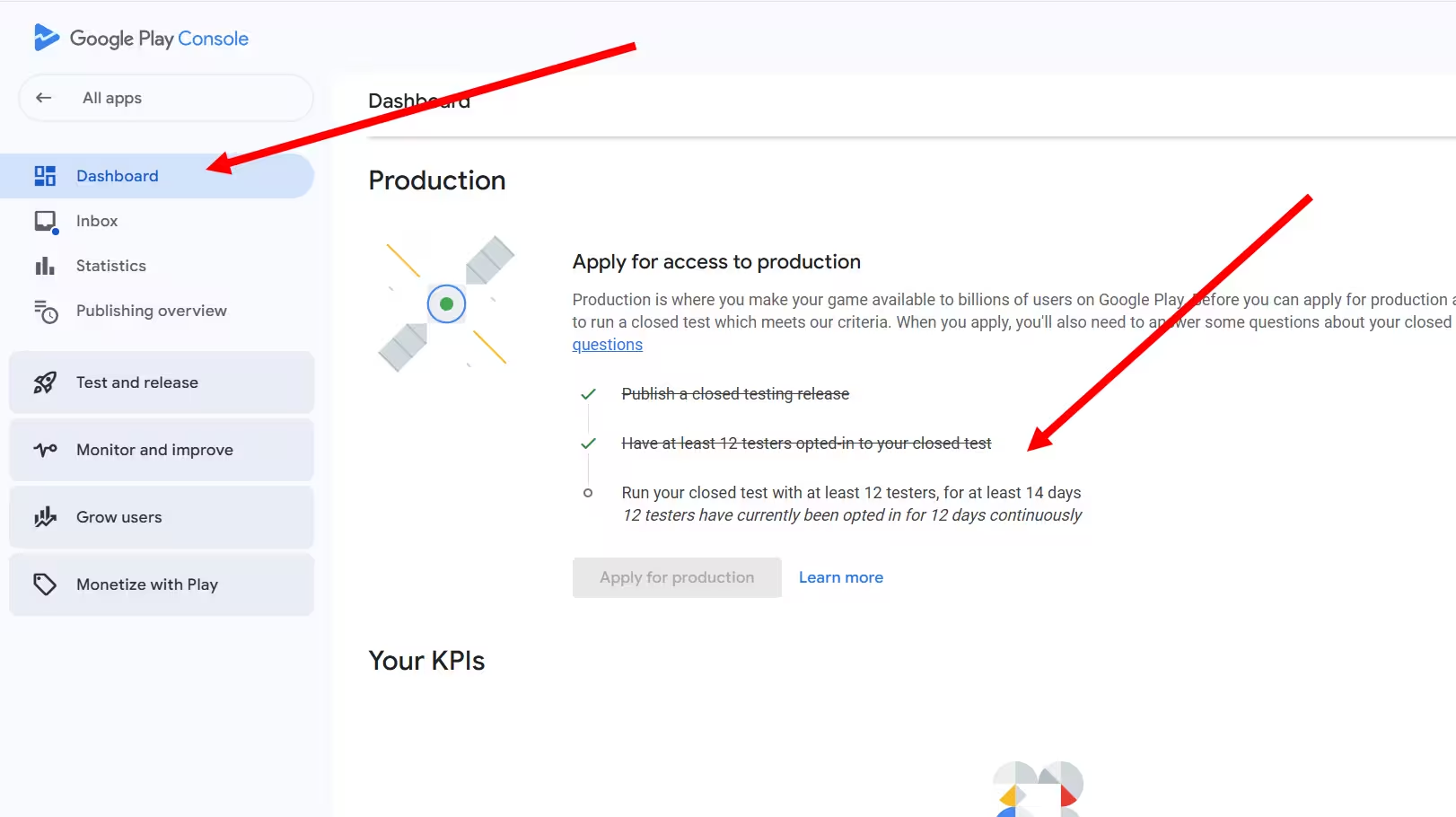
The 14-day clock is tied to your testers, not your build. Google's requirement is measured by whether you have maintained at least 12 opted-in testers for the last 14 days continuously. Your app's version number, how many times you upload a new AAB, and what you change in your release notes are simply not part of that timer.
This exact question comes up again and again on the Google Play Developer Community - whether creating a new release for the closed test resets the 14 days, or whether the counter resets when you update the app. Rather than quote forum replies word-for-word that we could not independently verify, this guide leans on Google's own Play Console Help documentation, which defines the requirement purely in terms of opted-in testers and time, never in terms of build uploads.
Across the 9,800+ apps we have supported through this process, a routine build update to the same closed track has never, on its own, reset a clock. Not sure about a specific action? Use the checker below - pick what you are about to do and it tells you instantly whether it touches your 14-day timer.
Which action are you worried about?
Based on Google's published Play Console requirement (opted-in testers x continuous days) plus widely reported developer experience. The two community-flagged risks are marked as such.
What Actually Resets the 14-Day Timer?
The continuous 14-day window is best understood as a consistency check, not a passive calendar countdown. Google wants to see that you held at least 12 opted-in testers without interruption. There are only two confirmed triggers that break that continuity:
Opted-in count drops below 12
If even one tester opts out and you fall to 11, the continuous streak can break and you start the full two weeks again. This is the number one reason DIY developers fail.
Testers formally opt out
A tester opts out by opening the testing web link and choosing to leave. This is different from uninstalling, and it only hurts the clock if it pushes you under 12.
Uploading a new build is not on that list. Neither is fixing a typo in your store listing, a tester submitting feedback, nor your app crashing on a tester's device - that last one is the entire point of testing. The simulator below makes the difference obvious: hammer the update button and nothing moves, but lose testers below 12 and the streak collapses.
What does NOT reset the clock
Uploading a new AAB to the same track
Editing release notes or store listing
A tester submitting feedback
Your app crashing on a tester's device
Bumping your version code or version name
A tester uninstalling without opting out
How Do I Push an Update to a Closed Test?
Pushing an update is the same flow as your very first release, with one important difference: you create the new release on the same closed testing track your testers are already opted into. You are not starting a new test - you are adding a build to the test already running, which is exactly why the 14-day clock keeps ticking. Here are the two steps in Play Console.
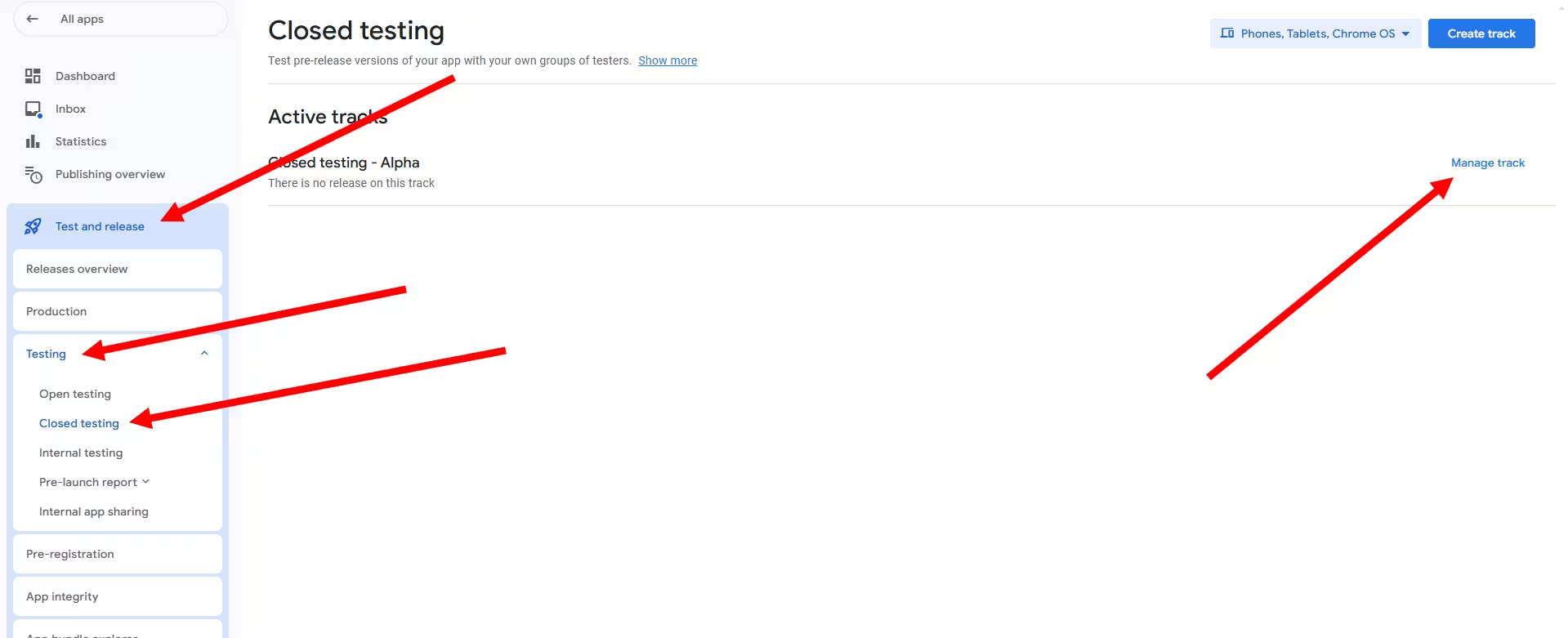
Create a new release on your closed track Testing > Closed testing > Manage track
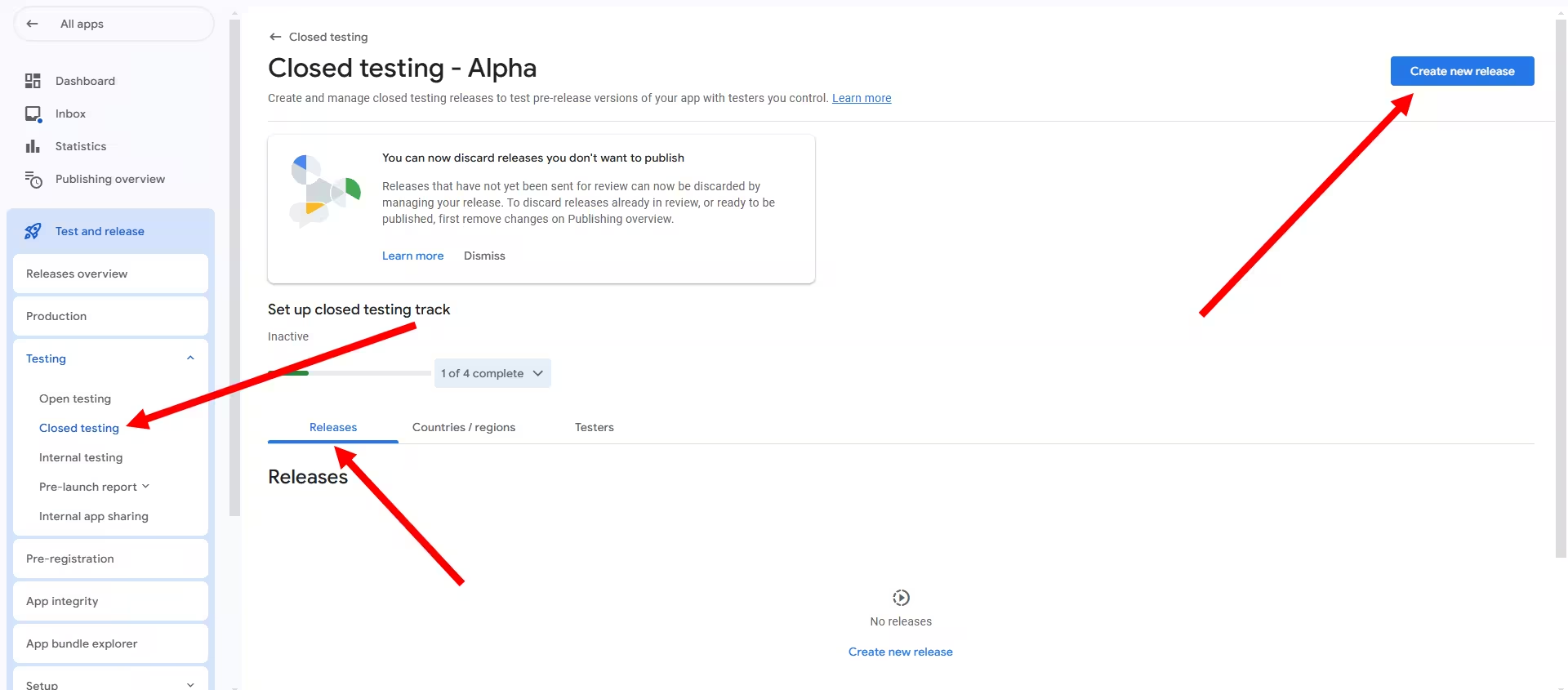
Open the closed testing track you have been running, click Create new release, and upload your updated app bundle (AAB). Add short release notes describing what changed, then save. Keep it on the same track - that is what preserves your continuous 14-day window.
Review and roll out the update Review release > Start roll-out
Step through Next and Review release, then start the roll-out to your closed track (and click Send changes for review on the Publishing overview if prompted). Once the new release is live (Google notes a published change can take up to several hours to reach testers), their devices auto-update to the new build - no reinstall and no second opt-in.
This never resets your clock. Because you release onto the same closed track your testers are already opted into, the 14-day continuous window keeps running underneath the new build. You are adding a build, not starting a new test - which is the whole answer to the question this guide is built around.
What Is the Difference Between Invited and Opted-In Testers?
This distinction trips up more first-time publishers than any other, and it is the key to understanding why builds do not matter to the clock. Google's system moves testers through a funnel, and only the later stages carry weight.
Invited
You added an email address to your tester list or Google Group. Nothing more has happened yet.
Opted-in
They clicked your opt-in link, signed in with their Google account, and chose Become a tester. This is the status the 14-day clock measures.
Installed & active
They downloaded the app and keep using it. This does not change the raw count, but it is what Google weighs for engagement at production-access time.
As Google's documentation makes clear, adding an email is not enough. Each tester must open the opt-in link, authenticate, and explicitly become a tester before they count. This is also exactly why an app update never resets your progress: your testers never leave the opted-in state, so the clock keeps running across every new build. For a full walkthrough, see our guide on how to invite testers correctly.
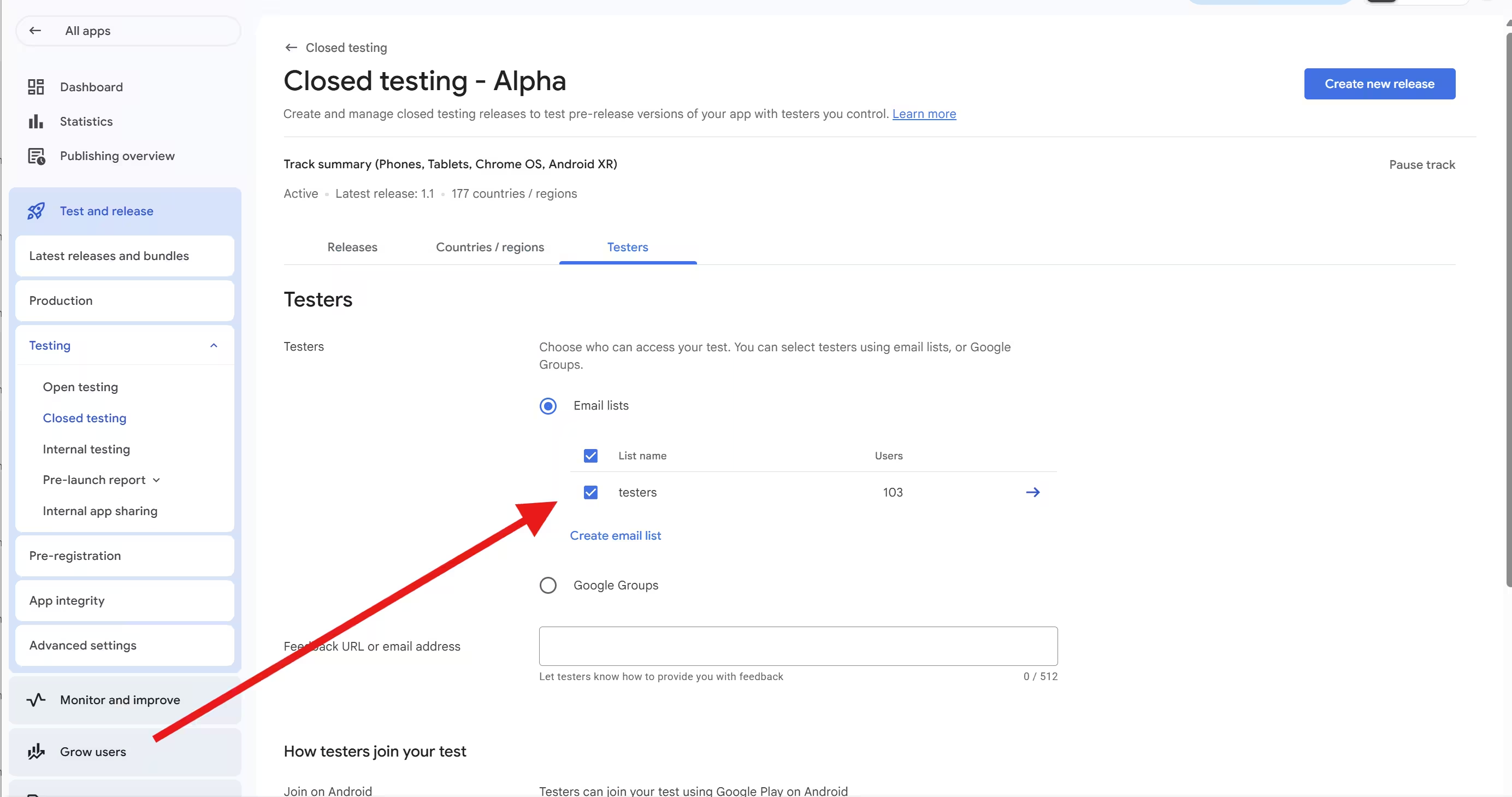
Tip from managing thousands of tests: run your testers through a Google Group rather than a static email list. With a Group wired into Play Console, you swap a tester in or out by editing the Group - the opt-in link stays the same and the track keeps running. That removes the risk of accidentally wiping active testers while you adjust your list, which is one of the few things that can actually break your streak.
What Is the Exact Google Requirement Wording?
Google's official Play Console Help page, "App testing requirements for new personal developer accounts," states it precisely:
"If you have a newly created personal developer account, you must run a closed test for your app with a minimum of 12 testers who have been opted-in for at least the last 14 days continuously."
Google Play Console Help · answer 14151465And separately, on the moment you apply for production access:
"At least 12 testers must be opted-in to your closed test when you apply for production access. They must have been opted-in for the last 14 days continuously."
Google Play Console Help · answer 14151465Google also spells out, in its own words, that the days must be consecutive: it will not count testers who opted in, tested for less than 14 days, and then opted out, and even if they opt back in, the 14 days must be consecutive to count. That single clause kills the "14 days is cumulative" myth on its own - and, just as importantly, it says nothing about your builds.
Three facts to lock in
Is Pushing Updates During Testing Good or Bad?
This is where developer anxiety flips into opportunity. Pushing updates during your closed test is widely viewed as a positive engagement signal. It is worth separating what Google officially says from what the developer community has concluded, because the two overlap without being identical:
Keep iterating and fixing
Play Console Help encourages ongoing iteration: continue to use closed testing while you fix user-reported issues and bugs, and updating your app in closed testing before going to production is "a great way to minimize low quality reviews and ratings."
When you apply for production access, the questionnaire asks you to describe the engagement you received and what you did with tester feedback.
Active beats frozen
Practitioners go further: an app frozen at version 1.0 for 14 days with zero activity looks like check-the-box testing, while one that ships updates in response to feedback looks like genuine development. Some developers deliberately push two or three small updates to show responsiveness.
This is community consensus and reasonable inference, not a published Google rule. Google has set no numeric "ship X updates" requirement.
The takeaway: updating is safe and encouraged, and the engagement story you build with it can help you answer the production-access questionnaire. The only real risk comes from what you ship, not the act of shipping - which leads to the one genuine caveat.
Can a Bad Update Reset My Clock Indirectly?
Yes - and this is the one caveat that matters. While the act of updating never resets the timer directly, the consequences of a broken update can. Follow the chain:
So the rule is simple: update freely, but vet each build for baseline stability before pushing it to your closed track. And never run at exactly 12 testers, because a single opt-out from a bad build can sink you. A buffer of testers above 12 absorbs that risk.
Read the chain carefully: the reset is never caused by the update. It is caused by dropping below 12 opted-in testers. The broken build is just the thing that triggered the opt-outs. Keep your builds stable and keep a buffer, and the indirect risk disappears too.
Do Testers Need to Re-Install or Re-Opt-In After an Update?
No. Once a tester has opted in and installed your app, Google handles updates automatically. There is nothing for them to click and nothing for you to re-send.
Updates roll out automatically
Google's Play Console Help, in Set up an open, closed, or internal test (answer 9845334), states it plainly: "Once your testers have installed your app, they'll automatically be updated to use the test version within a few minutes." Testers stay opted in across every build - no reinstall, no second opt-in click.
One timing caveat from that same Google page: when you publish additional changes, they "may not be available for testers for several hours" before the automatic on-device update kicks in. But the testers' opted-in status - which is what the 14-day clock measures - carries forward across each new AAB regardless. This is exactly why a build update does not reset the clock: the testers never left.
Important exception New permissions can interrupt the silent update
One kind of build does not always roll out silently: an update that adds a new dangerous (sensitive) permission such as ACCESS_FINE_LOCATION, camera, or microphone. Depending on the permission and your target API level, Google Play may surface an Update that the tester has to tap and approve by hand instead of installing it in the background - and anyone who ignores it stays parked on the old build. Even when it does install silently, the new permission is only granted at runtime, so a permission-gated feature can look broken until the tester allows it.
In a closed test that is a quiet trap: push a permission-heavy update on Day 5 and your active-tester numbers can sag - the exact engagement signal Google weighs at production-access time - because half your testers never saw the prompt. A new high-risk permission can also trigger a Permissions declaration review that delays the build from publishing at all.
Before you roll out mid-test: diff your new manifest's permissions against the live build. If the permission set changed, message your testers to open the Play Store and update manually (and grant the new prompt), and budget for a possible declaration review.
Common Closed Testing Myths, Debunked
Most of the panic around updating comes down to a handful of myths. Here are the five that cost developers the most sleep, with what is actually true:
Myth 1"Creating a new release resets the clock."
Myth 2"Uninstalling equals opting out."
Myth 3"The 14 days is cumulative."
Myth 4"Exactly 12 testers is enough."
Myth 5"Testers must use the app every single day."
What Resets the Clock vs What Does Not
Here is the whole question on one screen. Save it, screenshot it, or send it to whoever on your team keeps asking. Anything tied to your build is safe; only things tied to your tester count are not.
| Action | Resets the 14-day clock? |
|---|---|
| Uploading a new AAB to the same closed track | No |
| Editing release notes or store-listing metadata | No |
| A tester submitting feedback | No |
| Your app crashing on a tester's device | No |
| A tester uninstalling (without opting out) | No* |
| Opted-in tester count dropping below 12 | Yes |
| A tester formally opting out via the web link | Yes** |
| Pushing a broken build that drives opt-outs below 12 | Indirectly |
| Pausing the closed testing track | Reported risk |
| Overwriting your tester list and omitting active testers | Reported risk |
* The timer technically continues, but uninstallers rarely re-engage. ** Only if it drops you below 12. The last two rows are community-reported caution, not confirmed Google documentation, so treat them as "do not risk it" rather than stated rules. Using a Google Group sidesteps the list-overwrite risk entirely.
How the Requirement Has Changed Over Time
If you are reading older tutorials, this is why the numbers do not match. The duration has always been 14 continuous days; only the tester count moved.
Before November 2023 there was no required closed test to reach production. You could publish without recruiting testers.
Personal accounts created after November 13, 2023 had to run a closed test with 20 opted-in testers for 14 continuous days. Organization accounts were exempt.
On December 11, 2024 the minimum dropped from 20 to 12, with the 14-day duration unchanged. Organization accounts remain exempt.
Any guide still telling you to recruit 20 testers is out of date. We cover the switch in detail in what changed from 20 to 12 testers.
2026 Policy Changes You Should Know About
Closed testing does not exist in a vacuum. A few 2026 deadlines can intersect with your launch timeline - none of them change how the 14-day clock works, but they can collide with your window if you are not watching the calendar:
2026 deadlines that intersect your timeline
Dates per Google Play Console Help (target API level) and the Android Developers Blog (developer verification). Verification timing is phased and may expand across 2026-2027, so confirm against the official pages before you plan around it. Our 2026 publishing requirements guide tracks the full list.
How PrimeTestLab Keeps Your Clock Running
The hardest part of closed testing is not understanding the rules; it is keeping 12 or more real humans opted in and engaged for 14 unbroken days while you iterate. That is exactly what PrimeTestLab is built for. We provide real-device, opted-in testers and guide your Play Console setup so the clock starts cleanly and stays running while you ship fixes. See our full Google Play closed testing service for what is included. We maintain a 99.9% success rate across 9,800+ apps, with testing live in 4-6 hours.
You add our testers in Play Console, share your testing URL, and your clock starts. From there you can update your build as often as you like - the testers stay opted in, so the streak keeps running underneath you.
Most developers pick more than the 12-tester minimum precisely so a single opt-out - including one caused by a bad build - cannot drop them below 12 and reset the clock. A buffer is the cheapest insurance against the only thing that actually breaks your streak.
Frequently Asked Questions
Can I update my app during closed testing without restarting the 14 days?
Yes. Uploading a new build to your existing closed testing track does not restart the 14-day continuous window. The clock is tied to keeping at least 12 testers opted in continuously, not to your app version. Testers are updated automatically and stay opted in, so your progress carries forward across builds.
What is the only thing that resets the closed testing clock?
The continuous 14-day window breaks when your opted-in tester count drops below 12, or when testers formally opt out and push you under the minimum. Build updates, store-listing edits, and crashes do not reset it. Keeping a buffer of testers above 12 is the most reliable way to protect your streak.
What is the difference between invited and opted-in testers?
Invited means you added someone's email to your list, which counts for nothing. Opted-in means they clicked your link, signed in, and chose Become a tester, which is the status the 14-day clock measures. Only opted-in testers count toward the requirement, so always confirm testers actually completed the opt-in step.
Do testers have to re-opt-in after I push an update?
No. Once a tester opts in and installs, Google delivers your updates automatically within minutes. They do not reinstall or click the opt-in link again. Their opted-in status, which is what the 14-day requirement measures, continues uninterrupted across every new build you ship to the same closed track.
Is uninstalling the same as opting out?
No. A tester only formally opts out by visiting the testing web link and choosing to leave. If they merely uninstall, the timer technically keeps running. In practice, though, testers who uninstall rarely return, which can weaken the engagement you present when you apply for production access, so it is still worth keeping testers active.
Does Google want me to push updates during the test?
Google's documentation recommends continuing to fix issues in closed testing before production and routinely testing future updates. Developer-community consensus goes further, treating active updates as a positive engagement signal versus a frozen app that looks like box-checking. Google has not published a required number of updates, so iterate genuinely rather than churning.
How many testers do I really need for closed testing?
Google's minimum is 12 opted-in testers for 14 continuous days for personal accounts created after November 13, 2023. Because a single opt-out can drop you below 12 and break your streak, many developers run 20 to 25 testers for a buffer. PrimeTestLab offers 12, 20, and 25 tester plans starting at $19.99.
Bottom Line
Summary
Updating your app during the 14-day closed test is safe, normal, and encouraged. The clock is measured by keeping at least 12 testers opted in continuously, so a new build never resets it on its own. The real risks are dropping below 12 opted-in testers, testers formally opting out, or shipping a build so broken that testers quit. Ship your fixes, iterate on feedback, and protect your tester count with a buffer above the minimum. If you want a clock that simply does not break, PrimeTestLab keeps 12 to 25 real testers opted in from $19.99, with testing live in 4-6 hours. See pricing plans →