















Quick Answer (2026)
Google Play requires a closed test with at least 12 testers opted in continuously for at least 14 days before you can apply for production access, and only for personal developer accounts created after November 13, 2023. Google reduced the minimum from 20 to 12 on December 11, 2024; the two-week period did not change.
Twelve opted-in testers is the threshold that makes you eligible to apply for production access - it is not a guarantee that Google will grant it. Google can still require more testing, and the reasons it publishes are having fewer than 12 opted-in testers and insufficient tester engagement. Policy re-verified against Google’s published documentation on August 17, 2026.
As of 2026 the rule is unchanged: an affected personal developer account needs at least 12 testers opted in continuously for at least 14 days. PrimeTestLab provides 12 pre-qualified testers starting at $19.99 with testing beginning within 4-6 hours.
Personal developer accounts created after Nov 13, 2023
Table of Contents
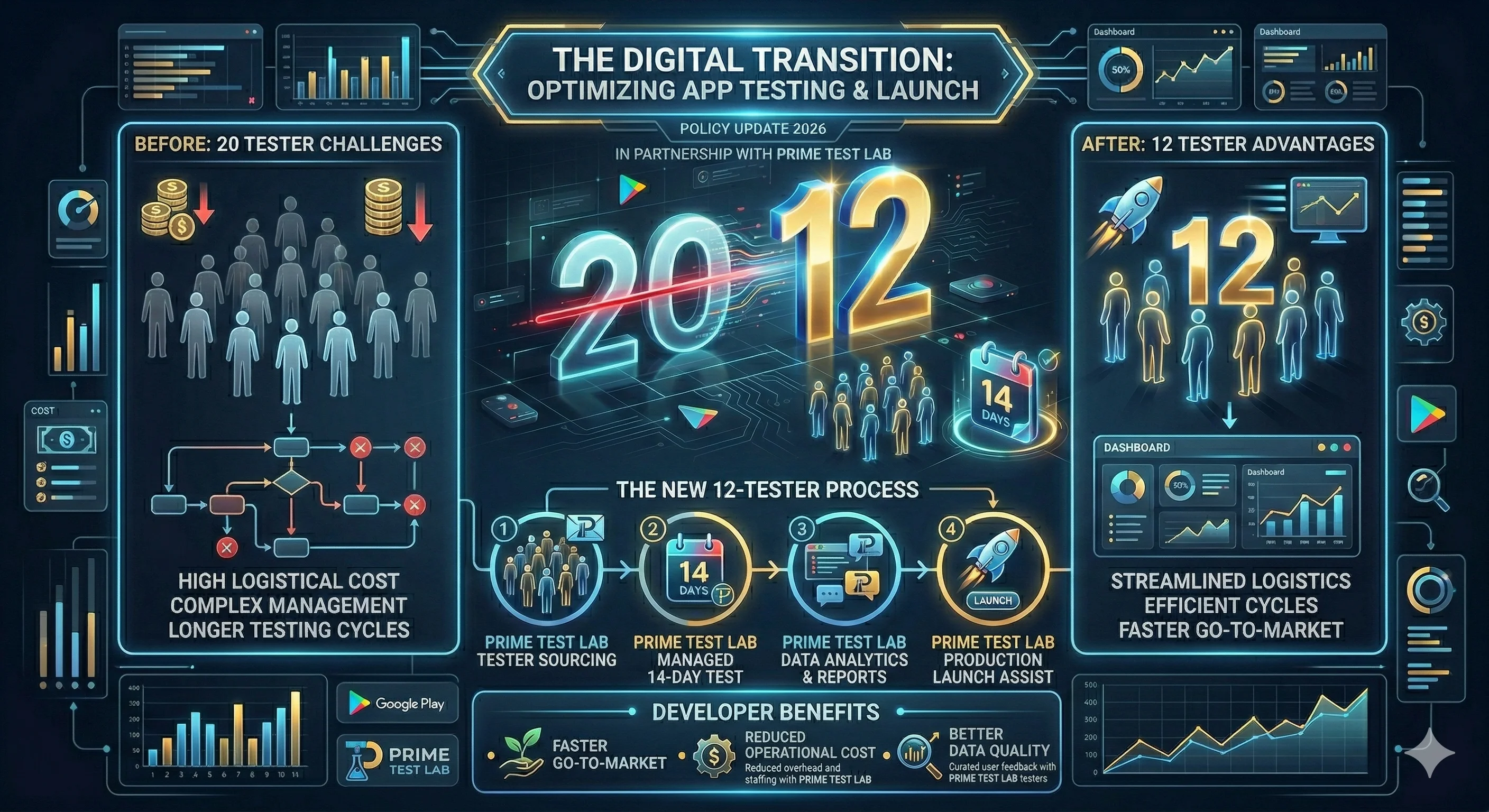
Did Google Change the Tester Requirement from 20 to 12?
Yes. Here is the clearest timeline based on Google's own documentation and announcements.
Timeline of the Change (What Actually Happened)
Google Play had testing tracks (internal, closed, open), but there was not a universal "minimum testers for 14 days" gate for new personal accounts to unlock production access.
Google announced that new personal developer accounts would be required to test apps with at least 20 people for a minimum of two weeks before applying for production access.
Google updated the policy and stated it was now requiring 12 instead of 20 testers for personal developer accounts, after hearing that 20 testers was challenging for developers starting with smaller audiences. Google’s announcement, updated December 11, 2024 →
Google describes it as a closed test with a minimum of 12 testers who have been opted in continuously for at least 14 days, for personal accounts created after November 13, 2023. App testing requirements, Play Console Help →
What Changed and What Did Not
Exactly one number moved on December 11, 2024. Everything else about the requirement stayed where it was, which is why a 2024 guide can still be right about the process and wrong about the count.
| Requirement | Before Dec 11, 2024 | Current rule (2026) |
|---|---|---|
| Minimum testers | 20 | 12 |
| Testing period | At least 14 days, continuously opted in | Unchanged |
| Who it applies to | Personal accounts created after Nov 13, 2023 | Unchanged |
| What it unlocks | Applying for production access | Unchanged |
Why Developers Got Confused
Most confusion comes from two things:
People still see old videos, posts, and tutorials referencing 20 testers because that was the rule for a long time after the November 2023 rollout.
Even under the new rule, 12 is the minimum, not a guarantee of approval. Google still checks your testing story and tester engagement when you apply for production access.
Who Does the 12 Tester Requirement Apply To?
This rule is specifically about new personal developer accounts, not "every developer forever."
"The testing requirements apply to developers with personal accounts created after November 13, 2023."
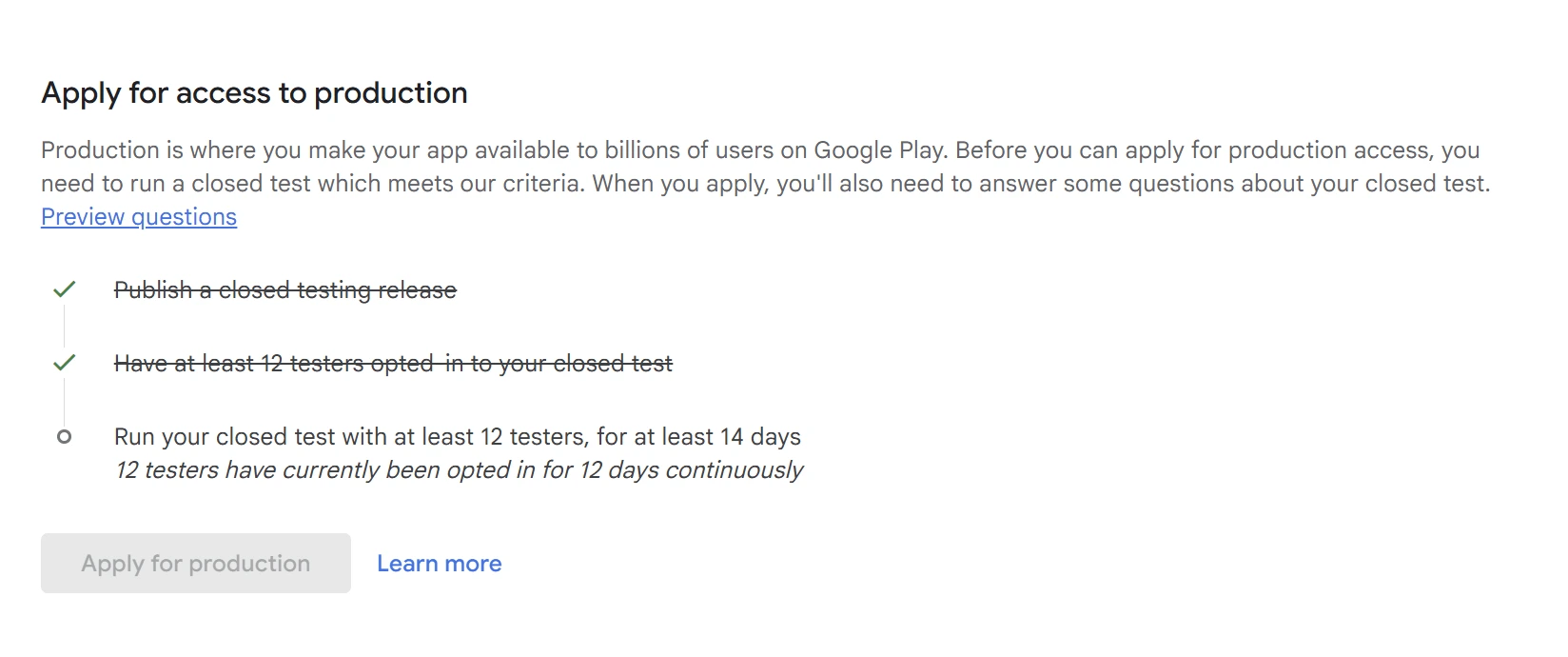
Until you meet the requirements, some Play Console features such as Production and Pre-registration can remain disabled. If you are unsure which account type you have, check your Play Console account details and your app dashboard messaging. Play Console is the only account-specific source of truth here: if it shows the testing requirement for your app, the requirement applies to your app.
| Account Type | Created | 12 Tester Rule |
|---|---|---|
| Personal Account | After Nov 13, 2023 | Required |
| Personal Account | Before Nov 13, 2023 | Not in scope |
| Organization Account | Any date | Not in scope * |
* Google writes this requirement as a scope - personal accounts created after November 13, 2023 - rather than as a list of exemptions. Read “not in scope” as “the published rule does not describe you”, and check two things before planning around it. A Google Play Product Expert has reported that an app transferred from a personal account can keep the testing requirement after the transfer, so a move to an organization account is not a documented way out. And an individual app can show the requirement on its own dashboard whatever the table says. The requirement Play Console shows for your app is the answer that counts.
What Does “12 Testers for 14 Days” Actually Mean?
The strict minimum for eligibility is three conditions at once:
Invited, Opted In, or Actually Testing?
Three different things get called “a tester”, and only one of them is the state Google counts. Most of the panic about missing testers is really a gap between the first two rows below.
Can the 12 Testers Start on Different Days?
Yes. Nothing requires the group to start together. What matters is how many testers satisfy the full continuous period at the moment you apply, so a staggered start moves your earliest application date rather than invalidating the test.
Eight testers opt in on day 1 and four more join on day 5. On day 15 only eight of them have completed 14 continuous days, so what you are waiting for is the twelfth qualifying tester, not the calendar. Play Console is the surface that tells you when the requirement is satisfied.
What Happens if a Tester Opts Out?
That person stops providing a continuous opt-in period, and their days do not bank - opting back in later starts them again. If enough other testers still satisfy the period, one departure changes nothing. If it leaves fewer than 12 who satisfy it, your eligibility date moves out until a replacement has completed the period themselves. Google publishes no rule that returns the rest of your testers to day zero, so treat pages that describe a global timer reset as guesswork.
Do Testers Have to Open the App Every Day?
Google does not publish a daily-opening requirement, a minimum session length, a device-model quota or an emulator rule for this count. The published condition is continuous opt-in for at least 14 days. Engagement is assessed separately, when you apply, and Google names insufficient tester engagement as a reason it may require more testing - without publishing where the line sits. Ask testers to use the app the way real users would; do not coach them toward an invented daily number, and do not pick a tester service on the strength of one.
Hidden device fingerprints, five-minute sessions, IP diversity rules and automatic timer resets are inferences other sites have published as though they were policy. Google has not documented any of them for this requirement.
That is the requirement. Everything below is risk management rather than policy:
Many developers aim for 20 to 25 testers as a safety buffer so they are less likely to fail the requirement due to drop-offs or low engagement. PrimeTestLab also recommends using more than the minimum for a smoother approval path, especially if your app is important to ship on a deadline.
Official requirement vs practical recommendation. The left column is what Google documents. The right column is PrimeTestLab’s advice - useful, and not something Google requires of you.
Is 12 Testers Enough to Get Production Access?
Twelve opted-in testers is the minimum that satisfies the tester-count condition. It is not a guarantee of production access: Google may require you to keep testing, and it gives having fewer than 12 opted-in testers and insufficient tester engagement as reasons.
Google's own production access application asks for information about your closed test, including:
- Engagement details - whether testers used all features
- Usage consistency - whether usage was consistent with real production usage
- Feedback summary - a summary of feedback and how you collected it
Google also says that if your app is not ready to be published, you may be required to continue testing (Play Console Help). The reasons it gives are having fewer than 12 opted-in testers, or testers not being engaged with your app during the closed test. Those are the examples Google publishes, not a complete list of what it looks at.
The number is necessary, but engagement is what makes approvals easier.
If you do exactly 12 and several testers barely open the app, you have no buffer and you may struggle to demonstrate real testing quality.
If you run 20 to 25 testers instead - a PrimeTestLab recommendation, not a Google requirement - you gain:
- Buffer against testers who join late or go inactive
- More device diversity across different Android versions and manufacturers
- More realistic usage patterns and feedback you can summarize in the questionnaire
This is why developers searching for “closed testing success rate” are really asking: “How do I finish this once, without pushing my eligibility date out?”
Why Google Looks Past the Number
Because production access is not only a checklist. It is also a quality gate - and the tester count is the part of it Google puts a number on.
"Testing helps verify correctness, usability, and reduces low quality user experiences. Developers who regularly use testing tools are able to provide higher-quality experiences."
When you apply for production access, Google asks you to describe your test. The exact form wording changes over time, but the questions have consistently covered things like:
Even though the policy changed from 20 to 12 testers, the mindset did not change: Google wants evidence of real testing.
How Closed Testing Works Now (Simple Checklist)
Use this as your "do not waste 14 days" checklist.
If your personal developer account was created after November 13, 2023, assume the rule applies. Organization accounts sit outside the scope Google published, which is not the same as a documented exemption - check what Play Console shows for your app before you plan around it.
Google recommends using testing tracks and explains the purpose of internal vs closed vs open testing. Closed testing is the track required before applying for production access for affected accounts. See how closed testing works step by step.
Each tester has to be opted in continuously for at least 14 days. Opting out and back in does not bank the earlier days - that tester starts their continuous period again.
Google publishes a condition, not a countdown: at least 12 testers opted in continuously for at least 14 days when you apply. Nothing in its documentation says the rest of your testers go back to day zero if you dip below 12, so treat “one dropout resets everything” as an internet claim rather than a rule. What a dropout does do is real enough: if fewer than 12 testers still satisfy the period, you are not eligible until a replacement has completed it themselves, which moves your date out by up to two weeks. This is why the Enterprise plan (25 testers) exists: a bigger group means a departure is less likely to move your date at all.
Uninstalling and opting out are different actions in Play Console, but Google’s public documentation does not spell out how an uninstall interacts with the opted-in count - treat the exact mechanics as undocumented rather than settled, whatever you read elsewhere. What Google does document is the other half of the review: it looks at whether testers were engaged, and a group that installed once and vanished is exactly what insufficient tester engagement describes. From our experience helping 9,800+ apps through closed testing, testers who uninstall almost never come back and engage again. The safe instruction to give testers: stay opted in and keep the app installed until you have applied.
Google notes you will be asked to summarize testing feedback later. Build a small file with:
- Top bugs found
- Fixes shipped during the test, if the test surfaced something worth fixing
- What feedback channels you used (email, form, Play feedback, WhatsApp group, etc.)
When Play Console shows the requirement as met, you apply from the dashboard and answer questions about your test and readiness. Google indicates reviews usually take 7 days or less, but they can take longer - do not plan a launch date around the lower number.
Google’s guidance describes testing best practices that may include gathering tester feedback and acting on it through app updates. That is not a required release count, and there is no published rule that rewards shipping something small to look busy. So: if the test surfaces a crash, a usability problem or a confusing flow, fix it and write down what changed - you will be asked to summarize your testing when you apply. If the test genuinely surfaces nothing worth changing, do not manufacture an update to satisfy a requirement Google never wrote.
Common Edge Cases
Real tests rarely follow a clean day 1 to day 14 path. These three questions cost developers the most time, and all three are places where confident internet advice is worth less than the message on your own dashboard.
Do I Repeat the 12-Tester Test for Every App or Every Update?
The requirement is a gate on production access for an app, not a tax on every release. Once an app has production access, ordinary updates to it do not send you back through the mandatory closed test - you keep using the testing tracks because they are useful, not because the gate reappears. A different app on the same affected account is a separate case, so check what Play Console shows for that app before assuming it is either exempt or blocked.
Can I Transfer the App to an Organization Account to Skip It?
Do not plan around it. Google does not publish an app transfer as a route out of the requirement, and a Google Play Product Expert has reported that an app transferred from a personal account can keep the testing requirement afterwards. Treat a transfer as an ownership decision with its own verification work, not as a shortcut around 14 days. If the requirement is showing on your app today, assume it follows the app.
What if Play Console Says More Testing Is Required?
It means Google was not satisfied that the test met the bar. The message you received is the most specific evidence you have, so read it before changing anything. The two reasons Google publishes are having fewer than 12 opted-in testers and insufficient tester engagement; those are the examples it gives rather than a complete list of what it considers.
- Keep the closed test running. Nothing is gained by taking it down, and stopping it can cost you the continuous opt-in period you have already built.
- Check the number first. How many testers are opted in right now, and how many have been opted in continuously for the full period? That is the one part of this you can measure.
- Improve the real signal. Testers using the app, feedback written down, and fixes for what the test actually surfaced. Manufacturing activity is not a documented route to approval.
- Reapply once the requirement is met and answer the questionnaire from your records rather than from memory.
Deeper dive: why closed testing gets rejected and what to do next.
How PrimeTestLab Helps You Finish Closed Testing Faster
There are four realistic ways to get 12 testers opted in: people you know, a user community that actually wants your app, a developer exchange where you test someone else’s app in return, or a paid testing service. The first three cost nothing and take longer - seven legitimate ways to find testers covers them properly. What follows is the paid option, described by the company selling it.
If your main problem is "I cannot find reliable testers," PrimeTestLab is designed specifically for this requirement.
Current PrimeTestLab Packages
- Meets Google's minimum
- Real Android devices
- Full 14-day coverage
- Maximum safety margin
- Best device diversity
- Strongest first-attempt rate
- Safety buffer included
- Better device diversity
- Higher approval confidence
If you want the fastest path with the least risk, most developers choose more than the minimum so that one inactive tester does not ruin a full two-week cycle. PrimeTestLab's own guidance also recommends 20 or 25 testers for a higher first-attempt approval chance.
Frequently Asked Questions
Did Google Play change the tester requirement from 20 to 12?
Yes. Google announced the requirement for new personal developer accounts in November 2023 with a 20-tester minimum, then updated it on December 11, 2024 to require 12 instead of 20. The minimum two-week testing period did not change.
How many testers do I need for Google Play in 2026?
If your personal developer account was created after November 13, 2023, you need a closed test with at least 12 testers who have been opted in continuously for at least 14 days before you can apply for production access. That is still the rule in 2026; nothing has changed since December 11, 2024.
What does “opted in continuously for 14 days” mean?
It means each tester has to stay opted in for at least 14 days without a gap. Someone who opts in, opts out after a few days and opts back in later starts that continuous period again - the earlier days do not bank. Google frames the condition around opt-in status and does not publish how uninstalling interacts with the count, so the safe advice is to ask testers to stay opted in and keep the app installed until you have applied. Engagement is judged separately when you apply.
Do testers have to open the app every day?
No. Google does not publish a daily-opening requirement or a minimum session length for this requirement. What it publishes is the opt-in condition: at least 12 testers opted in continuously for at least 14 days. Engagement is still assessed when you apply, and insufficient tester engagement is one reason Google gives for requiring more testing, so genuine use matters even though no daily quota exists.
Do I need 12 testers for every app and every update?
The requirement gates production access for an app, not each release afterwards. Once an app has production access, ordinary updates to it do not send you back through the mandatory closed test. A different app on the same affected account is its own case, so check what Play Console shows for that app rather than assuming either way.
Is 12 testers enough to get production access?
12 opted-in testers is the minimum that makes you eligible to apply. Google also reviews tester engagement and your answers about the test, and it may require you to continue testing - the reasons it publishes are having fewer than 12 opted-in testers and insufficient tester engagement.
Why do some developers use 20 to 25 testers even though 12 is the minimum?
Because it provides a buffer against inactivity and makes it easier to show real engagement and feedback. PrimeTestLab also recommends using more than the minimum for a stronger first-attempt approval chance.
How fast can I get 12 testers with PrimeTestLab?
PrimeTestLab states that testing typically begins within 4-6 hours after you provide your testing URL and add tester emails in Play Console. Starter pricing starts at $19.99 for 12 testers.
Bottom Line
Summary
Google reduced the Play Console requirement from 20 to 12 testers on December 11, 2024, and the rule in 2026 is still the same: a closed test with at least 12 testers opted in continuously for at least 14 days, for personal developer accounts created after November 13, 2023. Twelve is the threshold that lets you apply for production access, not an approval - Google can still require more testing, and engagement is what it looks at next. If you need testers quickly, PrimeTestLab can provide 12 testers starting at $19.99 with testing typically starting in 4-6 hours, and larger 20 and 25 tester packages are available for extra safety. See pricing plans →