














Individual / Indie
Solo developers, hobbyists, and makers
- Applies to accounts created after Nov 13, 2023
- $25 fee, a government ID, nothing else
- Fastest to set up - minutes to register
Registered Business
Companies, studios, and regulated apps
- Needs a real legal entity and a D-U-N-S number
- Verified website and business documents
- Slowest to set up - D-U-N-S can take 30 days
Quick Answer
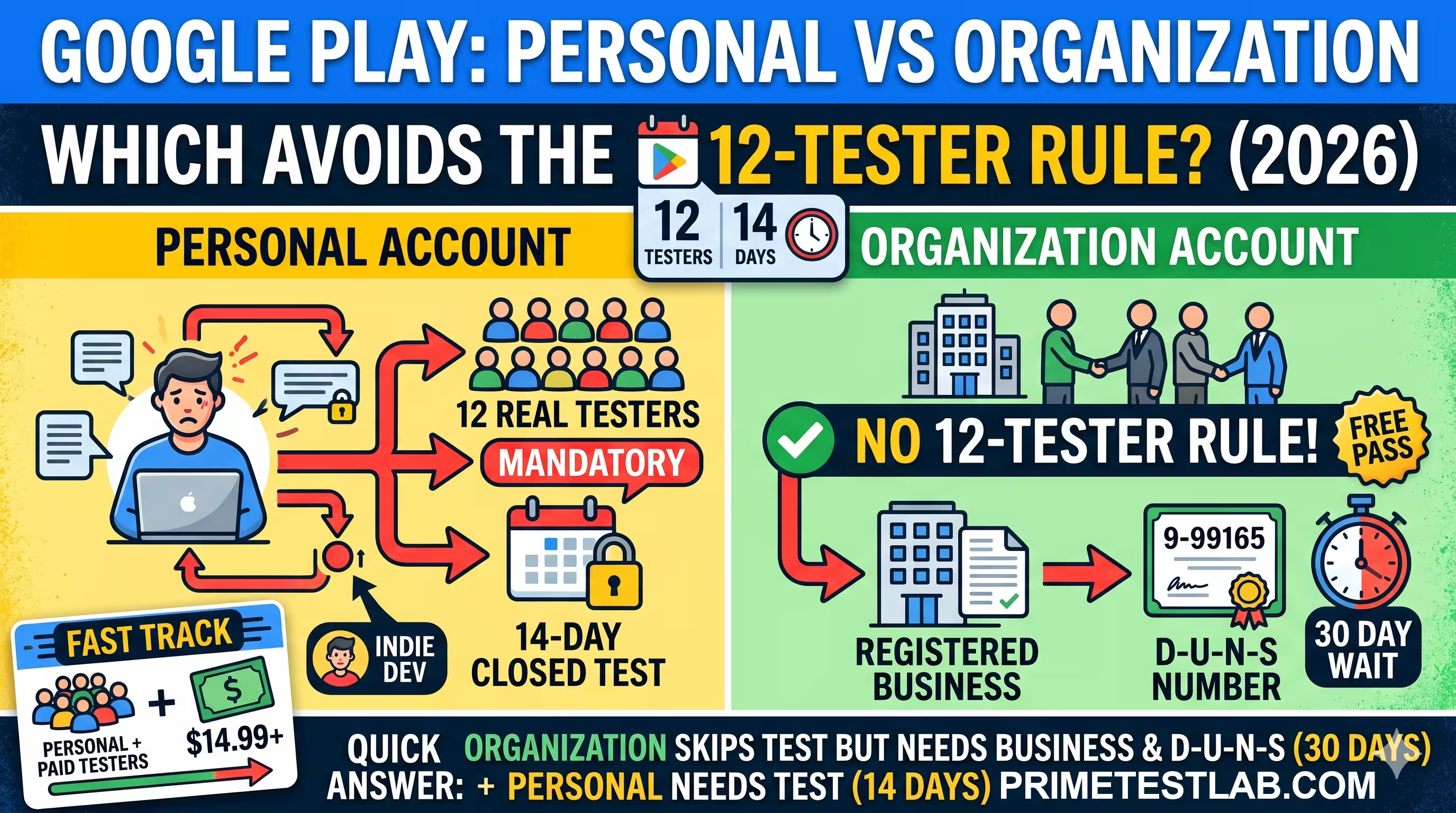
Organization Google Play accounts are not subject to the 12-tester, 14-day closed testing rule; personal accounts created after November 13, 2023 are. But an organization account requires a real registered business and a D-U-N-S number that can take up to 28 to 30 days to obtain, so for most solo developers shipping a single app, completing the 14-day closed test is faster and cheaper than forming a company. PrimeTestLab supplies 12 real, opted-in testers from $19.99, with testing starting within about 4 hours.
If you just created a personal Google Play developer account and hit the wall that says you need 12 testers for 14 days, you have probably already asked the obvious question: can I skip this by registering as an organization instead? The short version is yes - the rule is written to apply only to personal accounts. The longer version is that "just pick organization" is not free, fast, or available to everyone, and for a lot of developers it is the slower path. This guide lays out exactly who the rule applies to, how the organization exemption really works, what it costs in time and money, and how to decide which path fits you. It is current as of June 28, 2026.
In this guide
Which Account Type Skips the 12-Tester Rule?
Google Play has two developer account types: personal and organization. The mandatory closed testing requirement is scoped to personal accounts created after November 13, 2023. Organization accounts are not named in that rule, which is why a verified organization account can publish straight to production without running the 14-day test.
The catch is that an organization account is gated behind a verifiable legal business and a D-U-N-S number, so a solo hobbyist cannot select it on a whim. That single fact is what turns this from a simple toggle into a real decision - and it is the decision the rest of this guide helps you make.
The honest framing: organization accounts skip the test not because Google rewards businesses, but because the rule was written only for personal accounts. The exemption is real, but it is an exemption by omission - so it is best treated as highly likely rather than a written guarantee. We dig into that nuance below.
Decision Tool: Which Path Fits You?
Before the deep detail, get a fast read on your own situation. Answer four questions and this tool gives you a recommendation based on the same factors developers actually weigh: whether you already have a business, your app category, how many apps you ship, and your timeline. Nothing is sent anywhere - it runs entirely in your browser.
Personal or Organization: What Should You Pick?
Four quick questions. Your answer updates live as you go.
For a solo developer shipping one app with no existing business, the personal account plus a clean 14-day closed test is the fastest and cheapest route by a wide margin. Forming a company just to skip the test would cost more time and money than the test itself.
The one genuinely hard part is finding 12 testers who stay active for 14 unbroken days - which is exactly what PrimeTestLab handles, from $19.99.
Registering as an organization lets you publish under your company name and skips the 14-day testing gate. You will need a D-U-N-S number, a verified website, business documents, and a government ID, and you are already set up for the Android Developer Verification program.
Finance, health, VPN, and government apps must use an organization account regardless of the testing rule - a personal account will not be accepted. Get your D-U-N-S number and organization documents in order before you build.
What the 12-Tester Rule Actually Says
Google's Play Console Help article on testing requirements for new personal developer accounts states that you must run a closed test with at least 12 testers who have been opted in for at least the last 14 days continuously before you can apply for production access. Four details trip developers up:
It is 12, not 20
Google cut the minimum from 20 testers to 12, live in Play Console on December 11, 2024. The 14-day duration did not change. Any article still saying 20 is out of date - we cover it in the 20-to-12 change.
"Continuously" is literal
The 14 days must be consecutive. If a tester opts in, leaves, and opts back in, their clock resets. Testers must be real people on real Android devices with genuine Google accounts, actually using the app during the window.
Only closed testing counts
Internal testing (up to 100 testers) and open testing do not satisfy the gate. Closed testing is the only track that unlocks production access - see internal vs closed vs open testing.
There is a review after
Meeting the 14 days does not auto-publish. You apply through a three-section questionnaire and Google reviews it, usually in 7 days or less. We break it down in the production access answers.
This rule applies only to personal accounts created after November 13, 2023. Personal accounts created before that date, and organization accounts, are not in scope. That scoping is the entire basis of the organization "exemption" - which is worth examining closely, because it is not quite as absolute as it sounds.
Are Organization Accounts Really Exempt?
Mostly yes, with one honest caveat. Google's testing-requirements documentation only ever names personal accounts. The company does not publish a sentence that says "organization accounts are exempt." The exemption is an inference from how the policy is scoped, not an affirmative promise.
How to read it: the exemption is best understood as how Google structured the policy, not a loophole you are exploiting. In practice it holds, and verified organization accounts publish straight to production every day. But because it is defined by omission rather than stated outright, it is not airtight.
Because the exemption is defined by omission, a small number of developers with organization accounts have still seen the closed testing prompt appear in Play Console - usually as a leftover from an account migration or a UI artifact. So treat the exemption as highly likely rather than a hard guarantee.
Verify It in Your Own Console
Before you build a launch plan around skipping the test, confirm the exemption inside your own verified organization account. If the closed-testing prompt is showing for you, do not assume it is a bug and ignore it - resolve it in Play Console first. Building around an assumption you have not checked is how launches slip.
Can a Solo Developer Just Choose "Organization"?
No, and this is the part that catches people. To register and pass verification for an organization account, Google requires a D-U-N-S number tied to a verifiable legal entity. Its wording on this is blunt:
"We will not accommodate any exemptions or provide extensions for any organization accounts that fail to provide a D-U-N-S number." Google Play Console Help
That means an unincorporated solo developer cannot simply select "organization" to dodge the test. A sole proprietor operating only under a DBA, with no separate legal entity and no business documentation, will generally fail organization verification, because a sole proprietorship is not a distinct legal entity from the person. To use this path, most solo developers end up forming an LLC or a corporation first.
Do Not Fake a Business
Fabricating a business entity or using fraudulent corporate credentials to bypass the rule is a Terms of Service violation that can lead to permanent account termination. The organization route is legitimate only if you have, or are willing to create, a genuine business. There is no shortcut that involves making one up.
What an Organization Account Requires in 2026
Registering as an organization is a heavier process than a personal account. Here is everything Google asks for, and the detail that fails the most verifications is the matching: your legal name and address must be identical across the D-U-N-S record and your Google Payments profile.
D-U-N-S Number
A 9-digit Dun and Bradstreet ID, mandatory with no exemptions except certain government bodies or unsupported regions.
MandatoryLegal Name & Address
Must match the D-U-N-S record and your Google Payments profile exactly. Any mismatch across the three can trigger a verification failure.
Must matchVerified Website
A domain you confirm through Google Search Console. Social pages or placeholder domains will not pass.
Domain you ownOfficial Documents
A stamped IRS letter (CP575 or 147C confirming your EIN) or a state certificate of incorporation.
Business proof$25 Registration Fee
The same one-time fee personal accounts pay, by credit or debit card. It never recurs.
One-timeIdentity & Payments
Google verifies your payment profile, which can take up to 5 days, plus an identity review that usually takes a few days.
Up to 5 daysBy contrast, a personal account needs only a developer name, a verified email and phone, a government ID, and the $25 fee. No D-U-N-S, no business documents, no website verification. That gap is the whole reason a personal account is faster to open - and the whole reason it carries the testing requirement.
How Long a D-U-N-S Number Takes, and What It Costs
This is the single biggest reason the organization path is slow. A D-U-N-S number is free, but the standard turnaround is long. Google's own help pages give two figures - one says up to 28 days, another says up to 30 - so plan for the longer end. During that window you cannot finish verifying your Google Payments profile or complete registration, so you are effectively paused.
The iOS Shortcut
If you also publish on iOS, request your D-U-N-S number through the Apple Developer portal. Because of Apple's longstanding partnership with Dun and Bradstreet, numbers requested that way are often issued free within roughly five business days. The same nine-digit number then works for your Google Payments profile, which avoids the $229 fee entirely.
Ignore the Upsells and Watch for Scams
Dun and Bradstreet representatives often push paid credit-building packages that cost hundreds of dollars. You do not need any of that for Google Play - a free or basic expedited number is enough. The number never expires and has no renewal fee, so any invoice telling you to "renew" it is a phishing attempt.
What It Costs to Form a Business Just to Skip Testing
If you do not already have an entity, forming one purely to avoid 12 testers can quietly become the most expensive and slowest option. Stack the entity formation (often one to four weeks) on top of the D-U-N-S wait (up to 28 to 30 days) and the payments verification, and the organization route commonly takes several weeks. Here is how the two routes actually compare:
Form an entity + org account
To avoid the test by going organization.
Worth it only if you already have an entity or ship many apps
Personal + 14-day test
Keep the account you already have.
Fastest and cheapest for a solo developer with one app
Some States Make Path A Far Worse
Costs vary enormously by US state. California charges an $800 minimum annual franchise tax, due even in your first year and even if the app earns nothing. New York is the standout: under Section 206, every new LLC must publish a formation notice in two county-designated newspapers for six weeks - in 2026 that runs from roughly $230 in Albany County to $1,950 or more in Manhattan. Only a handful of states have anything like this, but if you are in one, it adds real cost and weeks of delay.
Personal vs Organization: The Honest Comparison
Everything above, side by side. Green marks the clear advantage, and flagged rows mark an added cost, a delay, or the hard blocker. The pattern is consistent: personal wins on speed and simplicity, organization wins on skipping the test - at the price of time, money, and paperwork.
The Migration Trap: Upgrading Mid-Project Rarely Helps
A common assumption is that you can start on a personal account, hit the testing wall, then "upgrade" to organization and skip the test. It does not work that cleanly. You cannot convert an existing personal account into an organization account - you have to register a new organization account from scratch.
Personal account
You hit the 12-tester wall
Organization account
Must be registered from scratch
On top of that, the testing requirement attaches to the app entry created under your personal account. To genuinely clear it, you would set up the app fresh under the new, verified organization account - which can mean a new package name and re-wiring anything tied to it, such as Firebase or OAuth configurations, and losing your existing internal testing history. If the package name is locked into external dependencies you cannot easily move, you can end up effectively stuck with the requirement despite having an organization account.
The Takeaway
Decide your account type up front, before you build, not after you hit the wall. If there is any real chance you will go the organization route, set it up first. If you are staying personal, plan the 14-day test into your launch from day one so the clock runs while you finish the app.
When Is Forming an Entity Actually Worth It?
Use this as a quick decision framework. Find the row that sounds like you, and the recommended path is on the right:
Solo developer, no business, shipping one app
Keep your personal account and complete the 14-day test. Fastest and cheapest by a wide margin - start the test on day one so the clock runs while you build.
You already have a registered business or a D-U-N-S number
Register as an organization. You skip the testing gate, and you are already set up for the Android Developer Verification program below.
Your app is finance, health, government, or VPN
An organization account is effectively required regardless of the testing rule. Start the D-U-N-S process immediately, and consider the $229 expedite if you are on a deadline.
You are a studio or serial publisher (3+ apps a year)
The entity pays off. On a personal account the test is per app, so five new apps means five separate 14-day cycles - at least 70 days of cumulative friction. An organization account removes that recurring tax.
You are in a high-cost state like California or New York
California's $800 annual franchise tax or New York's publication fees tilt a single-app decision further toward simply doing the test on a personal account.
Two 2026 Changes That Do Not Decide It
Both of these get raised in account-type discussions, but neither one settles the personal-vs-organization question, because both apply to either account type:
Android Developer Verification
A separate identity check, not a testing rule. It opened to all developers in March 2026, with enforcement starting in Brazil, Indonesia, Singapore, and Thailand, then expanding globally in 2027 and beyond. Organizations verify with a D-U-N-S number and a verified website.
Enforcing Sept 30, 2026API 36 (Android 16) targeting
New apps and updates must target Android 16 (API level 36) or higher. It is a technical deadline that applies no matter which account type you use, so it is a build task, not an account-type factor.
From Aug 31, 2026How PrimeTestLab Helps
If you are on a personal account - the common case for indie developers - the 14-day closed test is your fastest route to production. The hard part is rarely the 14 days; it is finding 12 committed testers on real Android devices who actually open the app and engage with it, because that engagement is exactly what Google checks before granting production access.
That is the gap PrimeTestLab fills. You get real, opted-in testers on real Android devices with full 14-day coverage, testing that starts within about 4 hours and is guaranteed within 6, a 99.9% success rate across 9,800+ apps, and coverage spanning 120+ countries.
Even If You Qualify for the Exemption
Closed testing is still good practice. It catches the Day-1 crashes and broken flows that tank your early ratings, so skipping it just because you are allowed to is not always the smart move. A clean test run protects your launch whether or not Google requires it.
Current Packages
Starter
12 Testers
$19.99
Enterprise
25 Testers
$27.99
Professional
20 Testers
$29.99
Money-back guarantee · Testing starts in 4-6 hours · No subscription
See current options on the pricing page, read the step-by-step process, or if you want a recommendation for your app, message us on WhatsApp. The extra testers in the larger plans act as a buffer against drop-offs, which is worth understanding if you are weighing plan sizes - we cover that in why you may need more than 12 testers. Every plan includes a money-back guarantee.
Frequently Asked Questions
Do organization Google Play accounts need 12 testers?
No. The 12-tester, 14-day closed testing requirement applies only to personal developer accounts created after November 13, 2023. Verified organization accounts can publish directly to production. The exemption is how Google scoped the policy, not a loophole, though Google does not state it in a single affirmative sentence, so confirm it in your own Play Console.
Can I switch from personal to organization to skip the test?
Not by converting your account. You would register a new organization account, and the testing requirement is tied to the app entry created under your personal account. Clearing it usually means setting the app up fresh under the organization account, which can break package-name-linked services. For most developers, simply completing the 14-day test is faster than that whole detour.
Can a sole proprietor get an organization account?
Generally not without forming a real entity. Organization verification requires a D-U-N-S number tied to a verifiable legal business and official documents like an IRS EIN letter or a certificate of incorporation. A DBA-only sole proprietor usually cannot satisfy that, so the practical step is forming an LLC or corporation first.
How long does a D-U-N-S number take?
Google's pages say up to 28 to 30 days for the free standard process. Dun and Bradstreet offers an expedited option for $229 that typically takes about eight business days. If you also publish on iOS, requesting the number through the Apple Developer portal is often free and issued in roughly five business days.
Is it worth creating a business just to avoid the 12-tester rule?
For a single app and a solo developer, usually not. Once you add entity formation, the D-U-N-S wait, verification, and ongoing costs like California's $800 annual franchise tax, the organization path tends to cost more time and money than one 14-day test. It pays off mainly if you already have an entity, publish many apps, or are in a category that requires a business account.
What is the fastest way to pass closed testing on a personal account?
Start the 14-day test as early as possible, and use real testers who genuinely engage with the app, since Google checks engagement, not just installs. PrimeTestLab provides 12 real opted-in testers from $19.99 with testing starting within about 4 hours, and larger 20 and 25 tester packages for extra safety against drop-offs.
Does Android Developer Verification replace closed testing?
No. They are separate. Developer Verification is an identity check rolling out with enforcement starting September 30, 2026 in four initial countries. Closed testing is a production-access gate for new personal accounts. Meeting one does not satisfy the other.
Bottom Line
Summary
Organization accounts skip the 12-tester, 14-day rule, but only if you have a real registered business and a D-U-N-S number, which can take up to 28 to 30 days to obtain. For most solo developers shipping a single app, forming a company just to avoid testing costs more time and money than the test itself, so the personal account plus a clean 14-day closed test is the faster path. PrimeTestLab gets you through that test with real, engaged testers from $19.99 and testing starting within about 4 hours. See pricing plans →