














The short version
Can an emulator count toward the 12 testers?The requirement names testers and continuous opt-in, not a device type
Use an emulator to test your app. Do not use emulators to manufacture your closed-test participants. Google's published requirement is 12 testers opted in for 14 continuous days, and the requirements and technical documentation reviewed for this guide do not specify whether emulator-based participation counts toward that minimum. Our own recommendation, from running these tests for developers, is firmer than the documentation has to be: running your build on an emulator is ordinary development and completely fine; standing emulator instances in for the twelve people is not a shortcut we would take; and creating fake Google accounts to opt in from them is manipulation, and in our experience the kind of test that gets sent back or rejected. Check your progress in Play Console and recruit people who will use the app and tell you what they found.
| The question | What decides it | Where it is answered |
|---|---|---|
| Can an emulator run and help test my app? | The system image you pick, and the app itself. | Android Studio emulator documentation. This is what the tool is for. |
| Can a tester open my closed build on one? | The Google account, whether the opt-in was accepted, the published release, and any restrictions you set. | Play Console test setup. Account eligibility, release availability, compatibility and any device checks you configured. |
| What does Play Integrity report for it? | Device state, Android version, and the fields your own app or backend reads. | Play Integrity documentation. It answers your own app and backend; Play Console reports on it separately. |
| Does that person count toward the 12? | Whether a tester is opted in to your closed test, continuously, for 14 days. | The testing requirement, which says nothing about device type or integrity. |
In This Guide
What Google Requires, and Who It Applies To
Google requirementGoogle's Play Console Help says a developer with a personal account created after November 13, 2023 must run a closed test before publishing to production, with a minimum of 12 testers opted in continuously for at least 14 days (app testing requirements). Until that is met, Production and Pre-registration stay locked. Meeting it makes you eligible to apply; approval is a separate review. Organization accounts are not subject to the rule. The requirement itself is unpacked in the 12 testers requirement explained.
For a personal developer account created after November 13, 2023, the app needs a closed test with at least 12 testers opted in continuously for 14 days before the developer can apply for production access.
Google also spells out what continuously means. Testers who opt in, test for fewer than 14 days and then opt out do not count toward the requirement, and if someone opts back in later, the 14 days still have to be consecutive. The minimum was 20 until Google reduced it to 12 on December 11, 2024, the change it added to its 2023 announcement. The 14-day duration did not change.
Read the requirement as written: it is about opt-in status
Notice which nouns the requirement uses and which it does not. It names testers and continuous opt-in, not a device model, a certification state or an integrity verdict. Two misreadings follow. Uninstalling is not the same action as opting out, so an uninstall is not automatically a broken window. And one person leaving does not reset the others: continuity is tracked per enrolment.
Developer device verification is a different task
Google does require a physical Android device in one place, and it is easy to mistake for a tester rule. New personal developer accounts must complete device verification on a non-rooted physical Android device running Android 10 or higher, signed in as the account owner (device verification requirements). Google says you may be asked to verify again later, though not necessarily on the same device. Either way it is the account owner proving device access, and it says nothing about what your testers use.
Does the requirement apply to you at all?
It applies to personal accounts created after November 13, 2023. Older personal accounts and organization accounts fall outside it, so "get an organization account" is an eligibility difference rather than a clever workaround. An organization account needs a registered organization that Google verifies, usually with a D-U-N-S number, which can be requested at no cost. We compare both in personal vs organization Google Play account.
Do Emulators Count Toward the 12 Testers?
Nothing in the documentation reviewed here answers that with a yes or a no, which is why the rest of this guide separates what is stated from what is inferred. Claims sit in one of four buckets, and the usual mistake is quietly promoting one from a lower bucket to a higher one.
A rule you must satisfy: 12 testers, 14 continuous days, the November 13, 2023 cutoff, and that meeting it lets you apply.
Accurate descriptions of behaviour: integrity verdicts, system images, test setup. Written for a different purpose than deciding who counts.
Threads on the Google Play Developer Community and Reddit. The recommended answer in the thread we cite advises using other people on physical Android devices rather than emulators. Worth reading, but the page warns content may be unverified, and a Google hostname is not policy.
Our own judgement: recruit above the minimum, and do not manufacture participation with emulators or fake accounts. Advice from doing this work, not a rule, and we sell testing help.
Documented and safe to quote
Stated in Google's policies, help pages or developer documentation.
- The requirement itself: 12 testers opted in for 14 continuous days, for personal accounts created after November 13, 2023.
- The production-access application asks how the test ran, what the app is, and what you changed because of testing.
- The Developer Program Policies prohibit manipulating placement, ratings, reviews or install numbers by illegitimate means.
- Google recommends testing on physical hardware before release, and documents emulator testing across versions and screen sizes.
Not specified - do not assume
Plausible-sounding, and absent from the documentation reviewed here.
- That a Play Integrity verdict decides whether a tester counts toward the 12.
- Any named detection signal: accelerometer noise, battery temperature variance, GPS drift, touch telemetry, IP clustering or account age.
- Any specific "X% of emulators are caught" figure. Treat exact percentages as unsubstantiated rather than as measurements.
- A universal reporting delay, a required number of daily sessions, or a required number of updates during the window.
Opted-In Testers, Installed Audience and Production Access
Most of this argument is really about three numbers in Play Console that get treated as interchangeable. They are not.
| What you are looking at | What it means | What it does not tell you |
|---|---|---|
| Testers opted in | Accounts that accepted the opt-in link for this track. This is the noun the requirement is written around, with how long they stay opted in. | Whether anyone installed, opened the app, or gave you useful feedback. |
| Installed audience | Google defines it as users with your app installed on at least one device they used in the previous 30 days. The device must have been used; the app need not. | It is an audience metric, not the production-access counter, and not a count of devices that passed a security check. |
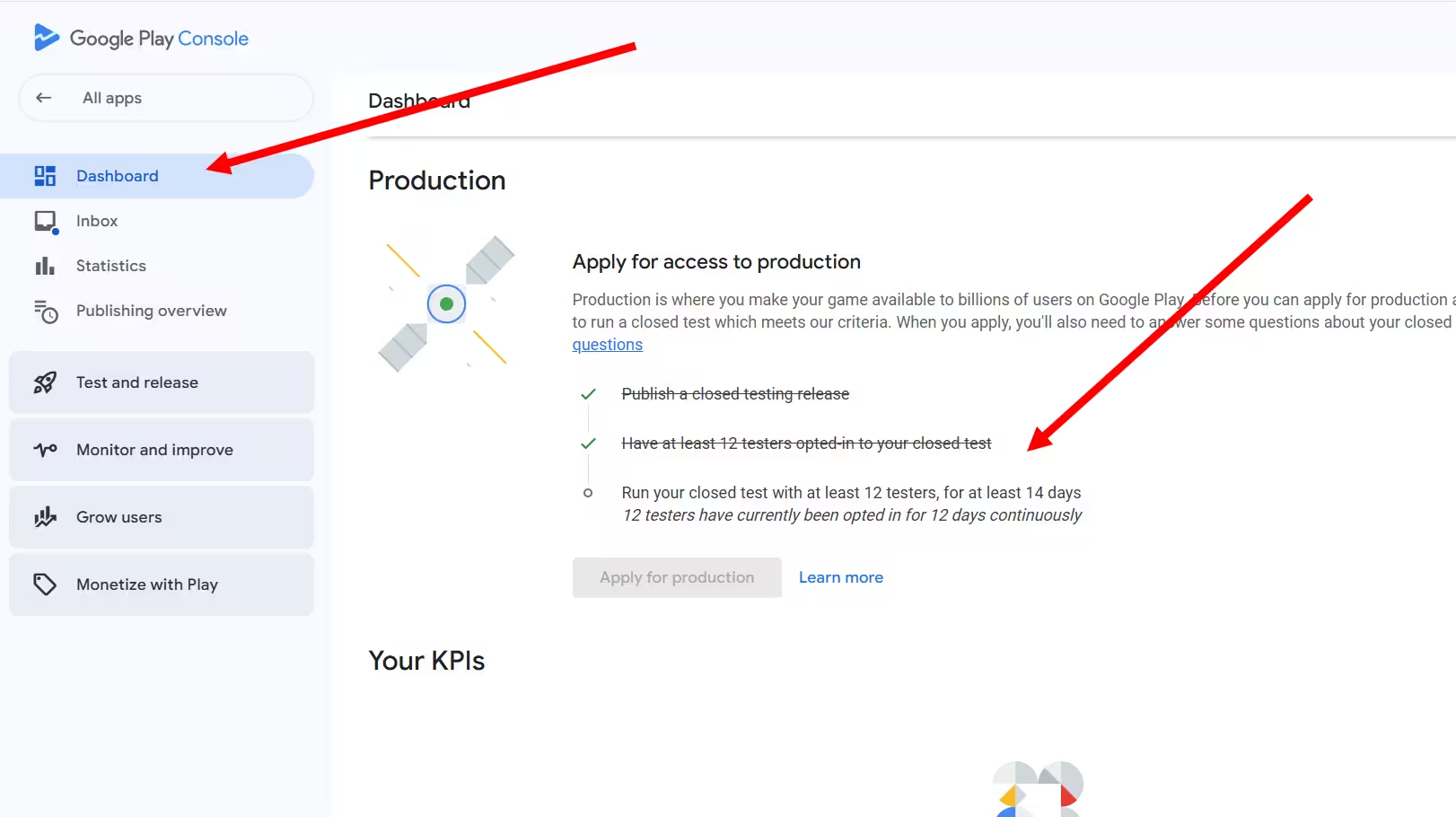
| The production access checklist | The Dashboard item stating how many testers have been opted in, and for how many continuous days. This is what the requirement is measured on. | Why a specific person is or is not in it. For that, check enrolment. |
Meeting the minimum is not the same as a convincing test. Google can ask for further testing when tester engagement is not sufficient, even once 12 testers have been opted in for 14 continuous days. It publishes no daily-session quota, so the goal is a test that produced real use and real feedback, not activity manufactured to look busy.
Installing outside Play is a separate path, and it enrols nobody. An Android App Bundle is a publishing format, not an installable file, so what gets installed that way is an APK generated from it. And however the file arrives - a manual install, a shared link, internal app sharing - it does not accept your opt-in link for anyone.
A gap between two of these numbers is a symptom, not a diagnosis. Twelve opt-ins with a low installed audience has ordinary explanations: people opted in and never installed, they installed on a device they have not used lately, reporting lags, or the release is not available to them.
What we can and cannot tell you here
Google publishes the testing requirement and definitions for these metrics, but not an explanation of every individual counting outcome, and no universal reporting delay. Read the documentation for the specific metric, keep an observed delay separate from a published guarantee, and work through the checklist below.
If a Tester Cannot Find or Install Your Closed Build
Check these configuration issues before attributing the problem to the environment. They apply to physical devices and emulators alike.
-
01
The wrong Google account
The account that accepted the opt-in link must be the account signed in on the device and selected in the Play Store. On a phone with several Google accounts, check that first when someone reports "app not available".
-
02
The opt-in was never completed
Your email list or linked Google Group makes someone eligible; it does not enrol them. They still have to open the opt-in link and accept it, and group membership can take a little time to take effect. A closed build is not in Play Store search either, so testers reach it through the opt-in link and the store link you give them.
-
03
A conflicting track
If the account is also in your internal test, ask them to leave that test before opting in to the closed one. Where tracks overlap, an eligible user gets the highest compatible version code available to them, which may not be the release you are watching (test setup).
-
04
No live release on that track
A closed track needs a published release that has actually rolled out, at the version and percentage you think it has. A draft is distributed to nobody. A halted rollout stops further distribution, but testers who already received that version can still have it installed, so check which version is being served. Google also notes that a new test link, and later changes to it, can take a few hours to become available.
-
05
Your own availability settings
Country availability and device restrictions are yours to set. For countries, Google reads the tester's Google Play account country, which is not always where they are sitting. And if you enabled integrity-based store-listing device checks, they can stop some devices seeing or installing the app: an access restriction you configured, not evidence about which testers count.
-
06
The environment or the build itself
Only after the five above. An emulator with the wrong system image cannot sign in to the Play Store at all, and Android Studio publishes known issues for specific images.
-
07
Your app is blocking it, not the Store
If the download works and the app then refuses to run, that is your own enforcement, not Play availability. Check what your app or backend does with the Play Integrity response before concluding that the tester cannot get your build.
If the count still looks wrong, we have dedicated walkthroughs: testers added but zero opted in, the app is not available to a tester, and Google Group tester access. Each covers the common configuration causes and the further checks to run.
When Emulator Testing Helps
Emulators are good, and Google builds one. It ships inside Android Studio, and Google recommends testing across Android versions and screen sizes. The mistake is not using an emulator; it is expecting one to do a job it was never meant to do.
PrimeTestLab recommendationFast iteration while you build. Android versions and screen sizes you do not own. Tablets, locales, dark mode, right-to-left layouts. Reproducing a crash on demand.
Independent judgement. One machine running five virtual devices is still one person's opinion.
How the app behaves on hardware people own: performance, battery, camera, notifications, network changes, the manufacturer's own Android build. Google recommends testing on hardware before release.
A guarantee about eligibility. Good phones do not satisfy a requirement written about testers.
The part tooling cannot supply: someone who opts in, keeps the app installed, tries the flows you did not think of, and tells you what confused them.
Device coverage. Twelve testers may own similar phones, which is why emulator checks still earn their place.
Android Studio images, Play-enabled images and BlueStacks
Not all emulators are the same, and the difference is the system image. An AOSP image has no Google apps. A Google APIs image adds Google services but no Play Store. A Google Play image includes the Store, and Android Studio marks the device profiles that support it with the Play logo, documenting those Phone profiles as CTS compliant. The profile and the system image are separate choices when you create the virtual device, and you need the Play image to sign in and install inside it. BlueStacks documents Play Store sign-in too. None of that settles eligibility: reaching the Store and being counted as a tester are separate outcomes.
If you do not own an Android phone but want to help someone test
This is a different situation from a developer manufacturing a cohort, and it deserves a straight answer rather than an accusation. Helping a friend test on the machine you own is not deception. What nobody can promise you is the outcome, because Google does not publish how each participant is counted. If it matters, borrow an Android phone or use an older compatible one. If you use an emulator instead, tell the developer so they can plan their test accordingly.
Cloud device labs and pre-launch reports
Firebase Test Lab runs your app on devices in Google's infrastructure, and the Play Console pre-launch report crawls your build automatically. Both are legitimate automated QA. Neither is a participant: an automated run does not opt in, does not stay opted in for 14 days, and does not tell you the onboarding screen made no sense.
What Play Integrity Does and Does Not Establish
Google technical documentationPlay Integrity is the technology most of this argument rests on, so it is worth knowing what it is for. Per developer.android.com, the API "helps you check that user actions and server requests are coming from your genuine app, installed by Google Play, running on a genuine and certified Android device" (integrity verdicts). The audience for that answer is your app and your own backend. Play Console reports integrity responses back to you as well, and a separate store-listing setting can restrict which devices may install. None of that is the closed-testing requirement, and none of it should be read as one.
"The app is running on a genuine and certified Android device." On Android 13 and higher that comes with hardware-backed proof that the bootloader is locked and the OS is a certified manufacturer image; earlier versions can rest on a software-backed evaluation.
How the device looks to the API. Not a statement about enrolment.Documented as a device with "signs of attack (such as API hooking) or system compromise (such as being rooted)", or an app "not running on a physical device (such as an emulator that does not pass Google Play integrity checks)". The field can carry several labels, so this is a missing label, not a value called "blank".
It covers several different situations, so it cannot be read backwards to one cause."The app is running on a device that passes basic system integrity checks. The device may not be certified." Optional here means the developer chooses whether to receive the label, which has nothing to do with a tester opting in.
A response setting, not enrolment."The app is running on a genuine and certified Android device with a recent security update." On Android 13 and higher that means device integrity plus recent security updates across the relevant partitions; Android 12 and lower is evaluated on hardware-backed boot integrity, without the same recent-update test.
A high bar for your own backend. Not a closed-testing threshold.Documented for an "Android-powered emulator with Google Play services", in the Google Play Games on PC context, which is a distribution surface with its own requirements.
Not a verdict on Android Studio test emulators, in either direction.Device, app recognition and licensing are separate fields
Three fields get quoted as if they were one, and mixing them is where most of the confusion starts. The device field describes the environment. The app recognition field describes whether the running binary matches what Google Play distributed. The licensing field describes entitlement, and can report unlicensed when the account has no Play entitlement for the app. A build installed outside Play is a licensing and distribution story, not a hardware verdict.
These examples explain terminology. Nothing here contacts Google, measures your device, verifies participation or predicts production access. Real responses depend on the app, its configuration and the environment.
| Environment | What a response may show | What that does and does not tell you |
|---|---|---|
| Certified phone, locked bootloader | The device field can include MEETS_DEVICE_INTEGRITY, and MEETS_STRONG_INTEGRITY with a recent security update. | That the device satisfies the API. Not whether that person accepted your opt-in link. |
| Standard Android Studio emulator | Google documents an emulator that does not pass Play checks as one reason no device-recognition label is returned. | That your own backend can respond to the result. An absent label does not by itself identify an emulator, and it says nothing about anyone's enrolment. |
| Build installed outside Play | Different fields answer this: app recognition for package and certificate matching, and licensing, which can report unlicensed when the account has no Play entitlement. | These fields describe app recognition and account entitlement. Read them separately: they are not a full record of how the current copy was installed, and they enrol nobody. |
So the summary is narrow: Play Integrity tells your own backend a lot about the environment your app runs in, and nothing in this documentation says those verdicts decide which testers count.
A Practical Path, and Recovery After Emulators
Treat the 14 days as a real beta rather than a hurdle. The steps below combine Google's published process with our own recommendations: recruiting above the minimum and organising feedback this way are suggestions, not extra Google quotas. The goal is a genuine test, not waiting for the calendar to advance.
PrimeTestLab recommendationUpload a signed App Bundle, create a closed testing track and publish a release to it. Nothing else works until a release is live on that track.
An email list suits a small, known group; a linked Google Group scales more easily. Either way, each person still accepts the opt-in link themselves.
Advice, not a rule. People lose interest, change phones or opt out, and a replacement does not inherit anyone's history: their 14 days start when they enrol. Recruiting 15 to 30 gives you room.
Give testers something specific to try and somewhere easy to report back. No daily-session or screenshot quota is published, so do not manufacture activity.
Release the changes the testing justified, and keep a short record of what was reported and what you did. No required number of updates is published, so do not publish changes solely to meet an assumed update quota.
The form asks how you ran the test and engaged testers, what the app is and who it is for, and what you changed as a result. Answer it from your notes. Review is usually seven days or less, and it can take longer.
If you already ran your test on emulators
-
Open the production-access checklist on your Dashboard and read what it says: how many testers, how many continuous days. That is the real state of your test.
-
Work through the diagnostic list above for anyone enrolled but not showing what you expect. Fix configuration before concluding anything about devices.
-
Keep the progress you legitimately have. Nothing Google publishes says a test resets because of the environment a tester used.
-
Add genuine participants and let each new tester complete their own 14 consecutive days of opt-in. Their time does not inherit anyone else's, so the test may need to run past the end date you had in mind. If your app has genuine problems, this is also the part that finds them.
If recruiting people is the hard part, start with the free options in seven legitimate ways to find 12 testers. From there: how to invite testers, the 14 consecutive days rule, updating your app during testing, and the production access questionnaire.
Genuine Participation and What Breaks the Rules
Much of the fear here comes from blurring three very different actions together. They are not the same, and neither are their consequences.
Installing your own build on an emulator to check that it compiles, runs and looks right is normal engineering, on the tool Google ships for it. It is not deceptive, and it is not what enforcement is aimed at.
This is the one developers ask us to rescue after it has gone wrong. Google publishes no emulator-counting rule, so we cannot tell you it is against the rules. We can tell you what we do: we will not build a test this way, and we advise against it. Production access is judged on evidence of a real test, and in our experience a cohort assembled from virtual devices is the kind that gets sent back for more testing, or rejected.
Creating fake Google accounts and opting in from them, on emulators or on anything else, is a different act altogether. Google's policy on ratings, reviews and installs prohibits attempting to manipulate placement, ratings, reviews or install numbers by illegitimate means.
So the practical line is about deception, not virtualisation: do not create accounts or automate activity to misrepresent who is taking part. Google prohibits illegitimate manipulation of installs and other store metrics. That policy does not, by itself, establish an emulator-specific counting rule.
One correction worth making: a "more testing required" response does not by itself establish an enforcement action against your account. Read the specific message and keep testing as it directs, rather than inferring automatic penalties for future reviews. What to do after that denial takes it apart.
The practical takeaway is the same across all three. An emulator does not give you an extra person, so the only question worth your time is how to find real ones efficiently.
Where PrimeTestLab Fits
Commercial disclosureWe sell closed-testing help, so read this section knowing that. Developers reach for emulators because finding a dozen people who will stay opted in for two weeks is genuinely hard, not because they want to cheat. That is the part we do.
What we do
Recruit and coordinate 12 or more real testers, keep them enrolled for the full 14 days, and replace anyone who drops out. Testing starts within about 4-6 hours.
What we will not claim
That any service can guarantee Google's decision, or that hiring testers removes the review. Production access is judged on your test and your app.
If you would rather not pay
That is a completely reasonable choice, and the free routes in seven legitimate ways to get 12 testers work. They cost time instead of money.
Every plan includes a money-back guarantee. You can also read the step-by-step process before deciding.
Frequently Asked Questions
Can I use an emulator for Google Play closed testing?
Use one to test your app: that is what Google builds it for. The published requirement is 12 testers opted in for 14 continuous days, and no documentation reviewed here says whether an emulator-based participant counts toward it. Our own recommendation goes further than the documentation: testing your build on an emulator is fine, using emulator instances as stand-in testers is not something we would do, and opting in from fake Google accounts is manipulation that can get production access rejected.
Does a Play Integrity failure mean a tester does not count?
The documentation reviewed for this guide does not say so. Play Integrity answers your own app and backend about the environment the app is running in, and Google documents it separately from the closed-testing requirement. Treat the chain from integrity verdict to tester count as an inference, not a published process.
Do I need 12 people, 12 accounts or 12 phones?
The requirement is written about testers opted in continuously for 14 days, which in practice means 12 people with their own Google accounts who accept your opt-in link. You do not need to own twelve phones, and no Google documentation requires premium hardware or a spread of manufacturers. Whether you can be one of the twelve yourself is covered in using your own accounts as testers.
I do not own an Android phone. Can I still help someone test their app?
Wanting to help is not deception, and it is different from a developer manufacturing a cohort. Nobody can honestly promise how your participation will be counted. Borrowing an Android device is the low-risk route; if you use an emulator instead, tell the developer so they can plan around it.
Can I use BlueStacks for Google Play closed testing?
BlueStacks documents Play Store sign-in, and a Play-enabled Android Studio image can reach the Store too. That confirms Play Store access is possible, not that your particular closed build will be available: that still depends on the account, the track and the release. It settles nothing about eligibility either, because no Google documentation states whether such a participant counts. Treat a vendor page as authority about that product and nothing more, in either direction.
Is developer device verification the same as closed testing?
No. Device verification is the account owner proving access to a non-rooted physical Android device running Android 10 or higher, at account setup, and Google may ask for it again later. Closed testing is about people opting in to a test track. Different actor, different purpose, different help page.
Does uninstalling the app mean a tester has left the test?
Uninstalling and opting out are different actions. The requirement is written about continuous opt-in status, so do not assume an uninstall breaks the window or that one person leaving resets the others. If progress looks wrong, check the production-access checklist and enrolment first.
Bottom Line
Summary
Emulators are a legitimate testing tool and a poor substitute for participants. The requirement is 12 testers opted in for 14 continuous days, and the documentation reviewed here does not specify whether an emulator-based participant counts. So open your production-access checklist, work through the configuration checks before blaming hardware, and spend the rest of the window recruiting people who will actually use the app. Our own recommendation, which the documentation does not have to state for us: manufacturing participation with emulators or fake accounts is not worth the rejection risk. Start with the free ways to find 12 testers →
Official Google documentation
Community discussion, not documentation
The recommended answer there advises using other people on physical Android devices rather than emulators, and a Product Expert endorsed it, which is worth knowing. It is still community discussion: no policy is cited, and the page warns content may be unverified.