














The opt-in funnel: adding an email is only the first stage
You granted access. Counts so far: 0
The opted-in counter moves here and the timer starts - but this alone will not pass
Required, or Google rejects the app at review even with 12 opted in
Opted in, installed, and genuinely used for 14 days is what truly counts
Two different bars: opting in moves Play Console's counter (and starts the 14-day timer), but testers must also install and use the app or the app is rejected at review. You can add 12 emails and count 0, or hit 12 opted in and still fail because nobody really tested.
Quick Answer
Adding an email to your closed testing track does not make that person count. Play Console's opted-in counter only moves after a tester opens your opt-in link, signs in with the exact Google account you invited, and taps "Become a tester". But opting in is not enough on its own: each tester must also install the app and genuinely use it, and stay opted in for 14 continuous days, or Google rejects the app at review even when the counter shows 12. That is why you can add 12 emails and see 0 opted in, and why 12 opt-ins with no real use still fail. PrimeTestLab supplies real, pre-vetted testers who complete that entire chain for you - opt in, install, and stay active on real devices - which removes the drop-off that stalls most first-time publishers.
You added 12 tester emails. You waited. And Play Console still shows 0 opted in - or it finally reached 12, you applied for production, and Google rejected you anyway. Two symptoms, one root cause, and this post untangles both traps in order. It is current as of July 2, 2026; where Google's wording matters, we quote it directly. If you hit this right after paying the fee, our I just paid the $25 fee, now what walkthrough maps the whole road to launch.
Read this before you celebrate 12
Hitting 12 opted in is not the finish line. Opting in only moves the counter and starts the timer. If most of your testers never install and actually open the app, Google frequently rejects the production release anyway - you can reach 12 opted in, hold a clean 14-day streak, and still be refused because nobody genuinely tested. Recruit testers who will really use the app, and verify installs and activity, not just the opted-in number.
What This Post Covers
Why Isn't Adding a Tester the Same as Opting In?
Your tester list controls who is allowed to join, not who has actually joined. When you paste 12 emails into Play Console, you grant 12 people permission to become testers. You have not created a single opted-in tester yet. Google's requirement is worded around opt-in, an action the tester takes, not the invitation you send.
The confusion comes from collapsing three separate states into one. Pulling them apart is the whole game:
1. Invited
Their email is on your list, or they are in your Google Group. You did this in Play Console.
Counts as 02. Opted In
They opened your link and tapped "Become a tester". This moves the opted-in counter and starts the 14-day timer, but by itself it is not enough.
Counter moves3. Installed & Active
They installed on a real device and genuinely used it across the 14 days. This is what actually passes Google's review.
Passes reviewOpting in is what moves the counter toward 12, and staying opted-in for 14 continuous days keeps it there. But there is a second bar most people miss: those testers must actually install and use the app, or Google rejects the app at review even when the counter shows 12. So you can add 12 emails and see 0 opted in, or reach 12 opted in and still fail because nobody really tested. The gap between "invited", "opted in", and "genuinely tested" is where every stuck count and surprise rejection lives.
Read the builder below correctly. If every tester you add opts in, installs, uses the app, and stays the full 14 days, all of them count - the tool does not penalize you for doing everything right. It simply builds in the realistic truth that some invited people never follow through, so the number it shows is an estimate of how many will genuinely complete the test. That is exactly why recruiting above 12 protects you.
How Many of Your Added Testers Would Actually Count?
Set how many you added, then tick only the steps you genuinely did. It builds in realistic drop-off to estimate how many will fully complete the test.
How many testers did you add?
Which of these did you actually do?
Play Console's counter shows everyone who opted in, but only testers who also install and stay active for 14 days pass review.
Predictive simulation, not your live Play Console data. It applies typical opt-in and drop-off rates to estimate how many testers complete the whole chain - your real numbers will vary.
What Does Google Actually Require?
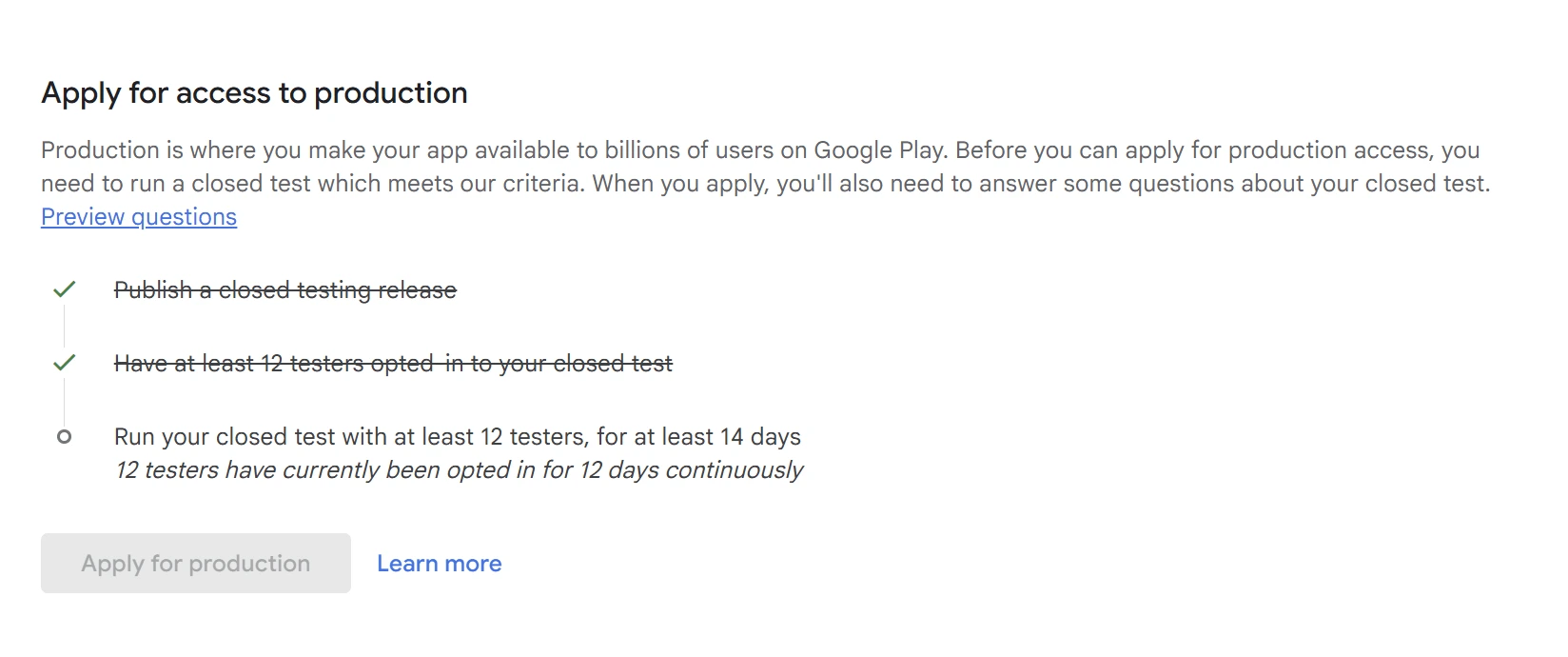
At least 12 testers opted in for the last 14 days continuously before you can apply for production access. The operative words are "opted in", and the 14 days must be consecutive. This applies to personal developer accounts created after November 13, 2023; organization accounts are exempt.
Here is Google's exact wording, which is worth reading slowly because every load-bearing word is about opt-in, not invitation:
"If you have a newly created personal developer account, you must run a closed test for your app with a minimum of 12 testers who have been opted-in for at least the last 14 days continuously."- Google Play Console Help (answer 14151465)
Organization accounts and accounts created before that date do not face this gate. If you are weighing which account type you have or should use, our breakdown of personal vs organization accounts covers the trade-offs. For everyone else, the number that matters is the opted-in count, and this is exactly what Play Console shows you:
A quick myth-buster while we are here: you may still find forum posts that mention 20 testers. Google originally announced the policy with a 20-tester minimum, then reduced it to 12 testers in December 2024. The current, correct number for eligible personal accounts is 12, and the 14-day continuous window never changed. There is more on that shift in why Google dropped 20 testers to 12.
One more thing Google checks: when you apply for production access, it asks how your testers engaged with the app and what feedback you acted on. Google can ask you to keep testing if you do not have 12 opted-in testers, or if the testers were not engaged during the closed test. So the goal is not 12 names in a list. It is 12 real testers who joined correctly and actually used the app.
What Is the Real Opt-In Chain, Step by Step?
Think of it as four stages. Adding the email is only the first one, and it is the only stage you can complete without the tester lifting a finger. The count does not start until stage two.
-
1
You grant access
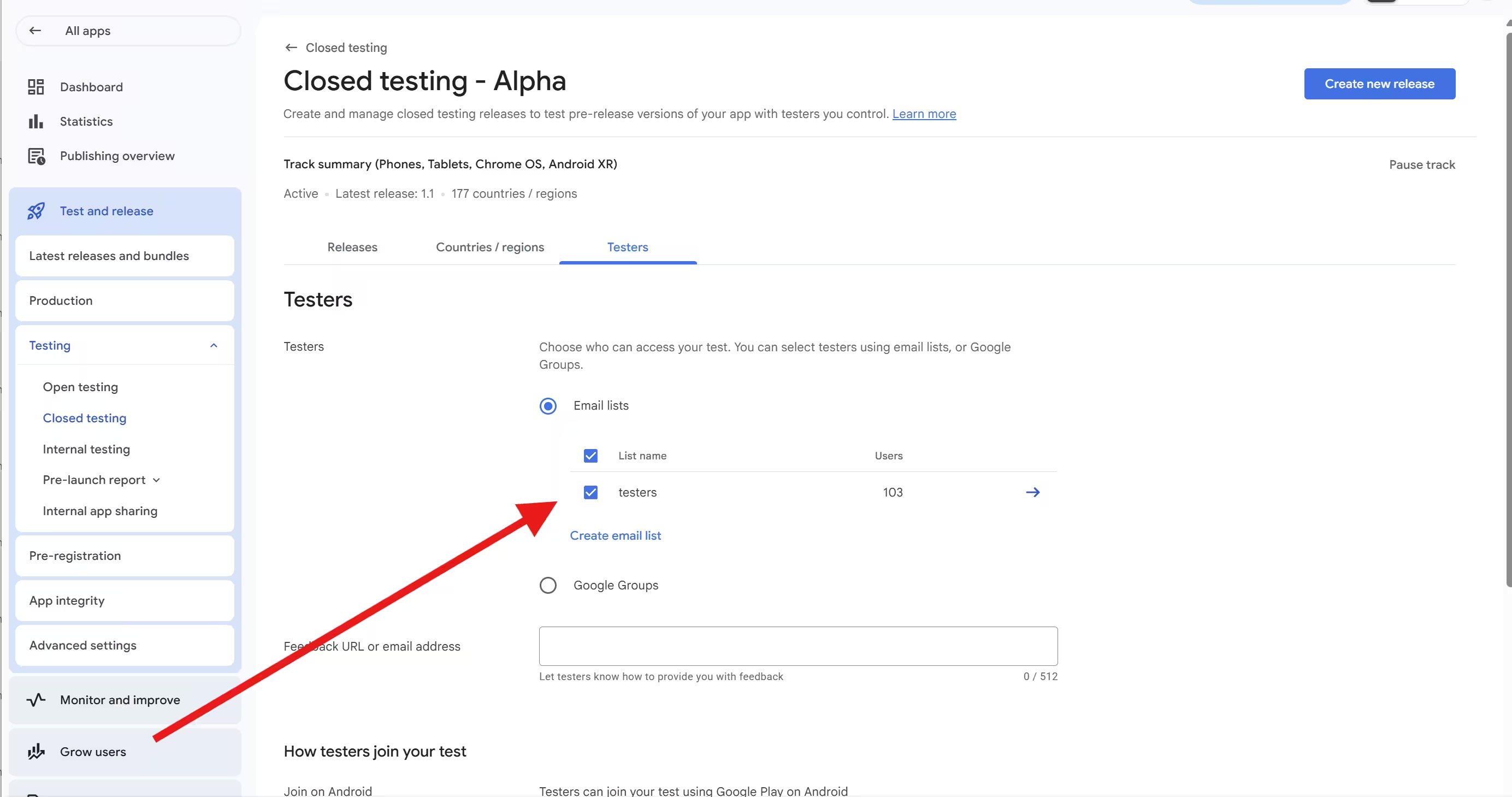
In Play Console, open Testing, then Closed testing, then your track, then the Testers tab. Add testers by email list or by Google Group. Two things trip people up here: testers need a Google Account (a Gmail or Google Workspace address), and creating a list is not the same as ticking the box to activate it for the track.
-
2
The tester opts in count starts
Copy the opt-in link from the Testers tab. It looks like
play.google.com/apps/testing/your.package.name. Send it to each tester. They open it, sign in with the invited Google account, read a short explanation, and tap "Become a tester". Google's documentation is explicit that each tester opts in using the link. The link only appears once the app is Published to the track - a build stuck in Draft or Pending publication shows no opt-in link at all. -
3
The tester installs and uses the app required to pass
After opting in, the confirmation page gives a link to install the app from Google Play. The tester must install on a real Android device signed in with the same account that opted in, and actually use it. This is the part that opting in alone does not cover: if a tester opts in but never installs or uses the app, the counter still moved, yet Google rejects the app at review because nobody genuinely tested it. A closed testing app does not appear in Play Store search, so testers who "just search for it" never reach the install, and a sideloaded APK does not count.
-
The tester stays opted in and active for 14 continuous days this is what counts
This is the only state that completes the requirement. Google counts the most recent unbroken 14-day window with at least 12 opted-in testers - not 14 days added up over time. We break the timing trap down in do the 14 days have to be consecutive.
So which step counts? Opting in (stage 2) moves Play Console's counter and starts the 14-day timer. But a moving counter is not the same as passing: installing and genuinely using the app (stages 3 and 4) is what Google evaluates at review. A test where 12 people opted in but never really used the app can still be rejected. Adding the email (stage 1) counts for nothing on its own, so if your testers are stuck there, no amount of adding more emails changes the number.
If sending the link and getting people over the line is where you are stuck, our walkthrough on how to invite testers for closed testing shows the exact Play Console screens and the message to send.
Why Are My Added Testers Not Counted? The 10 Usual Causes
If your count is stuck below 12 despite adding enough emails, it is almost always one of these ten, and not one of them is fixed by adding more emails. Find yours, then jump to the fix.
They never clicked the opt-in link
The most common cause by far. Being added is not being a tester. No link, no opt-in, no count.
Wrong Google account
They opened the link on a laptop signed into a work Gmail, but their phone uses a personal one. The account that opts in must match the account that installs, and both must be on your list. Shows as "Item not found" or "App not available".
Opted in but never installed or used it
The trap that looks fine. Opting in makes the counter count them and starts the 14-day timer, so your number can reach 12 with nothing obviously wrong. But with no install and no real use, Google rejects the app at review because the testers never actually tested it. Verify installs and activity, not just the opted-in number.
A typo in the email
One wrong character invalidates that tester. The address must be an exact Google account.
The internal testing link was shared
If you send testers your internal test link, they opt into internal testing, and none of that counts toward the closed test. Internal and closed are separate tracks; only closed testing opt-ins count toward the 12-tester, 14-day requirement.
The list was created but not selected
Building an email list is not the same as activating it on the track. If the checkbox attaching the list to your closed test was never ticked, those testers cannot opt in at all - the opt-in link shows the app as unavailable to them.
Google Group membership problems
Testers must be members before they opt in. If your group invites people instead of adding them, they only become members after they accept. See the Google Group fix.
Track conflict
A tester already opted into your internal test cannot join the closed test until they opt out of internal first, then opt into closed.
Country or device eligibility
A properly opted-in tester still cannot install if their Play country is outside your targeting or their device is unsupported. Different countries are fine on their own - see testers in different countries.
Propagation delay (not a failure)
After you first publish, the link can take a few hours to appear, and the console is not real time. Developers commonly report up to 24 to 48 hours of lag before a new opt-in shows. Wait before you troubleshoot.
Not sure which one you are hitting? Tell the diagnoser what Play Console is showing you and it will point to the most likely causes and the fix.
Diagnose My Stuck Tester Count
Pick the symptom that matches what you see, and get the likely causes plus the fix.
Email Lists vs Google Groups: Which Should You Use?
Both methods are fully supported. The practical difference is how easily you can manage testers mid-cycle without breaking your 14-day window. Either way, each tester still has to open the opt-in link and tap "Become a tester" - the method only changes how you manage who is eligible.
Email list / CSV
Add exact Google account emails; each tester opts in via the link
A small, fixed group you will not change
Editing or re-uploading the list can disrupt opt-ins
One list holds a large number of testers, but membership is manual
Google Group
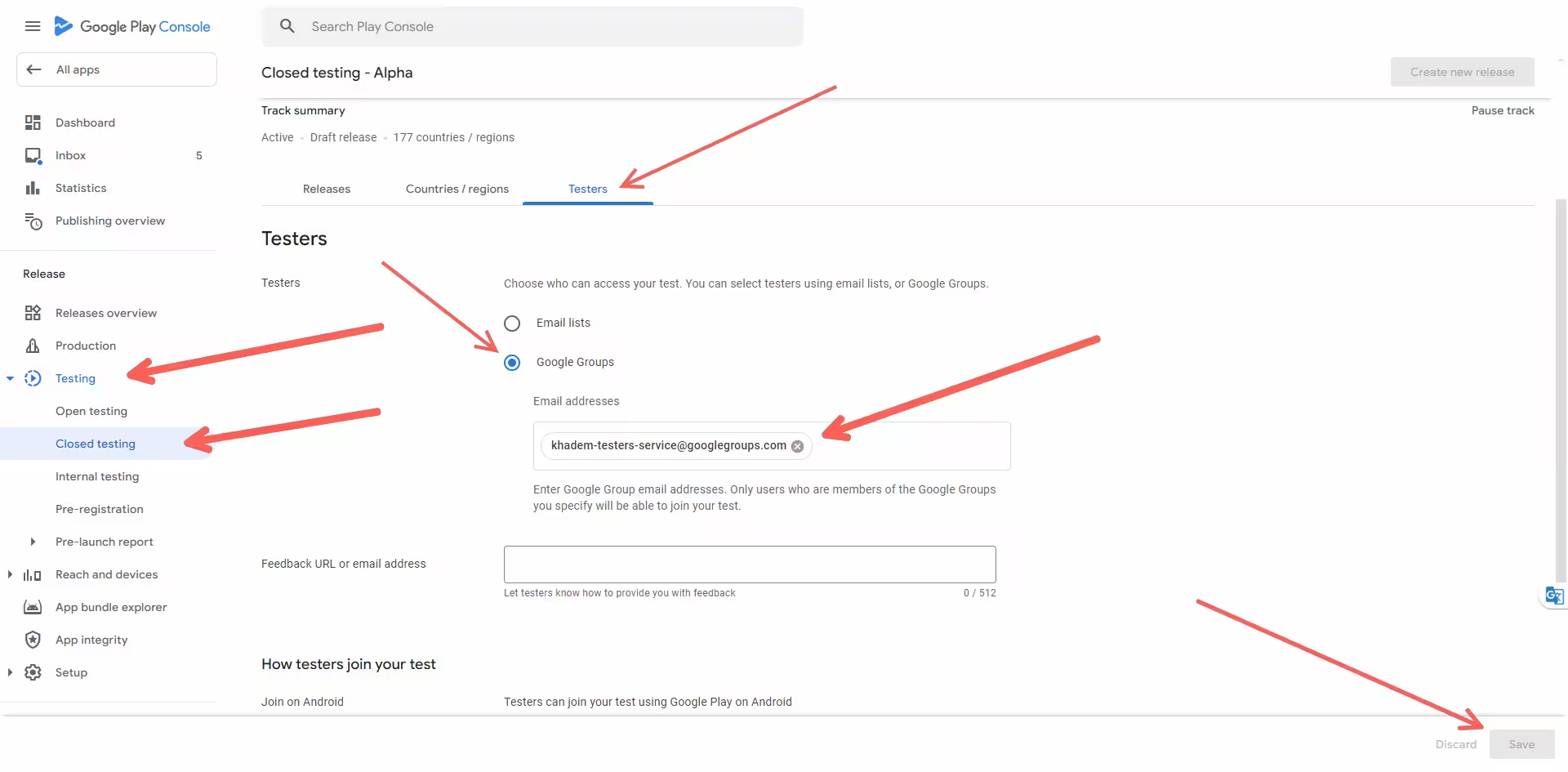
Add one group address to the track; testers join the group, then opt in via the link
Swapping testers without touching the Play Console track
Add or remove members in the group without editing the track
Testers must join the group first; invited members only count after they accept
Many developers prefer a Google Group for closed testing because you can add or remove members in the group without editing the Play Console track, which lowers the risk of accidentally breaking continuity. Worth knowing if you plan to automate: Google's Play Developer API for managing testers works with Google Groups, so a group is the more automation-friendly choice. Not sure which fits you? The advisor picks for your situation.
Email List or Google Group: Which Fits You?
Pick the situation that sounds most like yours.
How Do I Make Sure My Testers Actually Opt In?
Treat opt-in as the thing you are recruiting for, not the invitation. Over-recruit, give one crystal-clear instruction, confirm the numbers yourself, and keep testers genuinely active. Those four habits close most of the gap between added and counted.
Over-recruit
Aim for 15 to 25 opted-in testers, not exactly 12, so a single drop-off does not reset your window. Keeping 2 to 3 above 12 at all times is a sensible floor (a community best practice, not a Google rule). Where to find them: 7 legit ways to get 12 testers.
Send one clear instruction
Tell each tester the exact Gmail to use, that they must tap "Become a tester" on the link, then install from the confirmation link, and stay opted-in for 14 days. Vague asks are why testers stall at "invited".
Confirm, do not assume
Read the opted-in number on the Testers tab and cross-check installed testers' emails against your list. The console counts opt-ins, so that number is your source of truth, not who said "done".
Encourage real use for 14 days
Google evaluates engagement, not just installs, so ship an update or two and ask testers to open the app. Pushing a new build does not reset the clock - only dropping below 12 does.
If recruiting, chasing opt-ins, and holding 12 people for 14 straight days sounds like a second job, that is exactly the gap a managed run fills.
The Dependable Way
Rather than hoping 12 friends open a link and stay for two weeks, PrimeTestLab supplies real testers who complete the full opt-in chain on real devices, monitors them daily, and replaces anyone who drops so your count never falls below the line mid-cycle. See how it works →
How PrimeTestLab Helps
Every cause on the list above lives in the gap between "added" and "counted". PrimeTestLab closes that gap by supplying real, English-speaking human testers on real Android devices (Android 7 through Android 17) who complete the full opt-in chain for you. They join with a valid Google account, tap "Become a tester", install from your link, and stay opted in for the full 14 days.
That removes the two things you cannot control on your own: opt-in drop-off, and mid-cycle opt-outs that reset the clock. You share your closed testing opt-in link; the rest is handled and monitored daily. 9,800+ apps and counting, at a 99.9% success rate across 120+ countries.
To Be Straight About It
PrimeTestLab covers the tester requirement - the opted-in, 14-day-active part that stalls most publishers. It does not file your declarations or write your listing. The winning combination is your finished app and complete store listing plus 12 real testers who actually opt in and stay, so a stuck count is never the reason you get held up.
Chasing Opt-Ins Yourself vs a Managed Run
| What the rule needs | Do it yourself | With PrimeTestLab |
|---|---|---|
| 12 testers that opt in | Add emails and hope people click the link | 12+ testers who complete the opt-in |
| Right account, real install | Chase down "App not available" and wrong-account errors | Correct account and install handled for you |
| 14 continuous active days | Nudge people daily to stay engaged | Daily engagement monitoring built in |
| Never drop below 12 | One opt-out can reset your 14-day clock | Immediate replacement protects the streak |
| Real devices, not emulators | You verify every tester yourself | Real Android devices across 120+ countries |
| Time to first tester | Days to over a week if done alone | Testing starts in 4-6 hours |
| Cost | Free, but slow and easy to stall | From $19.99, one and done |
Current Packages
- Meets Google's minimum
- Real opted-in testers
- Full 14-day coverage
- Maximum safety margin
- Best drop-off protection
- Strongest first-attempt rate
- Safety buffer included
- Better device diversity
- Higher approval confidence
Frequently Asked Questions
I have 12 opted-in testers but Google still rejected my app. Why?
Because 12 opted in is a minimum, not a guarantee. Opting in moves Play Console's counter, but Google also grades engagement when you apply for production. If your testers opted in yet barely installed or used the app, Google can refuse production access even with 12 showing. Recruit testers who genuinely use the app across the 14 days, and confirm real installs and activity, not just the opted-in number.
Do internal testers count toward the 12 closed testers?
No. Internal testing is separate from closed testing. A tester who opted into your internal test is not eligible for the closed test until they opt out of internal first, then open your closed testing link and opt in again. Internal testing is useful for early checks, but those opt-ins do not count toward Google's 12-tester, 14-day closed testing requirement.
Can I use open testing instead of closed testing?
No. Google makes open testing available only after you have production access, so you cannot use it to skip the closed test. New personal accounts created after November 13, 2023 must complete a closed test with at least 12 opted-in testers for 14 continuous days first. Internal testing is optional and does not replace the closed test either.
Is adding someone to a Google Group enough for them to count?
No. Group membership only grants eligibility. If your group invites people rather than directly adding them, they become members only after they accept the invitation, and only members can join your test. Each tester still has to open your opt-in link and tap "Become a tester". Joining the group and opting in are two separate steps.
Do my testers have to keep the app installed and active for the 14 days?
Yes, in practice. The 14-day rule is measured by staying opted in, but Google evaluates engagement at review, so testers who install once and never return, or who uninstall, weaken your application. Opting out is different from uninstalling and is what formally lowers your count, but a test full of inactive installs is a common reason production access is refused. Keep testers genuinely active.
Does opting out reset my 14-day clock?
Yes, if it drops you below the required count. Google counts only a continuous 14-day window. If a tester opts in, tests for fewer than 14 days, then opts out, that period does not count, even if they opt back in later. The 14 days must be consecutive, which is why keeping a buffer above 12 opted-in testers matters.
How long until an opted-in tester shows in Play Console?
Not instantly. Google says a new test link can take a few hours to become available after you first publish, and the console is not real time. Developers commonly report a lag of up to 24 to 48 hours before a new opt-in or install appears, which is a community observation rather than an official guarantee. Wait up to two days before assuming a tester is not counting.
How many testers should I recruit to be safe?
More than 12. Because testers drop off, ignore the link, or opt out, recruiting 15 to 25 gives you a cushion so a single loss does not break your continuous 14-day window. Keeping at least 2 to 3 opted-in testers above the minimum is a widely used buffer. A managed testing service removes this volatility entirely.
Bottom Line
Summary
Play Console counts opted-in testers, not invitations - but even opting in is only half of it. Tapping "Become a tester" moves the counter and starts the 14-day timer; your testers must also install and genuinely use the app, or Google rejects it at review even when 12 show as opted in. So the full chain is: your email list or Google Group is the door, opting in is the entry, and real use across 14 continuous days is what passes. If your count is stuck, do not add more emails - check whether your testers actually opened the link, joined with the right Google account, installed from Play, used the app, and stayed opted in. If you would rather skip the chase entirely, PrimeTestLab delivers real testers who opt in, install, and stay active on real devices from $19.99, with testing that starts within hours. See pricing plans →