














The Straight Answer
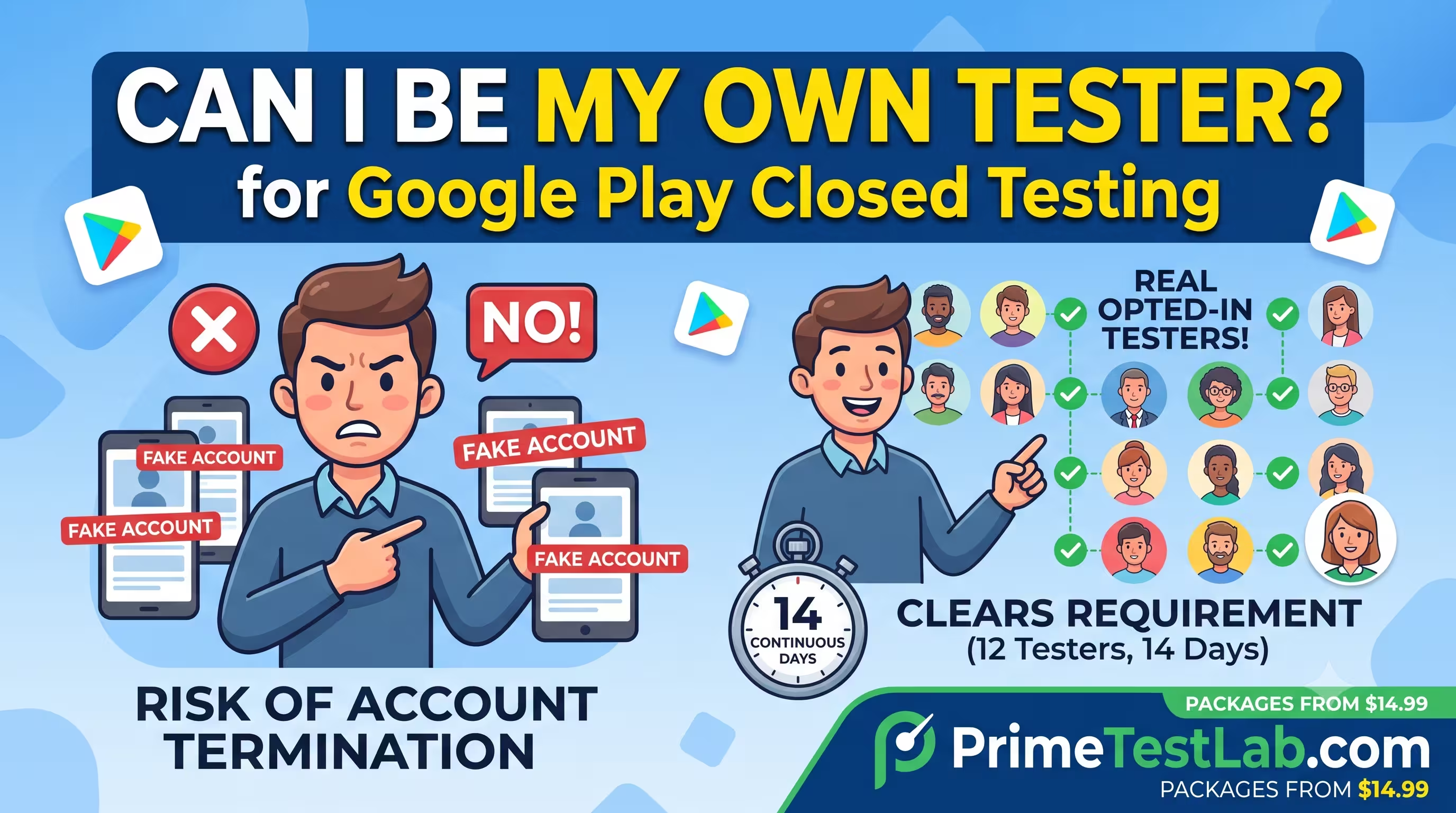
No - you can't be all 12
One person cannot be 12 independent, engaged testers
Nothing stops you from adding your own Gmail to a tester list, and friends and family are allowed. But the rule asks for 12 opted-in testers active for 14 straight days, and a single developer cannot believably be all twelve. Faking the count with extra accounts is what turns a missed launch into a banned account.
Add your own email as one tester.
You are allowed to be one of the testers, and you can recruit people you know. You just cannot be the other eleven, and you cannot manufacture them with burner accounts.
Quick Answer
No. You can add your own email address as a tester, but you cannot personally be the 12 independent, opted-in, engaged testers that Google Play requires for 14 continuous days - a rule for personal developer accounts created after November 13, 2023. One person logging into several self-owned accounts is still one real human producing one usage pattern. Spinning up extra or fake Google accounts to hit the number can get your developer account terminated under Google's account and manipulation policies. The dependable path is real opted-in testers on real devices - recruit people you know, switch to an exempt organization account, or use a service like PrimeTestLab that supplies real testers.
No, you cannot be your own 12 testers. It is one of the first things every new Android developer wonders when they hit the closed testing wall: if I just need 12 testers, why not be my own 12? Grab a couple of spare phones, make a few Google accounts, install the app, and call it done. It feels harmless. It is also one of the fastest ways to fail your test, and in the worst case, lose your developer account entirely. This guide walks through exactly what the requirement asks for, why your own devices and accounts cannot satisfy it, what Google's policies say, what actually happens if you are caught, and the legitimate paths that work. It is current as of June 30, 2026.
In This Guide
Can I Be My Own Tester, or Use My Own Phones and Accounts?
Technically, nothing stops you from adding your own Gmail address to a tester list, and Google does not require your testers to be strangers. Google's own recruiting advice is to reach out to friends, family, colleagues, or classmates, so people you know are explicitly allowed.
The problem is the math and the engagement bar, not the relationship. One person logging into several self-owned accounts is still one real human producing one realistic usage pattern. The requirement is 12 testers, opted in and active, for 14 straight days, and a single developer cannot believably be all twelve. Before we get into why, here is the requirement on one screen.
Google Play closed testing at a glance
- Who must run a closed test?
- Personal developer accounts created after November 13, 2023
- How many testers?
- At least 12, opted in and actively engaged
- For how long?
- At least the last 14 days, continuously
- Per app or per account?
- Per app in practice - each new app needs its own closed test
- Are organization accounts exempt?
- Yes, fully exempt
- Can I be my own 12 testers?
- No, and faking it with extra accounts risks an account ban
- What unlocks after you pass?
- Production and Pre-registration for that app
The number has changed over time. The rule launched in November 2023 at 20 testers, and Google lowered it to 12 in December 2024, while keeping the 14 continuous days. As of 2026, the 12-tester, 14-day standard is still current. So the real question is not whether you are allowed to test - it is whether your own devices and accounts can be those 12. Try it below.
Build Your Own 12 Testers
Tick everything you would use from your own resources. Watch the valid-tester count and the ban-risk meter.
What would you use to hit 12?
Distinct, opted-in, genuinely engaged people - the only thing that counts.
Rises as you add extra or fake accounts on your own footprint.
Pick your resources above
The counter will show why your own phones and accounts cannot get you to 12 valid testers.
A teaching tool, not a Google scoring formula. Valid testers means distinct, independent, engaged people; "risk" reflects how far an approach drifts into Google's multiple-account and manipulation policies.
However you combine them, the counter sticks in the low single digits while the risk meter climbs. That is the whole point: testing on your own devices might get your APK onto a phone, but it does not produce the 12 distinct, engaged closed-test testers Google is checking for. Next, here is exactly what "counts" as a tester.
What Actually Counts as a Valid Tester?
For someone to count toward your 12, all five of the following need to be true. Notice that "installed" is only one of them - the opt-in and the ongoing use are what separate a real tester from a number on a screen.
A real, distinct person
Each tester is a different human with their own Google account (Gmail or Google Workspace) - not another login belonging to you.
They opted in via your link
They clicked your testing link, signed in, and chose to become a tester. Being added to the email list is not enough on its own.
They installed from Play
They downloaded your app from the closed-testing link on a real device, not a sideloaded APK or a virtual one.
They actually used it
They opened and used the app across the 14 days, moving through the core flows - not a single launch on day one and silence after.
They stayed opted in 14 days
They remained opted in for the full 14 consecutive days. Dropping out partway breaks the continuous window.
The one that trips everyone up: "installed" is just step 3 of 5. A self-built test can fake an install, but it cannot fake an independent person who opts in and genuinely uses your app for two weeks. That gap is exactly what reviewers look for.
Why Self-Testing Fails Even If You Install on 12 Devices
Because Google does not just count installs - it looks for genuine engagement. The official Help Center lists two failure modes when you apply for production: not having 12 testers opted in, and your testers not being engaged with your app during the closed test. Installs that sit unopened, sometimes called dead installs, do not clear that bar.
You may have seen a rejection line quoted in forums saying testers "did not actively test the app daily" during the 14 days. That exact "actively test daily" phrasing comes from a community-authored guide hosted on Google's developer forum, not from the formal Play Console policy text, which uses the broader word "engaged." So daily use is a smart way to generate enough signal, but the rigid idea that missing a single day automatically fails you is a community interpretation, not a published rule. Here is what self-testing typically looks like, and why each version comes up short.
Adding your own Gmail as a tester
One person, one usage pattern - not 12 distinct engaged testers
12 burner accounts on one or two phones
Thin engagement, a single device footprint, plus policy risk
Family members on one home Wi-Fi
Often too little daily use, and frequently discounted as one tester
Android emulators
Weak, non-organic signals that reviewers tend to discount
Cheap "install and leave" gigs
Dead installs with no real engagement - a common rejection cause
The device and network observations above are widely reported by developers and testing services. Google does not publish the exact signals it uses, so treat these as field experience rather than confirmed mechanics.
Two more details trip people up:
Continuity resets. Google will not count testers who opted in, tested for less than 14 days, then opted out, and the 14 days must be consecutive. If your active count drops below 12 partway through, the practical effect is starting over.
Uninstalling is not the same as opting out, but it still hurts. Per developer-community guidance, a tester only formally opts out through the testing web link, so uninstalling does not remove them. It does stop their usage signal - exactly the low engagement Google cites when it rejects an app. Our guide on what to do when you do not have enough testers covers how to recover.
Why "Internal Testing" on My Own Devices Does Not Count
A common mix-up is assuming any testing counts. It does not. Google has three testing tracks, and only one of them satisfies the requirement. Pushing your app to internal testing on your own phones is fast and easy, which is exactly why people reach for it - but it contributes nothing toward the 12-tester, 14-day rule.
Track A
Internal
Up to 100 testers, instant
Track B
Closed
Invite-only, opt-in link
Track C
Open
Anyone with the link
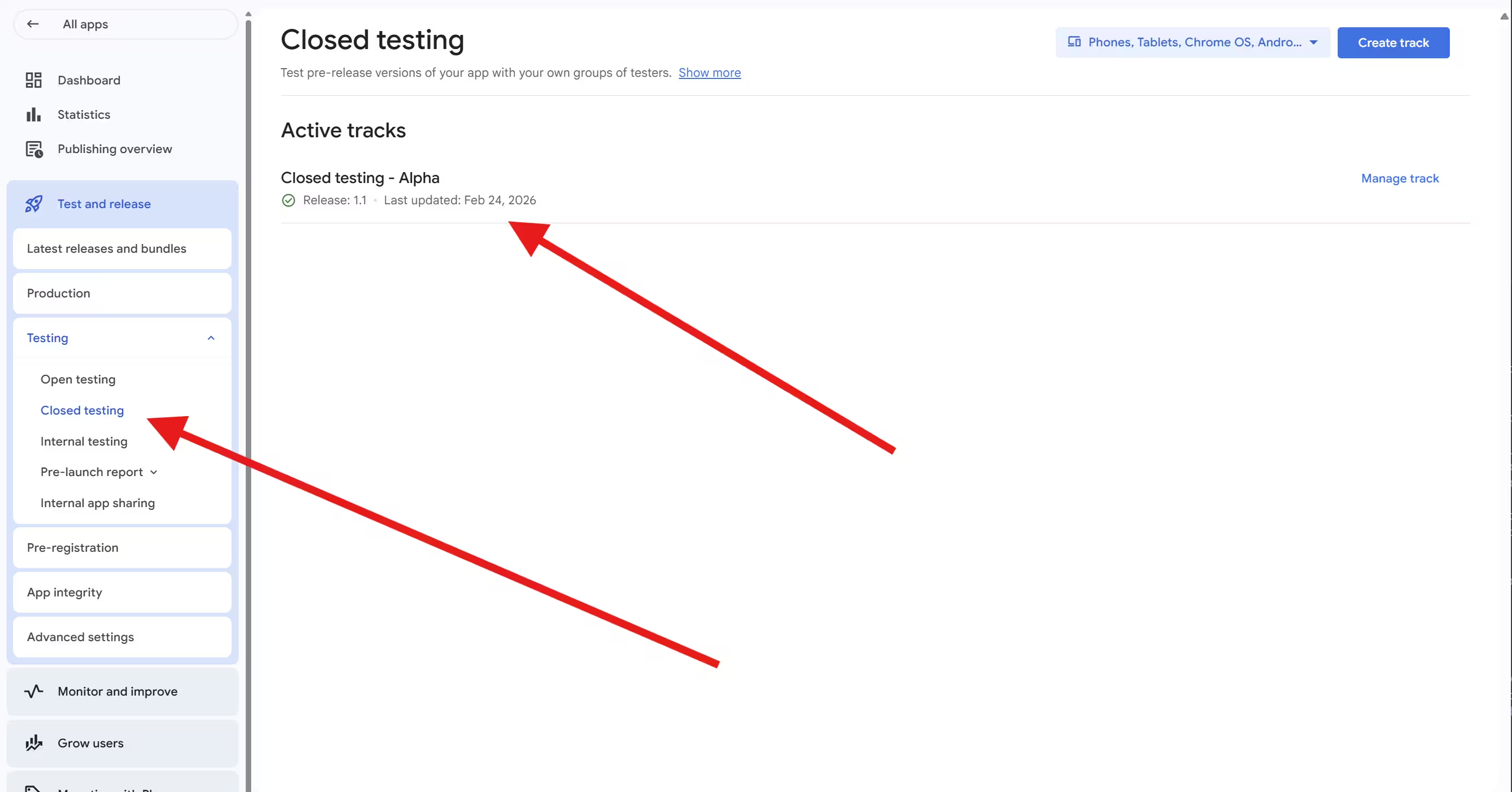
So testing on your own devices through internal testing might get your APK onto a phone, but it does not produce the 12 distinct, engaged closed-test testers Google is checking for. If you are weighing the tracks, our breakdown of internal vs closed vs open testing goes deeper.
Is It Against Google's Rules to Create Extra Accounts for Testing?
There is no single sentence in the closed-testing FAQ that says "do not use your own accounts." But the behavior runs straight into a convergence of three of Google's broader policies.
Google Account Terms
"Don't create or use multiple accounts to break Google's policies" and "don't use programs (bots) to create fake accounts."Google adds that it automatically detects and disables accounts made for abuse.
Ratings, Reviews & Installs
Prohibits manipulating app placement, including inflating ratings, reviews, or install counts by illegitimate means.Faking tester engagement to clear a required quality gate fits squarely inside this.
Misrepresentation
Forbids concealing ownership and coordinating with other accounts to mislead Google's systems.A stack of self-owned tester accounts is exactly that kind of coordination.
So while self-testing is not banned by name, manufacturing testers with extra or fake accounts is precisely the metric manipulation those policies exist to stop. Having more than one Google account is fine on its own - the violation is creating or using accounts specifically to game a requirement. Use the diagnoser to see where any given shortcut lands.
Will This Get My Account Banned?
Tap a shortcut to see its risk level, which policy it touches, and the likely consequence.
Pick the approach you are considering:
Based on Google's published Account Terms, Ratings/Reviews/Installs policy, and Enforcement process. Exact detection signals are not published, so risk levels reflect how clearly an approach violates a stated rule.
What Happens If Google Catches It?
This is where the real risk sits, and it is bigger than a single rejected app. Google's enforcement policy is explicit that bans cascade. A $25 sign-up can put your entire catalog at risk - here is how one flagged account becomes a terminated developer account.
-
Step 1 You create accounts to hit 12
A stack of burner Google accounts spun up on your own devices, home network, phone number, or payment method, just to fill the tester list.
-
Step 2 One is flagged for abuse
Google states it automatically detects and disables accounts made for abuse. It only takes one to draw attention.
-
Step 3 It gets linked to you
Google associates accounts through shared signals. The flagged account is tied back to your main developer account as a "related" account.
-
The fallout Everything cascades
The developer account is terminated, all apps in your catalog are removed, related accounts are permanently suspended too, the $25 fee is not refunded, and any new account you open is terminated as well.
"Related" is the dangerous word. Google links accounts through shared signals, so a stack of testing accounts created and used on your own footprint can be associated with your developer account. These are the kinds of signals that tie accounts together:
Device
The same phones and hardware IDs
Network / IP
One home Wi-Fi or IP address
Phone number
Reused for verification
Payment method
The same card on file
This matters most for freelancers and agencies. If you publish for clients, use Google's role-based access invitations rather than logging into a client console with your own credentials and network - otherwise a client's later violation can pull in accounts linked to yours.
How Does Google Detect Fake or Weak Testing?
It is worth being precise here, because a lot of confident-sounding "detection" theories online are guesswork. Here is the honest split between what Google actually states and what the developer community reports.
Official, documented
- Apps are reviewed with a combination of human and automated evaluation.
- The visible result of weak testing is a rejection for insufficient or non-unique engagement.
- Google does not publish the exact signals it uses - deliberately, since that would help bad actors.
Developer experience
- Telemetry concentrated on one device or one home network tends to be discounted as a single tester.
- Emulators and freshly wiped devices produce low-quality signals.
- These are field observations from developers and testing services, not confirmed Google mechanics.
The honest takeaway is simpler than any specific detection theory: if your testing does not look like 12 different people genuinely using your app, it is at risk of rejection - however you produced the installs. You do not need to know Google's exact signals to know that one person on one network cannot imitate twelve.
Myth versus Reality
A lot of bad advice circulates in developer forums. Here is what holds up.
"Uploading a new build resets the 14-day clock."
It does not. The clock tracks continuous opt-in, not your releases. Pushing updates during the test is encouraged.
"Uninstalling the app opts a tester out."
Formal opt-out is only through the testing web link. Uninstalling leaves them listed but stops their engagement signal (community guidance).
"The 14 days can add up over time."
Google requires 14 consecutive days of continuous opt-in. Gaps do not aggregate.
"Exactly 12 testers is plenty."
12 is the floor. If anyone drops out you can fall below it, so recruit a buffer.
"I can just be my own 12 testers."
One person cannot be 12 engaged testers, and extra or fake accounts risk an account ban.
How to Set Up Your Closed Test the Right Way
If you want to clear the requirement once and move on, this is the reliable sequence. None of it involves pretending to be your own testers.
-
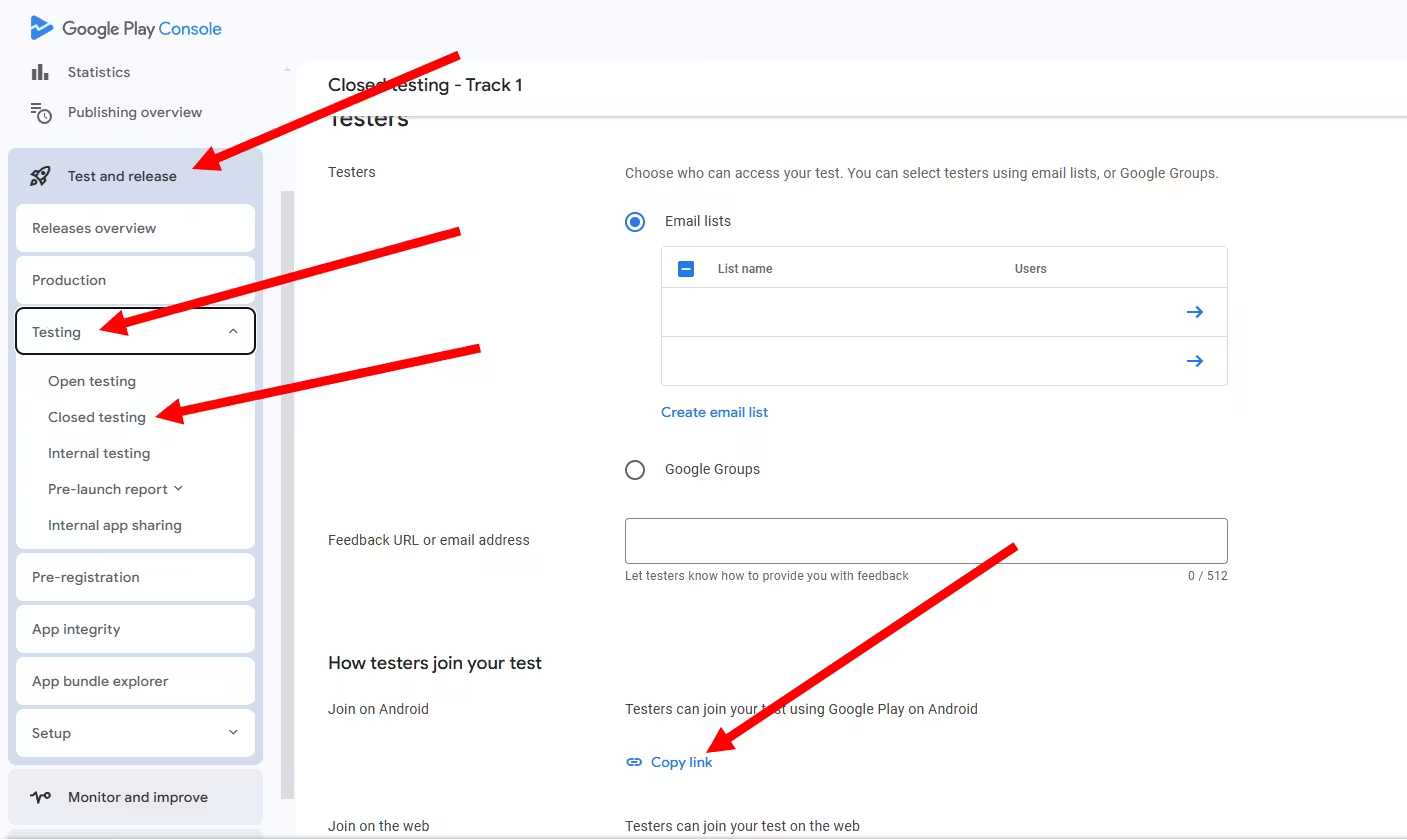
Upload to a closed testing track
Build your app bundle and push it to a closed track in Play Console. Internal testing is fine for your own quick checks, but remember it does not count toward the requirement.
-
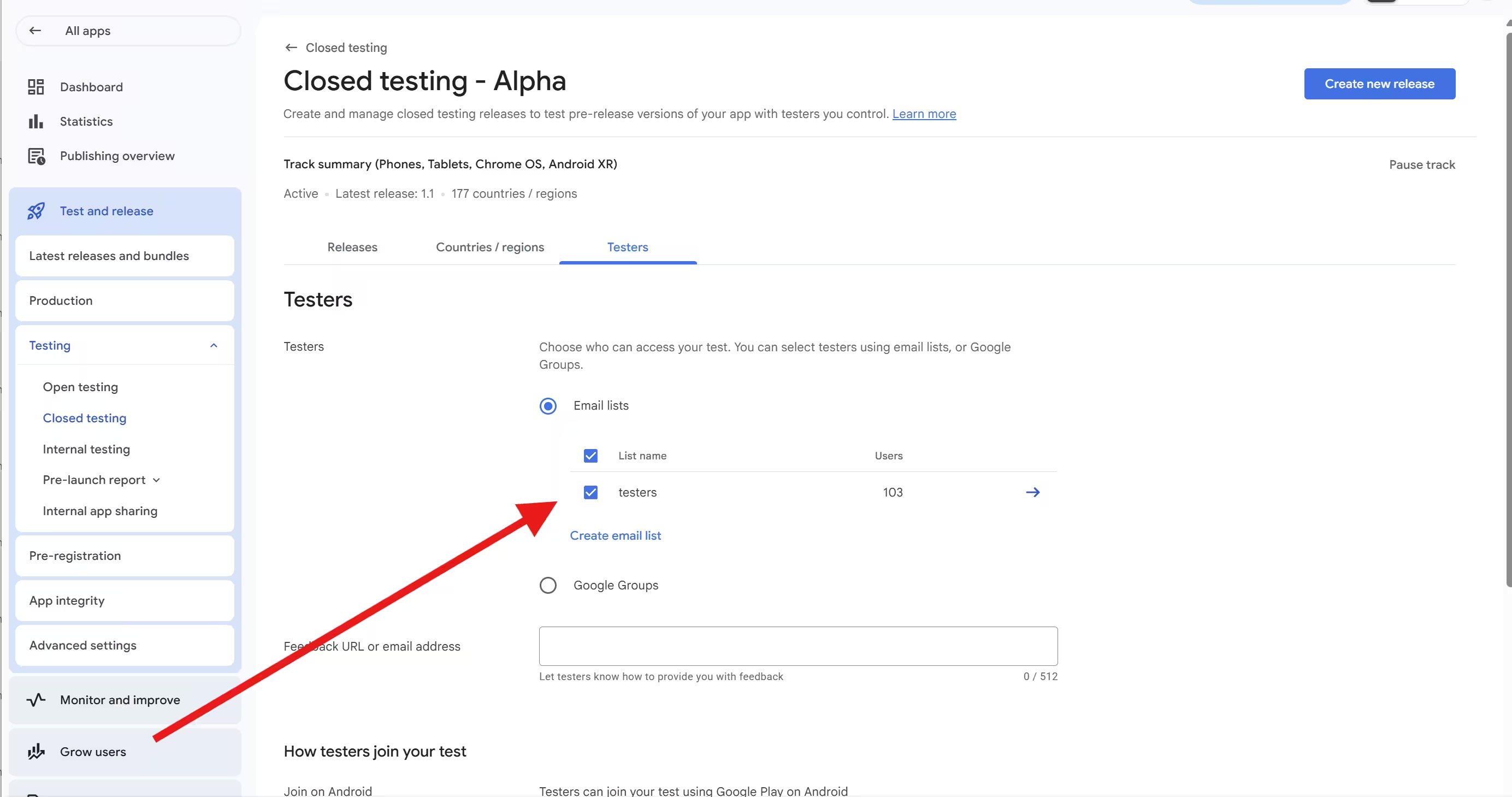
Recruit more than 12 testers
Add testers by email list or Google Group, and aim for 15 to 20 rather than exactly 12, so a few dropouts do not break your continuous count.
-
Confirm they actually opt in
Share your opt-in link and check that each tester joins and installs from Play. Added but not opted in does not count.
-
Ask for real, ongoing use
Encourage testers to open the app across the full 14 days, sign in, and move through the core flows - not just install it on day one.
-
Iterate and gather feedback
Push updates and collect notes as you go. The 14 days is an iteration sprint, and your production questionnaire will ask what you changed.
-
Apply with specifics
After 14 continuous days with at least 12 opted-in testers, apply for production access and answer the questionnaire concretely, with the real feedback and real changes you made.
The hard part is steps 2 through 4: finding enough real, engaged people and keeping them active for two straight weeks. That is the exact bottleneck a tester service removes.
The Legitimate Ways to Meet the Requirement, Compared
If being your own 12 testers is off the table, here are the paths that actually work, side by side.
| Path | Cost | Time to meet it | Risk | Best for |
|---|---|---|---|---|
| Your own devices & accounts | "Free" | Usually fails, then redo 14 days | High - ban | No one |
| Recruit friends & family | Free | 14+ days if they stay engaged | Low | Devs with a real network |
| Switch to an org account | Business + D-U-N-S | Up to ~30 days for D-U-N-S | Low | Registered businesses |
| A real tester service (PrimeTestLab) | From $19.99 | Starts in 4-6 hours, then 14 days | Low | No network or on a deadline |
D-U-N-S timing and review windows vary by case. An organization account removes the 12-tester requirement entirely because organization accounts are exempt.
A few notes on the non-fake options. Recruiting your own network is the cheapest legitimate route, and it works as long as the testers are different people on different devices who genuinely use the app - the risk is real life, where people forget or drop out. Switching to an organization account removes the requirement entirely, with the tradeoff of Dun and Bradstreet (D-U-N-S) verification that can take up to about a month, so it is a plan-ahead option, not a deadline fix. A tester service exists for the common case where you do not have 15 to 20 reliable Android users on standby and you have a launch date - you can see what that looks like for a single app on our 12 testers package page.
What the Production Access Review Actually Checks
The 14 days is meant to be an active sprint, not a waiting room. When you apply for production access you complete a short three-part questionnaire - and this is another reason fake self-testing backfires, because every part asks you to describe something real.
About your closed test
- How you recruited your testers
- What feedback they gave you
- What you changed in response
About your app
- Your app's value proposition
- Your target audience
- Core functionality and purpose
Production readiness
- What you improved during testing
- Why you decided it is ready
- Evidence the app got better
Reviewers are looking for evidence that real testing happened and that the app improved because of it. Generic, non-specific answers, or answers that show no changes were made, are a common reason apps get sent back for another 14 days. Google usually reviews the application in 7 days or less, using a mix of automated and human review. Even if you somehow cleared 12 installs, you still have to describe genuine feedback and genuine iteration - and if there was nothing real, that gap shows. Our walkthrough of the production access questionnaire goes question by question.
One 2026 note: don't confuse two different rules
Android Developer Verification is a separate identity requirement that begins enforcement around September 30, 2026 in Brazil, Indonesia, Singapore, and Thailand, expanding more widely afterward (per Google Play Help and the Android Developers Blog). It verifies who the developer is. It is not the same as the 12-tester closed-testing rule, and satisfying one does not satisfy the other. See our 2026 publishing requirements guide for how the pieces fit together.
How PrimeTestLab Helps
PrimeTestLab handles the part you cannot do yourself: 12 or more real, opted-in testers on real Android devices, engaged across the full 14 days - so your production application shows genuine activity instead of dead installs, and your developer account never touches a single fake one.
Real, opted-in testers
Distinct, independent people who opt in and genuinely use your app - the engagement reviewers check for.
Live in 4-6 hours
Testing usually starts within hours, so a deadline does not force you into risky shortcuts.
120+ countries
Real phones and tablets across 120+ countries, not emulators on one machine.
99.9% success rate
9,800+ apps supported, rated 4.9/5 from 2,200+ Fiverr reviews.
You can compare plans on our pricing page, see exactly how it works on How PrimeTestLab Works, or start with the 12-tester package if you just need to clear the requirement before a deadline.
Frequently Asked Questions
Do my family members count as testers for Google Play closed testing?
Yes, Google explicitly allows friends and family as testers. The catch is engagement and independence. Each person should opt in through the testing link and actually use the app across the 14 days, ideally on their own device and network. Several family members sharing one phone or one home network can be discounted as a single tester, which is a common reason these tests fall short.
Can I be my own tester or use my own devices to reach 12?
You can add your own email and count as one tester, but you cannot be the other eleven. Extra phones and accounts that all belong to you are still one person on one footprint, so they do not add distinct, engaged testers, and internal testing on your own devices does not count toward the closed-testing requirement. You still need 11 more real, independent people.
Can I use an emulator for Google Play closed testing?
Not reliably. Standard emulators tend to fail Google Play's device-integrity checks and produce weak, non-organic signals that reviewers discount, so they will not earn you a passing 14-day test. Pairing emulators with fake accounts also moves you into the multiple-account territory Google's policies prohibit. Real testers on real devices are the only dependable route.
Can I use multiple Google accounts on my own devices as testers?
No. Extra Google accounts created just to fill the tester list are still one person on the same devices, network, and payment method. Third-party testing services report that installs clustered on one device or IP get discounted as a single tester, and Google's own terms prohibit creating multiple accounts to break its policies, so this both fails the engagement bar and risks account action. The exact detection specifics are reported by third parties, not published by Google.
Does internal testing count toward the 12 testers requirement?
No. Internal testing is for your own quick checks and does not count toward the mandatory closed test. Google requires a closed test with at least 12 opted-in testers for 14 continuous days before you can apply for production access. Only closed testing satisfies that gate; internal testing is optional and separate.
Can I pay someone on Fiverr to be my testers, and is it safe?
It depends entirely on what you are buying. Cheap install-and-leave gigs produce dead installs with no engagement, which is a common rejection cause and can run into Google's manipulation policy. A legitimate service that supplies real, opted-in testers who genuinely use your app for 14 days is a different thing and is a normal way to meet the requirement. Judge by whether real people actually engage, not by price alone.
Does uninstalling the app remove a tester?
Not formally. Per developer-community guidance, a tester only opts out through the testing web link, so uninstalling leaves them on your list. However, uninstalling stops their usage signal, and testers not being engaged is one of the two reasons Google officially gives for rejecting a production request. So an uninstall can still cost you the requirement in practice.
Does uploading a new version reset the 14-day clock?
No. The 14-day clock tracks how long your testers have been continuously opted in, not how often you release. You can and should push updates during the test, because the production access questionnaire asks what you changed based on tester feedback. New builds do not restart the timer.
How many testers should I recruit to be safe?
More than the minimum. Twelve is a floor, and if anyone drops out or goes inactive you can fall below it, which breaks the continuous count. Recruiting 15 to 20 testers gives you a buffer so a couple of dropouts do not reset your two weeks. Keeping them engaged daily is more important than the exact headcount.
Do I need 12 testers with an organization account?
No. The 12-tester, 14-day requirement applies to personal developer accounts created after November 13, 2023. Organization accounts are exempt. Moving to an organization account requires Dun and Bradstreet (D-U-N-S) verification, which can take up to about 30 days, so plan ahead if you choose that route rather than recruiting testers.
Will using my own multiple accounts get my developer account banned?
It can. Google's terms prohibit creating multiple or fake accounts to break its policies, and its enforcement policy says related accounts can be permanently suspended together, with the $25 fee not refunded. Because Google links accounts through shared devices, networks, and payment methods, faking testers with your own accounts puts your main account at real risk.
How many testers does Google Play require in 2026?
At least 12 opted-in testers for at least the last 14 continuous days, for personal accounts created after November 13, 2023. The number was 20 until December 2024, when Google reduced it to 12. The 14 continuous days did not change, and the rule still stands in 2026.
Bottom Line
Summary
You cannot be your own 12 testers, and using extra or fake Google accounts to fake the count risks losing your developer account to Google's cascading bans. The requirement checks for 12 real people, opted in and genuinely engaged for 14 straight days, and a stack of self-owned accounts cannot produce that. Recruit real, engaged testers on distinct devices, switch to an exempt organization account, or use a legitimate service. PrimeTestLab supplies 12 or more real opted-in testers from $19.99, with testing that usually starts in 4-6 hours and a 99.9% success rate - so your closed test shows the genuine engagement Google is looking for. See pricing plans →