














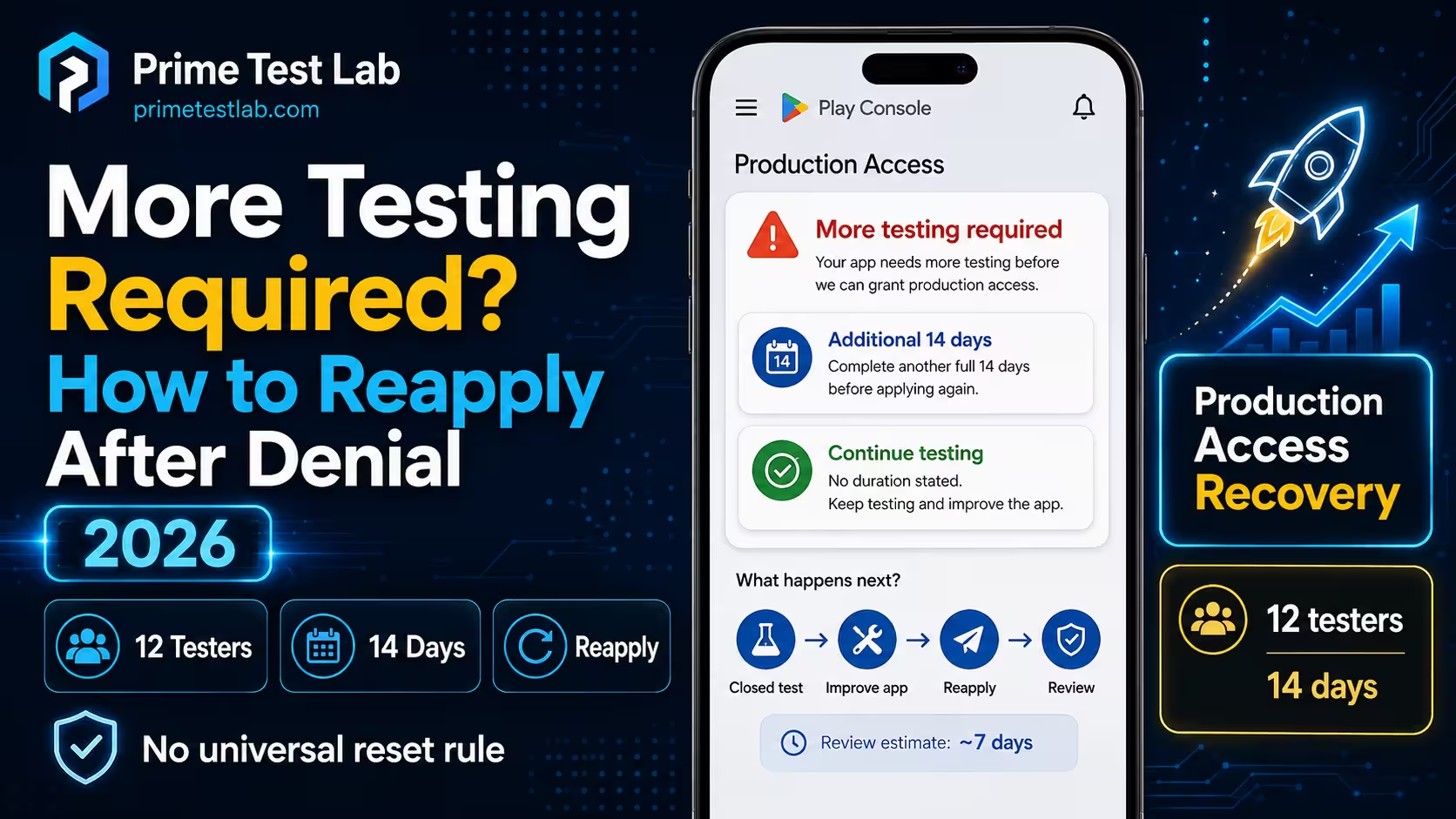
Quick Answer
As of August 17, 2026, Google publishes no rule that a more testing required denial resets the closed testing clock. Its Help Center says only that a denied app may be required to continue testing. If your denial specifically says to run closed testing for an additional 14 days with real testers, complete those 14 days before applying again. If it only says to continue testing, no separate numeric cooldown is published, and no Google source requires you to create a new closed testing track. Either way the eligibility floor is unchanged: at least 12 testers opted in for the previous 14 days continuously, on a closed test. Do not ask testers to opt out and rejoin to force a fresh start, because opting out breaks the continuous period Google actually counts.
| Your situation | What is officially known | Safest next action | Reapply when |
|---|---|---|---|
| Your message explicitly names an additional 14 days | The decision you received names a further testing period. Google's Help Center publishes no such period itself. Reproduced decision wording | Keep the qualifying closed test running and complete the period your message states. | That period is genuinely complete, at least 12 testers still qualify, and your readiness evidence has improved. |
| Your message only says to continue testing | This reproduced wording states no additional duration, and Google's public Help Center provides no universal numeric cooldown for it. Reproduced decision wording | Continue the existing test and strengthen what you can honestly say about it. Do not adopt a number your message did not give you. | Play Console allows the application and your answers have materially changed, not merely aged. |
| Fewer than 12 testers currently qualify | Published eligibility is not met, whatever your denial says. Official Google requirement | Restore a qualifying group before anything else. A replacement tester needs their own 14 continuous days. | At least 12 testers each hold their own unbroken preceding 14 days of opt-in. |
| You cannot find the decision message | The duration that applies to you is unknown, and no source supplies a default. Not publicly documented | Recover the message from the account owner's email, Play Console notifications or support history, and keep the existing test running meanwhile. | You have recovered the instruction, or Play Console support has confirmed it. Do not invent a duration. |
Table scrolls sideways on narrow screens
That table has to be conditional because Google's public guidance is less specific than the decision messages developers actually receive, so averaging the two into one confident answer produces a page that is wrong for half its readers. Every statement below is labelled official guidance, reproduced decision wording, community experience, or operational inference, and all of it is current as of August 17, 2026.
Rejection causes are deliberately out of scope here: this post owns what you do after the message arrives. For the diagnosis side, see our post on why production-access applications are denied.
The Recovery Desk
Two instruments built for this one denial. Both run in your browser against text you type or taps you make. Nothing is uploaded, stored on a server, or sent anywhere.
Table of contents
What Your Denial Message Actually Says
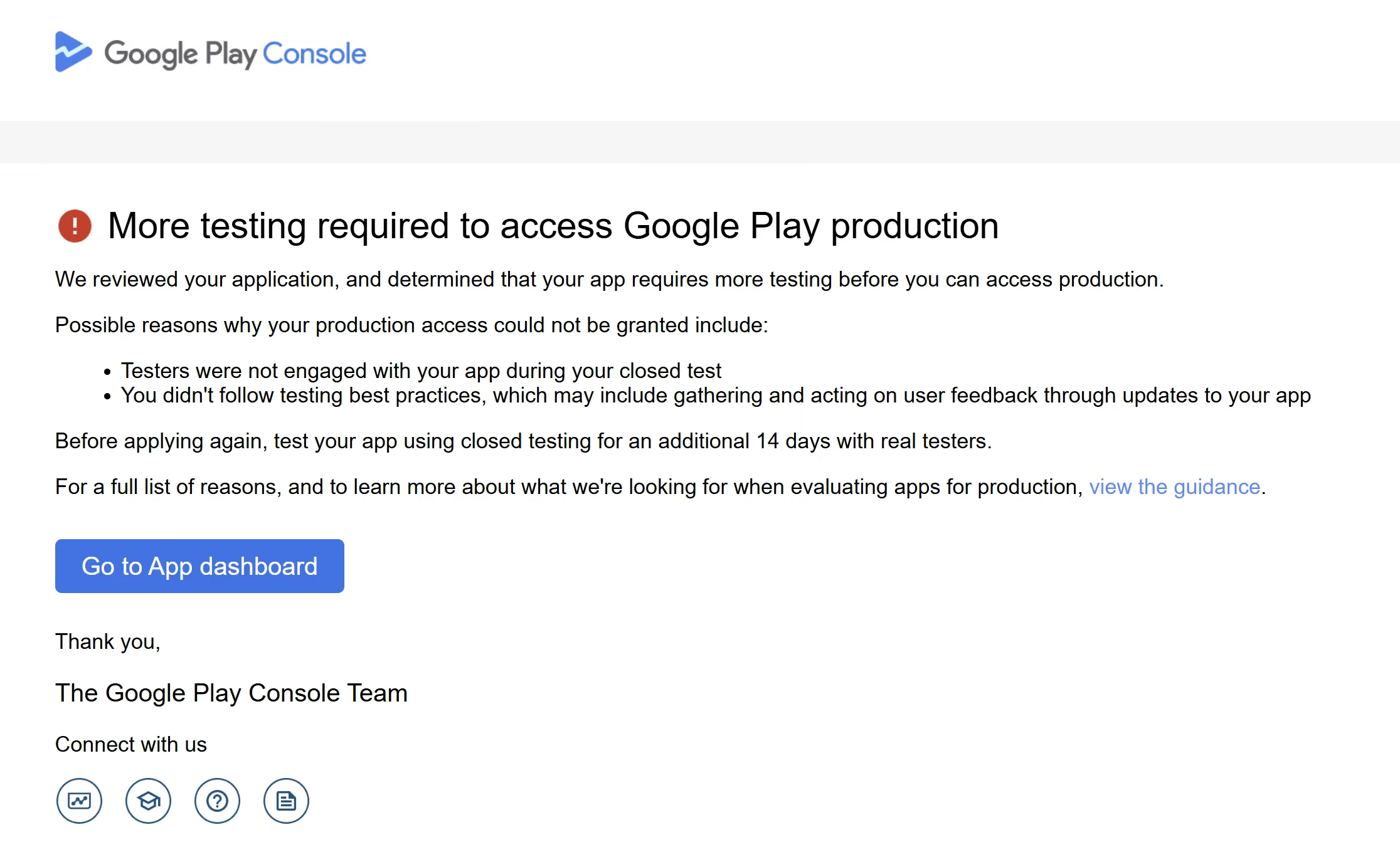
The message Google sent you is the most specific instruction you will get, and it outranks every forum answer about what "usually" happens. At least two substantively different versions have been reproduced publicly. Before you plan anything, work out which one you are holding.
Developers on the same forum thread contradict each other because they are describing genuinely different messages. So this post ranks its evidence in three tiers rather than averaging it:
-
Tier 1
Google's current Help Center
The only tier that is policy, and the least specific, because it is written for every developer at once.
-
Tier 2
A denial message reproduced by the developer who received it
Directly actionable for that app, but not policy text, and Google has demonstrably changed the wording over time.
-
Tier 3
Forum and community reports
Useful for showing something is possible, never for proving it is required.
Here is the whole of what Tier 1 says about your situation. The shortness is the point.
... may be required to continue testing your app.
The fragment Google publishes about what can happen when a production access application is not approved. Google Play Console Help, answer 14151465, accessed August 17, 2026. View the source page
That public passage states no reset, new clock, waiting period, or instruction to rebuild the tester group. Those details appear, when they appear at all, only in account-specific decision wording or community reports. Google's stated examples of why an app is not ready are fewer testers than required, or testers who were not engaged. Everything else circulating about this denial is Tier 2 or Tier 3, and the decoder below tells you which your own message is.
Instrument 01
Denial Decoder
Or tap the phrases that appear in it
Runs entirely in your browser. No upload, no storage, no network request.
Paste your message or tap a phrase above, and this panel will name the variant, what it proves, and what it does not.
Variant
PartialWhat this wording proves
What it does not prove
Your most specific instruction
Signals found in your text
One boundary on all of that: your denial is the most specific instruction available to you, not the only thing standing between you and a second application. Play Console still controls whether the apply button is live, and your account still has to hold at least 12 testers with qualifying opt-in histories on the day you press it. Follow any duration your message names, and check those two things independently.
What if you cannot find the decision message?
Then the honest position is that you do not know which instruction applies to you, and no page can supply the missing one. The no-duration variant is not a safe default: assuming it when your account actually received the other wording means reapplying before a stated period is finished.
- Search the account owner's email, including spam and any address other than the one you check daily, for the paragraph beginning "Before applying again".
- Check Play Console notifications and the app's policy or publishing status pages for the decision.
- Check your Play Console support history, where an earlier contact about the same decision may quote it back.
- Keep the existing closed test running while you look. Nothing about searching for the message requires you to pause, empty or rebuild anything.
- Contact Play Console support if the instruction cannot be recovered, and ask them to confirm what your app was told. Operational inference
Until you have the wording or a confirmation, do not assume a duration in either direction — not another fortnight, and not none.
Tested with PrimeTestLab?
If Google has not granted production access after your full PrimeTestLab test, you can choose a free retest or a full refund, and a free retest does not use up your refund; see the refund terms. New to PrimeTestLab? Read Google's notice before buying another test, and fix any named app or policy issue first. If you do need people to keep testing, compare testing support.
Does the 14-Day Closed Test Restart After a Denial?
Google does not document a universal reset: its Help Center says only that a denied app may be required to continue testing. Your denial message is the specific instruction, and those have come in at least two forms — one names an additional 14 days, one names nothing.
The word "restart" is doing the damage: it gets used for three different things, and only the third is a published rule.
- A platform reset. A Google-side event that wipes the qualifying period for everybody on the test. No source found
- An additional testing period. An instruction, delivered in the denial message, to test for a further stated time before applying again. Documented in one message family
- A broken individual streak. One tester's continuous opt-in period ending because they opted out. Published mechanic
That third one applies to individual testers, not to the test as a whole. Here is the full evidence set, ranked.
| Evidence | What it says | What you can conclude | Confidence |
|---|---|---|---|
| Google Help Center, accessed August 17, 2026 | A denied app may be required to continue testing. The examples given are fewer testers than required, and testers who were not engaged. | Google expects continued testing after a denial, and defines no universal reset event anywhere on the page. | Verified wording |
| 2024 denial, reproduced in Google's developer community | Instructs the developer to test using closed testing for an additional 14 days with real testers before applying again. | That recipient had to run another 14 days. Strong evidence that Google has used an explicit additional-period variant. | Partial, reproduced by a user |
| 2025 denial, reproduced in Google's developer community | Instructs the developer only to continue testing, following Google's guidance for gaining production access. No number of days appears. | At least one message family states no post-denial period at all. | Partial, reproduced by a user |
| April 2026, a Turkish developer forum | The same no-duration message, posted by a developer who had already paid for two rounds of closed testing. | The newer wording was still in circulation as of April 25, 2026, outside Google's own community, in another language. | Community reported |
| Google's testing best practice guidance | Continue using closed testing while you resolve the problems testers report. | This supports keeping the current closed test active while reported problems are resolved. It does not document what happens if a developer creates another track. | Operational inference |
Table scrolls sideways on narrow screens
Those five rows support one honest answer, and it is conditional: follow the wording of the denial you actually received, and do not treat any rejection as proof that Google formally reset a timer.
If your email says an additional 14 days
Then that is your instruction, and the safest earliest point to reapply is after those 14 days are genuinely complete. Google does not publish where the period should be served, so serving it on the existing qualifying track is an operational inference rather than a Google rule. Use the fortnight rather than waiting it out — the same message that gave you the number also asks for real testers. Operational inference
It is not evidence of a platform-wide mechanism: one developer was told to do 14 more days, and that is the whole claim. Ordinary attrition can still cost you the cohort, so check who is currently opted in before assuming the 12 are intact.
If your email only says continue testing
Then no duration has been given to you, and Google's Help Center publishes no numeric cooldown to fill the gap. Do not invent one — and beware the opposite error, because "continue testing" is not permission to reapply the same afternoon. Keep the qualifying test running and apply when two things are true: Play Console lets you, and you can materially improve your readiness answers. If your denial named engagement or tester numbers, those are the things to describe differently.
On the 14 day rule itself
The 14 days in the eligibility rule and the 14 days in that 2024 denial message share a number and nothing else. The rule is how long each tester has been continuously opted in; the instruction is how long to keep testing before applying again. Our post on the 14 consecutive days requirement covers the first in full.
Should You Keep the Same Closed Test or Create a New Track?
Google does not publish a rule requiring a new closed-testing track after a production access denial. Unless your decision or Play Console gives a different instruction, keeping the existing qualifying track active is the lower-risk default, because it preserves the testing setup and tester relationships you already have. Google's own best practice guidance points the same way: continue using closed testing while you fix what testers reported. Creating a new track is not documented as forbidden either, but it is not required, and moving people costs opt-in history you cannot get back cheaply. This is an operational inference, not a separate Google requirement. Operational inference
This is the most repeated question in the community threads behind this post, and the fear underneath it is reasonable: that choosing wrong wastes another two weeks. What is not known is what Google would do if you did start a new track, because it has never published anything about that either way. Given one documented recommendation and one silence, the lower-risk path is the documented one.
Keep doing
- Keep the existing qualifying track active, its release live and its tester enrolment intact.
- Confirm in Play Console who is actually opted in, rather than who you invited.
- Keep the test build installable and worth opening.
- Keep collecting feedback through whatever channel your testers already use.
- Ship fixes to the same track when testing justifies them.
Stop doing
- Deleting or emptying the track to mark a fresh start.
- Creating a parallel track and splitting your testers across both.
- Asking testers to opt out and rejoin.
- Removing testers who were quiet, when what you need from them is engagement rather than absence.
- Pausing the release while you decide what to do next.
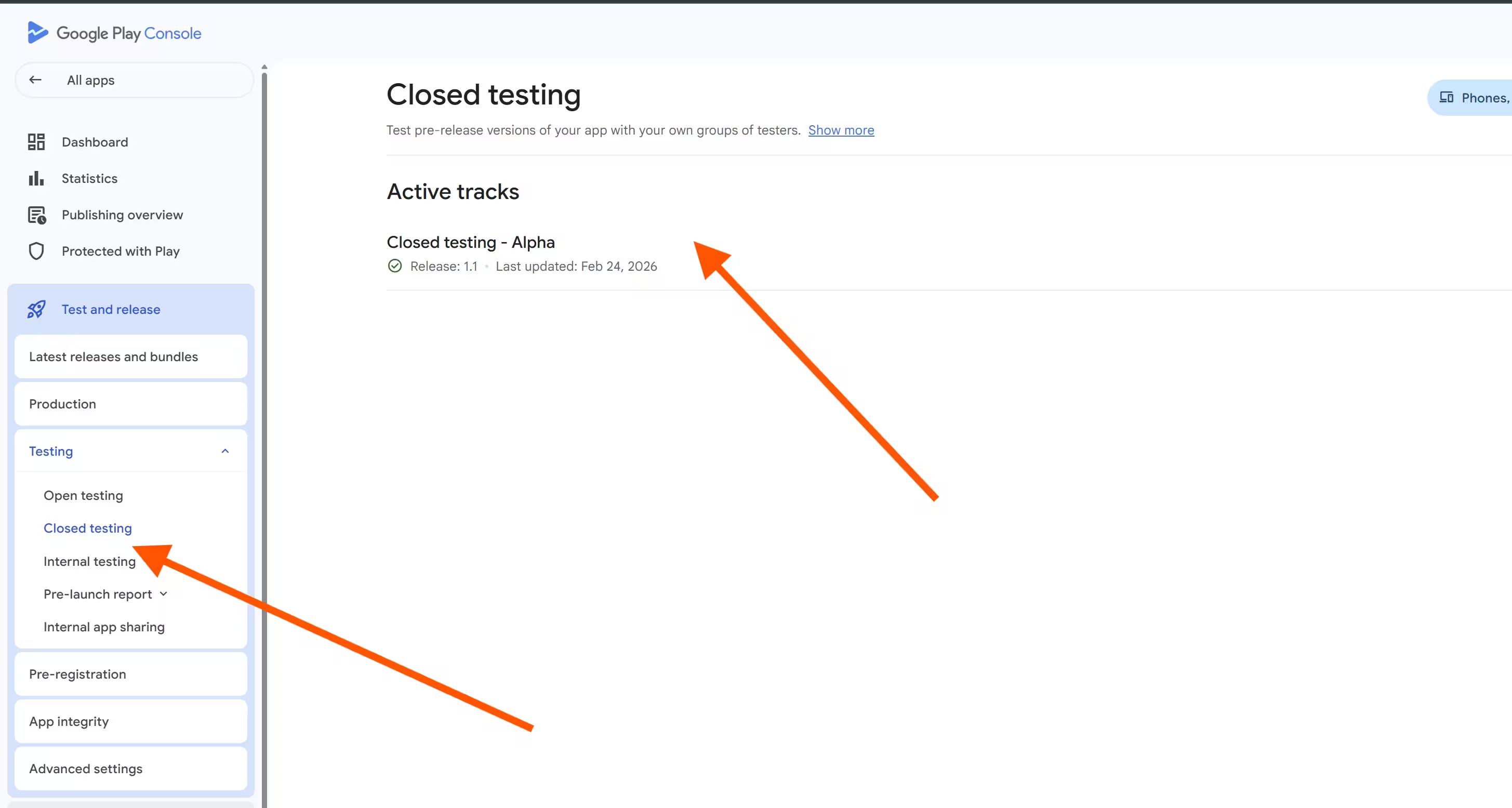
The console path to check any of this has not changed: Testing Closed testing Manage track Testers
Do the same testers still count?
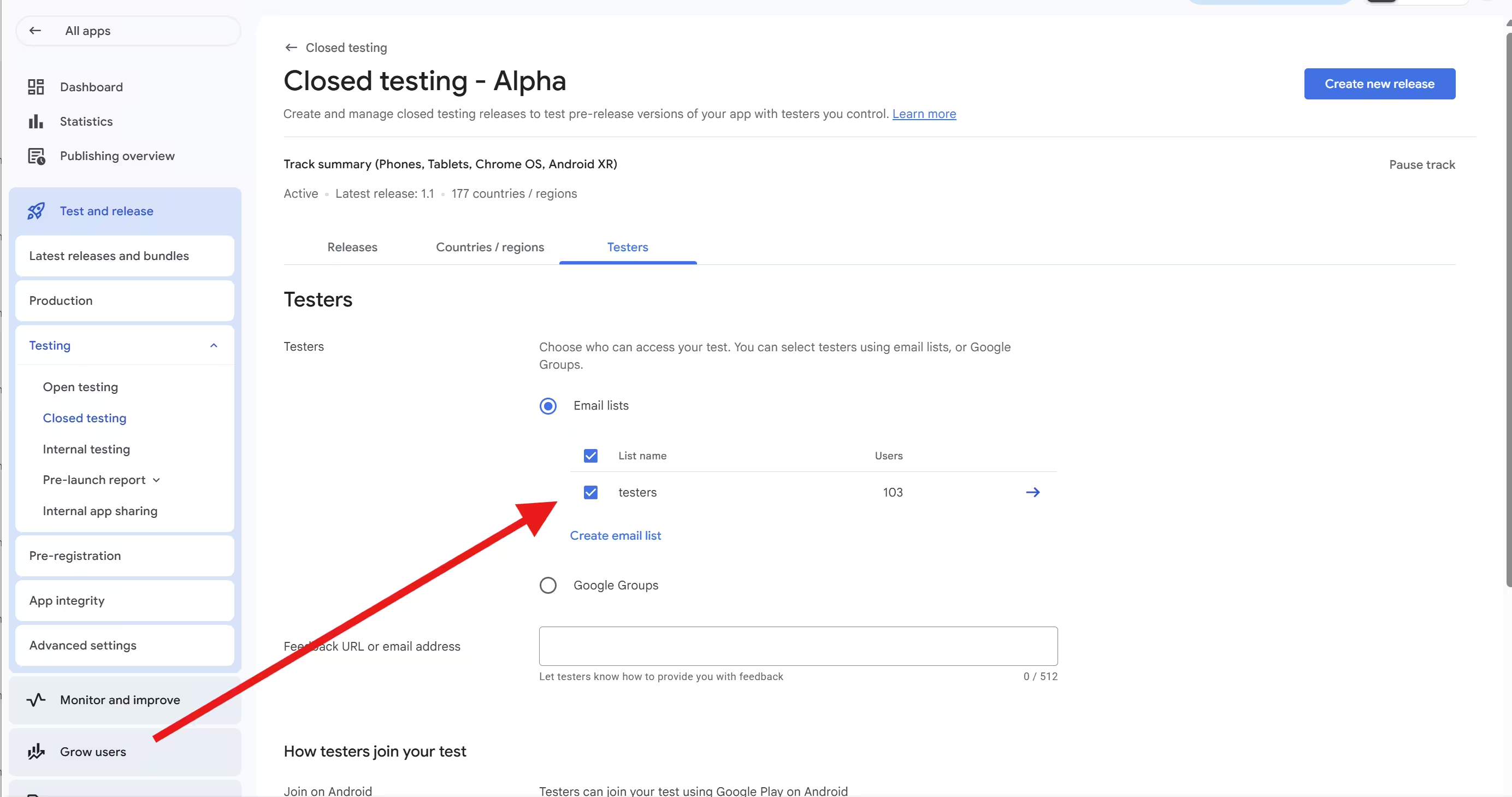
The hard rule. Each tester counted toward eligibility needs a qualifying continuous opt-in history, currently at least the last 14 days without interruption. That is published, and it is measured per person rather than as one global timer for the test.
The uncertainty. Google publishes no rule saying a denied developer must replace their testers. One r/androiddev commenter describes approval on a fourth attempt without adding any new testers, which argues against presenting replacement as mandatory. It is one anecdote and cannot prove the same testers always work, but it is more evidence than exists on the other side, where there is none.
The useful reframe
The question is not whether your testers are allowed to stay. It is whether they will do anything this time. A cohort that stayed opted in and never opened the app produced the exact evidence gap Google names when it says testers were not engaged, and swapping 12 silent people for 12 different silent people fixes nothing.
Should you ask testers to opt out and rejoin?
No. This is the most concrete mistake this post can prevent, and it is popular precisely because it feels like doing something.
Opting out ends that person's continuous period. There is no documented reset that leaving and rejoining triggers, so the tactic destroys real qualifying history in exchange for nothing, and it does it to every tester who cooperates at once. A developer who runs this on a full cohort turns a group that qualified yesterday into a group that qualifies in two weeks.
The same reasoning applies to the softer version of the idea, which is removing the testers who look inactive so the list "starts clean". If you are below 12 after that, you have made the eligibility problem worse rather than better, and our post on what to do when fewer than 12 testers still qualify covers where to go from there. If you need to rebuild the group rather than repair it, our post on ways to recruit 12 reliable testers is the practical companion.
What Should Change Before You Reapply?
Work through Google's own review inputs rather than a list of guesses. It publishes an eligibility floor, then asks about tester engagement, the feedback you collected, what changed because of it, and why you consider the app ready. Those five are the whole shape of the second application.
Note what is missing from that list: a cause of your denial. Google does not publish a scoring model, and no page can tell you which answer tipped the decision. What it can tell you is which subjects the reviewer is actually looking at, which is a better use of a fortnight than guessing. For the broader question of why apps fail this stage at all, our post on why closed testing gets rejected covers the causes; this section stays on the recovery.
Keep at least 12 testers continuously opted in
This is the only hard floor in the whole process, and it is worth reading in Google's own words rather than anyone's paraphrase.
If you have a newly created personal developer account, you must run a closed test for your app with a minimum of 12 testers who have been opted-in for at least the last 14 days continuously.
Google Play Console Help, answer 14151465. Applies to personal developer accounts created after November 13, 2023. Google reduced the requirement from 20 testers to 12 on December 11, 2024. View the source page
Three things in that sentence are routinely misread. It is a minimum, not a target, and nothing published says a bigger number performs better. It is continuous, measured per tester, so one person leaving breaks their own qualification rather than everybody's. And it specifies a closed test, which is why internal testing does not satisfy it no matter how many of its 100 seats you fill. If you are weighing the tracks, our post on internal versus closed versus open testing lays out what each one is for.
If your cohort dropped below the floor since the denial, that is the first thing to fix, and it takes calendar time: a replacement tester needs their own 14 continuous days before they count. Recruiting on day 10 of a plan built around day 14 is how people end up denied twice.
Give testers specific things to test
Google's recommendation is concrete: give testers clear instructions, tell them what kind of feedback you want, and encourage them to use as many of the app's features as possible. That is a very different brief from "please keep it installed", which is what most 12-tester groups are actually asked to do.
It is also the recommendation with the largest gap between what Google says and what the internet says. What the production access form actually asks is whether testers used the app's features, and whether their use resembled the way you expect real users to behave. Those are answerable questions about coverage, not about cadence.
- Name the features. Two or three that matter most, by name, so an answer about coverage later is a description rather than a claim.
- Name the flows. Sign up, create something, edit it, share or export it, come back the next day and find it still there.
- Name what you want back. Where they got stuck, what they expected to happen, what they would not use again.
- Spread the devices you already have. Representative real devices are recommended; no numeric device-model threshold is published.
Record feedback and make justified improvements
Google recommends responding to tester feedback and fixing the bugs testing uncovers, and says doing so can improve the likelihood of a successful production access application. That is a much stronger piece of evidence than any community recipe about how many releases to publish, and it is the one place where "do more" is genuinely supported.
The practical form this takes is a log. You will be asked to summarise what feedback you received and what changed because of it, and reconstructing that from memory a fortnight later is where good tests produce weak applications. Keep something like this, one row per item.
| Feedback received | Decision | Change made | Validated by | Build |
|---|---|---|---|---|
| What the tester said, in their words, plus how to reproduce it | Fix now, fix later, or no change and why | What you actually changed | Who confirmed it, and how | Version code that shipped it |
Blank template. Table scrolls sideways on narrow screens
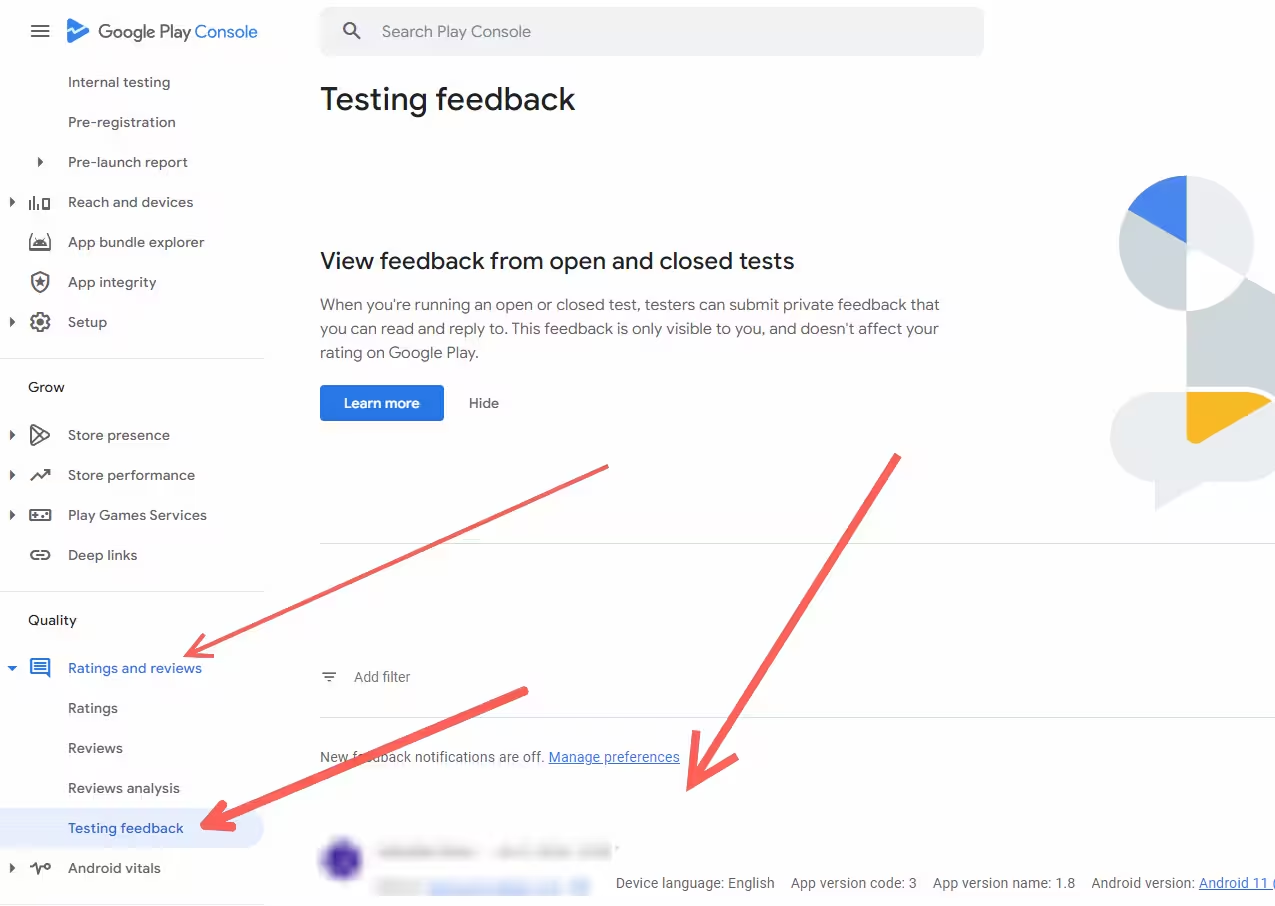
The "no change and why" row matters as much as the fixes. A production readiness answer that says which known issues remain and why they do not prevent launch is a stronger answer than one that implies everything was perfect. And the channel the feedback arrived through is your choice: email, a website or forum, or the private feedback testers can send through Google Play, which surfaces under Monitor and improve Ratings and reviews Testing feedback
On updates: ship one when the testing justifies it. Google encourages fixing what testing finds, and updating the build during a closed test does not break the tester requirement, which our post on whether updating your app resets closed testing covers in detail. What is not published anywhere is a required number of releases, so publishing builds to reach a count is effort spent on a number nobody set.
Check the pre-launch report
Google points developers to the pre-launch report to investigate issues, warnings and errors before releasing. Read it before the second application, and treat what it raises as work rather than as a diagnosis: nothing published says that a given warning caused a production access denial, and nothing says every warning must be cleared first. It is a source of real problems you can fix while you are already fixing things.
Check policy compliance, app reliability and reviewer credentials
Testing activity is not the whole of what Google asks you to confirm before applying. Its current guidance names four readiness areas alongside the closed test, and a fortnight spent only on tester engagement can still meet a decision about one of these instead.
The four official readiness checks
Policy compliance. Confirm the app meets Google Play's policies, and that its content, features and monetisation are what the store listing says they are. Target audience and content rating. Confirm the declared audience and the content rating questionnaire still match what the app actually does. Functional reliability. Confirm the app works as intended, without the crashes and broken flows a reviewer would hit first. Reviewer credentials. If any part of the app sits behind a login, supply working test credentials under App access, because a reviewer who cannot get in cannot see what you tested.
These sit outside this post's lane, which is recovery mechanics, so treat the list as a checklist rather than a guide. What matters here is that a "more testing required" decision is a readiness decision, and readiness is broader than tester count. Official Google requirement
How to Reapply for Production Access
The path is unchanged from the first attempt: open the app in Play Console, go to Dashboard, and choose Apply for production once you are eligible. The form is currently described by Google in three sections, covering your closed test, your app or game, and production readiness.
There is no separate reapplication flow documented, no different form, and no published queue for second attempts. What changes is what you bring to it.
| Section | What Google asks about | What to have ready |
|---|---|---|
| About your closed test | How difficult recruiting testers was | An honest description of how you found your testers |
| About your closed test | Tester engagement | Which important features were exercised, and whether that use resembled expected production behaviour |
| About your closed test | Feedback | The main themes you heard, and the channel you collected them through |
| About your app or game | Intended audience | A specific user group rather than everyone |
| About your app or game | Value, or what differentiates the game | A concise, real value proposition |
| About your app or game | Expected installs in the first year | Your best rough estimate. Google says an estimate is acceptable |
| Production readiness | What changed because of the closed test | Concrete feedback to change examples from your log |
| Production readiness | Why the app is ready | Evidence from testing and bug resolution, not the fact that 14 days elapsed |
Table scrolls sideways on narrow screens
Do not trust a question count
Pages currently ranking for this topic disagree with each other about whether this is a ten question form or a twenty question form, and some quote character minimums. Google describes three sections and the subjects above. Treat any specific count, including one you read here, as something to verify in your own console rather than plan around.
What to say about engagement, feedback and readiness
Engagement. Google asks whether testers used the app's features and whether their use resembled what you expect in production, so the strongest answer is descriptive and specific: which features, by name, and what testers actually did with them. If enthusiastic use is not true of your test, say what is true. An answer describing modest but genuine use is defensible; one describing activity you cannot evidence is something you then have to keep consistent across every later application.
Feedback. Summarise the themes rather than transcribing the messages, and name the collection channel. Email, a website or forum, and private Play feedback all count, so there is no wrong channel to have used — only an unanswerable question if you collected nothing at all.
Changes and readiness. Tie each meaningful change to a specific test finding, then explain why the issues that remain do not prevent launch. Those are the two answers where a documented fortnight visibly outperforms an undocumented one. For the full treatment of how to write each one, see our post on production access questionnaire answers.
What if Apply for production is still disabled?
A greyed-out or missing Apply for production button usually means that an eligibility or app-setup condition is not yet satisfied. Console delays and account-specific issues are also possible, so work through the documented conditions below before concluding that the interface is malfunctioning.
- The count is not there yet. The account may not currently hold 12 testers with the required preceding 14 days of continuous opt-in, whatever the total on the invite list says.
- Invited is not opted in. People who received a link and never accepted it are not testers for this purpose. Check who is actually opted in rather than who was asked.
- Replacements are still accruing. Someone added after the denial starts their own 14 continuous days from the moment they opt in, so a topped-up cohort can be twelve strong and still not eligible for another fortnight.
- App setup is incomplete. Outstanding store listing, content rating, app access or policy declarations can leave the application gated independently of your tester numbers.
- It is a closed test that counts. Internal testing does not satisfy this gate no matter how many of its seats are filled.
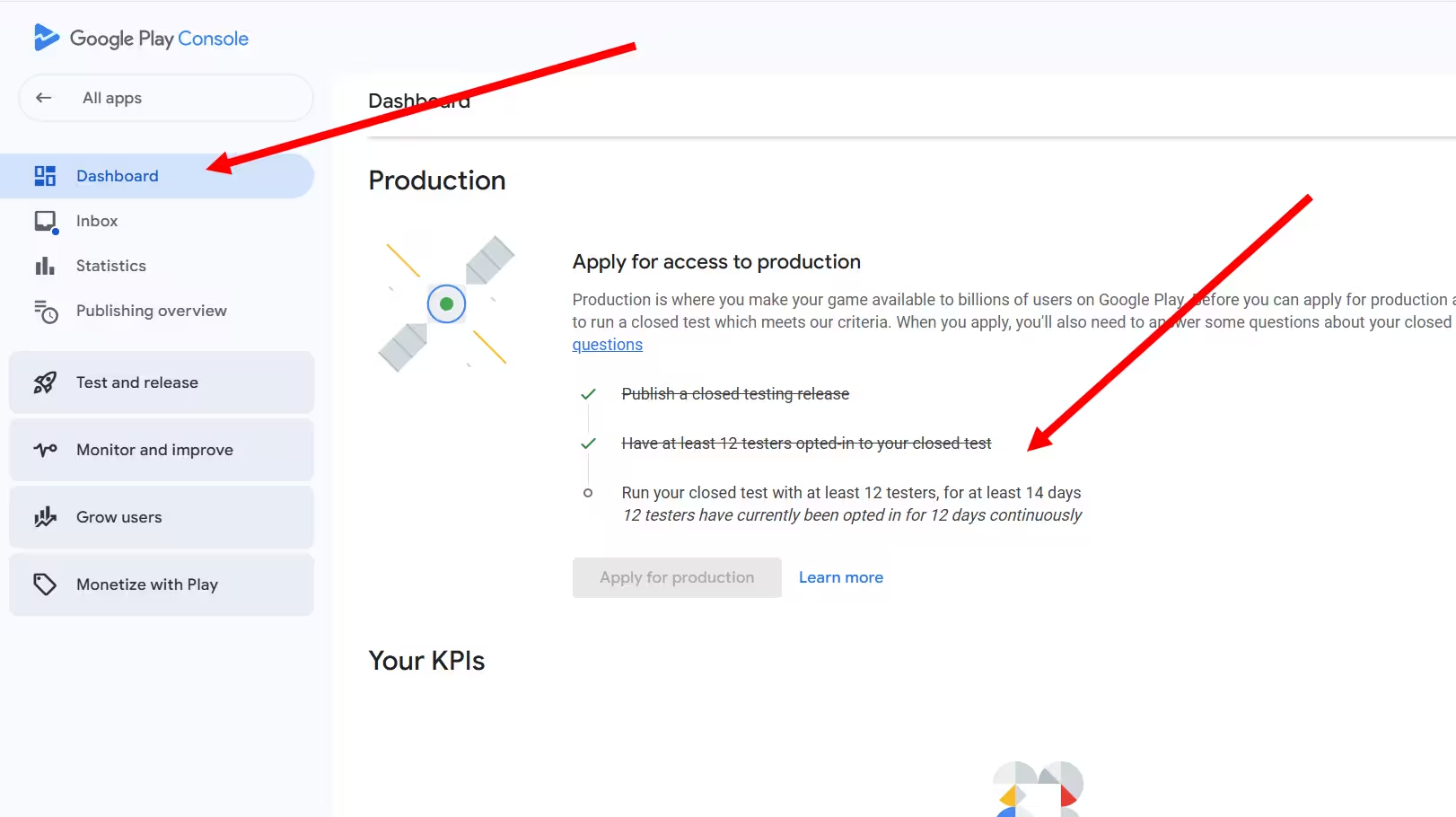
If every one of those looks satisfied in your own console and the button still does not appear, that is one of the situations worth taking to Play Console support rather than waiting out, because you are no longer troubleshooting something the public documentation describes.
Keep your own copy
Whether previously submitted answers stay visible or editable on a later application is not documented on Google's public Help Center, and this post will not guess at it. Draft your answers somewhere you control and paste them in, so a second attempt never depends on the console showing you what you wrote the first time. Unverified: needs a current console capture
One line on what you are applying for, since it is easy to lose sight of it on a second attempt: approval unlocks production releases for the app, and it also unlocks open testing, so the reader who wanted a wider beta rather than a store launch is waiting on the same decision. Everything after that point is ordinary release management rather than a continuation of this process.
Do You Need Daily Opens, More Testers, or More Updates?
No published rule requires any of them. Google publishes a tester count and a continuous opt-in period. It recommends engagement, feedback and acting on that feedback. It publishes no number for daily opens, minutes per session, releases, feedback messages or device models, and the confident numbers circulating on forums and competitor pages are tactics rather than requirements.
This is where most of the damage gets done. A denied developer searches for what went wrong, finds a page saying testers must open the app daily and you must ship three releases, and spends the fortnight chasing a target Google never set while the thing Google actually asked about — whether testers meaningfully used the app, and what you did with what they told you — goes unaddressed. The honest position is worth stating plainly: Google's public production access guidance provides no numeric engagement threshold and no published scoring rubric. The form's questions are review inputs, not a rubric with weights, and no published dashboard converts your tester activity into a rating you can read. So the useful move is not to guess the number, but to know which of the things you have been told are actually published.
| What you were told | Status | What you can say instead |
|---|---|---|
| Testers must open the app every day | Not publicly documented | Google publishes no once-per-day requirement. It expects meaningful engagement and asks whether testers used your features, but no daily cadence appears in its public guidance. The published 14-day rule is about continuous opt-in status, not daily use. |
| Testers must use the app for a set number of minutes | Community folklore | No primary source states any required session duration. Do not design a test around a number nobody published. |
| You must ship two or three updates | Community folklore | No mandatory release count is published. Update when tester feedback identifies a justified fix, not to reach a number. Google does recommend fixing what testing uncovers, which is the part worth doing. |
| You need a minimum number of feedback messages | Not publicly documented | No published threshold exists. Collect enough real feedback to understand and improve the app, and be able to summarise what you received and what changed because of it. |
| Questionnaire answers must be at least 250 characters | Community folklore | No public minimum answer length was found. Be specific, complete and truthful rather than padding to a character count. |
| You must replace your testers after a denial | Not publicly documented | No published replacement rule was found. Keep qualified testers opted in rather than breaking streaks you already have. What the denial points at is engagement, and swapping 12 silent people for 12 different silent people fixes nothing. |
| You must create a new closed testing track after a denial | Not publicly documented | No Google instruction requiring a new track was found, and its best practice guidance points the other way: continue using closed testing while you fix what testers reported. Keeping the existing track is the lower-risk default, which is an operational inference rather than a Google rule. |
| More than 12 testers improves your odds | Not publicly documented | Google publishes no approval-rate benefit for any number above 12, so nobody can sell you a larger cohort as a better chance. A larger cohort does give real operational resilience: a buffer against opt-outs, broader device coverage and more feedback. Treat it as an operational choice, not an approval lever. |
Table scrolls sideways on narrow screens
Two of those deserve a sentence more, because they are the ones that cost real money. Buying a larger tester group is a reasonable operational choice, since a group of 12 has no margin if one person leaves, but nobody can honestly sell it to you as a higher chance of approval, and community reports include denials with more than 30 testers and with 19 testers plus 17 updates. And chasing a device-model quota diverts effort from the thing Google actually asks about on the form: no numeric device threshold is published, and representative testers on real devices are a recommendation rather than a formula. If you want the detail on what counts as a valid closed-test participant, our post on emulators in Google Play closed testing covers the device side properly.
What not to do with this table
A status of "not publicly documented" is not permission to do the opposite. Google publishes no minimum feedback count, and a test that produced no feedback at all is still a weak application, because you will be asked what feedback you received and what you changed because of it. The absence of a number means there is no target to hit, not that the underlying expectation is fictional.
How Many Times Can You Reapply?
No public Google maximum was found as of August 17, 2026, and no separate fixed cooldown is documented independently of whatever continued testing your denial instructs. Community reports reach a fourth application and a sixth denial, which makes any claim of a two or three attempt ceiling unsafe. Absence of a published limit is not a promise of unlimited attempts.
That is nearly the whole of the public evidence base, and it is worth seeing how thin it is before anyone quotes a number at you. Individual developers on public forums describe approval on a fourth application without adding new testers, a roughly sixth rejection behind 19 testers and 17 updates, a second denial with a cohort well above the minimum, and another second denial after a full extra fortnight with the same testers and shipped fixes. They tell you those attempts happened. They cannot tell you why any of them went the way it did. Community reported
Two conclusions follow, and only two. First, there is no obvious low ceiling: applications beyond a second and a third demonstrably exist. Second, and more useful, doing more of the same is not a strategy. Most of those reports describe developers who added testers, added updates or added time and were denied anyway. If your second application is your first one plus a fortnight, you are reproducing the last of them.
On the fear underneath the question: Google's public guidance does not classify a "more testing required" readiness decision as a policy strike, and no evidence was found that repeated readiness decisions on their own lead to account suspension. A separate policy issue can still exist alongside one — policy enforcement is its own process with its own notices and its own remedies — so read any message that names a policy violation as the different thing it is, rather than as another round of this one.
How Long Does Google Take to Review a Reapplication?
Google's only published figure is that a production access request usually takes 7 days or less, and it explicitly says some reviews take longer. There is no separate published timetable for a second or later application. Community threads in 2026 report waits well past that estimate, so treat seven days as a normal case rather than a deadline.
This section exists mostly to stop one behaviour: day eight arrives, the estimate has passed, and the developer starts changing things. The two community reports below show how far outside the estimate a review can sit without anything being wrong with it.
Those two long waits are single reports and prove only that long waits occur. They are not a distribution, and passing day seven is not by itself a signal that something has gone wrong. For the wider picture across review types, see our post on Google Play review times.
When is it worth contacting Play Console support?
There is no published "contact support after X days" rule, and inventing one would be the same mistake as inventing a cooldown. What can be said is which situations the public documentation stops explaining, which is where support becomes the only remaining source of an answer:
- The instruction is unavailable or contradictory. You cannot recover the decision message, or what it says does not match what the console shows.
- The console stays gated. Apply for production remains unavailable although the published criteria appear to be met and every item in the disabled-button list above checks out.
- The review is materially outside the estimate with no status information available anywhere in the console.
- The message looks like a different process. Anything naming a policy violation or a technical enforcement action is not this decision, and asking about it here wastes the fortnight.
Outside those, waiting is the correct action rather than the passive one. Resubmitting, altering the track or withdrawing an application to reapply are all changes made to a process you cannot see, and none of them is indicated by anything Google publishes.
While you wait
Keep the closed test running through the review rather than winding it down the moment you press submit. If the answer is another request for more testing, an intact cohort is the difference between continuing and starting the recruitment problem again from zero.
Your Reapplication Checklist
Eleven steps, in order. Most are grounded in Google's current production-access guidance. The same-track recommendation, missing-message recovery, and some sequencing advice are operational recommendations rather than published Google rules. Operational inference
The eleven steps, in order
- Read the exact denial and note whether it specifies an additional 14 days. If you cannot find it, recover it before you plan around a duration.
- Keep the qualifying closed test running. Do not close, delete or replace the track because of the denial, and publish justified fixes to it when testing warrants them.
- Keep at least 12 qualifying testers continuously opted in. Each one counted needs their own unbroken period.
- Do not ask testers to leave and rejoin. Google documents no reset that rejoining would trigger, and leaving breaks a real continuous period you already hold.
- Give testers real feature-level testing instructions rather than asking them to keep the app installed.
- Record meaningful feedback in a short written log, whatever channel it arrives through.
- Fix justified bugs and usability problems, then validate the fix with the tester who reported it.
- Review the pre-launch report for issues, warnings and errors before you apply.
- Check the readiness areas outside testing: policy compliance, target audience and content rating, functional reliability, and working reviewer credentials under App access.
- Prepare specific, truthful production access answers about engagement, feedback, changes and readiness.
- Apply from Dashboard when eligible, and do not promise anyone a seven day decision.
That list is the general case. Your case has at least three variables the general case cannot see: what your message said, where your tester cohort actually stands today, and how many times you have been here before. The builder below turns those into an ordered route you can work through, and it keeps your ticks if you close the tab.
Build your own route
Instrument 02
Recovery Route Builder
01 What does your denial message say?
02 Where does your closed test stand right now?
03 Has anyone opted out since the denial?
04 What testing evidence can you actually show?
05 Which application will this be?
Answer all five and this panel builds your ordered route, plus the matching list of things not to do.
Do this, in this order
Do not do this
Your answers and ticks stay in this browser only.
One thing the builder will never print, whatever you answer, is a date on which Google will approve you. Nobody can produce that, and a community report of a developer approved on a fourth attempt sits alongside another describing a sixth denial. What the route can do is make sure that when the decision comes, it is being made about an application you can defend rather than about a fortnight that merely elapsed.
If working through that route tells you the tester side is the blocker — your denial explicitly requires an additional 14 days, or your cohort no longer holds 12 qualifying testers — that is the half you can hand off: PrimeTestLab runs it while you improve the app, the feedback record and your reapplication answers. That is covered in how we help further down.
How PrimeTestLab Helps If You Need Another Cohort
Only if you need it. If your denial explicitly requires an additional 14 days, or your cohort no longer holds 12 qualifying testers, PrimeTestLab can run the tester side while you improve the app, the feedback record and your reapplication answers. If your message named no duration and your testers are still opted in and still using the app, you may not need a second cohort at all — and this post would rather you kept your money.
Where a managed run earns its place, the recovery splits into two halves. One is judgement: reading your denial, deciding what to change, writing answers you can defend. That half is yours. The other is logistics: keeping 12 real people opted in and using the app across a whole testing window. It is not the interesting problem, but it is the one that consumes the calendar.
PrimeTestLab supplies 12 real testers on real devices spanning Android 7 to 17, opted in and held for the full 14 days, with testing starting in 4-6 hours. We have run this across 9,800+ apps in 120+ countries at a 99.9% managed test-completion rate — completion meaning the test held the required tester count and an unbroken opt-in period through its end date.
What we do not do, and what this post has argued nobody can do, is promise the decision: Google reviews production access on its own criteria and publishes no rubric. Our guarantee is a free retest or a full refund — conditions and claim window on our refund and free-retest policy.
Recruiting another cohort yourself versus a managed run
| What another testing round needs | Recruiting it again yourself | Managed run |
|---|---|---|
| At least 12 opted-in testers | The same ask, to the same people, after they have already given you two weeks | 12 supplied and held for the whole window |
| 14 continuous days, unbroken | One person opting out breaks their own qualifying period, and you may not notice for days | Monitored so the window stays intact, with testing starting in 4-6 hours |
| Testers who actually use the features | Friends who installed it once are the cohort you already had | Real people on real devices, Android 7 to 17, exercising the app during the run |
| Cost | Your time, during the fortnight you are also rewriting your application | From $19.99 for 12 testers |
| If it does not go through | Start the recruitment problem again from zero | Free retest or a full refund |
Table scrolls sideways on narrow screens
To be direct about the boundary: buying testers does not answer the questionnaire, write your feedback log, or make Google approve anything. Everything above this section is written so you can do those parts well. What a managed run removes is the part where a testing window collapses for the same reason the first one did.
One caveat worth repeating from the myth table above: larger cohorts hedge against opt-outs, but Google publishes no number above 12 that measurably increases the chance of approval, so nobody — including us — should sell you extra testers as better odds. Buy the buffer for the buffer. Full breakdown on the pricing page.
Sequencing tip
If your denial named an additional 14 days, start the tester side first and do your own work inside that window rather than after it. The timelines can overlap: Google encourages updating the build during a test, and publishing a justified update to the same closed track normally does not require testers to opt out and rejoin. Running them in sequence instead is how a two week recovery becomes a five week one.
Frequently Asked Questions
Do I need another 14 days after more testing required?
When the denial itself says to test for an additional 14 days with real testers, complete that additional period before reapplying. When it only says to continue testing, Google's public Help Center does not publish a separate universal numeric cooldown, so do not treat another 14 days as certain unless that is what your message says. If you cannot find the decision at all, recover it rather than assuming either answer. Either way the eligibility floor stays the same: at least 12 testers opted in for the previous 14 days continuously.
Should I continue the same closed testing track or create a new one?
Google does not publish a rule requiring a new closed-testing track after a production-access denial. Unless your decision or Play Console gives a different instruction, keeping the existing qualifying track active is the lower-risk default, because it preserves the testing setup and tester relationships you already have. Google separately recommends continuing to use closed testing while you fix issues testers report. Creating a new track is not documented as forbidden either, but it is not required, and moving testers risks the opt-in history you already hold. This is an operational inference, not a separate Google requirement.
Do I need 12 new testers after a rejection?
Google does not publish a rule saying the cohort must be replaced with 12 new people after a denial. Keep qualified testers continuously opted in rather than deliberately breaking their streak. One developer on r/androiddev reports approval on a fourth attempt without adding new testers, which argues against treating replacement as mandatory, but that is a single community anecdote and not a Google guarantee.
Do my testers have to open the app every day for 14 days?
The published 14-day requirement is about continuous opt-in status, not daily use. Google separately expects meaningful engagement and asks on the production access form whether testers used the app's features and whether their use resembled expected production behaviour, but its public production-access guidance gives no once per day, minutes per day or sessions per day number. Aim at real feature coverage and useful feedback instead of an invented activity quota.
Can I change my questionnaire answers when I reapply?
This is genuinely unverified. Google's public Help Center explains what the production access questionnaire asks but does not document whether every field from a previous rejected application stays editable or even viewable on a later application. Keep your own copy of what you submitted before you submit it, so you are not depending on the console to show it back to you.
Is more testing required a policy strike against my account?
Google's public guidance does not classify this readiness decision as a policy strike. It is a decision about whether the app is ready for production, and policy enforcement is a separate process with its own notices and remedies. A separate policy issue can still exist alongside it, so read any message that names a policy violation as the different thing it is. No evidence was found that repeated more testing required decisions on their own lead to account suspension.
Bottom Line
Summary
Google's current public documentation does not describe a universal reset event that every "more testing required" denial triggers. Its Help Center says only that a denied app may be required to continue testing, so your own decision message is the most specific instruction available: one reproduced variant orders an additional 14 days with real testers, another only says to continue testing. If you cannot find yours, recover it rather than assuming either. Keeping the existing closed test running is the lower-risk default — an operational inference, not a published Google rule. Hold at least 12 testers opted in for 14 continuous days, never ask anyone to opt out and rejoin, and check policy, rating, reliability and reviewer credentials alongside the testing itself. Review usually takes 7 days or less, occasionally much longer.
If your denial did name another 14 days, or your cohort no longer holds 12 qualifying testers, that tester side is the one part of the recovery you can hand off while you do the rest. See pricing plans →
Official Google documentation
Reproduced denial messages and community evidence
These are the two Google Developer Community reproductions this article relies on. The no-duration wording was also independently reported in a Turkish developer forum in April 2026. None of these reproductions is official policy text, and this page never treats them as more than that.
What on this page will go stale first
- The denial wording. The fastest-decaying fact here, and the one the whole page is built on. It already differs between 2024 and 2025 reproductions. If your message matches neither variant, your message wins.
- The 12 testers and 14 days figures. Google has changed the tester number once already, from 20 to 12 on December 11, 2024. Check answer 14151465 before planning around either number.
- The questionnaire sections. Google can change what the form asks without touching the eligibility rule, so treat the subject list here as current rather than permanent.
- The reapplication flow. Whether previous answers stay visible or editable is undocumented, which means it can also change without an announcement.
- The seven day estimate. Published as a usual case rather than a commitment, and the community outliers on this page show how wide the tail is.
Verified against Google Play documentation on August 17, 2026. Re-checked when Google changes answer 14151465 or a new denial variant appears.