













Quick Answer
From August 31, 2026, new Google Play apps and app updates for phones, tablets, foldables and Android Auto must target Android 16, API level 36 or higher. Wear OS and Android Automotive OS submissions need API 35 or higher, and Android TV and Android XR need API 34 or higher. A published phone app you are not updating needs API 35 to stay available to new users on devices running a newer Android version than it targets. Missing the date does not delete your app: it blocks noncompliant uploads and removes the app from discovery and installation for those new users, while previous installers keep it. Impacted developers can request an app specific extension through Play Console that runs to November 1, 2026.
How this post grades every claim
- Verified means the statement comes straight from a current Google policy or developer page. Most of this post is verified. Verified
- Partial means Google's own pages support the conclusion but leave an edge case unaddressed, or contradict themselves. Partial
- Field reports are repeated developer observations from Google's support forums. Useful for troubleshooting, not policy. Field reports
- Not documented means Google has published nothing on that exact scenario, and we say so instead of guessing. Not documented
Google raises the Play Store's target API floor once a year, and 2026 is the API 36 cycle. The number is not the confusing part. The confusing part is that "the target API level requirement" is really two rules wearing one name: one governs what you are allowed to upload, and a different, lower one governs who can still install what is already published. Nearly every page ranking for this question blurs the two, which is how developers end up rebuilding an app that did not need rebuilding, or shrugging off a Play Console warning that mattered.
This post separates them, gives you the per form factor numbers, and then answers the question our support inbox actually receives in August: what does this do to an app that is halfway through a 12-tester, 14-consecutive-day closed test? PrimeTestLab runs that testing side for developers, so we see the timing collision constantly, and the guidance in that section applies whether you use a service or recruit testers yourself. Every date and level below was checked against Google's own pages on August 9, 2026, and anything Google has not actually documented is labelled rather than filled in with a confident guess.
The rule in one sentence
Starting August 31, 2026, an ordinary phone, tablet, foldable or Android Auto app must target Android 16, API level 36 or higher to be submitted to Google Play, whether it is a brand new app or an update to a published one. That single sentence covers most readers. The exceptions, and the separate lower floor for apps you are not touching, are what the rest of this post is about.
Google's exact wording, phrase by phrase
"Starting August 31, 2026" · apps "must target Android 16" · existing apps need "Android 15 (API level 35)" · noncompliant apps "stop being discoverable" · developers may request an "extension to November 1, 2026"
Fragments quoted individually from Google Play's target API level requirements page, Play Console Help answer 11926878, accessed August 9, 2026. Google published its annual policy reminder on July 15, 2026. Verified
One name, two different rules
Google uses the phrase "target API level requirement" for two things that behave nothing alike. Keeping them apart is the single highest value thing you can do with this page.
Rule 1
The submission rule
Applies the moment you upload. From August 31, 2026 a phone app bundle must declare target API 36 or higher, for a new app and for an update alike. This is the rule that stops you shipping.
- Triggered by uploading, not by the calendar alone
- Same floor for new apps and for updates
- Google's developer page says an uploaded APK must meet the target API requirements, with no testing track carve out
Rule 2
The availability rule
Applies to an app you leave completely alone. A published phone app needs API 35 or higher to stay visible and installable for new users whose device runs a newer Android version than the app targets.
- The floor is API 35, not 36
- Affects new users on newer devices, not everyone
- Previous installers keep discovery, reinstall and use on supported versions
So an app sitting quietly on API 35 with no planned updates is compliant on August 31 under rule 2, and becomes noncompliant the instant you try to ship anything under rule 1. That is not a contradiction, it is the design: Google raises the bar for what enters the store faster than it raises the bar for what stays in it.
The three words Google defines precisely
The policy leans on three terms, and each has a specific meaning that decides which rule you are under:
- New app: an app "not yet published on Google Play". First upload of a package name.
- Existing app: an app that is already published on Google Play.
- App update: a new version of an existing app submitted for review to replace the current one. An update is judged by the submission rule, not the availability rule.
One documented exemption exists: permanently private apps restricted to a specific organization for internal distribution are not subject to the target API level requirement. If you publish a normal public app, you are in scope. Verified
Requirements by form factor
"Android app" is not one row. Phones, tablets, foldables and Android Auto go to API 36. Wear OS and Android Automotive OS stop at API 35. Android TV and Android XR stop at API 34. The floors for an app you are not updating are lower again, and the switch below flips between the two sets.
Target API level required
Minimum target for a new app or an app update submitted on or after August 31, 2026. Both cases use the same floor.
Minimum target for an already published app you are not updating to stay discoverable and installable for new users on devices running a newer Android version than the app targets.
- Phone, tablet, foldable API 36+ Android 16. The general rule, and the one most readers are here for.
- Android Auto API 36+ Follows the general mobile rule. It is not named as a lower target exception. Partial
- Wear OS API 35+ Android 15.
- Android Automotive OS API 35+ Android 15. This is the car's operating system, not Android Auto.
- Android TV API 34+ Android 14. This submission floor has already applied since August 31, 2025.
- Android XR API 34+ Android 14, applying from August 31, 2026.
- Phone, tablet, foldable, Auto API 35+ Below this, new users on devices running an Android version above your target cannot discover or install the app.
- Wear OS API 34+ Restricted for new users on newer Wear OS versions below this level.
- Android Automotive OS API 32+ Android 12L. Targeting API 31 or lower restricts new users on newer Automotive OS versions.
- Android XR API 34+ Targeting API 33 or lower restricts new users on newer XR versions.
- Android TV API 34+ Treat 34 as the safe number. Google's page contradicts itself here, see the note below. Partial
Sources: Google Play target API level requirements (Play Console Help answer 11926878) and the Android Developers target SDK summary, both accessed August 9, 2026. Values are minimums, not recommendations: targeting higher than the floor is always allowed.
Android Auto is not Android Automotive OS
These two names cost developers real time every year. Android Auto projects an app from a phone onto the car's screen, so the app is a phone app and follows the phone rule: API 36. Android Automotive OS is the operating system running on the vehicle itself, and it is one of the named lower target exceptions: API 35. If you build a media or navigation app that ships to both, you need the higher of the two.
Contradiction on the record
Google's current page states in one place that Android TV apps targeting API 33 or lower are restricted, and in its detailed per form factor section that API 33 is compliant. API 32 is not clearly classified either way. Because the two passages disagree inside Google's own highest authority document, this post reports API 34 as the safe operating target for TV rather than picking a winner. Partial
Are you affected? Answer three questions
Whether August 31 is your problem depends on three things: what you are about to do, which form factor you ship, and what your current build actually targets. The tool below applies Google's published floors to that combination and tells you which of the two rules you are under.
Target API deadline checker
Nothing is sent anywhere. The logic runs in your browser using Google's published target levels.
1 What are you about to do?
2 Which form factor?
3 What does your latest build target?
Values come from Google's target API level requirements page, accessed August 9, 2026.
If the verdict says you are clear, you still want the pre-deadline checklist at the end, because "my source sets target 36" and "the artifact Google evaluated declares 36" are not the same claim. The most common false sense of safety in this whole cycle is a developer reading their Gradle file instead of their uploaded bundle.
What actually happens if you miss August 31
Two different things, depending on which rule you are under. If you try to upload a build below the floor, the submission does not meet the requirement. If you simply leave a published app alone below the availability floor, it stops being discoverable and installable for new users on devices running a newer Android version than it targets. Neither outcome is deletion.
If you try to upload
Submission consequence
Google's developer documentation states that an uploaded APK must meet Play's target API requirements. There is no published exception for a particular release track, a small app, or a first time developer. A bundle below your form factor's floor does not satisfy the requirement, so the release path closes until you ship a compliant artifact. Verified
Note what this consequence is attached to: the act of uploading. The calendar alone does not do anything to a build that is already live. This is why an app can be perfectly compliant on September 1 and blocked on September 2, purely because you decided to ship a bug fix.
If you leave a published app below the floor
This is the one competitors describe as "your app disappears", which is wrong in a way that matters. Google's wording is that the app will "stop being discoverable" for a specific group of users. Concretely:
- New users on newer devices lose access. If a user's device runs an Android version higher than your app's target, Google Play no longer shows or installs the app for them.
- New users on older devices are unaffected. A device running the same or a lower API level than the app targets can still receive it.
- Previous installers are unaffected. Anyone who already installed the app can still find it, reinstall it, and use it on supported Android versions.
- Deep links tell the truth. A user on an ineligible newer device who opens your Play Store link is told the app was "made for an older version of Android".
What does not happen
Every August this policy generates the same four fears in Google's support forums. None of them is what the target API level page describes.
Not what happens
The four myths
- Your app is deleted from Google Play
- Installed copies are removed from user devices
- Your developer account is terminated for missing this date
- Every existing user loses the app on August 31
What the policy says
The real consequences
- Noncompliant uploads do not meet the submission requirement
- Discovery and installation stop for new users on newer devices
- The listing itself and previous installers are not described as affected
- An extension can be requested per impacted app
On account termination specifically: developers ask this every cycle, and the target API level policy page does not say that missing this deadline alone terminates a developer account. It describes submission blocking and new user availability restrictions. Terminations are governed by separate policies, so treat this as an app level distribution problem. Verified
Will targeting API 36 kill support for older phones?
No, not by itself. targetSdk declares the Android behaviour level your app is built and tested for. minSdk decides the oldest Android version it can install on. They are separate numbers, and raising the target to 36 does not itself raise the minimum: your app can keep supporting older Android versions down to that minimum, provided your code and any upgraded dependencies remain compatible.
This is the misunderstanding that generates the most alarm every cycle. A developer reads "must target Android 16", assumes it means "only runs on Android 16", and concludes Google has just deleted most of their addressable devices. Drag the minimum below and watch what actually changes.
Install ladder: what target 36 does and does not change
Set your project's minimum SDK. The target stays pinned at 36, the level Google Play now requires.
- 21 5.0
- 22 5.1
- 23 6
- 24 7.0
- 25 7.1
- 26 8.0
- 27 8.1
- 28 9
- 29 10
- 30 11
- 31 12
- 32 12L
- 33 13
- 34 14
- 35 15
- 36 16
Android 7.0 and every newer version, which is 13 API levels. Raising the target changed none of this.
Android 16 behaviours switch on for your app on Android 16 devices. A user still on Android 7.0 sees no behavioural change from this deadline.
The three numbers, and which one Google Play polices
Policed
targetSdk
The behaviour level your app declares it is designed and tested for. This is the number in the Play policy. Set it to 36.
Not the policy check
compileSdk
The API surface available to the compiler. Not what Google Play checks, but you normally raise it to 36 so you can build and test against Android 16.
Untouched
minSdk
The oldest Android version that can install the app. This deadline does not change it. Leave it where it is unless your code or a dependency forces a move.
The one honest caveat
Raising the target does not change who can install, but it does change how your app behaves on Android 16 devices. That is the whole point of the policy, and it is why the migration is a testing job rather than a one line edit. The high-priority Android 16 behaviour changes to test are listed further down with a scanner you can run against your own feature list.
What this means if your app is in closed testing right now
If you are a new personal developer account running the mandatory 12-tester, 14-consecutive-day closed test, the deadline lands in the middle of your window. The safe move is to get the API 36 build into the same closed track before August 31, keep every tester opted in, and never let a deadline force you into changing tracks or restarting testers.
Google's target API page and Google's closed testing page are written by different teams for different purposes, and neither one addresses the other. That leaves a genuine gap, and the honest thing to do is show you exactly where the documented ground ends.
What is verified
- A qualifying new personal account "must run a closed test" with at least 12 testers opted in continuously for the last 14 days before it can apply for production access. This applies to personal accounts created after November 13, 2023. Verified
- Google's developer documentation says an uploaded APK must meet Play's target API requirements, and publishes no exception for testing tracks. That wording is track-agnostic, not testing-specific, so a new closed-track upload after the deadline should be planned for as needing API 36 — a strong inference, not a documented testing-track rule. Partial
- Google's own guidance encourages developers to keep updating the app in closed testing while fixing issues, and defines the qualifying period around tester opt-in continuity, not around one frozen artifact. Verified
- Internal testing is capped at 100 testers and does not substitute for the qualifying closed test. Verified
What Google has not documented
The open question
Nowhere does Google state whether a closed release that was accepted before August 31 with a lower target keeps running, gets paused, or gets pulled once enforcement starts. We searched for it and it is not published. Any page that tells you confidently that your running test will be stopped, or that it will definitely be fine, is filling a gap with a guess. Not documented
Because the answer is unknown, the correct strategy is not to predict it. It is to make the question irrelevant by having a compliant build in the track before the date, which is safe under either outcome and costs you nothing if the old artifact would have kept running anyway.
The sequence that is safe either way
-
Keep the same closed track and the same tester group
Do not create a fresh track to hold the API 36 build and do not remove opted-in testers. The 14-day continuity Google counts is about testers staying opted in, so the enrollment is the asset you are protecting.
-
Build and test API 36 before the deadline, not on it
Treat the migration as its own task with its own test pass. Discovering an edge-to-edge layout break on August 30 is a very different day from discovering it on August 10.
-
Upload it to the existing closed track with a higher version code
Every replacement bundle needs an incremented version code. Google defines the qualifying period around tester opt-in continuity and explicitly encourages developers to keep fixing issues during testing, but it does not publish an absolute guarantee covering every build-replacement scenario. Keep the same track and the same opted-in testers, and confirm the Play Console counter afterward. The full mechanics of updating mid test are worth reading if this is your first cycle.
-
Confirm the release actually reached testers
A published release is not the same as a delivered one. Check that the closed release is live, that the version code is higher, and that testers on the opt-in list can see the update.
-
Recheck Policy status after processing
Give the bundle time to process, then reopen the app's Policy status page. If the target API warning persists, work the triage list rather than deleting releases at random.
-
Request the extension only if the migration genuinely cannot land in time
It buys until November 1, 2026 and it is requested per impacted app. It is not a reason to pause the technical work.
On the daily usage myth
While you are shipping the migration build, you will read that all 12 testers must open the app every single day or the test resets. Google's published requirement is continuous opt-in for 14 days, and it separately looks at whether testers were genuinely engaged. It does not publish a once-per-day quota. Aim for real use, not a folklore ritual. Verified
How to request the November 1, 2026 extension
Impacted developers can request an extension that keeps distribution running until November 1, 2026. It is requested per app, from that app's policy warning in Play Console. Google does not describe it as automatic, guaranteed, or a permanent exemption, so keep migrating while the request is open.
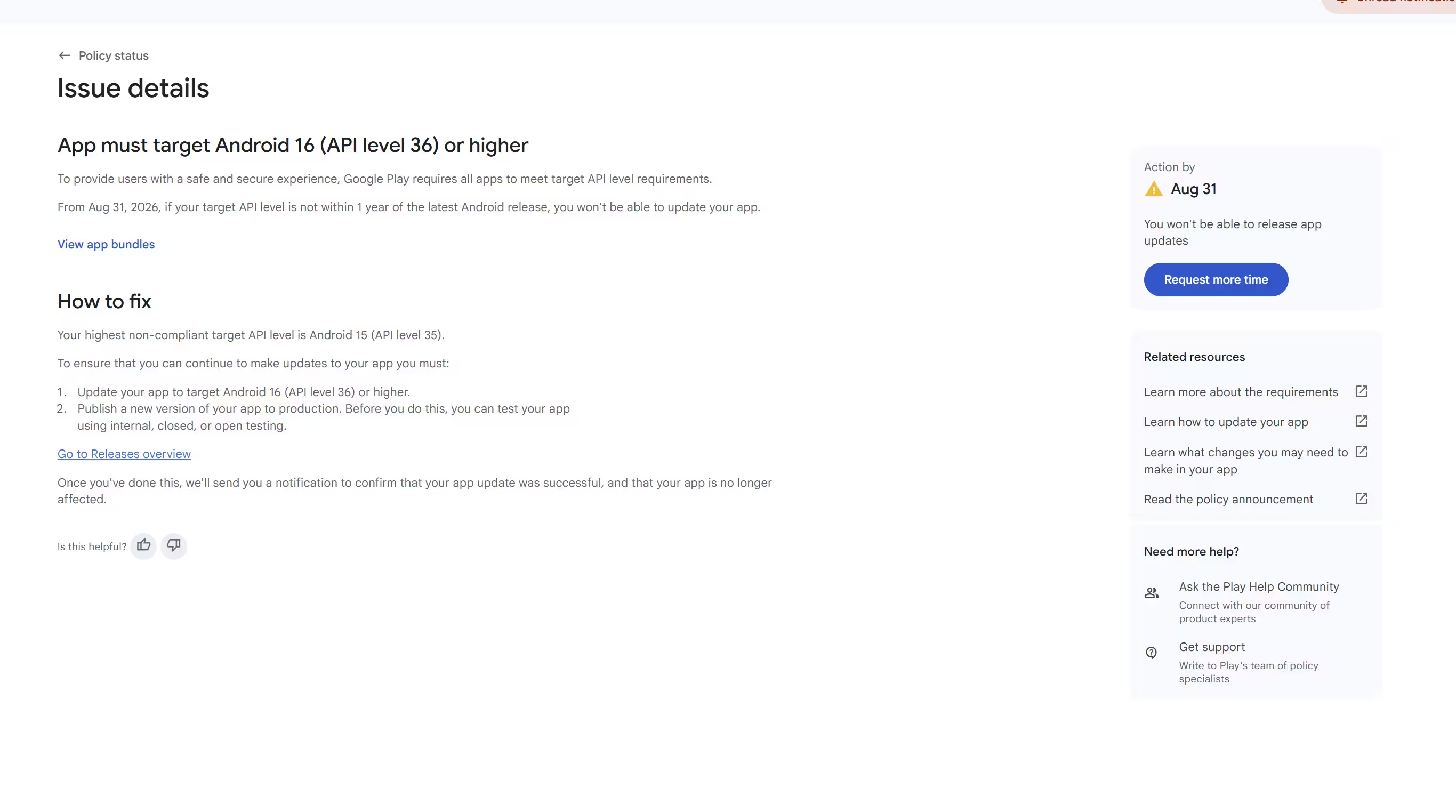
-
Open the affected app in Play Console
Extension access is app specific rather than account wide. If you publish several apps, expect to repeat this for each impacted one.
Verified -
Go to Policy status
Only apps Google considers noncompliant are expected to carry the target API issue. If the app is already compliant, there is nothing here to extend and no form to find.
Verified -
Open the target API warning or issue details
The issue title shown in the screenshot above is
VerifiedApp must target Android 16 (API level 36) or higher. Wording can still vary by app and by rollout state, so treat that as what one real account saw rather than a guaranteed universal string. -
Follow the extension link in the issue, or in Notifications
Google routes some impacted developers through the app notification rather than the issue panel. Check both before concluding the option does not exist for you.
Verified -
Submit the requested information
Google does not publish the exact questions on its public help page, so treat any list of "the questions they ask" as unverified. Answer from your real migration plan.
Partial -
Treat November 1, 2026 as the hard stop
The extension moves the date, it does not remove the requirement. Whatever you could not finish by August 31 has to be finished by November 1.
Verified -
Keep migrating while the request is open
Nothing in Google's wording promises approval. Planning around a granted extension you have not received is the most expensive assumption available this cycle.
Partial
Google contradicts itself here too
One passage on Google's current page says extension forms will be accessible "later this year", while its FAQ says the form is available through the warning details on the Policy status page. Both statements are on the same document. The practical reading: check your own app's Policy status and Notifications, and do not assume a missing button means you are ineligible or that a visible button means everyone has one. Partial
One more distinction worth holding onto: Google attaches the extension footnote to the API 36 requirement, and its prose most often describes the extension as preserving distribution for an existing app. It does not walk through every new app, update and existing app permutation with equal precision. Before you assume an extension covers a particular upload you have planned, read what your app's own warning says it covers.
How to upgrade an app to API 36
Four steps: install the API 36 SDK, raise compileSdk and targetSdk to 36, update the dependencies that break when you do, and test the Android 16 behaviour changes. Changing the number is a one line edit. Proving the app still works is the actual migration.
Step 1: install the Android 16 SDK
Open Android Studio, go to the SDK Manager, and install the Android SDK Platform for API level 36 along with the current 36.x.x build tools. Without the platform installed, raising compileSdk just produces a build error that looks unrelated to anything you did.
Step 2: raise the levels in your build
Pick your stack. The file path and the exact lines change, the destination does not: the manifest inside your uploaded bundle has to declare target 36.
Build snippet generator
Choose your stack for the file to edit and the lines to change.
Green = the lines you change · struck through = the line it replaces
android {
    compileSdk = 36

    defaultConfig {
        applicationId = "com.example.app"
        minSdk = 24
        targetSdk = 36
        versionCode = 2
        versionName = "1.0.1"
    }
}
Leave minSdk alone. It is not part of this policy. Increment versionCode on every bundle you upload, including replacements inside a closed test.
android {
    compileSdk 36

    defaultConfig {
        applicationId "com.example.app"
        minSdkVersion 24
        targetSdkVersion 36
        versionCode 2
        versionName "1.0.1"
    }
}
Older projects may still use compileSdkVersion. Either spelling works as long as the value reaches 36 and the project builds.
android {
    compileSdk = flutter.compileSdkVersion
    compileSdk = 36

    defaultConfig {
        targetSdk = flutter.targetSdkVersion
        targetSdk = 36
    }
}
Flutter projects inherit their levels from the toolchain by default. Pinning 36 explicitly is the reliable move, then upgrade the Flutter SDK and plugins so the pin does not fight the toolchain.
buildscript {
    ext {
        buildToolsVersion = "36.0.0"
        minSdkVersion = 24
        compileSdkVersion = 36
        targetSdkVersion = 36
    }
}
React Native keeps its levels in the root android/build.gradle ext block, not in the app module. Update React Native itself and any native modules that pin an older compile level.
ext {
    minSdkVersion = 24
    compileSdkVersion = 36
    targetSdkVersion = 36
}
Capacitor and Cordova wrappers put the levels in a variables file. After editing, run your platform sync step so the change actually reaches the generated Android project.
Unity exposes the target level in the editor rather than a file you edit. Set Target API Level to the API 36 entry, install that platform through the SDK Manager Unity is pointed at, and confirm the built bundle rather than trusting the dropdown. If your Unity version does not offer API 36, that is an editor upgrade, not a settings problem.
You do not have a Gradle file, and you should not go looking for one. App Inventor, Thunkable, Kodular, Glide and similar builders generate the Android project for you, so the target API level is decided by the platform's exporter, not by you.
- Check the builder's release notes or status page for Android 16 and API 36 support.
- Rebuild and re-export once the platform ships it, because an old export keeps the old target no matter when you download it.
- Upload the new bundle and confirm the target level Play Console reports for that artifact.
- If the platform has not shipped API 36 support yet, that is exactly the case the November 1 extension exists for.
Step 3: update dependencies and framework tooling
Raising the compile level is where old dependencies fail. Expect to touch the Android Gradle Plugin, Gradle itself, Kotlin, AndroidX libraries, Google Play services, and any ad or analytics SDK that ships native code. This post deliberately does not publish "the correct versions", because compatible versions move weekly and a hardcoded list here would be misleading within a fortnight. Take them from your framework's own current release notes on the day you migrate.
Step 4: build, upload, and verify the artifact
- Generate a signed Android App Bundle and increment the version code.
- Test the release artifact, not just a debug build. Minification and resource shrinking break things that debug builds hide.
- Upload to the intended track and confirm in Play Console that the artifact reports target API level 36.
- After processing, review every active track and reopen Policy status.
Verify the artifact, not the source
Google evaluates the manifest inside the bundle you uploaded. A wrong build variant, a stale flavour, a cached export or a framework that quietly overrides your value all produce a project that "targets 36" and an artifact that does not. Read the number back from Play Console every time.
Android 16 behaviours to test before you ship API 36
Targeting API 36 switches on Android 16 behaviours for your app on Android 16 devices. The high-priority behaviours to test are edge-to-edge layout, predictive back, large-screen orientation freedom, health permissions, fixed-rate scheduling and text layout. Tick what applies below and you get the test list for your app rather than a generic one.
Android 16 risk scanner
Tick everything your app does. The list below rebuilds as you go.
Edge-to-edge and predictive back: the widest blast radius
Edge-to-edge has a wide blast radius because it does not need your app to use any exotic API. On Android 16, an app targeting API 36 can no longer use the previous opt-out attribute, so content that assumed the system bars would leave room for it now runs underneath them. The symptom is cosmetic right up until the moment a primary button sits under the gesture bar and stops being tappable.
Predictive back carries a similarly wide blast radius. If your app registers legacy back handling, that path may simply not fire the way it used to once predictive back is enabled by default for target 36. Test back from every navigation depth you have: modals, WebViews, forms with unsaved state, and the last screen before exit.
What is not a universal target 36 break
Several pages currently list safer intent matching and the local network permission as things every API 36 app must handle. Android's own documentation describes both as opt-in in Android 16, with broader enforcement framed as future facing. Test them if you have enabled them. Do not rewrite your intent filters or add a network permission solely because you raised your target level. Verified
What about the 16 KB page size requirement?
Different requirement, different date, same apps. The target API deadline is about the level your manifest declares. The 16 KB page size requirement is about whether your native libraries work on devices with 16 KB memory pages. Google's current guidance names February 1, 2027 as the date affected app updates without 16 KB support can no longer be released.
- Who it affects: Google's requirement applies to apps targeting API 35 or higher on 64-bit Google Play devices. Within that group, apps that package native
.solibraries — directly or through an SDK — are the ones most likely to need explicit rebuild and alignment work. If your app is Kotlin or Java only, it is generally already compatible, but it is still worth testing rather than assuming. - What it is not: it is not part of the August 31, 2026 target API deadline, and passing one does not pass the other.
- Why it lands together: everyone raising their target level this month is rebuilding anyway, which is when the page size check surfaces. That timing is why the two get confused.
Do not repeat the old date
A large amount of material still on the web names November 1, 2025 as the 16 KB enforcement date. Google's current page supersedes it. As of August 9, 2026 the operative date is February 1, 2027, and any page still quoting the 2025 date has not been rechecked since the change. Verified
If your app bundles native libraries, treat the page size check as its own task with its own test pass rather than something you fold into the API 36 build at the last minute. The two changes touch different parts of the build, and debugging them at the same time is how a one-week migration becomes a three-week one.
You uploaded API 36 and the warning is still there
Usually one of three things: the bundle has not finished processing and Policy status has not refreshed, an older artifact is still sitting on another active track, or the artifact you uploaded does not actually declare 36 even though your project does. Work down the list, and do not start deleting releases.
The current issue title developers are reporting is Your app must target Android 16 (API level 36) or higher. Google has not published a canonical full error string for every upload flow, so treat exact wording you find online, including that one, as observed rather than official.
The warning appeared minutes after I uploaded API 36 Field reports
- Likely cause
- Play Console has not refreshed its policy state yet. Bundle processing and policy evaluation are not instant and are not the same step.
- What to check
- Confirm the release is fully processed, then reopen Policy status later rather than reloading it repeatedly.
- Evidence
- A Google Product Expert has told a developer in this exact situation that the notice could disappear over the following few days. Product Experts are not policy authors and Google publishes no guaranteed clearing time, so this is a useful signal rather than a commitment.
Production is on API 36 but the warning will not clear Field reports
- Likely cause
- An older artifact is still active on another track. Internal, closed, open, beta and a partially rolled out staged release can all still hold a lower target bundle.
- What to check
- Walk every active track and compare version codes. Look specifically for the internal track you set up months ago and forgot about.
- Do not
- Delete or halt releases at random to make the warning go away. If you are mid closed test, an impulsive track change can cost you tester continuity you cannot get back.
My Gradle says 36 but Play Console reports a lower level Strong inference
- Likely cause
- The artifact you uploaded is not the artifact you think you built. A wrong build variant, an old flavour, a stale cached export or a CI job pointing at a different branch all produce this.
- What to check
- Inspect the uploaded bundle itself in Play Console rather than your source. The manifest inside the bundle is the only thing Google evaluates.
My builder exports a lower target and I cannot change it Field reports
- Likely cause
- The no-code or low-code platform has not shipped an Android 16 exporter yet. This is not something you can fix from inside your project.
- What to check
- The vendor's release notes or status page, then rebuild and re-export once support lands. Downloading an old export later does not update its target level.
- If it does not arrive in time
- This is precisely the situation the November 1 extension exists for.
The API 36 build now crashes or the layout looks wrong Verified
- Likely cause
- An Android 16 behaviour change activated by the new target, or a dependency that is not ready for the higher compile level.
- What to check
- Run the behaviour risk scanner against your feature list, then test on a device running Android 16. Edge-to-edge and predictive back are the two changes with the widest blast radius, so check those first.
There is no extension link anywhere in my console Partial
- Likely cause
- The app may already be compliant, the form rollout may not have reached your account, or the warning may not be in the state that offers it.
- What to check
- Policy status and Notifications for that specific app, not an account level menu. Google's own page is internally inconsistent about whether every impacted account can already see the form.
My closed testers are not receiving the new build Partial
- Likely cause
- Version code, rollout state, tester eligibility or plain processing delay.
- What to check
- Confirm the new bundle has a higher version code, that the closed release is actually published rather than draft, that the tester group is attached to that track, and that the testers you are chasing are still opted in.
- Related
- If testers were never counted in the first place, that is a different problem: added 12 testers but Play shows 0 opted in.
One habit fixes most of this permanently: after every upload, read the target API level back from the artifact in Play Console and write it down next to the version code. It takes ten seconds and it removes the entire category of "I am sure I fixed this" from your week.
The pre-deadline checklist
Fourteen items, in the order they actually happen. The last four are the ones people skip, and they are the ones that decide whether the warning clears.
API 36 migration tracker
Tick items off as you go. Nothing is saved, so finish in one sitting or keep the tab open.
0 / 14 complete
Nothing ticked yet. Work down the list in order.
Where PrimeTestLab fits into this deadline
To be clear about the boundary: we do not migrate your code. Raising targetSdk, updating dependencies and fixing Android 16 behaviour changes is your build, and this post is the whole of our contribution to it. What we do cover is the other half of the collision, the 12 real testers, opted in for 14 consecutive days that a new personal account needs before it can reach production at all.
The timing is the problem. A first-time publisher in August 2026 is being asked to do two unrelated hard things in the same window: ship an API 36 build, and hold a qualifying closed test together for two straight weeks. The build is a solvable engineering task. Recruiting twelve real humans who stay opted in for fourteen days, on real devices, is the part that quietly consumes a month.
Doing the closed test yourself versus handing it over
Google decides production access, not us and not any service. What a managed test removes is the tester recruitment and continuity risk, which is the step most first-time publishers actually stall on. Success rate across 9,800+ apps tested: 99.9%.
The order to do it in this month
If you are facing both problems at once, run them in parallel rather than in sequence. Start the closed test now, because its 14 days are wall-clock time you cannot compress, and do the API 36 migration alongside it. Push the compliant build into the same closed track when it is ready, with a higher version code and the same testers still opted in. That way the deadline and the testing window stop competing for the same fortnight.
Frequently asked questions
Do I need to target API 36 before August 31, 2026?
For a normal phone, tablet, foldable or Android Auto app, yes. New apps and app updates submitted from August 31, 2026 must target Android 16, API level 36 or higher. Wear OS and Android Automotive OS submissions must target API 35 or higher, and Android TV and Android XR submissions must target API 34 or higher.
Will targeting API 36 stop my app working on older Android phones?
No, not automatically. targetSdk declares the Android behaviour level your app is designed and tested for, while minSdk controls the oldest Android version the app can install on. Raising targetSdk to 36 does not raise minSdk, so the app keeps installing on devices down to its declared minimum SDK. What does change is that Android 16 behaviours become active for your app on Android 16 devices.
Will Google remove my app if I miss the API 36 deadline?
Google describes two narrower consequences, not deletion. A new app or update below the applicable target cannot meet the upload requirement, and a published app below the existing-app availability floor stops being discoverable or installable for new users whose devices run an Android version higher than the app targets. Previous installers can still discover, reinstall and use the app on supported Android versions.
Will Google terminate my developer account if I miss the deadline?
Google's target API level policy page does not say that missing this deadline alone terminates a developer account. It describes submission blocking and new-user availability restrictions for the affected app. Account terminations are governed by separate policies, so treat the target API deadline as an app-level distribution problem rather than an account-level one.
My published app already targets API 35. Do I have to update it to API 36?
Not merely to keep an unchanged phone app available to new users. API 35 satisfies the 2026 existing-app availability floor for phones, tablets, foldables and Android Auto. However, the next update you submit on or after August 31, 2026 must target API 36, so most active apps end up on API 36 anyway.
How do I request the November 1, 2026 extension?
Open the affected app in Play Console, go to Policy status, open the target API warning or issue details, and use the extension form offered there or through Notifications. The extension is requested per impacted app and runs to November 1, 2026. Google does not state that approval is automatic or guaranteed, so keep migrating while the request is pending.
Can I upload an API 35 build to my closed test after August 31?
For an ordinary phone app you should assume no. Google's developer documentation says an uploaded APK must meet Play's target API requirements and publishes no testing-track exception, so a new closed-track upload after the deadline should target API 36. Prepare the compliant build before August 31 rather than discovering the block mid test.
Will uploading an API 36 build reset my 14-day closed test?
Google defines the qualifying period around at least 12 testers remaining opted in continuously for 14 days, not around one immutable build, and its help pages encourage updating the app in closed testing while fixing issues. Keep the same closed track and the same tester enrollment, upload the API 36 build with a higher version code, and do not remove opted-in testers. Google does not publish a guarantee covering every Play Console counter, so avoid unnecessary track changes.
I uploaded API 36. Why is the Play Console warning still there?
First allow time for bundle processing and policy status refresh, which developers report can take days. Then inspect every active release: production, open, closed, internal and any paused staged rollout can still hold an older artifact. Also confirm that the bundle you actually uploaded reports target 36, since a wrong build variant or a framework exporter that still targets a lower level is a common cause.
What if I built my app with Flutter, React Native, Unity, or a no-code tool?
The exported bundle, not the setting shown in the editor, must contain the required target API level. Update the framework or builder to a version capable of exporting API 36, rebuild, test the Android 16 behaviour changes, and confirm the uploaded artifact's target in Play Console. If you use a no-code builder you cannot edit Gradle files, so the practical action is to check the vendor's release notes for Android 16 support and rebuild once it ships.
Do my testers have to open the app every day while I upgrade it?
Google's published requirement is that at least 12 testers stay opted in continuously for the last 14 days. Google also looks at whether testers were actually engaged and may ask for more testing if they were not, but it does not publish a universal rule that every tester must open the app once a day. Treat daily-usage claims from forums as folklore, keep testers opted in, and aim for genuine use rather than a fixed daily quota.
How much does PrimeTestLab cost if I still need testers before the deadline?
PrimeTestLab offers three plans: Starter with 12 testers for $19.99, Professional with 20 testers for $29.99, and Enterprise with 25 testers for $27.99. All plans use real testers on real devices for the full 14-day period, testing typically starts within 4-6 hours, and if a test does not deliver you get a free retest or a full refund.
Bottom line
Summary
From August 31, 2026, new Google Play apps and app updates for phones, tablets, foldables and Android Auto must target Android 16, API level 36 or higher. Wear OS and Android Automotive OS need API 35, Android TV and Android XR need API 34, and a published phone app you are not updating needs API 35 to stay available to new users on newer devices. Missing the date blocks noncompliant uploads and hides the app from those new users; it does not delete the app, remove it from existing devices, or terminate your account. Impacted developers can request an app specific extension through Play Console to November 1, 2026, and Google does not describe approval as automatic. Raising targetSdk does not raise minSdk, so old devices keep the app. If the closed testing side of your launch is the bottleneck rather than the build, PrimeTestLab supplies 12 real testers from $19.99. See pricing plans →
Official Google documentation
Policy snapshot verified August 9, 2026. Google updates these pages without notice, so check the primary sources above before acting on any date. This post is scheduled for re-verification immediately after August 31 and again after November 1, 2026.