












Quick Answer
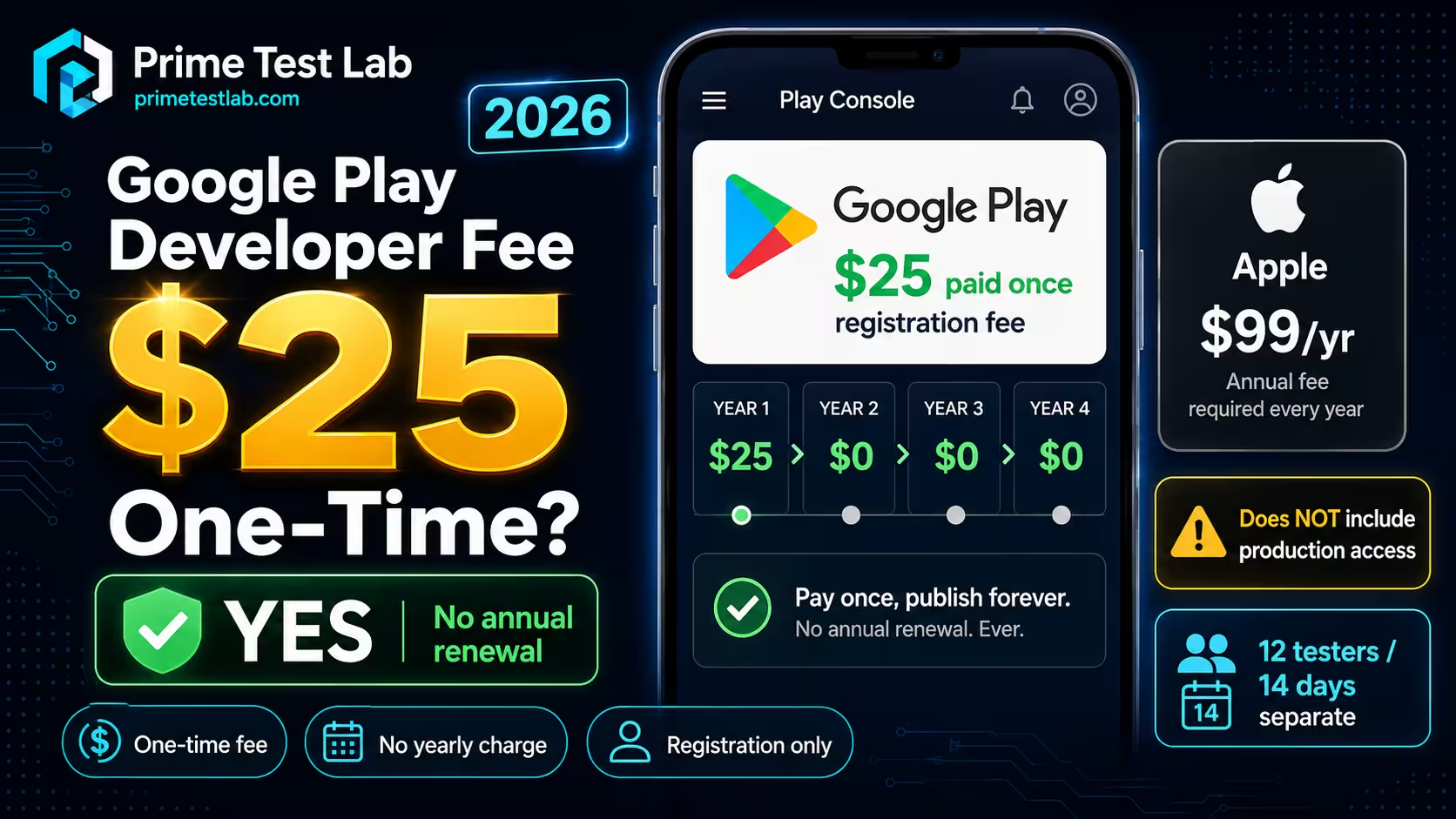
The fee. Google Play charges a US$25 one-time registration fee to open a Play Console developer account, paid at step 3 of signup, and Google's current documentation lists no annual registration renewal charge. Google does not list a separate US$25 registration charge for each app. Paying does not guarantee identity verification, app approval or production access.
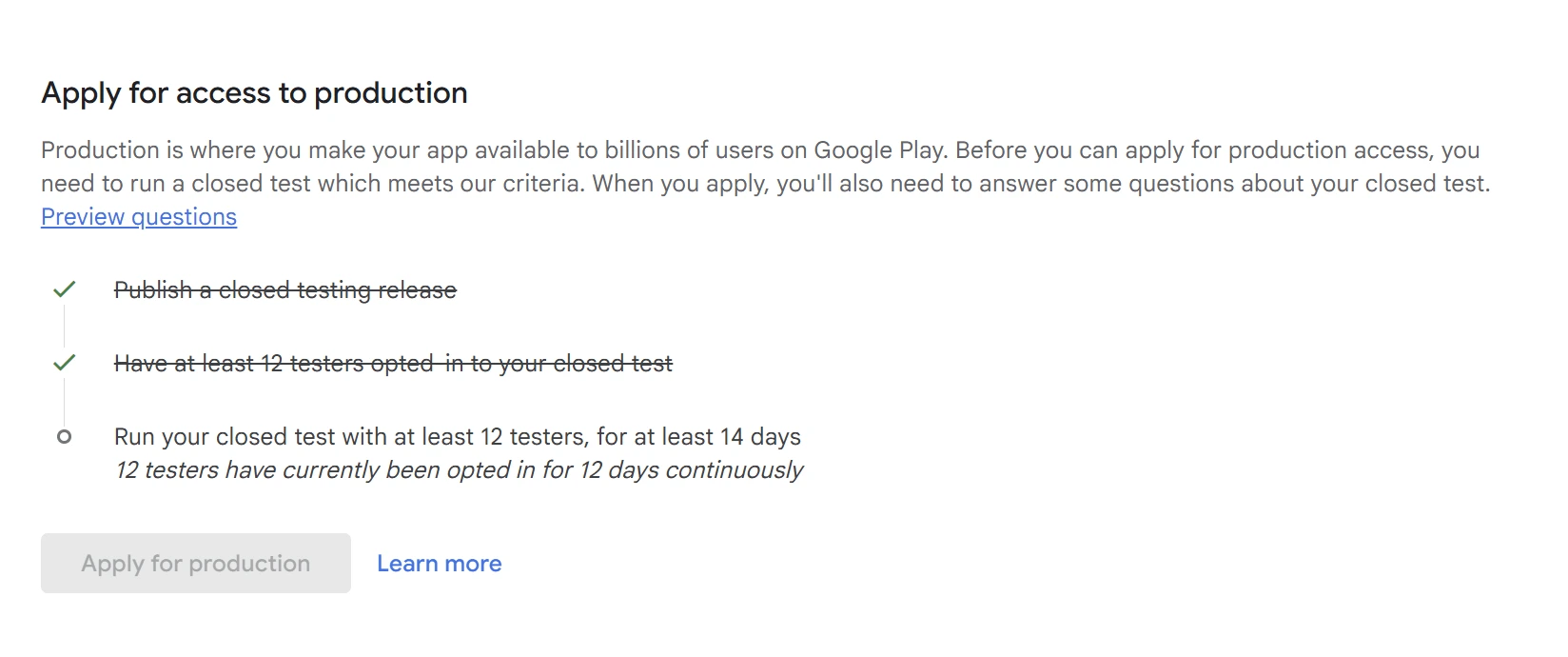
After payment. A personal developer account created after November 13, 2023 must run a closed test with at least 12 testers opted in for the last 14 days continuously, then apply separately for production access, which Google says it usually reviews in 7 days or less. Meeting the threshold makes the account eligible to apply; it is not an approval.
Registration fee versus service fees. Google Play service fees are a separate charge from the US$25 registration fee. They apply to certain paid apps, digital transactions and optional distribution programmes, and there is no single global percentage. The applicable rate depends on the buyer's region, the transaction category, annual earnings, the install date, the billing route and the specific programme used. Refundability of the US$25 is not absolute either: it depends on how the account closes.
If the US$25 is paid and the tester requirement is now the thing standing between you and production, PrimeTestLab runs that part.
The part that gets simplified hardest is the part that costs money: refunds. "The US$25 is non-refundable" is repeated as a flat rule, while Google's own help pages describe one scenario where the fee is refunded and several where the answer depends on what happened. Everything below was checked against Google's documentation on August 17, 2026, and claims Google's wording only partly supports are labelled rather than rounded up.
How claims are labelled on this page
- Verified Google's own documentation states it, and this page links the page it came from.
- Partial Google documents part of the claim; the rest is inference, so the claim is stated at the weaker strength.
- Reported Developers report it, usually in Google's own forums. Real symptom, no official diagnosis.
- First-party PrimeTestLab's own observation from running closed tests, labelled so it is never mistaken for a Google rule.
Table of contents
Tools in this guide Card eligibility checker, refund verdict and service fee resolver - each runs in your browser, with no account and no network request.
Google Play Developer Fee: US$25, Paid Once
US$25, charged once, during Play Console developer-account signup. Google's registration documentation lists a one-time registration fee, and no announced change to the US$25 amount was found as of August 17, 2026.
Registration fee fact box
Checked Aug 17, 2026- Amount
- US$25
- Billing frequency
- One time
- When it is paid
- Step 3 of signup, "Pay registration fee"
- Annual renewal
- None stated in Google's current signup documentation
- Charged per
- Developer account, not per app submission
- Guarantees publication?
- No. Verification, policy review and, for affected new personal accounts, the closed-testing gate still apply
"There is a US$25 one-time registration fee"
Google Play Console Help, "Get started with Play Console", answer 6112435
Two words in that sentence do the work. One-time is the billing cadence. Registration is the scope: the payment opens a Play Console developer account, and Google frames it inside account creation rather than as a licence to publish. Both halves get misquoted, in opposite directions, which is what the three questions below are for.
Is there an annual renewal fee?
No. Google's current Play Console signup page calls it a one-time registration fee, and Google publishes no annual Play Console registration renewal charge. There is no yearly invoice for keeping a developer account open.
Stated without hedging: a developer who pays US$25 in 2026 is not scheduled to pay it again in 2027 for the same account. Search results describing an annual Google Play developer subscription are describing Apple's model, or are simply wrong.
Is the fee per app or per developer account?
Per developer account. Google charges the US$25 during Play Console developer-account registration, and lists no separate registration charge for each app submitted. One registered account can publish and manage multiple apps.
The popular shorthand overshoots this in both directions. Google's signup page frames the charge as part of creating the account; it publishes neither a per-app registration price nor "unlimited apps for life". The defensible claim is the narrow one: the fee registers the account, and no per-app registration charge is listed.
Does one-time mean the account lasts forever?
No, and this is the leap worth refusing. "One-time charge" and "lifetime account" are different claims, and Google's current documentation describes a one-time charge, not a permanent account. Two published rules cut against the second reading. An account closed for inactivity forfeits the registration fee. And after a termination for policy violations Google provides no refund assurance, warning specifically that a replacement account created afterwards can itself be terminated without a refund of its own registration fee. So the correct summary is that the fee does not recur, not that the account is permanent.
Accurate
- "US$25, one-time registration fee"
- "There is no annual Play Console registration renewal charge"
- "The fee registers the developer account"
- "The charge does not recur; the account can still be closed"
Not supported
- "US$25 for life" or "lifetime developer account"
- "US$25 per year" or "annual Google Play membership"
- "US$25 per app you publish"
- "The US$25 is always non-refundable"
The last item in that right-hand column is the one this post spends the most effort on, because it is repeated almost universally and it is not what Google's documentation says. The refund section works through all seven scenarios individually, and the post on what happens after paying the US$25 fee picks up from the receipt.
What to Prepare Before Paying the Fee
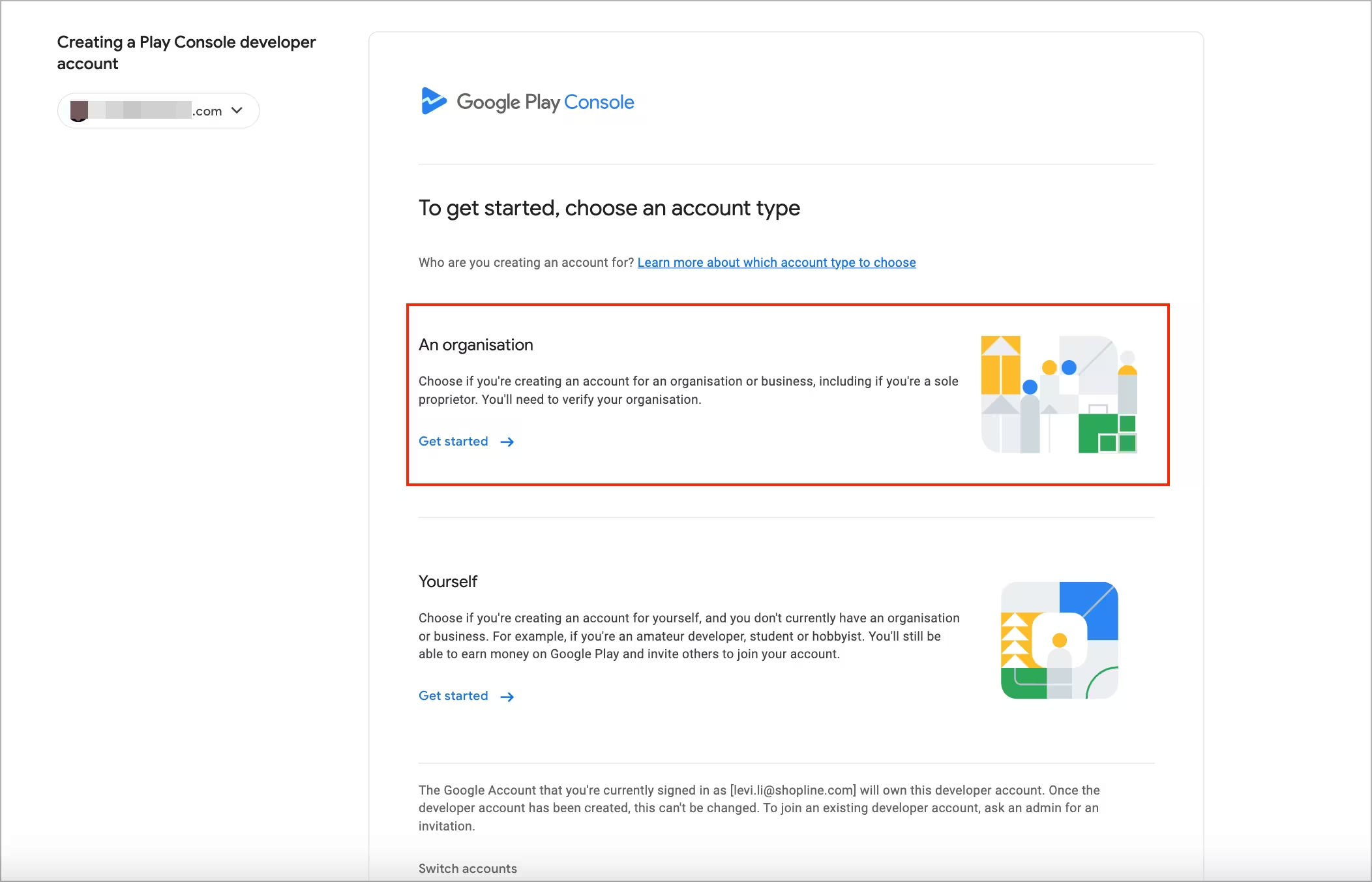
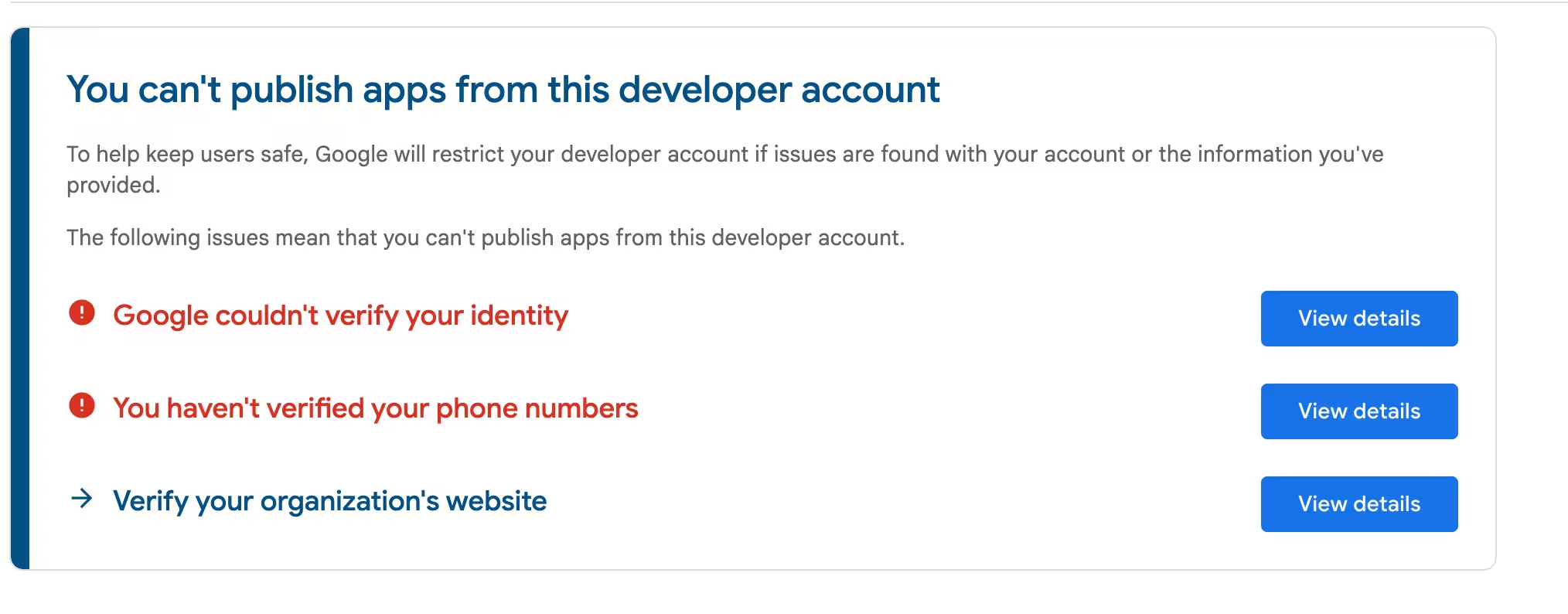
Google charges the US$25 before it verifies who you are, so the checks that can fail come after the money moves. Six things are worth having ready: your age eligibility, your account type, an ID that matches the name you register, a supported non-prepaid card, a D-U-N-S number if you are registering as an organization, and an Android device for the new-personal-account check.
Before you pay
Checked Aug 17, 2026- Age
- You must be at least 18 to register a Play Console developer account
- Account type
- Personal or organization, chosen at signup - the choice changes the verification you face, not the US$25. See personal versus organization account
- Identity
- Legal-name verification. Register the name on the ID you will submit; a mismatch is a significant post-payment failure risk
- Payment
- A supported card that is not prepaid, with a billing address matching your Google payments profile
- Organizations
- A D-U-N-S number is generally required, and obtaining one is not instant
- New personal accounts
- Access to a real Android device for Google's device verification, plus the closed test later
 Click to enlarge
None of these is a reason to delay paying if you already qualify, but each is cheaper to sort out first. The one that catches people hardest is the name: Google verifies identity against the details you registered, and it states outright that the registration fee is not refunded if the requested ID and card information is determined to be invalid. The full signup walkthrough, including what verification actually asks for, is in our guide to creating a Google Play developer account, and the account-type decision, D-U-N-S included, is in our personal versus organization developer account post.
What the US$25 Buys, and What It Does Not
It buys registration of a Play Console developer account, which can be used to publish and manage multiple apps - Google does not list a separate US$25 registration charge for each app. It does not buy identity verification, policy review, app approval, production access, or exemption from the closed-testing requirement.
The short version: US$25 buys account registration, not automatic production access. That sentence is a summary of two separate Google requirements rather than a quotation from one page, which is exactly why it keeps catching people out.
| The US$25 covers | The US$25 does not cover |
|---|---|
| Registering the developer account and access to Play Console | Passing identity verification. If requested ID or card details are found invalid, the fee is not refunded |
| Publishing and managing multiple apps under that one account, with no per-app registration charge listed | Production access. A separate application, separately reviewed by Google |
| Access to the testing tracks, including internal, closed and open testing | The closed-testing requirement itself. Paying does not shorten it or waive it |
| Distribution of free apps with no transaction service fee | Service fees on paid apps and digital purchases, which are a separate percentage charge |
| The account itself, for as long as it stays active and compliant | Protection from closure. Inactivity forfeits the fee; after a termination Google gives no refund assurance |
 Click to enlarge
Does paying US$25 let me publish immediately?
For a personal developer account created after November 13, 2023, no. That cohort must run a closed test with at least 12 testers opted in for at least the last 14 days continuously, and only then becomes eligible to apply for production access. Google reviews that application separately and says it usually takes 7 days or less, though it can occasionally take longer. Organization accounts are outside the cohort Google describes for this requirement.
Holding 12 opt-ins is eligibility, not approval
Meeting the 12-tester, 14-day threshold makes an affected personal account eligible to apply. It does not decide the outcome. Google's production-access application also asks how the test was run, what the testers did, what feedback they gave and what changed as a result, and it can require further testing when engagement looks insufficient. Any page implying that maintaining 12 opt-ins automatically produces approval is describing the entry ticket as if it were the verdict.
Do testers have to open the app every day?
Google publishes a continuous opt-in minimum, not a universal daily-session quota: the requirement is that at least 12 testers stay opted in across the 14 days. What Google does expect is meaningful testing, and its application asks what testers did and what feedback they provided, so it may require additional testing when engagement is thin. Daily opening is therefore a testing practice - ours included - rather than an official Google minimum, and anyone quoting a documented daily-use rule is quoting something Google has not published.
Two dates that get conflated: Google announced the requirement on November 9, 2023, while November 13, 2023 is the account-creation cutoff defining who it applies to. The original requirement was 20 testers, reduced to 12 on December 11, 2024.
Step 3 is where the registration fee stops helping and additional requirements still apply. It is also the step routinely mistaken for something else: internal testing does not satisfy it. Internal testing supports up to 100 testers and is genuinely useful for a fast first install, but production eligibility specifically requires a closed test. The mechanics of that test, what testers actually have to do and what breaks the continuous window, are covered in our 12 testers requirement post, the difference between internal, closed and open testing in the track comparison, and the full sequence from receipt to live app in our post on what to do after paying the US$25.
Which Cards Does Play Console Accept?
Google currently lists Mastercard, Visa, American Express, Discover in the United States only, and Visa Electron outside the United States only. Prepaid cards are not accepted.
Google also states that accepted card types may vary by location, so a card on that list can still be refused in a particular country. The list is the starting point, not a guarantee.
The two geographic entries run in opposite directions: Discover works for the registration payment only inside the United States, Visa Electron only outside it. Everything else on the list is available in both places, subject to Google's caveat about location. The checker below encodes that, so you do not have to hold two inverted rules in your head while a payment page is timing out.
| Payment method | Current status |
|---|---|
| Mastercard credit or debit | Listed by Google |
| Visa credit or debit | Listed by Google |
| American Express | Listed by Google |
| Discover | Listed by Google in the United States only |
| Visa Electron | Listed by Google outside the United States only |
| Prepaid card | Not accepted |
| GPay | The payment interface, funded by one of the card types above Verified |
| Any location | Google states accepted card types may vary by location |
Source: Google Play Console Help, registration fee and registration payment. Checked August 17, 2026.
Can you use PayPal or a prepaid card?
Neither. Google's published registration-payment methods are GPay funded by one of the supported credit or debit cards above. PayPal is not listed as a registration payment method, and prepaid cards are explicitly not accepted regardless of which network logo they carry.
That catches two groups out in different ways. PayPal users usually find nothing refusing it, because Google does not publish a refusal - it simply does not list it, which is not the same claim and is worth stating precisely. Prepaid-card users find an outright statement. If neither route is open to you, the constraint is the card rather than Google Play, and the account-creation walkthrough in our guide to creating a Google Play developer account covers the payments-profile setup the payment runs through.
Check a card before you try it
Tool 01
Card eligibility checker
Two questions, because two of Google's five card entries depend on which side of the US border you are on. This checks the published list only; it cannot see your bank.
Before you charge it
Why is my US$25 payment failing?
Google splits this into two cases, and the split is the useful part. If Play Console says the payment was declined, the documented fix is to update your Google payments profile with a different payment method or billing address, then use Google's common payment troubleshooting if that does not resolve it. If the payment was not declined but registration still failed, that is a different problem and Google's documented route is developer support. Either way the next steps once the payment does clear are in our what happens after paying the US$25 fee post.
The rows labelled Reported are community evidence from Google's own developer forums: real symptoms, no official diagnosis. The one that matters most is a card charged while Play Console still asks for payment. A completed charge is not proof that account creation finished, and paying a second time is not the documented remedy.
| Symptom | Safest factual action | Evidence |
|---|---|---|
| Google explicitly says the payment was declined | Update the Google payments profile with a different payment method or billing address, then follow Google's common payment troubleshooting if it still fails | Verified |
| The payment was not declined, but registration failed | Contact Google Play developer support; this is the documented route for a non-decline registration problem | Verified |
| A prepaid card is being used | Replace it with a supported card that is not prepaid | Verified |
| The card was charged, but Console still asks for payment | Do not assume the charge means registration completed, and do not pay again by reflex. Gather the transaction details and contact support as an unresolved registration issue | Verified route, Reported pattern |
| The browser crashed after payment and the fee was paid more than once | Document every transaction and contact support. This is not established as a Google-side bug, so do not report it as one | Reported |
A card failure code such as OR_FGVEM_07 |
This post will not invent a meaning for the code. Check payment profile and card eligibility, then use Google's payment troubleshooting and support | Reported code, Verified remedy |
Where the receipt comes from
Google sends a confirmation email once the registration payment goes through, and the transaction is also visible in the Google Pay account used to pay it. Google's registration-payment documentation states that Play developer support cannot generate receipts or invoices for the registration fee, so that email and your own card or Google Pay records are the documentation you keep. Save them at the time rather than looking for them later: they are what you attach if a charge ever has to be traced.
On tax and currency
Google's signup documentation states the fee as US$25 and publishes no country-by-country registration price table, and no primary source establishing a universal tax or exchange-rate surcharge was found. Your card statement may present the transaction differently; that is between you and your issuer. Anyone quoting a specific local registration price should be asked which Google page it came from.
Is the Google Play Registration Fee Refundable?
Usually not, and Google says so outright in two documented cases: no refund when requested identity or card information is determined invalid, and forfeiture when an account is closed for inactivity. But Google also documents a refund when every published app is transferred to another developer and the old account is then deleted, and it publishes no rule at all for several other closure routes, where support decides case by case.
So the practical default is "expect not to get it back" - but "the US$25 is non-refundable" is still not a rule. It is the common outcome being repeated as if it covered every case.
The developers asking are usually in the worst version of the situation: the money is gone, the account is unusable, and every search result tells them flatly that nothing can be done. Two of the scenarios below have a documented answer in the developer's favour or in their control. Three have no published rule at all, which is worth knowing precisely because it means support is the correct next step rather than a waste of time.
| Scenario | Refund answer | Evidence |
|---|---|---|
| Requested government ID or credit card information is determined invalid | No refund | Verified |
| Registration rejected for an unspecified other reason | Not established | Partial |
| Voluntary deletion of an account with no published apps | No universal promise | Partial |
| All published apps transferred to another developer, then the old account is deleted | Refund documented | Verified |
| Account has published apps that users have installed | Usually cannot simply close | Verified |
| Account closed for inactivity or dormancy | Forfeited | Verified |
| Account terminated for policy violations | Do not expect one | Partial |
Sources: Google Play Console Help, registration fee, account closure, closure of inactive accounts and the Developer Program Policy. Checked August 17, 2026.
The expensive mistake after a termination
The instinct after a terminated account is to pay the US$25 again and start clean. Google's enforcement documentation specifically addresses this: an account created to replace a terminated one can itself be terminated, without a refund of that second registration fee. That turns one lost US$25 into two. The appeal on the original termination is the cheaper path, even when it is the slower one.
How to prevent an inactive account from being closed
Forfeiture after inactivity closure is the one scenario on that list that is entirely preventable, and Google publishes how. It warns before it closes: reminders at 60, 30 and 7 days before closure, sent to the account's contact details. So the steps are ordinary maintenance rather than anything clever:
- Keep the contact email and phone verified, because that is where the warnings go, and an unread warning is the usual reason a closure surprises someone.
- Respond to the inactivity notices rather than assuming a dormant account with no apps is safe.
- Upload or update something when instructed - an app, an app update, an internal-testing build or a closed-testing build all count as the activity Google is looking for.
- Do not pay years before you intend to publish unless you will keep the account active in the meantime. The US$25 is not a reservation.
Check your own scenario
Tool 02
Refund verdict
Pick what actually happened. Each verdict carries the confidence label the evidence supports, and says plainly when Google has published no rule at all.
Google Play Console Help
What to do
One framing that helps: Google treats a refund as something that happens when the registration is cleanly unwound, not as compensation when an account goes wrong. That is why the transfer-then-close route is the documented refund and termination is not. If you are still choosing an account type, that decision is covered in our personal versus organization account post.
Google Play's Service Fees Are Not the US$25 Fee
These are two unrelated charges. The US$25 is a one-time account registration fee. A service fee is a percentage Google takes from transactions, and standard transaction service fees generally apply to paid apps and digital purchases rather than to free distribution. Google reports that 97% of developers distribute apps and use Play without paying any service fee at all.
If you do charge, the answer is no longer one global number. On June 30, 2026 Google began a staged rollout of a new fee model, region by region. It splits the old single percentage into two named components, and several optional distribution programmes sit alongside it with rates and start dates of their own.
Google's own documentation draws the line clearly for the standard case: service fees concern paid apps and digital goods or services, and free distribution is not subject to a transaction service fee. That is a narrower claim than "you will never be charged again". It holds for as long as the app stays free of digital purchases and stays out of the optional programmes: Google's external content links programme for users in the United States, for instance, publishes fixed per-install download fees of US$3.65 for games and US$2.85 for apps alongside its transaction rates. So the safe wording is that standard transaction service fees apply to paid apps and digital transactions, while external-link and alternative-distribution programmes can carry separate transaction or install fees. Of the developers who do pay a service fee, Google reports that 99% qualify for a rate of 15% or less.
The complication is timing. Google announced a new commercial model on March 4, 2026 and is rolling it out on a staggered schedule, so the correct rate today depends on where your buyers are, not where you are. A developer in one country can be on both models at once depending on who is buying.
New fee model rollout
1 of 4 market groups confirmed live · last checked Aug 17, 2026-
EEA, United Kingdom and United States June 30, 2026 · status checked August 17, 2026On the new model
-
Australia and Japan September 30, 2026 · status checked August 17, 2026Date passed, pending re-check
-
South Korea December 31, 2026 · status checked August 17, 2026Previous model for now
-
Remaining markets September 30, 2027 · status checked August 17, 2026Previous model for now
Each row's state is set by hand, after re-reading Google's documentation, and is not switched by the calendar: a published date arriving is not evidence that the change shipped. 1 group is in that state right now: treat the rates below as Google's published schedule for it, not as confirmed current practice.
EEA, UK and US: the split rate since June 30, 2026
For in-app transactions with users in the European Economic Area, the United Kingdom and the United States, Google now publishes the charge as two separate components: a service fee, and a Google Play Billing fee of 5% that applies when the purchase is completed using Google Play Billing. Collapsing them into one number loses a distinction Google deliberately introduced, so this post keeps them apart.
| Transaction category | Service fee | Play Billing fee | Combined when Play Billing is used |
|---|---|---|---|
| First US$1M of annual earnings | 10% | 5% | 15% |
| Auto-renewing subscriptions | 10% | 5% | 15% |
| Standard in-app non-recurring transactions, new install | 20% | 5% | 25% |
| Standard in-app non-recurring transactions, existing install | 25% | 5% | 30% |
Source: Google Play Console Help, service fees and the 2026 fee model. Checked August 17, 2026.
Do not write "the service fee is 15%"
Two problems with that shorthand. The 10% and the 5% are distinct charges with distinct triggers, and only the second depends on how the purchase is processed, so a single 15% produces the wrong number the moment Play Billing is not used. And 10% is only the first row: the service-fee component here is 10%, 20% or 25% depending on the transaction category and the install date. Google defines new versus existing installs by the user's first installation or first update relative to that region's implementation date, which for the EEA, UK and US is June 30, 2026.
The 5% billing fee is published for three markets, not all of them
Google states the 5% Google Play Billing fee for the EEA, the United Kingdom and the United States. For the market groups whose rollout dates are still ahead - Australia and Japan from September 30, 2026, South Korea from December 31, 2026, the remaining markets from September 30, 2027 - Google says billing-fee details are still to come, so a page that assumes 5% everywhere is guessing. The resolver below shows a billing fee only where Google has published one.
A region's cutover date is not every programme's start date
June 30, 2026 is the general fee-model threshold for EEA, UK and US buyers, but programmes inside those regions start on their own dates. Google's alternative billing update states that developers in the United States alternative billing without user choice programme do not begin reporting transactions and paying the relevant service fee until October 1, 2026, so those rates are published and payable as of that date. That deferral is specific to that programme: US user choice billing already carries reporting obligations, and external-link programmes carry their own rates and dates again. The resolver below asks which programme for exactly this reason.
Markets still on the previous fee model
Until a market reaches its cutover date, transactions with users there stay on the structure Google has used since July 1, 2021: no separate billing-fee component, and the headline number is the whole charge.
| Transaction category | Previous model rate | Notes |
|---|---|---|
| First US$1M of annual earnings | 15% | Requires enrolment in the 15% tier; it is not automatic |
| Earnings above US$1M annually | 30% | No new-install versus existing-install split under this model |
| Auto-renewing subscriptions | 15% | Applies regardless of annual developer earnings |
Source: Google Play Console Help, service fees. Checked August 17, 2026.
Enrolling in the 15% tier
The first-US$1M 15% rate under the previous model is an opt-in, which surprises developers who assume it applies automatically. Google lists three prerequisites, all completed through the Play Console associated-developer-accounts workflow: a Google payments profile attached to the developer account; an Account Group with that account as primary and any associated developer accounts declared, because the tier is assessed across the group rather than per account; and acceptance of the tier's own Terms of Service. Google's menu placement for this changes independently of the policy, so treat that as the shape of the requirement rather than a click path. If you are working out what a launch costs end to end, that budgeting sits in our cost to publish an app on Google Play post rather than here.
Which billing programme are you in?
This is the question that decides the number, and it is the one most pages skip. "Not using Google Play Billing" is not a single situation. Google runs several separate programmes, each with its own market list, its own eligibility rules, its own reporting obligations and its own start date:
| Programme | Where Google lists it | What it does to the service fee |
|---|---|---|
| Google Play Billing | Everywhere | The standard service fee, plus the separate 5% Play Billing fee where Google has published one |
| User choice billing, offered alongside Google Play Billing | EEA, Australia, Brazil, Indonesia, Japan, South Africa, United Kingdom, United States | The standard service fee reduced by four percentage points, unless the market has moved to the 2026 rate table, which supersedes the flat reduction |
| Alternative billing without user choice | Separate programmes in the EEA and the United States; separate programmes again in South Korea and India | Programme-specific. The US programme's reporting and fee payment start on October 1, 2026; the South Korea and India programmes carry the four-point reduction under the previous structure |
| External content links and external offers | Optional, US external content links published with its own rate card | Its own transaction rates and fixed install fees - US$3.65 per game install, US$2.85 per app install. Out of the resolver's scope |
Sources: Google Play Console Help answers 12570971, 16497028 and 16470497. Checked August 17, 2026.
Two limits apply to every row of that table, and the resolver below enforces both rather than glossing over them. A reduction applies only where the app is eligible for and enrolled in the relevant programme, not to anyone who simply takes payment elsewhere. And the four-point reduction is published against the previous fee structure: for markets that have moved to the 2026 model, Google publishes a rate table for the programme instead, so the resolver uses the table rather than carrying a flat reduction forward into it.
Tool 03
Service fee resolver
Pick where your buyer is, what they are buying, and which billing programme the purchase runs through. The resolver reads the same rollout dates and the same editorially verified statuses as the board above, so it cannot disagree with it - and where Google has not published a number, or has published one that is not payable yet, it says so instead of filling one in.
Scope: standard in-app non-recurring digital transactions and subscriptions on Google Play, through Google Play Billing, user choice billing or alternative billing without user choice. It does not cover Google's external content links or external offers programmes, which have separate transaction rates and, in the United States, fixed per-install download fees of US$3.65 for games and US$2.85 for apps. It also excludes negotiated or programme rates such as the Play Media Experience and Apps Experience programmes and Games Level Up, which are agreed separately with Google.
Google Play vs Apple: the Two Membership Charges
Google Play is US$25 once to register a developer account. The Apple Developer Program is US$99 per membership year, with Apple noting local currency where available. The difference is structural, not just the amount: one is a registration charge, the other is a membership that renews.
| Platform | Developer program or account fee | Cadence |
|---|---|---|
| Google Play Console | US$25 registration fee | One time |
| Apple Developer Program | US$99, or local currency where available | Per membership year |
Sources: Google Play Console Help, registration fee; Apple, what the Developer Program includes. Checked August 17, 2026.
Six years of each fee
One charge vs one every yearGoogle Play Console Registration fee
Apple Developer Program Membership fee
Deliberately not totalled. The point of the rail is the cadence, not a six-year figure: Google Play charges once and publishes no renewal, Apple charges per membership year. Turning that into a saving requires assumptions about how long the account runs and about everything else a launch costs, which is a different question.
That is the whole comparison this post makes. Working out what shipping an app actually costs, once devices, tooling, testing and the rest are counted on both platforms, is a different question with a different answer, and it lives in our cost to publish an app on Google Play post. Apple's pricing can also change independently of anything Google does, so treat the US$99 above as a figure to re-check against Apple directly rather than a fixed constant.
Does the US$25 Fee Include Closed Testing?
No. The registration fee is only one part of publication, and closed testing is a separate requirement it does not cover: 12 real testers, opted in and staying opted in for 14 continuous days, before production access can even be applied for.
 Click to enlarge
Look at the sequence again. Registration is a card payment. Verification is paperwork. The closed test is the only step that requires other human beings to do something, on their own devices, for two weeks, without drifting away. It is the one step money cannot shorten, and First-party it is where we see launch timelines slip: if enough people opt out that fewer than 12 testers remain continuously opted in, the qualifying window has to be rebuilt. The mechanics are in our 12 testers for 14 continuous days guide.
That is the part PrimeTestLab runs: 12 real testers on real devices spanning Android 7 to 17, opted in and held for the full 14 days, with testing starting in 4-6 hours and a free retest or a full refund if a run does not work out.
Recruiting the testers yourself versus a managed run
| Google's requirement | Recruiting it yourself | Managed run |
|---|---|---|
| At least 12 opted-in testers | Find, brief and chase real people, then hope enough of them stay opted in | 12 supplied and held for the whole window |
| 14 continuous days | A dropout costs you the window if it leaves fewer than 12 continuously opted in, so a buffer matters | The group is monitored so the window stays intact |
| Real devices, real humans | Emulators and inactive accounts are the common shortcut, and Google reviews tester engagement | Real devices across Android 7 to 17 |
| Time to first opt-in | Days, depending on who answers you | Testing starts in 4-6 hours |
| Cost on top of the US$25 | Your time, plus whatever you spend recruiting | From $19.99 |
| If the run does not work out | Start the 14 days again with a new group | Free retest or a full refund |
To be direct about the boundary. No public Google Play policy located in our review expressly prohibits compensating real people to perform genuine closed-test QA. Google publishes no blanket approval of third-party tester services either, and its testing documentation recommends recruiting from friends, family, colleagues, communities and target users. What Google does prohibit, separately and explicitly, is manipulation of ratings, reviews and install counts. So the line to hold is that testing must involve genuine use and private feedback and stay entirely separate from anything touching public ratings, reviews or install numbers. Nobody can guarantee Google's approval decision or a fixed review time, us included. What can be committed to is the tester side: the 12 people, the 14 days, and the group staying intact.
Practical recommendation, not an official rule
If you have just paid the US$25 and the account is verified, start the closed test before you polish anything else. The 14 days run in the background while you finish the store listing, the data safety form and the screenshots, so the two timelines overlap instead of stacking. Developers who treat the test as the last step routinely add two weeks to their own launch for no reason.
Frequently Asked Questions
Is the Google Play developer fee US$25 one time or every year?
It is US$25 one time. Google's current Play Console signup page explicitly calls it a one-time registration fee, and Google does not list an annual Play Console registration renewal charge. One-time describes the charge, not a guarantee that the account itself lasts forever, because developer accounts can still be closed for inactivity or terminated for policy violations.
Is the US$25 fee per app or for the developer account?
Google charges the US$25 during Play Console developer-account registration, not as a fee shown for each individual app submission. Google's main signup page does not use the phrase "US$25 per account", so the safest wording is that US$25 registers the Play Console developer account rather than inventing a separate per-app pricing rule.
I paid the US$25. Can I publish my app immediately?
Not necessarily. A personal developer account created after November 13, 2023 must run a closed test with at least 12 testers who have been opted in for at least the last 14 days continuously, then separately apply for production access. Meeting that threshold makes the account eligible to apply; it is not an approval. Google also asks how the test was run, what testers did, what feedback they gave and what changed as a result, and it can require further testing. Google reviews that application, and says the review usually takes 7 days or less but can occasionally take longer.
What cards can I use to pay the Google Play developer fee, and can I use PayPal?
Google currently lists Mastercard, Visa, American Express, Discover in the United States only, and Visa Electron outside the United States only. Prepaid cards are not accepted, and Google states that accepted card types may vary by location, so a card on this list can still be refused in a particular country. PayPal is not listed as a registration payment method: Google's published route is GPay funded by one of those supported credit or debit cards.
Why did Google decline my US$25 registration payment?
Google's official troubleshooting says to update your Google payments profile with a different payment method or billing address when a registration payment is declined, and to use its common payment troubleshooting if that does not resolve it. If the payment was not declined but registration still failed, Google directs developers to Play developer support instead.
Google charged me US$25 but Play Console still asks me to pay. Should I pay again?
Do not assume another payment is the correct fix. Developers have reported repeated charges and payment loops in Google's own community forums, but those reports are community evidence rather than an official diagnosis, and a card being charged is not by itself proof that account registration completed. Google's documented route for a registration problem that was not a decline is to contact Play developer support with your transaction details.
Where can I find my Google Play developer registration receipt?
Google sends a confirmation email once the registration payment goes through, and the transaction can also be viewed in the Google Pay account used to pay it. Google's registration-payment documentation states that Play developer support cannot generate receipts or invoices for the registration fee, so that confirmation email and your own card or Google Pay records are the documentation to keep.
Is the US$25 Google Play registration fee refundable?
It depends on the scenario, and a flat "non-refundable" is not what Google publishes. Google states outright that the registration fee will not be refunded if the requested government ID and credit card information is determined to be invalid, and that an account closed for inactivity forfeits it. Google separately documents a refund when all published apps are transferred to another developer and Google then deletes the old account. For voluntary deletion of an account with no published apps Google directs you to developer support without promising a refund in every case, and Google provides no refund assurance following termination, warning specifically that a replacement account opened afterwards can also be terminated without a refund of its own registration fee.
How do Google Play's service fees relate to the US$25 registration fee?
They are unrelated charges, and there is no single global service-fee percentage. The US$25 is charged once at signup; a service fee is a percentage of transactions and applies only if you charge for an app or for digital goods inside it. For in-app transactions with users in the EEA, the United Kingdom and the United States since June 30, 2026, the service-fee component is 10% on the first US$1M of annual earnings and on auto-renewing subscriptions, 20% on standard non-recurring transactions to new installs and 25% to existing installs, with a separate 5% Google Play Billing fee when Google Play Billing is used. Markets that have not yet reached their rollout date still use the previous structure, where an enrolled developer pays 15% on the first US$1M of annual earnings and 30% above it, and 15% on auto-renewing subscriptions regardless of earnings. Alternative billing programmes, external content links and external offers are separate programmes with their own rates and start dates: Google's July 22, 2026 update states that developers in the United States alternative billing programme do not begin reporting transactions and paying the relevant service fee until October 1, 2026. Always qualify a rate by the buyer's region, the transaction category, the install date, the billing programme and the date.
Does the US$25 fee include the 12 testers Google requires?
No. The US$25 registers the developer account and nothing else. An affected personal developer account must arrange the closed test separately, finding and holding 12 testers opted in for 14 continuous days before it can apply for production access, and that is the step the registration fee explicitly does not cover.
Still stuck on the tester requirement rather than the fee? PrimeTestLab supplies 12 real testers on real devices from $19.99, opted in and held for the full 14 days, with a free retest or a full refund if a run does not work out.
See pricing plans →Bottom Line
Summary
The Google Play developer fee is US$25, charged once at signup, and Google publishes no annual registration renewal. It registers a developer account that can be used to publish and manage multiple apps, with no per-app registration charge; it does not buy verification, review, or production access. A personal account created after November 13, 2023 still needs 12 testers opted in for 14 continuous days before it can apply, and meeting that threshold is eligibility rather than approval. Refunds are scenario-dependent, not universally refused: no refund for invalid verification information, forfeited after closure for inactivity, a documented refund when published apps are transferred out and the old account is then deleted, and no refund assurance after a termination. Google's service fees are a separate charge that only applies if you sell something: in the EEA, UK and US the service-fee component is currently 10%, 20% or 25% depending on the transaction category, annual earnings and install date, with a separate 5% billing fee when Google Play Billing is used, and alternative-billing and external-link programmes carry rates and start dates of their own.
The registration fee is only one part of publication. The 12 testers are the part that stalls launches, and that is the part PrimeTestLab takes off your hands.
See pricing plans →Primary Sources
What on this page will go stale first
- The service-fee model. Highest decay risk here by a distance. South Korea is published for December 31, 2026, and further groups follow after that. Each market's state on this page is set by hand after re-reading Google's documentation, so a date arriving marks the row as pending a re-check rather than promoting it. Programme-specific dates move separately again: US alternative-billing reporting and fee payment start on October 1, 2026, not on the June 30, 2026 model cutover.
- The US$25 amount. No announced change was found as of August 17, 2026. That is a research finding about today, not a promise about next year; treat it as current rather than fixed.
- Accepted card types. Google already states these may vary by location, so the list is the floor rather than the guarantee, and it can change without an announcement.
- Refund wording. Support and enforcement procedures move without a headline. The scenarios labelled Partial on this page are the ones most likely to gain or lose a published answer.
- The tester minimum. Google has changed it once already, from 20 to 12 on December 11, 2024. It is worth re-checking before planning a launch around it.
Verified against Google's documentation on August 17, 2026. The fee facts are reviewed quarterly; every rollout date triggers a manual re-check of the service-fee section, and no market's status changes here until that check happens.
Correction history
-
August 18, 2026
The service fee resolver asked only whether Google Play Billing was used, which treated every alternative as one programme. It now asks which programme. Two published claims were wrong as a result and are corrected: the four-percentage-point reduction is documented for user choice billing across the EEA, Australia, Brazil, Indonesia, Japan, South Africa, the UK and the US, not only for South Korea and India; and the October 1, 2026 reporting and payment date belongs to the alternative billing without user choice programme specifically, not to every US transaction that avoids Google Play Billing. The Quick Answer and Bottom Line also described the EEA, UK and US service fee as "10% plus 5%", which is correct only for the first US$1M tier and auto-renewing subscriptions; the component is 10%, 20% or 25% by transaction category and install date.
-
August 17, 2026
The rollout board used to promote a market to "on the new model" as soon as its published cutover date passed. A scheduled date is not evidence a policy shipped, so each market's state is now set by hand after re-reading Google's documentation, and a passed date without a re-check renders as pending.