













Quick Answer
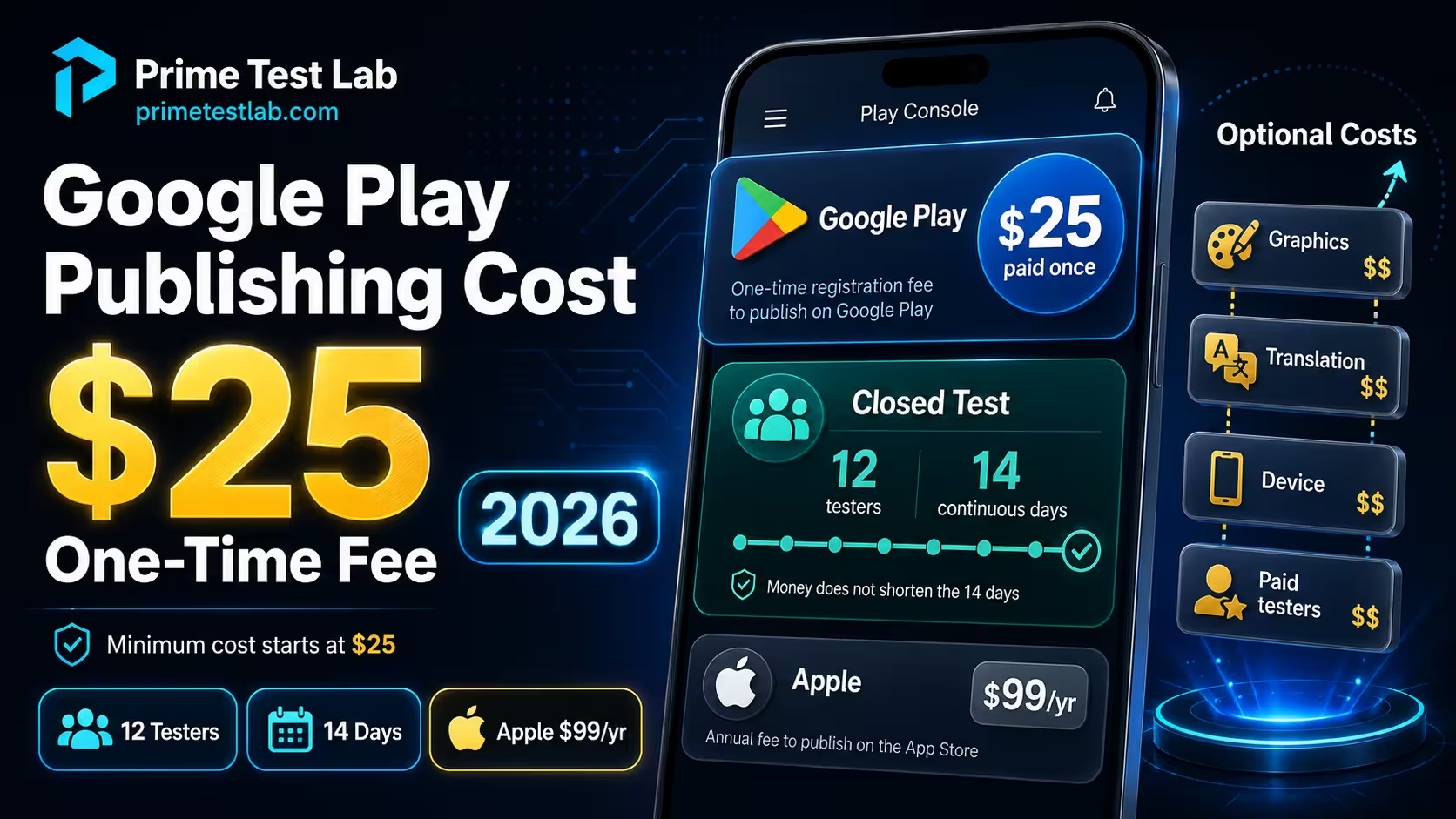
Publishing an app on Google Play costs US$25 once, a one-time Play Console developer account registration fee rather than an annual membership. Personal accounts created after November 13, 2023 must also complete a closed test for the app, with at least 12 testers opted in continuously for 14 days, before they can apply for production access. Google charges nothing for that test or that application, so the barrier is elapsed time rather than money. Apple's comparable Developer Program membership costs US$99 per membership year.
Which of those two halves you owe depends on your account, so start here.
| Your situation | Google registration | Closed-test requirement | The other main consideration |
|---|---|---|---|
| Personal account created after November 13, 2023 | US$25 once | 12 testers opted in continuously for 14 days, assessed for the app you are releasing | Device verification for the account owner, then a production access application Google reviews |
| Personal account created earlier | US$25 once | Outside the stated date scope of the current rule | Check that app's Play Console Dashboard for what it currently asks of you |
| Genuine organization account | US$25 once | Outside the stated scope of the personal-account rule | Organization verification and generally a D-U-N-S number, free but up to 30 days |
| Paid app on an affected account | US$25 once | The same closed test as any other app on that account | Testers on an open or closed test still buy the app, unless you issue promo codes |
Official rule Personal accounts created after November 13, 2023 are the group Google's testing requirements page names. "Outside the stated scope" is deliberate wording: it describes what Google's documentation currently applies the rule to, which is not the same as a published exemption that will hold forever. Whatever this table says about your row, the app's Play Console Dashboard is the final operational check: it is where Google shows the requirement for that specific app and where the option to apply for production access appears.
This post keeps four things apart that a single total blends together: what Google charges, what Google requires in time, what you may choose to outsource, and what only matters once you are earning money. Every figure was checked against Google's and Apple's own documentation on August 17, 2026, and anything that is this post's reading of a rule rather than the rule itself is labelled as such.
What this guide counts, and what it does not
In scope: the Google account fee, the publishing inputs Google requires, the work you may choose to outsource, and the elapsed time between paying and going live. Out of scope: building the app, backend or cloud hosting, ongoing maintenance, and marketing. Those are real costs and they are project-sized, which is exactly why folding them into a publishing figure produces the "$500 to $5,000" answers that help nobody plan.
Skip to the launch budget builder
Table of contents
Google Play Publishing Cost at a Glance
The minimum is US$25, paid once, to register a Play Console developer account. That is the only fixed sum Google asks for in order to publish. Every other figure you have seen attached to this question belongs to one of three other categories, and the categories do not add up into a single meaningful number.
The US$25 registration, once, per account. Applying for production costs nothing extra.
Fixed and smallFor affected personal accounts: 12 testers, 14 continuous days, then a review of your production access application.
Free and unavoidableTesters, screenshots, translation, a test device, a legal entity. All optional, none of it paid to Google.
$0 to hundredsService fees on transactions, under whichever commercial terms apply in your market.
Not a publishing costA page that answers "$25" is describing bucket one and calling it the total. A page that answers "$500 to $5,000" has quietly folded in bucket three and often the cost of building the app as well. Both leave a first-time developer unable to plan. The rest of this post prices each bucket separately, then lets you rebuild them from your own figures in the launch budget builder.
US$25 is the only universal fee paid to Google for account registration. It is not a promise about your total. Your own cash floor is higher if your situation requires a genuine organization, tester access to a paid app, hardware you do not yet have, or work you cannot do yourself, and every one of those is priced by somebody other than Google.
Required inputs that can cost $0
One thing the four buckets must not be read as saying: that everything beyond the $25 and the 14 days is elective. Plenty of it is elective in cash and still mandatory in fact. The items below are required to publish, cost nothing when you produce them yourself, and stop a launch just as completely as an unpaid registration fee. They belong in your plan even though they will never appear on a receipt.
None of these is a payment. All of them are prerequisites. The useful distinction for budgeting is therefore not "required versus optional" but required inputs you can supply yourself against optional outsourcing you may choose to buy, and only the second one has a dollar figure attached.
The Complete Google Play Publishing Cost Table
Exactly one line in the table below is a fee Google charges you for publishing access: the US$25 registration. Everything else is either a service you may choose to buy from somebody who is not Google, or a requirement measured in days rather than dollars. Keeping those three categories apart is the whole job.
"US$25 one-time registration fee"
Google Play Console Help, "Get started with Play Console", answer 6112435. Accessed August 17, 2026.
Google writes the amount in US dollars and does not publish a durable country-by-country price table for registration, so treat any fixed local-currency equivalent you see quoted elsewhere with suspicion. Your payment method may display or convert the amount according to its own checkout conditions, and Google's registration page says prepaid cards are not accepted, with the accepted credit and debit card types varying by location. The mechanics of that single payment, what it does and does not entitle you to, are covered in detail in what the $25 Google Play developer fee actually covers. This post is about everything around it.
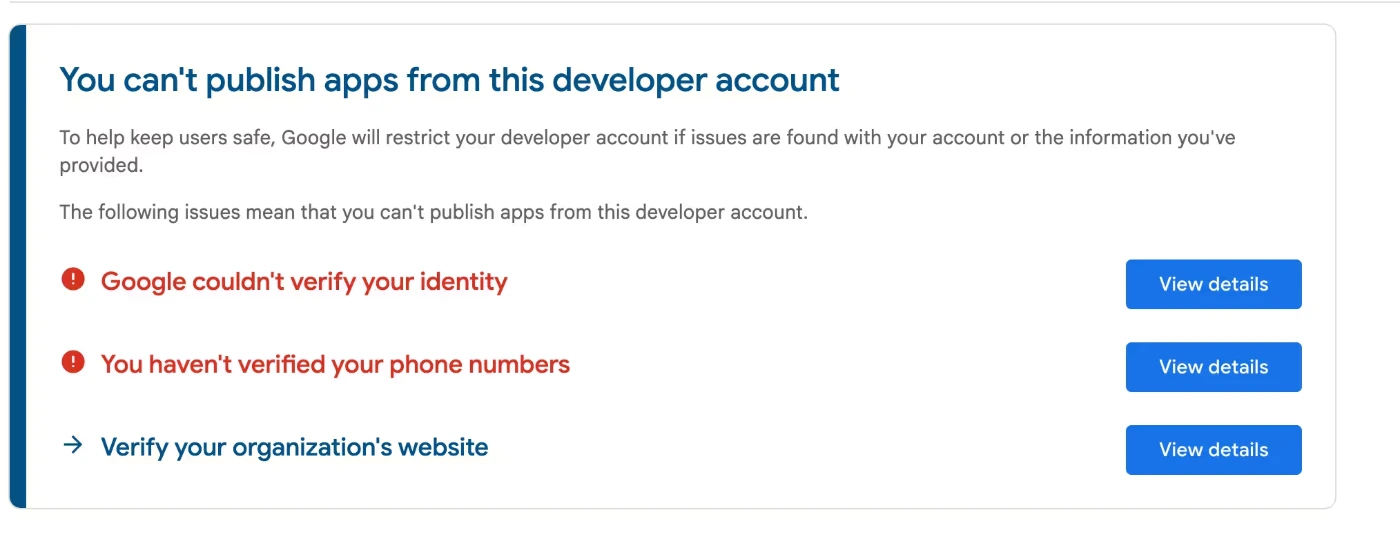
The $25 can be lost if your verification details do not check out
Google says the registration fee may not be refunded where the government ID or card information submitted under your legal name is found to be invalid, so the name on the document, the name on the card and the name on the account need to match before you pay. That is separate from what happens to an individual app: a rejected release or a declined production access application does not refund the registration fee, because the fee bought the account rather than the outcome. Registering with details you can actually verify is the cheapest precaution on this page.
 Click to enlarge
The master table below carries every line a Google Play launch can touch: whether Google requires it, what it can cost in cash, whether the money goes to Google, and what the line actually means. Exactly one row is money paid to Google. Swipe sideways on a phone to reach that column.
| Cost item | Required? | Cash cost | Charged by Google? | What it actually means |
|---|---|---|---|---|
| Play Console developer registration | Required | US$25 once | Yes | A one-time account registration fee, not a charge per app and not an annual membership. |
| Closed test for affected personal accounts | Required | $0 possible | No | At least 12 testers opted in continuously for 14 days. Nobody charges you if you recruit them yourself. |
| The 14-day elapsed testing period | Required | Not money | No | A calendar minimum. No budget shortens it, and it is not 14 days of your labour either. |
| Tester access to a paid app | If your app is paid | Up to 12 purchases | Via Play | Google says testers in an open or closed test still need to purchase a paid app. Internal testers can install it free. |
| DIY tester recruitment | Optional route | $0 cash | No | Community reports of the time it takes range from about two hours to three weeks. No reliable average exists. |
| Paid closed-testing service | Optional | Your quote | No | Priced by the provider, not by Google. Listed prices vary widely for the same nominal deliverable, so get three current quotes rather than planning on a published range. |
| Production access application | Required after the test | No separate fee | Process | Google charges nothing to apply. It reviews the application and says that usually takes seven days or less. |
| Store graphics, made yourself | Assets required | $0 outsourcing | No | Google specifies what assets a listing needs and charges no design fee for them. |
| Store graphics, outsourced | Optional | Your quote | No | Scope differs wildly between listings: image count, device frames, localised variants and revisions all move independently of price. |
| Translation and localization | Optional | $0 or your quote | No | Play Console translates app strings with Gemini at no cost. A human translator is priced per word, and the rate moves with the language pair. |
| Physical Android device | Access matters | $0 if you have one | No | Buying hardware is a retail purchase, not a store fee. But new personal accounts do face a real-device check. |
| D-U-N-S number, organization accounts | Orgs only | $0 to request | No | Free, and Google warns the process can take up to 30 days. That is a schedule cost, not a cash one. |
| Business or legal entity formation | Only if genuine | Jurisdiction based | No | The US Small Business Administration says registration costs less than $300 in most cases. That is a US benchmark only. |
| Google service fees on revenue | Earnings only | Transaction based | Yes | Applies once you are selling under the relevant commercial terms. Not part of the cost of getting published. |
| Development, marketing, backend hosting | Out of scope | Project based | No | Building and promoting an app is not a Play publication cost. Mixing them is why cost estimates online disagree by thousands. |
Official rule Only the first row is a fee Google charges for publishing access. Every "your quote" line is priced by somebody who is not Google, and this post deliberately publishes no range for them: any range it could offer would be a few listings seen on one day from providers it does not name, which is not something you can re-check or plan on. The budget builder below takes your own quotes instead, which is the only version of those numbers that is true for you.
Can I publish on Google Play for free?
No. Publishing through Google Play requires the one-time US$25 Play Console registration fee. After that a free app has no per-listing and no annual Google fee, and many required inputs cost $0 when you supply them yourself. The 12-tester closed test also carries no Google charge.
The same $25 is not the same everywhere
Google states the registration fee in US dollars and does not publish a durable country-by-country price. That flat figure lands very differently depending on where you live, and developers say so plainly: one described $25 as "a lot of money in my country." It is worth stating because a page that treats $25 as trivially small is writing for one kind of reader only. What the fee does buy is unusual in its own right, since it is charged once rather than every year, so the burden does not repeat.
Service fees on revenue are not a publishing cost
Service fees apply to money you make, not to permission to publish, so they cost a developer with no revenue exactly nothing and do not belong in any total on this page. They are also region-dependent and mid-transition: Google's separated structure began in the United States, United Kingdom and EEA on June 30, 2026, with a 10% service fee on the first US$1 million of annual earnings and a separate Google Play Billing fee of 5% where applicable. Australia and Japan followed on September 30, 2026, Korea is scheduled for December 31, 2026, and the wider transition continues into 2027. That is why this post publishes no single worldwide percentage. The Google Play policy calendar tracks which markets have moved, and Google's own fee documentation is the thing to check before making a pricing decision.
Instrument 01
Launch budget builder
Eight choices, and every priced line takes your own quote rather than a price observed on a marketplace weeks ago. The ledger itemises each line with the evidence behind it, keeps the time you owe in a separate panel where it cannot be added to a dollar total, and tells you what it is deliberately leaving out. Nothing you type leaves your browser.
Your itemised cash ledger
Worked example
The bare-minimum launch
Outside the total: at least 14 continuous days of closed testing once 12 qualifying testers are in place, then the production access review, then the separate review of the release itself.
Assumes a personal account, an existing Android device, no paid services and a single-language launch. This is the cheapest route Google's own rules allow, not a prediction about yours.
And the part no total can include
Who Needs 12 Testers for 14 Days?
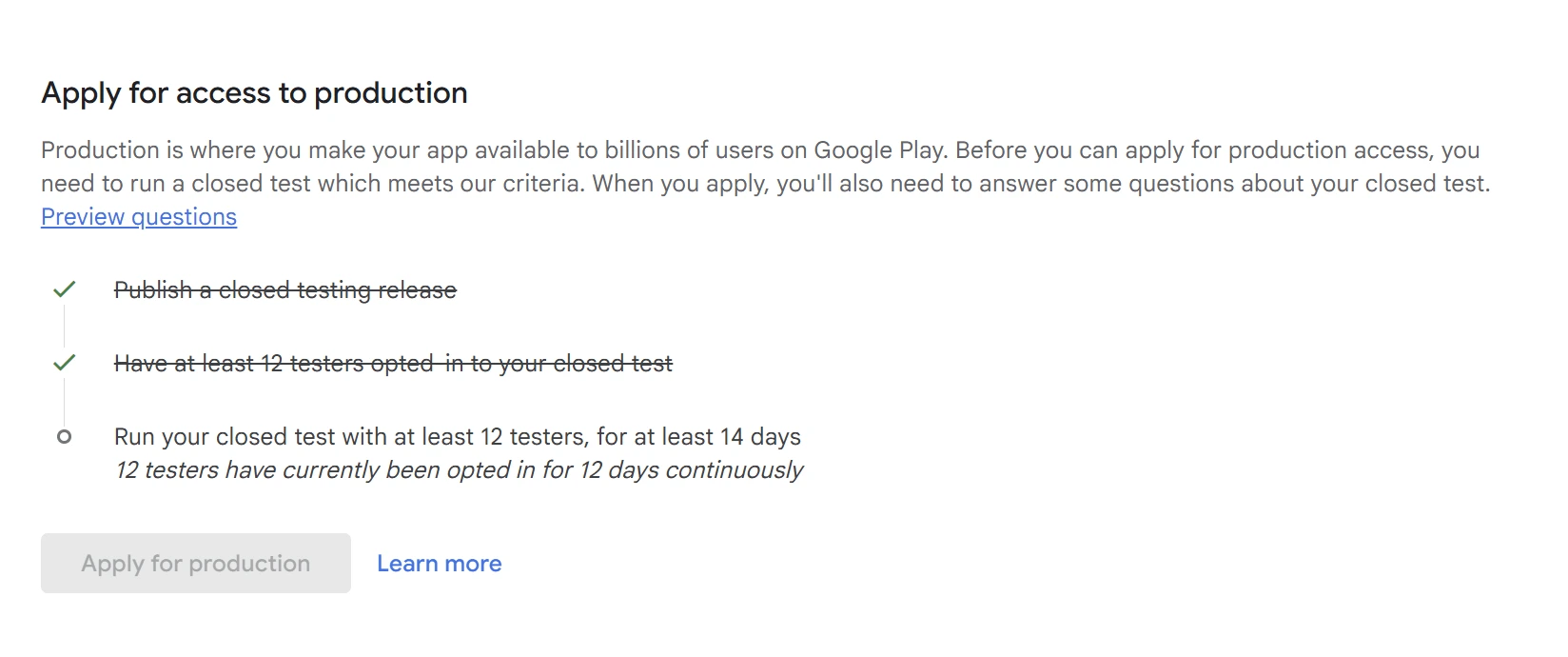
This is the line item that turns a $25 answer into a wrong answer. If your personal developer account was created after November 13, 2023, you cannot apply for production access until you have run a closed test with at least 12 testers opted in continuously for 14 days. It costs nothing. It is still the most expensive thing on the list for most people.
"at least 12 testers"
Google Play Console Help, testing requirements for new personal developer accounts, answer 14151465. Accessed August 17, 2026.
Two details in that rule do more damage than the number itself. The first is continuously: Google says testers who opt out before completing 14 days do not count, and a tester who opts out and later opts back in needs a new consecutive period, so what matters is how many qualifying testers are still opted in at the moment you apply. The second is that the requirement attaches to the closed testing track specifically, which is where a lot of first launches quietly lose two weeks.
 Click to enlarge
What happens when a tester opts out
This is the question that decides whether a launch slips. Start from what Google actually publishes, because the useful answer is a consequence of that condition rather than a separate rule.
The planning conclusion follows without needing anything Google has not said: recruit above the minimum before the window opens, and treat a mid-test replacement as a new clock rather than a patch. "Same-day replacement", from any source including a paid service, means the seat is filled quickly. It does not mean the calendar is unaffected. If the continuity rule itself is what you are trying to pin down, what 14 consecutive days actually means covers it in full.
What Google measures besides the number 12
The only numeric criteria Google publishes for this requirement are the tester count and the 14 continuous days. It does not publish a daily session rule, and the widely repeated "every tester must open the app for two minutes a day" is community folklore rather than policy. What Google does do is assess engagement: the production access application asks how you recruited your testers, how they engaged with the app, what feedback you received and what you changed as a result, and Google can require more testing where it judges the testing was not genuine. So the practical target is not a stopwatch. It is twelve people who actually opened the app, hit something worth reporting, and told you about it, which is also the only version of a closed test that is worth the fortnight.
Internal testing does not count
Google's internal testing track supports up to 100 testers and is genuinely useful for fast iteration, but it is a different track. The production access prerequisite calls for a closed test, so a month spent on the internal track accumulates exactly zero days toward the 14. If you are choosing a track, the difference between internal, closed and open testing is worth five minutes before you start, and there is a full internal testing setup walkthrough if that is the track you actually want.
If the app is paid, your testers pay too
This is the cost almost nobody quotes. Google's testing documentation says that if you are testing a paid app using an open or closed test, testers still need to purchase it, while on an internal test they can install it for free. Twelve people buying a $2.99 app is $35.88 that somebody spends before day one of the 14. There are two documented ways to handle it: issue promo codes, which Play Console allows up to 500 per quarter across all non-subscription promotions in an app, or budget for reimbursing your testers. The purchases do run through Play, so the money comes back to you as revenue rather than disappearing, but net of any service fee that applies in that market and on Play's own payout schedule, and refunds and taxes can move the figure again. It also lands before you have any other income, and the $25 does not cover it.
Why so many pages still say 20 testers
Because they were right when they were written. The requirement has moved once, which is worth knowing before you budget around advice you found with no date on it.
The full history sits in the 20 to 12 testers post, and the mechanics of the continuous window are covered in what 14 consecutive days actually means.
How much developer time does DIY testing really take?
Nobody knows, and any page that gives you an average is inventing one. Public developer reports run from finding enough testers within a couple of hours to spending about three weeks on it. Those are individual threads on r/androiddev, r/googleplayconsole and r/TestersCommunity, read on August 14, 2026, not a sample and not measured hours. What they agree on is the shape: the expensive part is the coordination, not the 14 days.
Can I pay for testers instead?
Yes, and it is worth being precise about what that does and does not buy. Google's public documentation sets no per-tester charge and publishes no explicit prohibition on third-party recruitment. What it does publish is guidance: recruit through personal and professional networks and through communities where your likely users already are, aim for a diverse group that resembles your real audience, and expect to be asked about engagement, the feedback you received and what you changed as a result. Its official community guide to the 12-tester requirement acknowledges that developers use specialized third-party testing companies while also making clear that Google does not control them, which is community guidance rather than core policy. No Google certification programme for paid testing providers appears in the sources reviewed for this post, so treat "Google approved testers" as a marketing phrase rather than a status that exists.
On price, this post publishes no range. The listed offers it could quote came from providers it does not name, which means you cannot re-check any of them, and an unverifiable band in a budgeting guide is worse than no band at all: it becomes an anchor. Get three current quotes for a 12-tester, 14-day service and compare what each one actually commits to. Price on its own tells you nothing about whether the testers are real people on real devices who will still be opted in on day 14, which is the only property that matters when you apply.
What no payment can buy
No service can shorten Google's 14-day minimum, and none can promise that Google will grant production access. Google reviews the application itself and can require more testing. Any listing offering "100% approval guaranteed" is describing something Google does not sell. If you are evaluating providers, the vetting checklist and red flags for paid tester services covers what to actually ask.
The comparison below sets the two routes against what Google actually requires. The requirement itself is identical in both columns, including the 14 days; what differs is who does the recruiting, what happens when somebody leaves, and what it costs in cash rather than hours.
| Against the requirement | Recruiting them yourself | Managed testing |
|---|---|---|
| 12 opted-in testers | You find, invite and confirm each one | Supplied as a group, above the minimum in the larger plans |
| 14 continuous days | Same 14 days | Same 14 days |
| Real devices | Whatever your contacts happen to own | Real devices spanning Android 7 to 17 |
| Dropouts mid-test | You notice late and re-recruit under time pressure, and the replacement's own continuous period starts from the day they opt in | Managed and replaced as part of the service |
| Time to start | Hours to weeks, according to public developer reports, which vary too widely to average | 4-6 hours |
| Cash cost | $0, plus your hours | From $19.99 at PrimeTestLab |
| If Google says no | You start the recruitment again | Free retest or a full refund |
Official rule Neither column can promise production access. Google reviews every application on its own terms and can ask for more testing regardless of who supplied the testers.
How Long Does Google Play Publishing Take?
There is no single number, because only two of the five stages have one attached. In order: account and device verification, then the 14-day closed test if that app needs one, then the production access application, then Google's review of it, then the production release and its own separate app review. Completing the test makes you eligible to apply. It does not publish your app and it does not guarantee approval. You apply from the Play Console dashboard, Google reviews the application, and Google's testing requirements page says that review usually takes seven days or less while also saying it can take longer and that it can come back requiring more testing.
Google publishes a minimum for the closed test and an expectation of "usually seven days or less" for the production access review. It publishes no figure at all for the other three stages, which depend on you, on how fast your testers opt in, and on Google's queue. That is why this post gives no total: adding two published numbers and three unknowns produces a launch date that only looks like one.
What the application asks you about
The production access application is a questionnaire, not a button. Google asks about your closed test, what the app or game is for, how you recruited your testers, how they engaged with the app, what feedback you received, what you changed as a result, and whether the app is ready for production. Two of those are the ones people are unprepared for: how you recruited and how they engaged.
That is also the quiet reason artificial tester farms are a poor idea. You are going to be asked to describe recruitment and engagement in your own words, and Google reviews those answers as part of the production access decision. It does not publish whether that review is human, automated or a mix, so treat the questionnaire as something that will be read rather than counted. A full walkthrough of the questions and how to answer them is in the production access questionnaire post.
Never budget a launch date on 14 plus 7
It is arithmetic, not a schedule. The 14 days are a minimum, the production access review is described as usually seven days or less rather than promised at seven, more testing can be required, and the release itself goes through a separate app review afterwards. Nobody, including any paid service, can commit to a live date on your behalf. If the answer you get back is a request for more testing rather than a grant, what to do when production access is denied covers the reapplication route.
Optional Publishing Costs: Device, Graphics, and Translation
None of these is a Google fee, and each one has a genuine $0 route. Google requires store assets but charges nothing for them, launching in one language costs nothing, Play Console's own Gemini translation of your app strings is offered at no cost, and a device you already have access to satisfies the verification step. What you are pricing here is whether to hand any of it to somebody else.
Android device access
Official Google requirement What counts as a device for account verification
Google's device verification requirements ask the account owner for a physical, non-rooted Android phone or tablet running Android 10 or later, verified through the Play Console mobile app while signed in as that account owner. Emulators and rooted devices do not satisfy it. One device can verify more than one developer account, so a borrowed handset can do the job. This is a requirement on the person who owns the account, not a published requirement about which Android versions your 12 closed testers must run.
What the Android Emulator covers
- Development testing across many device configurations, screen sizes and API levels, included with Android Studio at no extra cost.
- Catching layout and behaviour problems long before a tester ever sees them.
- Working at all when the hardware you own is the wrong shape, old, or borrowed.
What it does not cover
- The physical, non-rooted, Android 10 or later device verification that new personal accounts face during setup.
- Your 12 closed testers. Google's requirement is about real, opted-in people, and emulator-based participation is a poor idea for the same reason artificial accounts are.
- Anything you need to feel with your hands before shipping it: real touch latency, real battery behaviour, real network conditions.
If you do decide to buy, treat it as a normal hardware decision rather than a compliance purchase. This post deliberately does not print a device price: Android hardware pricing is local, moves constantly, and any figure quoted here would be somebody else's country and somebody else's month. Since the requirement is a non-rooted physical device on Android 10 or later, a secondhand handset or a borrowed one qualifies, which is usually the cheapest answer available. Put the price of the device you would buy into the launch budget builder and the ledger will carry your number rather than an example. The deeper question of what emulators can and cannot do inside a closed test is covered in the emulator and closed testing post.
Store screenshots and graphics
Google's preview-asset documentation sets what a listing needs: an app icon, a feature graphic, a short description and a minimum of two screenshots. It charges nothing for any of it. What varies by an order of magnitude is what an outsourced "screenshot package" contains, which is why comparing two quotes on price alone tells you almost nothing. Before you compare, ask each quote the same four questions: how many images, whether device frames and localised variants are included, how many revisions, and whether the feature graphic is in scope. Two quotes that differ by a factor of five routinely turn out to be describing different jobs.
This post no longer publishes a price range for that work. Any range it could offer would be a handful of listings seen on one day from providers it does not name, which makes it something you cannot re-check and should not plan on. Get three current quotes for the scope you actually need, and put the one you would accept into the launch budget builder.
The DIY floor is genuinely zero
Google publishes what each asset needs to be and charges nothing for the design work. A first launch made from real screenshots of your own app, taken on a device you already own, costs nothing and is often more honest than a rendered marketing mockup. Outsource when the listing is the thing holding back installs, not because a checklist told you to.
Translation and localization
Before pricing a translator, note that Google now offers a route with no cash cost at all. Play Console can translate your app's strings with Gemini at no charge, and keep those translations updated as you ship later releases. That changes the shape of this decision: paid translation is no longer the only alternative to doing it yourself. What the free route does not give you is judgement. Product terminology, regulated or legal wording, culturally sensitive phrasing, marketing copy that has to persuade, and strings that break a layout when they get longer are all still worth a human pass, and store-listing copy is short enough that paying for a review of it is a small job.
If you do hire a translator, the only defensible way to price it is as a formula, because per-word rates differ by language pair, service and turnaround by more than any single quoted rate would suggest.
your word count x the rate you are quoted = your translation cost
Both inputs have to be yours. Count the words you would actually send, which for most first launches is the store listing rather than the app, and get a quote for your specific language pair and turnaround. The launch budget builder does this arithmetic for you and also carries a zero-cost row for the Gemini route.
Most first launches do not need this at all. Your store listing is limited to an app name of 30 characters, a short description of 80 and a full description of up to 4,000, so even translating the whole listing is a small job. Translating the app itself is a product decision with a much larger cost attached, and it is outside what this post is measuring.
Technical readiness: one deadline that only costs money if you miss it
Official Google requirement Target API level
Since August 31, 2026, new mobile apps and mobile app updates generally need to target Android 16 (API level 36), subject to documented form-factor exceptions. The extension window closes on November 1, 2026. That is not a fee, but it becomes a cost the moment you discover it late: an app that cannot be submitted is an app whose closed test cannot start, and the migration lands in the same weeks you were trying to recruit testers. Google's target API level requirements are the primary source for the dates, and the full breakdown, including the different levels for Wear OS, Automotive, TV and XR, is in the target API level post.
Personal vs Organization Developer Account
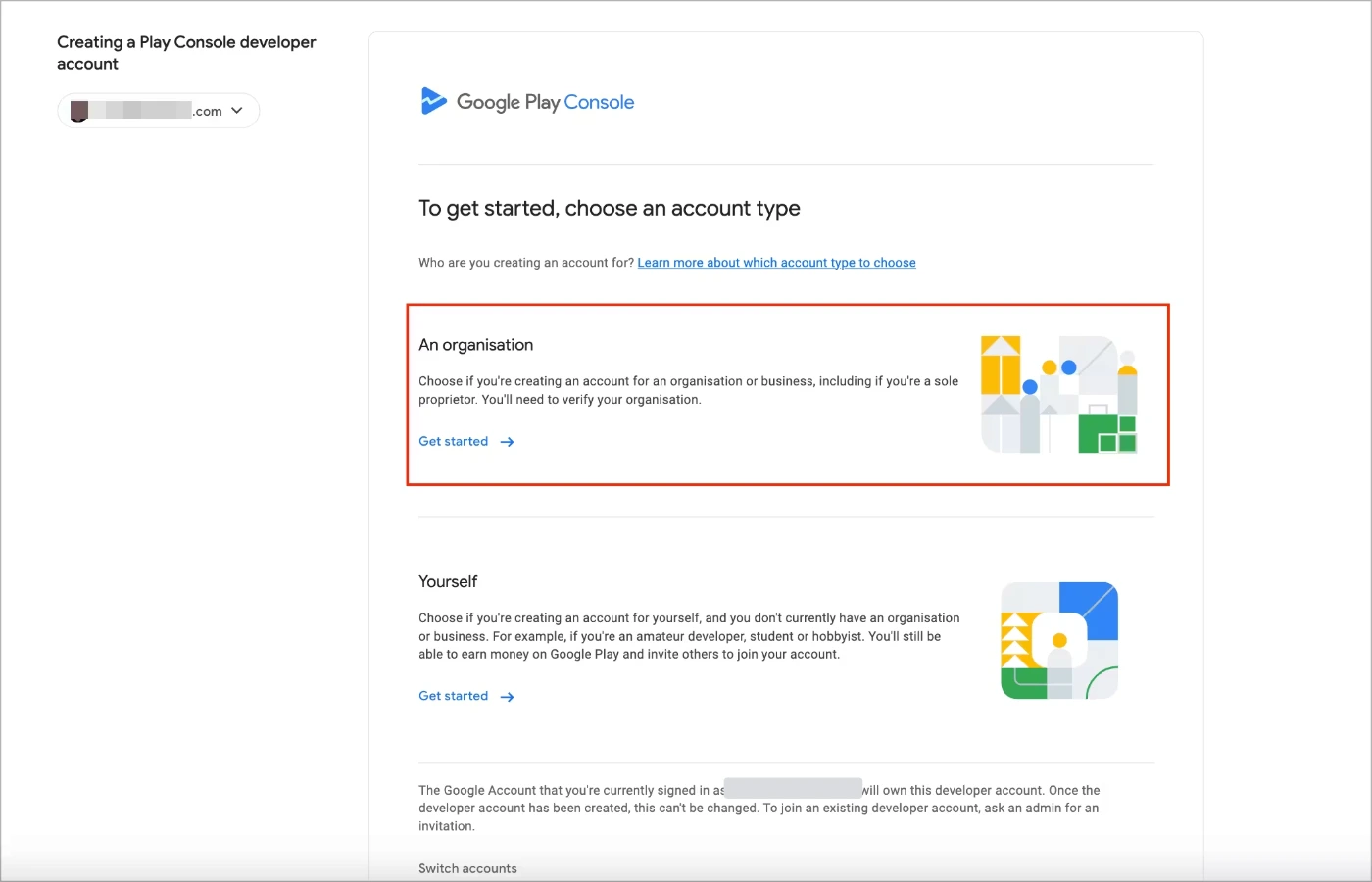
The registration fee is the same US$25 either way. The difference is what each account type carries with it: the 12-tester requirement is scoped to qualifying personal accounts, while an organization account needs genuine organization details and generally a D-U-N-S number, which Google says is free to request and can take up to 30 days. For four categories of app it is not a choice at all, which is covered below.
| Personal account | Organization account | |
|---|---|---|
| Registration fee | US$25 once | US$25 once |
| 12 testers for 14 days | Applies to accounts created after Nov 13, 2023 | Outside the requirement's stated scope |
| D-U-N-S number | Not required | Generally required, free to request |
| Setup wait before you can even start | No D-U-N-S wait, but identity and real-device verification still apply | Identity and organization verification, plus up to 30 days if a new D-U-N-S number is needed |
| Free to choose? | Not for every app. Finance, health, approved VPN and government apps must register as an organization | Always available, and mandatory for those four categories |
| What you must already have | Identity documents and a real Android device for verification | A genuine organization, its details, and identity verification |
| Entity formation cost | $0 | Only if the entity does not exist. US benchmark: under $300 in most cases |
| Sensible when | You are one person shipping your own apps | A real company already exists and will own the apps |
US benchmark The under-$300 figure is a US Small Business Administration benchmark for business registration in most cases. It is not a global price and it is not a Google fee. Costs and rules differ in every jurisdiction.
 Click to enlarge
When the organization account is not a choice
Everything above frames this as a decision. For four categories of app it is not one. Google's account type documentation says you must choose an organization account if your apps provide financial products and services, including banking, loans, stock trading, investment funds, cryptocurrency software wallets and cryptocurrency exchanges; if they are health apps, such as medical apps and human subjects research apps; if they are approved to use the VpnService class; or if they are government apps, including apps developed by or on behalf of a government agency.
If you are in one of those four, the personal-account budget on this page is not yours
The organization route is the requirement rather than the shortcut, so plan for organization verification and, unless you are a government organization using Google's documented exception route, a D-U-N-S number. The upside is that the 12-tester rule is scoped to personal accounts, so it does not apply to you; the trade is a setup path measured in weeks rather than a test measured in days. What does not change is the US$25.
Do not create a company just to avoid the test
The reasoning is easy to follow: organization accounts sit outside the 12-tester requirement, so form an entity and skip two weeks of recruiting. In practice it inverts the thing you were trying to optimise.
The maths does not work, and neither does the premise
Google says the D-U-N-S process can take up to 30 days, against a 14-day test. Organization enrollment asks for organization information and identity verification, so it is an account type for organizations that exist rather than a switch a hobbyist can flip. And forming a company carries legal, administrative and tax consequences in every jurisdiction that outlast the two weeks you were trying to save. If a company genuinely exists or genuinely should, register it as one. If it does not, run the test.
Converting an existing account is not a documented test waiver
Do not assume that changing an existing account from personal to organization will erase a testing requirement already shown for an app. Google's public documentation does not present account conversion as a waiver process, and this post will not claim it is one in either direction. Follow the requirement displayed on that app's Dashboard.
If you are weighing this decision for real reasons rather than as a shortcut, the full comparison lives in the personal versus organization account post, and the account creation flow itself is covered step by step in how to create a Google Play developer account.
Google Play vs Apple: $25 Once Against $99 a Year
At the membership level Google Play is cheaper and it is not close: US$25 once against US$99 per membership year. Hold both accounts for five years at today's headline rates and that is $25 against $495. The direction reverses on the requirement side, where Google asks affected new personal accounts for a 12-tester, 14-day closed test and Apple's current documentation asks for no equivalent minimum.
| Question | Google Play | Apple |
|---|---|---|
| Developer account fee | US$25 once | US$99 per membership year |
| How it recurs | One-time account registration | Annual membership |
| Three years at today's rates | $25 | $297 |
| Five years at today's rates | $25 | $495 |
| Local currency | Google states the fee in US dollars and publishes no durable country price table | Apple says prices may vary by region and are listed in local currency during enrollment |
| Fee waivers | None located in the documentation reviewed | Qualifying nonprofits, accredited educational institutions and government entities can request one |
| Mandatory pre-release tester count | 12 for affected personal accounts | No Google-style minimum found in current documentation |
| Mandatory beta duration | 14 continuous days | No equivalent prerequisite found in current documentation |
| Internal beta capacity | Up to 100 internal testers | Up to 100 internal testers |
| Wider beta capacity | Separate open and closed tracks, not directly comparable | Up to 10,000 external TestFlight testers |
| Revenue fees | Separate from the $25 and changing by region through 2026 and 2027 | Separate from the $99. The Small Business Program rate is generally 15%, although qualifying transactions in the China mainland storefront use 12% as of March 15, 2026 |
Official Apple fee The three and five year figures are arithmetic on today's headline membership fees, not a forecast. Either company can change its pricing.
Over five years the account fees differ by $470 at today's headline rates, which is real but small next to the thing this post keeps returning to: on Google Play the expensive part of publishing is usually not billed to you at all. Two things this comparison is not saying. It is not saying Apple asks for no testing: Apple tells developers to test on device for bugs and stability before submitting, and the first build used for external TestFlight testing goes through App Review for TestFlight. What Apple's current documentation does not contain is Google's specific shape of requirement, a minimum number of testers held for a minimum number of days as a precondition for submission. And it is not saying the $25 covers everything on Google Play, which is what the rest of this post exists to correct.
Common Cost and Timeline Mistakes
Almost every expensive surprise in a first launch comes from one of five beliefs, each wrong in a specific and correctable way. The table states each belief in the words developers actually use, then corrects it.
| The belief | Why it is wrong | The correction |
|---|---|---|
| "I paid $25, so I can publish." | The payment created the developer account. It did not grant production access. | Check the account type and creation date, then run the closed test if that app's Dashboard asks for one. |
| "I already did internal testing for a month." | Internal and closed testing are different tracks. | Internal testing supports up to 100 testers and still accumulates no days toward the closed-test prerequisite. |
| "A replacement tester inherits the days of the one who left." | The published condition is about each tester's own preceding 14 days, not about a seat staying filled. | A tester added on day nine has their own continuous period to complete. A tester opted in since day one already has theirs. |
| "14 days plus 7 days means I launch on day 21." | Both numbers are floors, and one of them is not the last review. | 14 days is a minimum, the production access review is "usually seven days or less" rather than promised, and the release itself is reviewed separately. |
| "Google's fee is 15% or 30%." | Registration is being confused with service fees on revenue. | Registration is $25 once. Service fees apply to transactions, vary by market and are mid-transition through 2026 and 2027. |
Community report The beliefs quoted above are drawn from public developer discussions. They are here because the phrasing is the fastest way to recognise your own assumption, not as evidence of how common each one is.
DIY Testing vs a Managed Testing Service
Very little of a Google Play launch budget can actually be delegated. The US$25 is yours to pay. The 14 days belong to Google. Store graphics and translation are optional and now have free routes. That leaves one line that reliably eats a first-time developer's fortnight, and it is the only one either route can change: finding 12 people who will opt in and stay opted in.
That is the line PrimeTestLab exists for. We supply real testers on real devices spanning Android 7 to 17, opted in and held for the full 14 continuous days, so the requirement is satisfied without you spending a week asking friends whether they own an Android phone. Testing starts in 4-6 hours, and we have run this across 9,800+ apps in 120+ countries at a 99.9% completion rate.
Starter
12 Testers
$19.99
Enterprise
25 Testers
$27.99
Professional
20 Testers
$29.99
The larger plans exist for one reason worth understanding before you choose. The condition Google checks is that at least 12 testers have been continuously opted in for the preceding 14 days when you apply, so a group that starts at exactly 12 has no margin: if someone leaves on day nine, a replacement added then still has their own continuous period to complete, while a tester opted in on day one has already been accumulating theirs. That is the argument made at length in why you may need more than 12 testers. The three plans are priced on what is delivered rather than headcount alone, so they are not in tester order; the full line-by-line comparison lives on the pricing page, which renders from the same source as the cards above so the two cannot disagree.
What we are not selling you
Not a shorter test: the 14 days are Google's and they do not move. Not approval: Google reviews your production access application on its own terms and can ask for more testing regardless of who supplied the testers. What is on offer is the tester side of the requirement, run for you, and a guarantee that is stated plainly rather than dressed up. If Google does not approve the app, you choose a free retest or a full refund.
If you would rather do it yourself, that is a completely reasonable answer to this post and there is a page for it: seven legitimate ways to find 12 testers covers the routes that work without paying anyone. You can also see the full step-by-step process or compare everything on the pricing page.
Frequently Asked Questions
Do I pay $25 for every app I publish?
Google's current documentation describes US$25 as a one-time developer account registration fee, not a charge that repeats each time you upload a new app. The safest way to state it is that the fee is attached to the account rather than to the app. Google does not charge another registration fee for each update either, though that is a statement about fees and not a promise that any update is approved. The 12-tester, 14-day closed testing requirement works differently. Google frames production access around each app and you apply from that app's Dashboard, so the practical reading is that a second app on an affected account faces the testing requirement again. Google does not spell that out in one unambiguous sentence, so check the Dashboard for each new app rather than assuming the account is permanently unlocked.
Is the $25 registration fee refundable, and how can I pay it?
Google says the registration fee may not be refunded where the government ID or card information submitted under your legal name turns out to be invalid, so make sure the name on your document, your card and your account match before you pay. The fee is also separate from what happens to any individual app: a rejected release or a declined production access application does not return it, because the payment registers the account rather than buying an outcome. On payment methods, the accepted credit and debit card types vary by location and prepaid cards are not accepted.
Can I get the 12 Google Play testers for free?
Yes. Google does not charge a per-tester fee, and recruiting people through your own network and relevant communities has a cash cost of zero. The cost moves to your time, and public developer reports of how much time vary enormously, from finding enough testers within a couple of hours to spending about three weeks on it. Those are anecdotes rather than a reliable average. If you would rather not spend that time, PrimeTestLab supplies the tester side as a managed service from $19.99.
Does internal testing count toward the 12 testers?
No. Internal testing is a separate track that supports up to 100 testers and is useful for fast iteration, but the production access prerequisite for affected personal accounts specifically requires the closed testing track with at least 12 qualifying testers opted in for 14 continuous days. Time spent on the internal track does not accumulate toward that requirement.
Do closed testers have to buy my app if it is paid?
Yes, unless you give them promo codes. Google says that if you are testing a paid app using an open or closed test, testers still need to purchase it, while testers on an internal test can install it for free. The production access prerequisite is a closed test, so 12 tester copies of a paid app is a genuine launch cost: at $2.99 that is $35.88 spent before day one of the 14. Play Console lets you create up to 500 promo codes per quarter across all non-subscription promotions in an app, which is the documented way to give testers access without asking them to pay for it. Purchases made through Play do come back to you as revenue, but net of any service fee that applies in that market and on Play's payout schedule.
What happens if a tester drops out during the 14 days?
It depends on when the replacement joined. Google's published condition is that at least 12 testers must have been opted in continuously for the preceding 14 days at the moment you apply for production access. A tester who has been opted in since day one already satisfies that period, so if enough testers like that are still opted in when you apply, one departure does not move your date. A replacement who joins on day nine has their own continuous period to complete first. Google does not publish a detailed seat-replacement calculation, so recruit above the minimum before the window opens and treat the app's Play Console Dashboard as the check that decides when you can apply.
How much do paid closed testing services cost?
There is no reliable published range, and this post has stopped printing one. Listed prices for a nominally identical 12-tester, 14-day service vary widely, and any band quoted here would come from providers it does not name, which means you could not re-check it. Get three current quotes and compare what each one commits to rather than the headline number: price alone does not establish tester quality, real-device usage or engagement. PrimeTestLab's own plans start at $19.99 for 12 testers. No service can change Google's 14-day minimum or promise that Google will grant production access; if Google does not approve the app, you choose a free retest or a full refund.
Bottom Line
Summary
US$25, once, is the only universal fee Google charges for publishing access. If your personal account was created after November 13, 2023, that app also needs a closed test of 12 testers opted in continuously for 14 days before you can apply for production, and no budget shortens it. Everything else is either a required input you can supply yourself for $0 - store assets, a privacy policy, verification, the App content declarations - or work billed by somebody who is not Google. Budget the $25, plan the days, and price the rest with your own quotes.
Primary Sources
How the evidence on this page was gathered
Every rule, threshold, date and fee on this page comes from Google's or Apple's own documentation, checked on August 17, 2026, and the specific pages are listed above.
Three third-party price figures used to sit alongside them: a paid-testing band, a screenshot-package range and a per-word translation rate. All three were listings observed on a single day from providers this post does not name, which meant no reader could reproduce them. They were removed on August 18, 2026 rather than left in place with a caveat attached, because an unverifiable number in a budgeting guide functions as an anchor no matter how carefully it is labelled. Where those figures used to be, the page now asks for your own quotes and the budget builder does the arithmetic on them.
Two pieces of non-Google evidence remain, both labelled where they appear. The under-$300 business registration figure is a published US Small Business Administration benchmark for most cases, not a global price and not a Google fee. The recruitment time reports are public Reddit threads read on August 14, 2026, linked by subreddit; they are individual accounts, they are far too few to produce a median, and the page says so at the point of use rather than only here.
Change log
| Date | Material change | Source checked |
|---|---|---|
| August 18, 2026 | Removed all three unnamed marketplace price samples (paid testing, screenshot packages, the per-word translation rate) and the outsourced budget scenario built on two of them, because none could be re-checked by a reader; those lines now take your own quote. Re-grounded the tester-dropout explanation on Google's published "preceding 14 days" condition and named the app Dashboard as the check that decides. Added the China mainland 12% exception to Apple's Small Business Program rate, a direct answer to "can I publish for free", an account-conversion warning, a scope note, and evidence labels. Fixed the reading-time script, which had been measuring an article that did not exist yet. Merged the device, graphics and translation sections into one optional-costs H2, folded the revenue-fee and target-API sections into callouts, moved the mistakes table to the end and cut it to five rows. Added three Play Console screenshots from the shared library: the production-access requirement card with its live continuous-days counter, the publishing block an unverified account sees, and the account-type chooser. | Google Play Console Help, Apple Developer |
| August 17, 2026 | Added the account applicability table, the tester-dropout two-case rule, the full in-app privacy policy requirements, the exact device verification criteria, Google's free Gemini translation route, and registration-fee refundability and payment methods. Replaced the builder's marketplace defaults with reader-entered quotes, removed the device retail example, and cut roughly a third of the body: two calculators, the anecdote table, one budget scenario, the duplicated payer strip and five FAQ entries already answered under their own headings. | Google Play Console Help, Apple Developer |
| August 14, 2026 | Published. Added the paid-app tester purchase rule with promo codes, the four categories that must register as an organization, and the required-but-uninvoiced inputs strip. | Google Play Console Help, Apple Developer |
What on this page will go stale first
- Any quote you collect. This page publishes no marketplace prices for testing, graphics or translation, because listings move constantly and the ones it could quote were not re-checkable. Whatever you put into the budget builder is current on the day you get it and not much longer, so re-quote before you commit.
- The tester count. It has already moved once, from 20 to 12 on December 11, 2024. If Google edits the testing requirements page, that number is the first thing to re-check.
- The service fee rollout. Google's new structure reached the United States, United Kingdom and EEA on June 30, 2026 and continues to further markets through 2026 and 2027, which is exactly why this post gives no global percentage.
- Play Console menu names. Console copy and navigation change independently of policy, so the exact paths reproduced here may be worded differently by the time you open it.
- The two membership fees. US$25 and US$99 are stable today and neither company has promised to keep them there.
Verified against Google and Apple documentation on August 17, 2026. Last edited August 18, 2026.